
CLI Agent MCP is a unified Model Context Protocol server that orchestrates multiple AI agents through a single interface for collaborative development and creative tasks.
Core Agents & Tools:
Codex: Deep code analysis, critical review, bug hunting, and security analysis
Gemini: UI design, image analysis, requirement discovery, and comprehensive text analysis
Claude: Code implementation, refactoring, and feature development
OpenCode: Full-stack rapid prototyping with multiple framework support
Banana: High-fidelity image generation via Nano Banana Pro (Gemini 3 Pro) with style transfer, multi-image fusion, and multiple aspect ratios (1:1 to 21:9) at 1K/2K/4K resolutions
Image: OpenRouter/OpenAI-compatible image generation endpoints
Key Capabilities:
Parallel Execution: Run up to 100 concurrent tasks per agent type with configurable concurrency and fail-fast options
Persistent Output Capture: Required
handoff_fileparameter enables append-only output with XML wrappers for stateful tracking across stateless callsMulti-Agent Collaboration: Chain agent tasks using metadata-wrapped outputs for different perspectives (critical review, creative design, implementation)
Context Management: Provide reference files/directories via
context_pathsand image attachments for visual contextContinuation Support: Resume conversations with agent-specific continuation IDs
Permission Levels: Three security controls (read-only, workspace-write, unlimited) for each agent
Report Mode: Generate standalone, shareable documents with optional verbose reasoning
GUI Dashboard: Real-time task monitoring with pywebview
Request Isolation: Per-request execution context for safe concurrent usage
Signal Handling: Graceful SIGINT cancellation without killing the server
Configuration: Highly customizable via environment variables for enabling/disabling tools, GUI settings, debug modes, and concurrency limits. Compatible with MCP clients like Claude Desktop through JSON configuration.
Invokes Google Gemini CLI agent for UI design mockups, image analysis, requirement discovery, and comprehensive full-text analysis of projects.
Invokes OpenAI Codex CLI agent for deep code analysis, critical code review, bug hunting, and security analysis with image context support.
Click on "Install Server".
Wait a few minutes for the server to deploy. Once ready, it will show a "Started" state.
In the chat, type
@followed by the MCP server name and your instructions, e.g., "@CLI Agent MCPclaude implement user authentication in /home/projects/api with workspace-write permission"
That's it! The server will respond to your query, and you can continue using it as needed.
Here is a step-by-step guide with screenshots.
cli-agent-mcp
Unified MCP (Model Context Protocol) server for CLI AI agents. Provides a single interface to invoke Codex, Gemini, Claude, OpenCode CLI tools, and Nano Banana Pro image generation.
Why cli-agent-mcp?
This is more than a CLI wrapper — it's an orchestration pattern for multi-model collaboration.
Can't articulate your requirements clearly? Let Claude orchestrate. Describe what you want, and it will decompose your vague idea into concrete tasks for the right agent. The act of delegation forces clarity.
Planning a grand product vision? Each model brings a unique lens:
Codex: The critic. Its analytical eye catches what you missed, challenges assumptions, finds edge cases.
Gemini: The creative. Divergent thinking, unexpected connections, the spark you didn't know you needed.
Claude: The scribe. Faithful execution, clear documentation, turning ideas into working code.
Banana: The artist. High-fidelity image generation for UI mockups, product visuals, and creative assets.
Want persistent results? Use handoff_file to capture agent outputs, then let Claude synthesize insights across multiple analyses.
We don't just wrap CLIs — we provide a thinking framework for human-AI collaboration.
Features
Unified Interface: Single MCP server exposing multiple CLI agents
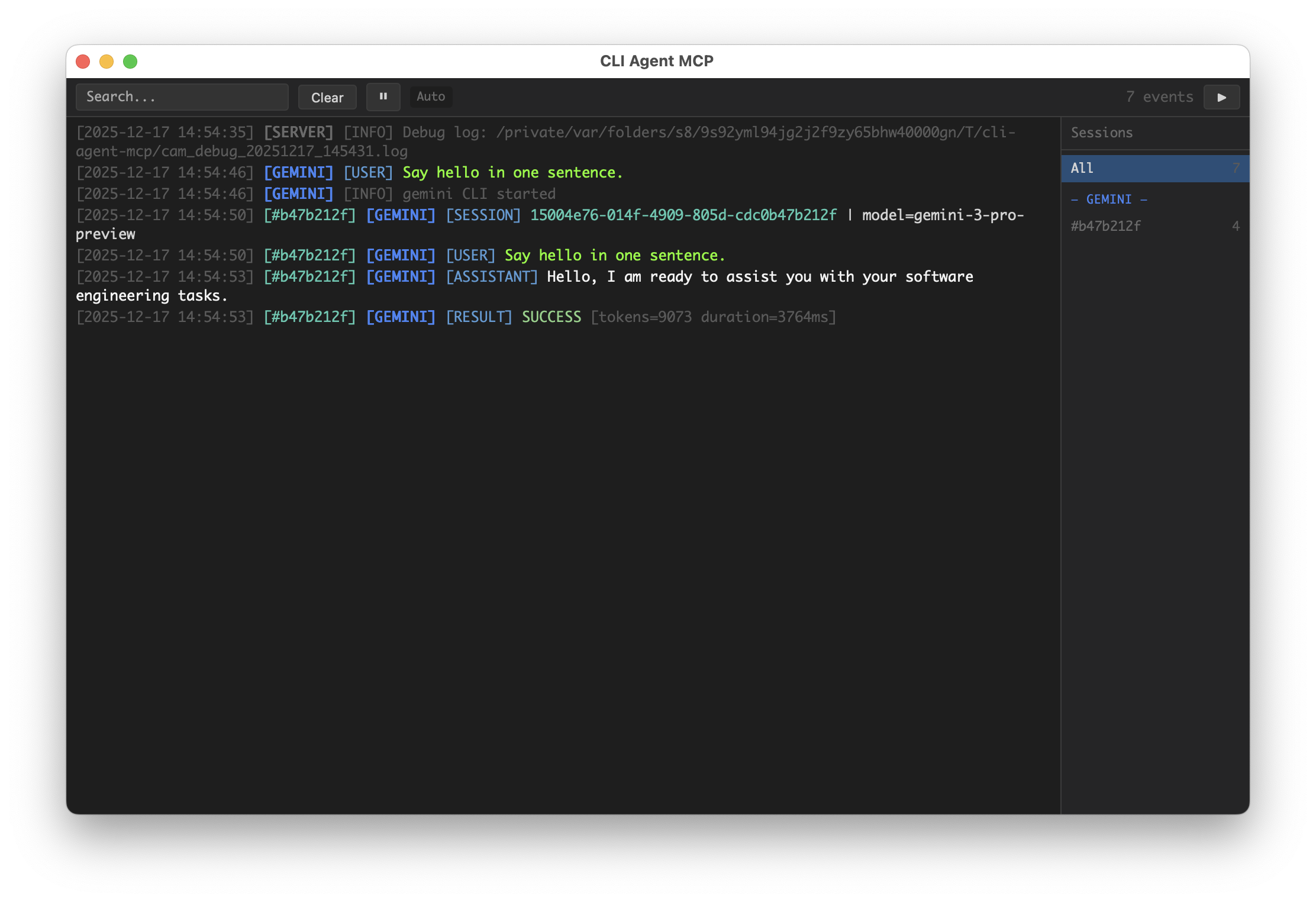
GUI Dashboard: Real-time task monitoring with pywebview
Request Isolation: Per-request execution context for safe concurrent usage
Signal Handling: Graceful cancellation via SIGINT without killing the server
Debug Logging: Comprehensive subprocess output capture for debugging
Screenshot
Installation
Configuration
Configure via environment variables:
Variable | Description | Default |
| Comma-separated list of enabled tools (empty = all) |
|
| Comma-separated list of disabled tools (subtracted from enable) |
|
| Enable GUI dashboard |
|
| GUI detail mode |
|
| Keep GUI on exit |
|
| GUI bind host |
|
| GUI bind port (set a fixed port to keep URL stable across restarts) |
|
| Include debug info in MCP responses |
|
| Write debug logs to temp file |
|
| SIGINT handling ( |
|
| Double-tap exit window (seconds) |
|
Tools
codex
Invoke OpenAI Codex CLI agent for deep code analysis and critical review.
Best for: Code review, bug hunting, security analysis
Parameter | Type | Required | Default | Description |
| string | ✓ | - | Task instruction for the agent |
| string | ✓ | - | Absolute path to the project directory |
| string | ✓ | - | REQUIRED. Server-side append-only output capture (always wrapped in |
| string |
| Pass from previous response to continue conversation | |
| string |
| Permission level: | |
| string |
| Model override (only specify if explicitly requested) | |
| boolean |
| Generate standalone report format | |
| boolean |
| Return compact status message instead of full output (full output still written to handoff_file) | |
| boolean |
| Return detailed output including reasoning | |
| array |
| Reference file/directory paths to provide context | |
| array |
| Absolute paths to image files for visual context | |
| string |
| Display label for GUI | |
| boolean | (global) | Override debug setting for this call |
gemini
Invoke Google Gemini CLI agent for UI design and comprehensive analysis.
Best for: UI mockups, image analysis, requirement discovery, full-text analysis
Parameter | Type | Required | Default | Description |
| string | ✓ | - | Task instruction for the agent |
| string | ✓ | - | Absolute path to the project directory |
| string | ✓ | - | REQUIRED. Server-side append-only output capture (always wrapped in |
| string |
| Pass from previous response to continue conversation | |
| string |
| Permission level: | |
| string |
| Model override | |
| boolean |
| Generate standalone report format | |
| boolean |
| Return compact status message instead of full output (full output still written to handoff_file) | |
| boolean |
| Return detailed output including reasoning | |
| array |
| Reference file/directory paths to provide context | |
| string |
| Display label for GUI | |
| boolean | (global) | Override debug setting for this call |
claude
Invoke Anthropic Claude CLI agent for code implementation.
Best for: Feature implementation, refactoring, code generation
Parameter | Type | Required | Default | Description |
| string | ✓ | - | Task instruction for the agent |
| string | ✓ | - | Absolute path to the project directory |
| string | ✓ | - | REQUIRED. Server-side append-only output capture (always wrapped in |
| string |
| Pass from previous response to continue conversation | |
| string |
| Permission level: | |
| string |
| Model override ( | |
| boolean |
| Generate standalone report format | |
| boolean |
| Return compact status message instead of full output (full output still written to handoff_file) | |
| boolean |
| Return detailed output including reasoning | |
| array |
| Reference file/directory paths to provide context | |
| string |
| Complete replacement for the default system prompt | |
| string |
| Additional instructions appended to default prompt | |
| string |
| Specify agent name (overrides default agent setting) | |
| string |
| Display label for GUI | |
| boolean | (global) | Override debug setting for this call |
opencode
Invoke OpenCode CLI agent for full-stack development.
Best for: Rapid prototyping, multi-framework projects
Parameter | Type | Required | Default | Description |
| string | ✓ | - | Task instruction for the agent |
| string | ✓ | - | Absolute path to the project directory |
| string | ✓ | - | REQUIRED. Server-side append-only output capture (always wrapped in |
| string |
| Pass from previous response to continue conversation | |
| string |
| Permission level: | |
| string |
| Model override (format: | |
| boolean |
| Generate standalone report format | |
| boolean |
| Return compact status message instead of full output (full output still written to handoff_file) | |
| boolean |
| Return detailed output including reasoning | |
| array |
| Reference file/directory paths to provide context | |
| array |
| Absolute paths to files to attach | |
| string |
| Agent type: | |
| string |
| Display label for GUI | |
| boolean | (global) | Override debug setting for this call |
banana
Generate high-fidelity images via the Nano Banana Pro API.
Best for: UI mockups, product visuals, infographics, architectural renders, character art
Nano Banana Pro has exceptional understanding and visual expression capabilities—your prompt creativity is the only limit, not the model.
Parameter | Type | Required | Default | Description |
| string | ✓ | - | Image generation prompt |
| string | ✓ | - | Base directory for saving images |
| string | ✓ | - | Subdirectory name (English recommended, e.g., 'hero-banner'). Files saved to |
| array |
| Reference images (absolute paths) with optional role and label | |
| string |
| Image aspect ratio: | |
| string |
| Image resolution: | |
| boolean |
| Include thinking process in response |
Environment Variables:
Variable | Required | Default | Description |
| ✓ | - | Google API key or Bearer token |
|
| API endpoint (version path auto-appended) |
Prompt Best Practices:
Explicitly request an image (e.g., start with "Generate an image:" or include
"output":"image")Use structured specs (JSON / XML tags / labeled sections) for complex requests
Use
MUST/STRICT/CRITICALfor non-negotiable constraintsAdd negative constraints (e.g., "no watermark", "no distorted hands")
image
Generate images via OpenRouter-compatible or OpenAI-compatible endpoints.
Best for: General image generation when you need compatibility with various providers. For best results with Gemini models, use the banana tool instead.
Parameter | Type | Required | Default | Description |
| string | ✓ | - | Image generation prompt |
| string | ✓ | - | Base directory for saving images |
| string | ✓ | - | Subdirectory name (English recommended, e.g., 'hero-banner'). Files saved to |
| array |
| Reference images (absolute paths) with optional role and label | |
| string |
| Image aspect ratio: | |
| string |
| Image resolution: | |
| string | (env) | Model to use for generation | |
| string | (env) | API type: |
Environment Variables:
Variable | Required | Default | Description |
| ✓ | - | API key for image generation |
|
| API endpoint (version path auto-appended) | |
|
| Default model | |
|
| API type: |
*_parallel_with_template
Batch task execution using simple placeholder templates. Available for all CLI agents:
codex_parallel_with_templategemini_parallel_with_templateclaude_parallel_with_templateopencode_parallel_with_template
Best for: Batch code review, batch file processing, batch analysis with structured data
Template Syntax:
Parameter | Type | Required | Default | Description |
| string | ✓ | - | Placeholder template for generating prompts |
| array | ✓ | - | List of variable dicts (each generates one task) |
| string | ✓ | - | Absolute path to the project directory |
| string | ✓ | - | Server-side append-only output capture |
| string |
| Template for per-task labels | |
| string |
| Permission level | |
| integer |
| Max concurrent tasks | |
| boolean |
| Stop on first failure | |
| array |
| Shared context paths for all tasks | |
| array |
| Per-task context paths (length must match variables) |
Auto-injected variables (available in templates, override same-named keys in variables[i]):
task_index: 1-based index of current tasktask_count: Total number of tasksvars: The original variables[i] dict
Example: Batch Code Review
get_gui_url
Get the GUI dashboard URL. Returns the HTTP URL where the live event viewer is accessible.
No parameters required.
Prompt Injection
Some parameters automatically inject additional content into the prompt using <mcp-injection> XML tags. These tags make it easy to debug and identify system-injected content.
report_mode
When report_mode is set, output format requirements are injected:
context_paths
When context_paths is provided, reference paths are injected:
Stateless Design
Important: Each tool call is stateless - the agent has NO memory of previous calls.
New conversation (no
continuation_id): Include ALL relevant context in your prompt - background, specifics, constraints, and prior findings.Continuing conversation (with
continuation_id): The agent retains context from that session, so you can be brief.
If your request references prior context (e.g., "fix that bug", "continue the work"), you must either:
Provide
continuation_idfrom a previous response, ORExpand the reference into concrete details
Handoff File
handoff_file is REQUIRED for all CLI tools. The server appends each tool output to this file after execution.
Behavior (always):
Append-only (never overwrite)
Wrapped as
<agent-output ...>withagent,continuation_id,task_note,task_index,statustask_index: single task =0; parallel tasks =1..NOn failure, still appends with
status="error"and anError: ...message
Safety notes:
Avoid concurrent writes to the same path (outputs may interleave)
Avoid double-write conflict: do NOT point
handoff_fileat a file the agent is asked to editRecommended: use
.agent-handoff/(e.g.,.agent-handoff/handoff_chain.md)
Example wrapper:
Migration: save_file → handoff_file
save_file, save_file_with_wrapper, and save_file_with_append_mode were removed. Use handoff_file instead (required; always append; always wrapper).
Response Format
All responses are wrapped in XML format:
Success Response
Error Response
Error responses include partial progress to enable retry:
Permission Levels
Level | Description | Codex | Gemini | Claude | OpenCode | Banana |
| Can only read files |
| Read-only tools only |
|
| Read workspace images only |
| Can modify files within workspace |
| All tools + sandbox |
|
| Write to workspace only |
| Full system access (use with caution) |
| All tools, no sandbox |
|
| Full access |
Debug Mode
Enable debug mode to get detailed execution information:
When CAM_LOG_DEBUG=true, logs are written to:
Debug output includes:
Full subprocess command
Complete stdout/stderr output
Return codes
MCP request/response summaries
MCP Configuration
Add to your MCP client configuration (e.g., Claude Desktop claude_desktop_config.json):
Basic Configuration
Install from GitHub
With Debug Mode
Disable GUI
Limit Available Tools
Disable Image Tools
Project Structure
Development
License
MIT