

F
licenseNot graded
qualityD
maintenanceGive AI agents access to your localhost dev server. Zero-config tunnel that works with Claude Code, OpenClaw, and any MCP-compatible agent. No interstitial pages, no account required.

Pipepie is a self-hosted, end-to-end encrypted tunneling platform for webhooks, AI pipelines, and local development, with extensive management, monitoring, and AI tool integration capabilities.
Secure Tunneling: Create encrypted HTTP/TCP tunnels from local ports to public URLs, supporting custom subdomains, password protection, and multi-tunnel configs via pipepie.yaml. Dynamically register, create, start, stop, and delete tunnels.
Webhook Inspection & Replay: Stream live requests, inspect full details (headers, request/response bodies, status codes, duration, source IP), list recent requests with pagination, and replay captured webhooks.
AI Pipeline Tracing: Auto-detect and correlate webhooks from major AI providers (Replicate, fal.ai, RunPod, Modal, OpenAI) into step-by-step execution timelines, viewable in terminal or a web UI.
Dashboard & Monitoring: Get aggregate overviews of all tunnels including request counts, success/error rates, uptime, and online status.
Server Administration: Run an interactive setup wizard (DNS, TLS, firewall), diagnose configurations, monitor tunnel activity, and manage multiple server accounts.
MCP Server Integration: A built-in Model Context Protocol server exposes 13 tools, allowing AI assistants (Claude, Cursor) to programmatically manage tunnels, inspect requests, replay webhooks, and analyze pipeline traces.
Supports TLS certificate management through Cloudflare during server setup, allowing automatic SSL configuration for secure tunnel connections.
Provides Jaeger-style timeline visualization for AI pipeline traces in the web dashboard, enabling distributed tracing of AI workflow executions.
Supports automatic TLS certificate provisioning through Let's Encrypt during server setup, enabling secure HTTPS connections for tunnels.
Auto-detects webhooks from Modal AI provider, extracts call ID and status information, and correlates them into pipeline traces for monitoring serverless AI executions.
Provides a preset tunnel configuration for n8n workflow automation on port 5678, enabling secure external access to n8n webhook nodes and workflows.
Auto-detects nginx configuration during server setup and integrates with existing nginx installations for tunnel routing and management.
Provides a preset tunnel configuration for Ollama with authentication enabled on port 11434, enabling secure external access to local Ollama instances.
Auto-detects webhooks from OpenAI batch operations, extracts batch ID and model information, and correlates them into pipeline traces for monitoring AI batch processing.
Auto-detects webhooks from Replicate AI provider, extracts job ID, status, and prediction time information, and correlates them into pipeline traces for monitoring AI model inferences.
Provides a preset tunnel configuration for Telegram Mini Apps on port 5173, enabling secure external hosting of Telegram web applications.
Supports pass-through streaming for Vercel AI SDK compatibility, enabling seamless integration with Vercel's AI streaming patterns without buffering.
Self-hosted, encrypted tunnel for webhooks, AI pipelines, and local development. End-to-end Noise encryption, pipeline tracing, web dashboard.
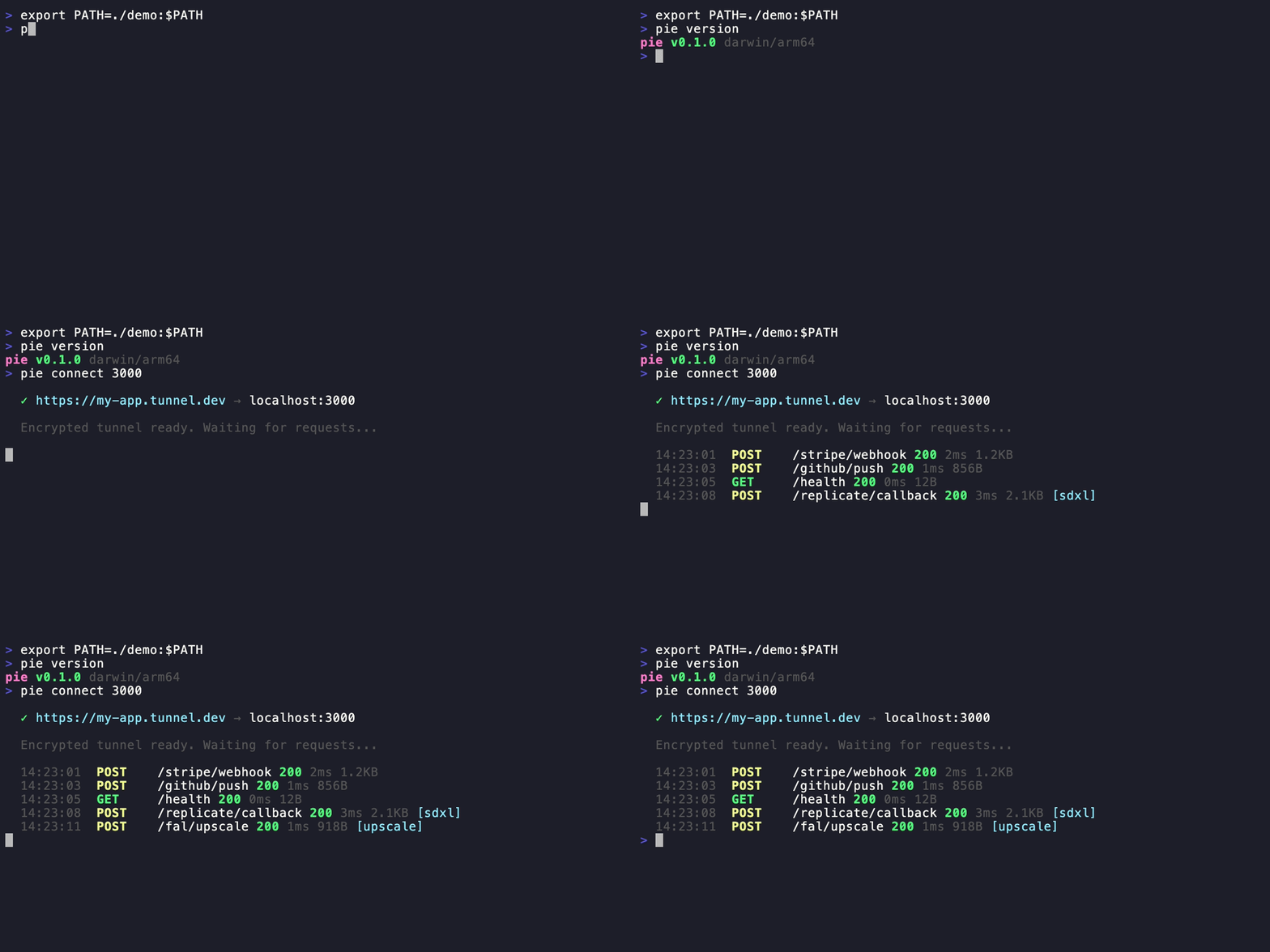
pie connect 3000
# ✓ https://my-app.tunnel.dev → localhost:3000End-to-end encrypted — Noise NK protocol. The relay server never sees your data.
AI-first — auto-detects Replicate, fal.ai, RunPod, Modal, OpenAI webhooks. Pipeline tracing with timeline visualization.
Self-hosted — your server, your domain, your data. No vendor lock-in.
Fast — 577 req/s parallel, 2ms overhead. Protobuf + zstd + yamux.
MCP server built-in — pie mcp gives Claude, Cursor, and AI tools direct access to tunnels, requests, and pipeline traces.
Beautiful CLI — Dracula theme, interactive forms, 17 commands.
Zero-config start — pie setup on server, pie login on client, done.
Related MCP server: hookray-mcp
# Homebrew
brew install pipepie/tap/pipepie

# Script
curl -sSL https://raw.githubusercontent.com/pipepie/pipepie/main/install.sh | sh

# Or build from source
git clone https://github.com/pipepie/pipepie && cd pipepie && make buildpie setupInteractive wizard handles DNS, firewall, TLS (Let's Encrypt auto or Cloudflare), nginx detection, systemd service — everything.
# Save server connection (key from pie setup)
pie login --server tunnel.mysite.com:9443 --key a7f3bc21...

# Tunnel any local port
pie connect 3000pie connect --ollama # Ollama (port 11434, auth enabled)
pie connect --comfyui # ComfyUI (port 8188, WebSocket)
pie connect --n8n # n8n workflows (port 5678)
pie connect --tma # Telegram Mini App (port 5173)pie connect 3000 # HTTP tunnel
pie connect 3000 --name my-app # Stable subdomain
pie connect --tcp 5432 # TCP (databases, gRPC)
pie connect 3000 --auth secret # Password-protected URL
pie up # Multi-tunnel from pipepie.yaml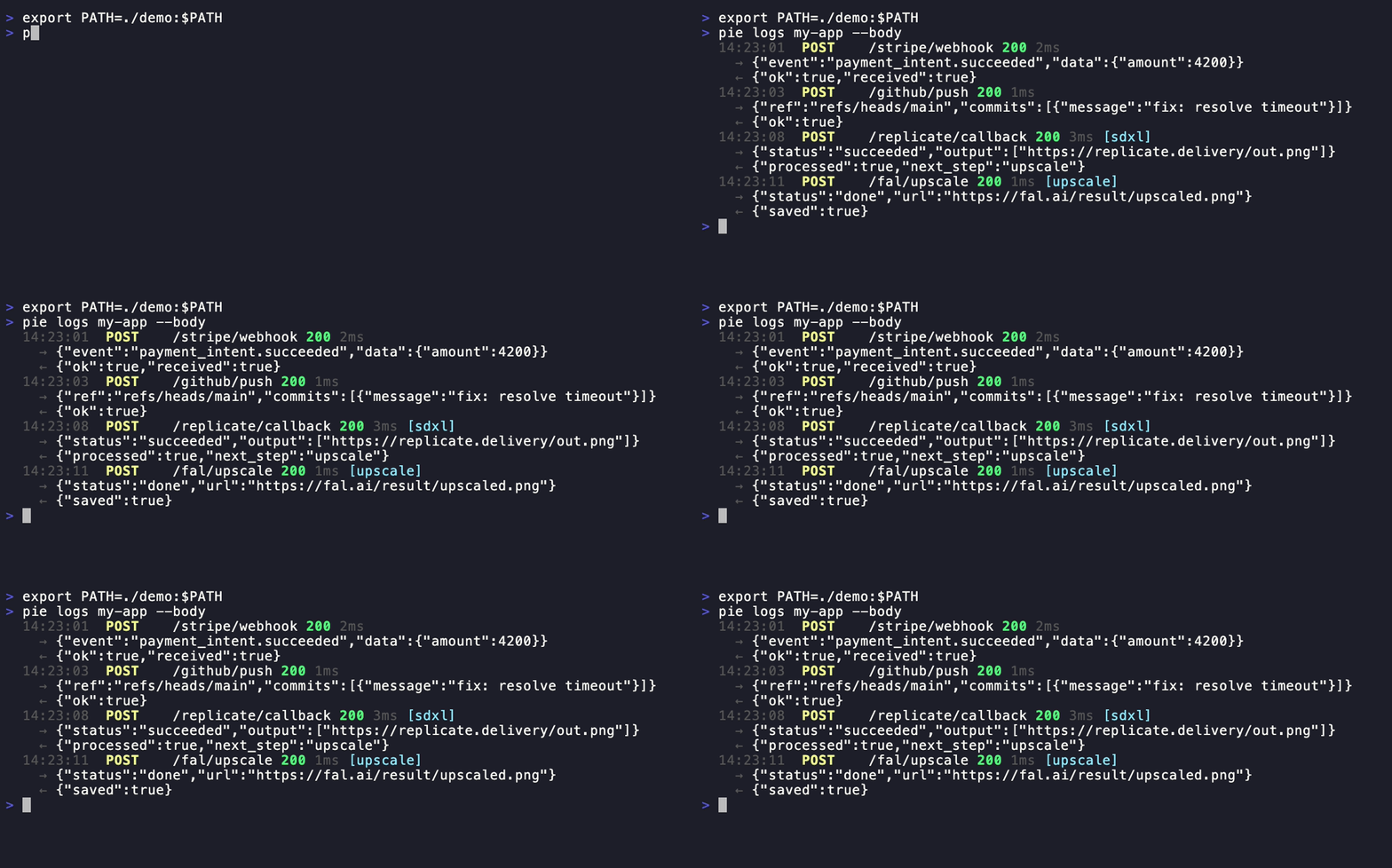
pie logs my-app --follow --body     # Stream with request/response bodies
pie inspect <request-id>            # Full headers, body, metadata
pie replay <request-id>             # Re-send a captured webhook
pie dashboard # Open web UI in browserPipepie auto-detects webhooks from AI providers — no configuration needed:
Provider | Detection | What's extracted |
Replicate |
| Job ID, status, predict_time |
fal.ai |
| Request ID, status |
RunPod | UPPERCASE status in payload | Run ID, execution time |
Modal |
| Call ID, status |
OpenAI |
| Batch ID, model |
MCP | JSON-RPC 2.0 | Tool name, call ID |
Webhooks from the same pipeline are auto-correlated into traces:
pie traces my-app                   # Terminal timeline view
pie dashboard                       # Web UI with Jaeger-style bars
Or use headers for manual correlation:
curl -X POST https://my-app.tunnel.dev/webhook \
  -H "X-Pipepie-Pipeline: image-gen" \
  -H "X-Pipepie-Step: generate" \
-H "X-Pipepie-Trace-ID: trace-001"# pipepie.yaml
server: tunnel.mysite.com:9443
key: a7f3bc21...
tunnels:
api:
subdomain: my-api
forward: http://localhost:3000
frontend:
subdomain: my-app
port: 5173
pipeline:
name: image-gen
steps:
- name: replicate-sdxl
webhook: /replicate
forward: localhost:3000/on-image
- name: fal-upscale
webhook: /fal
forward: localhost:3000/on-upscalepie uppie login --server work.example.com:9443 --key abc...
pie login --server personal.example.com:9443 --key def...
pie account # List all, see active
pie account use work.example.com # Switch
pie logout personal.example.com # Remove
pie setup                           # Interactive setup wizard
pie server --config pipepie.yaml    # Start server
pie doctor --config pipepie.yaml    # Diagnose configuration
pie status                          # Tunnel overview
pie status --json # JSON output for scriptsClient (pie connect) Server (pie server)
│ │
│◄──── Noise NK handshake ────►│
│ (ChaChaPoly + BLAKE2b) │
│ │
│◄──── yamux multiplexing ────►│
│ (parallel streams) │
│ │
│◄──── Protobuf + zstd ──────►│
│ (binary, compressed) │
│ │
localhost:3000 https://sub.domain.comNoise NK — server authenticated by public key. Know the key = have access. yamux — multiplexed streams, no head-of-line blocking. Protobuf — binary wire format, ~10x smaller than JSON. zstd — bodies >1KB auto-compressed. SSE/streaming — pass-through without buffering (Vercel AI SDK, Ollama compatible).
Pipepie includes a built-in Model Context Protocol server. Your AI tools can inspect webhooks, replay requests, manage tunnels, and debug pipelines — directly from the chat.
# Claude Code (one command)
claude mcp add --transport stdio pipepie -- pie mcp
Add to claude_desktop_config.json or Cursor MCP settings:
{
  "mcpServers": {
    "pipepie": {
      "command": "pie",
      "args": ["mcp"]
    }
  }
}
13 tools available:
Tool | What it does |
| Dashboard with all tunnels, stats, success rates |
| All registered tunnels with online/offline status |
| Check if a specific tunnel is online |
| Start a tunnel (e.g. port 3000 → public URL) |
| Stop a running tunnel |
| List tunnels running in this session |
| Recent webhook requests for a tunnel |
| Full request details: headers, body, response |
| Re-send a captured webhook |
| AI pipeline execution traces |
| Step-by-step timeline for a trace |
| Register a new subdomain |
| Remove a tunnel and its data |
Command | Description |
| Create a tunnel |
| TCP tunnel |
| Ollama preset |
| ComfyUI preset |
| n8n preset |
| Telegram Mini App preset |
| Add server connection |
| Remove account |
| List & switch accounts |
| Open web UI in browser |
| Show tunnels and activity |
| Stream requests |
| Full request details |
| Replay a webhook |
| Pipeline trace timelines |
| Multi-tunnel from pipepie.yaml |
| Server setup wizard |
| Start relay server |
| Diagnose server config |
| Start MCP server for AI tools |
| Self-update to latest |
| Version + update check |
Metric | Result |
Latency | 2ms overhead |
Sequential | 119 req/s |
Parallel (20 workers) | 577 req/s |
1MB body | 16ms |
Self-hosted & open source — your infrastructure, your data, no third-party traffic inspection
End-to-end encrypted — Noise NK protocol, the relay server never sees plaintext
AI-native — auto-detects 6 providers, pipeline tracing, MCP support
Complete toolkit — tunneling + inspection + replay + dashboard in one binary
Free forever — no bandwidth limits, no session timeouts, no paid tiers for core features
AGPL-3.0 — free to use, modify, and self-host. If you modify and offer as a service, you must open-source your changes.
List all tunnels currently connected through this MCP session, showing port, subdomain, and forward address.
| Name | Required | Description | Default |
|---|---|---|---|
No parameters | |||
Does the description disclose side effects, auth requirements, rate limits, or destructive behavior?
Complements annotations well: 'currently connected' explains why idempotentHint=false (active set changes over time) and 'through this MCP session' clarifies the context scope. The description also compensates for missing output schema by disclosing return fields (port, subdomain, forward address). Does not mention rate limits or auth, though openWorldHint=true is present.
Agents need to know what a tool does to the world before calling it. Descriptions should go beyond structured annotations to explain consequences.
Is the description appropriately sized, front-loaded, and free of redundancy?
Single, efficiently structured sentence. Front-loaded with the action verb 'List,' immediately followed by scope and output fields. Zero redundancy or filler. Every clause earns its place by conveying distinct information.
Shorter descriptions cost fewer tokens and are easier for agents to parse. Every sentence should earn its place.
Given the tool's complexity, does the description cover enough for an agent to succeed on first attempt?
Adequate for a zero-parameter read operation. Annotations cover safety profile (readOnlyHint, destructiveHint). Description compensates for missing output schema by listing return fields. Could marginally improve by noting return format (array vs object) or pagination, but sufficient given tool simplicity.
Complex tools with many parameters or behaviors need more documentation. Simple tools need less. This dimension scales expectations accordingly.
Does the description clarify parameter syntax, constraints, interactions, or defaults beyond what the schema provides?
Input schema has zero parameters. Per rubric baseline for 0 params is 4. Description appropriately does not invent parameters, maintaining alignment with the empty schema.
Input schemas describe structure but not intent. Descriptions should explain non-obvious parameter relationships and valid value ranges.
Does the description clearly state what the tool does and how it differs from similar tools?
Excellent specificity: 'List' (verb) + 'tunnels' (resource) + 'currently connected through this MCP session' (scope). The phrase 'currently connected' effectively distinguishes this from sibling 'list_tunnels' (likely all tunnels) and 'tunnel_status' (likely individual status). Output fields (port, subdomain, forward address) are also previewed.
Agents choose between tools based on descriptions. A clear purpose with a specific verb and resource helps agents select the right tool.
Does the description explain when to use this tool, when not to, or what alternatives exist?
Provides implicit usage guidance through the scope qualifier 'currently connected,' suggesting use when monitoring active connections rather than historical/configured tunnels. However, lacks explicit comparison to siblings (e.g., 'Use this instead of list_tunnels when you only need active connections...') or when-not guidance.
Agents often have multiple tools that could apply. Explicit usage guidance like "use X instead of Y when Z" prevents misuse.
Start a tunnel that forwards a public URL to a local port. Uses the active account from 'pie login'. Example: connect port 3000 with subdomain 'my-app' to get https://my-app.yourdomain.com → localhost:3000.
| Name | Required | Description | Default |
|---|---|---|---|
| port | Yes | Local port number to forward to (e.g. '3000', '8080') | |
| subdomain | No | Subdomain name for the public URL (empty = auto-assigned) |
Does the description disclose side effects, auth requirements, rate limits, or destructive behavior?
Adds important auth context (active account requirement) not present in annotations. Explains the open-world behavior (public URL creation) which aligns with openWorldHint=true. Annotations already disclose non-read-only and non-idempotent traits, so description appropriately adds operational context rather than repeating safety flags.
Agents need to know what a tool does to the world before calling it. Descriptions should go beyond structured annotations to explain consequences.
Is the description appropriately sized, front-loaded, and free of redundancy?
Three tightly structured components: purpose declaration, auth prerequisite, and concrete example. Every clause earns its place with zero redundancy. Information density is high and front-loaded.
Shorter descriptions cost fewer tokens and are easier for agents to parse. Every sentence should earn its place.
Given the tool's complexity, does the description cover enough for an agent to succeed on first attempt?
With annotations covering safety/idempotency and schema covering parameters, the description successfully establishes complete operational context: tunnel creation mechanism, URL forwarding behavior, and authentication requirements. No output schema exists but the result structure is evident from the example.
Complex tools with many parameters or behaviors need more documentation. Simple tools need less. This dimension scales expectations accordingly.
Does the description clarify parameter syntax, constraints, interactions, or defaults beyond what the schema provides?
Schema coverage is 100% so baseline is 3. The example ('connect port 3000 with subdomain my-app to get https://my-app.yourdomain.com') significantly clarifies the semantic relationship between 'subdomain' parameter and resulting URL structure, adding concrete value beyond schema definitions.
Input schemas describe structure but not intent. Descriptions should explain non-obvious parameter relationships and valid value ranges.
Does the description clearly state what the tool does and how it differs from similar tools?
Clear specific description of what the tool does (starts tunnel, forwards public URL to local port). Includes concrete example showing the forwarding mechanism. Does not explicitly differentiate from sibling 'create_tunnel' though 'Start' vs 'Create' implies a distinction.
Agents choose between tools based on descriptions. A clear purpose with a specific verb and resource helps agents select the right tool.
Does the description explain when to use this tool, when not to, or what alternatives exist?
Provides critical prerequisite ('Uses the active account from pie login') and concrete example showing parameter usage and expected URL outcome. While it lacks explicit 'when not to use' guidance, the prerequisite and example provide clear usage context.
Agents often have multiple tools that could apply. Explicit usage guidance like "use X instead of Y when Z" prevents misuse.
Register a new tunnel subdomain on the server. The subdomain must be lowercase alphanumeric with hyphens, 1-63 characters. Returns the tunnel ID and public URL.
| Name | Required | Description | Default |
|---|---|---|---|
| subdomain | Yes | Subdomain to register (lowercase alphanumeric and hyphens) |
Does the description disclose side effects, auth requirements, rate limits, or destructive behavior?
Annotations indicate write operation (readOnlyHint=false) and external effects (openWorldHint=true). Description crucially adds return value specification ('Returns the tunnel ID and public URL') which is essential given no output schema exists. Also adds validation constraints (1-63 chars) that affect behavior.
Agents need to know what a tool does to the world before calling it. Descriptions should go beyond structured annotations to explain consequences.
Is the description appropriately sized, front-loaded, and free of redundancy?
Two efficient sentences totaling ~20 words. First establishes action/resource, second covers validation and return value. Zero redundancy, perfectly front-loaded.
Shorter descriptions cost fewer tokens and are easier for agents to parse. Every sentence should earn its place.
Given the tool's complexity, does the description cover enough for an agent to succeed on first attempt?
For a creation tool with external side effects (openWorldHint=true) and no output schema, the description adequately covers return values and input validation. Could briefly mention persistence or cleanup requirements (linking to 'delete_tunnel'), but covers core needs.
Complex tools with many parameters or behaviors need more documentation. Simple tools need less. This dimension scales expectations accordingly.
Does the description clarify parameter syntax, constraints, interactions, or defaults beyond what the schema provides?
Despite 100% schema coverage (baseline 3), description adds the length constraint '1-63 characters' which is absent from the schema's parameter description, providing necessary validation detail for the 'subdomain' parameter.
Input schemas describe structure but not intent. Descriptions should explain non-obvious parameter relationships and valid value ranges.
Does the description clearly state what the tool does and how it differs from similar tools?
Clear specific verb ('Register') plus resource ('tunnel subdomain'). Distinguishes from siblings like 'connect', 'list_tunnels', and 'delete_tunnel' by specifying this creates a new registration rather than managing existing connections or enumerating.
Agents choose between tools based on descriptions. A clear purpose with a specific verb and resource helps agents select the right tool.
Does the description explain when to use this tool, when not to, or what alternatives exist?
Provides implied usage through the verb 'Register' (suggests initial creation vs connection), but lacks explicit when-to-use guidance or prerequisites (e.g., when to use this vs 'connect', or whether a tunnel must be created before connecting).
Agents often have multiple tools that could apply. Explicit usage guidance like "use X instead of Y when Z" prevents misuse.
Permanently delete a tunnel and all its stored requests. Cannot be undone.
| Name | Required | Description | Default |
|---|---|---|---|
| subdomain | Yes | The tunnel subdomain to delete |
Does the description disclose side effects, auth requirements, rate limits, or destructive behavior?
Annotations confirm destructiveHint=true, but the description adds critical context: specifically that 'stored requests' are destroyed alongside the tunnel, and explicitly states 'Cannot be undone' to emphasize irreversibility. No contradictions with annotations.
Agents need to know what a tool does to the world before calling it. Descriptions should go beyond structured annotations to explain consequences.
Is the description appropriately sized, front-loaded, and free of redundancy?
Two sentences with zero waste. First sentence front-loads the action and scope ('Permanently delete a tunnel and all its stored requests'), second provides the irreversibility constraint. Every word earns its place.
Shorter descriptions cost fewer tokens and are easier for agents to parse. Every sentence should earn its place.
Given the tool's complexity, does the description cover enough for an agent to succeed on first attempt?
Appropriately complete for a single-parameter destructive operation. Annotations cover safety profile (destructiveHint, readOnlyHint), while description covers what gets destroyed. No output schema expected for a delete operation. Minor gap: could clarify behavior when tunnel doesn't exist (given idempotentHint=false).
Complex tools with many parameters or behaviors need more documentation. Simple tools need less. This dimension scales expectations accordingly.
Does the description clarify parameter syntax, constraints, interactions, or defaults beyond what the schema provides?
Schema coverage is 100% with 'subdomain' well-documented as 'The tunnel subdomain to delete'. Description adds no parameter syntax details, but with complete schema coverage, this is acceptable. Baseline 3 applies.
Input schemas describe structure but not intent. Descriptions should explain non-obvious parameter relationships and valid value ranges.
Does the description clearly state what the tool does and how it differs from similar tools?
The description uses specific verb 'delete' with resource 'tunnel' and explicit scope 'and all its stored requests'. 'Permanently' distinguishes it from sibling 'disconnect' (temporary) and 'create_tunnel' (opposite action). Clear and unambiguous.
Agents choose between tools based on descriptions. A clear purpose with a specific verb and resource helps agents select the right tool.
Does the description explain when to use this tool, when not to, or what alternatives exist?
The phrase 'Cannot be undone' warns about irreversibility, implying this should be used only when permanent removal is intended. However, it lacks explicit comparison to sibling 'disconnect' for temporary severance or guidance on when deletion is preferred over deactivation.
Agents often have multiple tools that could apply. Explicit usage guidance like "use X instead of Y when Z" prevents misuse.
Stop a running tunnel by its local port number.
| Name | Required | Description | Default |
|---|---|---|---|
| port | Yes | Local port number of the tunnel to stop |
Does the description disclose side effects, auth requirements, rate limits, or destructive behavior?
Confirms the mutation aspect (aligns with readOnlyHint=false) but adds minimal behavioral detail beyond annotations. Doesn't clarify error conditions (e.g., port not found) despite idempotentHint=false, or whether stop is graceful vs immediate.
Agents need to know what a tool does to the world before calling it. Descriptions should go beyond structured annotations to explain consequences.
Is the description appropriately sized, front-loaded, and free of redundancy?
Single efficient sentence with zero waste. Front-loaded with action verb. Every word earns its place.
Shorter descriptions cost fewer tokens and are easier for agents to parse. Every sentence should earn its place.
Given the tool's complexity, does the description cover enough for an agent to succeed on first attempt?
Adequate for a simple 1-parameter mutation tool with comprehensive annotations covering safety/idempotency. Could improve by clarifying relationship to delete_tunnel and failure modes, but sufficient for agent selection.
Complex tools with many parameters or behaviors need more documentation. Simple tools need less. This dimension scales expectations accordingly.
Does the description clarify parameter syntax, constraints, interactions, or defaults beyond what the schema provides?
Schema coverage is 100%, so baseline applies. Description reinforces the 'port' parameter's role by stating 'by its local port number', but doesn't add format details or constraints beyond the schema.
Input schemas describe structure but not intent. Descriptions should explain non-obvious parameter relationships and valid value ranges.
Does the description clearly state what the tool does and how it differs from similar tools?
Specific verb 'Stop', clear resource 'running tunnel', and targeting mechanism 'by its local port number' distinguishes this from sibling tools like delete_tunnel (removal) or connect (establishment).
Agents choose between tools based on descriptions. A clear purpose with a specific verb and resource helps agents select the right tool.
Does the description explain when to use this tool, when not to, or what alternatives exist?
Implies usage through 'Stop' (use on active connections vs creating/deleting), but lacks explicit when-to-use guidance or differentiation from delete_tunnel which might remove configuration vs stopping traffic.
Agents often have multiple tools that could apply. Explicit usage guidance like "use X instead of Y when Z" prevents misuse.
Get full details of a specific webhook request: headers, request body, response status, response body, duration, source IP, and pipeline/trace metadata. Use request IDs from list_requests.
| Name | Required | Description | Default |
|---|---|---|---|
| request_id | Yes | The request UUID |
Does the description disclose side effects, auth requirements, rate limits, or destructive behavior?
Annotations cover read-only safety and idempotency. Description adds valuable content transparency by listing the specific data fields returned (headers, response body, metadata), compensating for the missing output schema. It doesn't mention side effects or rate limits, but annotations sufficiently cover the safety profile.
Agents need to know what a tool does to the world before calling it. Descriptions should go beyond structured annotations to explain consequences.
Is the description appropriately sized, front-loaded, and free of redundancy?
Two sentences, zero waste. First sentence front-loads the action and specific return fields; second sentence provides prerequisite. Every word earns its place.
Shorter descriptions cost fewer tokens and are easier for agents to parse. Every sentence should earn its place.
Given the tool's complexity, does the description cover enough for an agent to succeed on first attempt?
For a single-parameter lookup tool, it compensates perfectly for the missing output schema by detailing what 'full details' includes. Combined with annotations and the explicit reference to list_requests, this is complete.
Complex tools with many parameters or behaviors need more documentation. Simple tools need less. This dimension scales expectations accordingly.
Does the description clarify parameter syntax, constraints, interactions, or defaults beyond what the schema provides?
Schema has 100% coverage with 'The request UUID.' Description adds semantic value by specifying these IDs come from list_requests, establishing the tool relationship. Baseline 3 elevated by workflow context.
Input schemas describe structure but not intent. Descriptions should explain non-obvious parameter relationships and valid value ranges.
Does the description clearly state what the tool does and how it differs from similar tools?
Description uses specific verb 'Get' and enumerates exactly what is retrieved (headers, body, status, duration, IP, metadata). It clearly targets a single webhook request, distinguishing it from list_requests (which lists many) and replay_request (which executes).
Agents choose between tools based on descriptions. A clear purpose with a specific verb and resource helps agents select the right tool.
Does the description explain when to use this tool, when not to, or what alternatives exist?
Explicitly states prerequisite: 'Use request IDs from list_requests.' This tells the agent exactly when to use this tool (when you have a specific ID and need full details) and where those IDs originate.
Agents often have multiple tools that could apply. Explicit usage guidance like "use X instead of Y when Z" prevents misuse.
List recent webhook requests received by a tunnel, ordered newest first. Includes method, path, status code, duration, and pipeline metadata. Supports pagination.
| Name | Required | Description | Default |
|---|---|---|---|
| limit | No | Number of requests to return, 1-100 (default 20) | |
| offset | No | Pagination offset (default 0) | |
| subdomain | Yes | The tunnel subdomain |
Does the description disclose side effects, auth requirements, rate limits, or destructive behavior?
Adds valuable behavioral details beyond annotations: specifies ordering (newest first), enumerates returned fields (method, path, status code, duration, pipeline metadata), and confirms pagination support. Does not contradict readOnlyHint=true or destructiveHint=false.
Agents need to know what a tool does to the world before calling it. Descriptions should go beyond structured annotations to explain consequences.
Is the description appropriately sized, front-loaded, and free of redundancy?
Three tightly constructed sentences with zero waste. Front-loaded with core action and ordering, followed by data payload description, and ending with capability note. Every sentence earns its place.
Shorter descriptions cost fewer tokens and are easier for agents to parse. Every sentence should earn its place.
Given the tool's complexity, does the description cover enough for an agent to succeed on first attempt?
Compensates well for missing output schema by enumerating the specific fields returned (method, path, status code, duration, metadata). Would be perfect if it clarified the time window for 'recent' or mentioned total count availability.
Complex tools with many parameters or behaviors need more documentation. Simple tools need less. This dimension scales expectations accordingly.
Does the description clarify parameter syntax, constraints, interactions, or defaults beyond what the schema provides?
With 100% schema coverage, baseline is 3. Description adds context by mentioning 'Supports pagination', which explains the relationship between limit and offset parameters without repeating their individual schemas.
Input schemas describe structure but not intent. Descriptions should explain non-obvious parameter relationships and valid value ranges.
Does the description clearly state what the tool does and how it differs from similar tools?
Excellent clarity with specific verb 'List', resource 'webhook requests', scope 'received by a tunnel', and ordering 'newest first'. Distinguishes from sibling 'inspect_request' (single detail) by emphasizing 'recent' and listing summary fields.
Agents choose between tools based on descriptions. A clear purpose with a specific verb and resource helps agents select the right tool.
Does the description explain when to use this tool, when not to, or what alternatives exist?
Implies usage context by stating 'recent' and describing pagination, suggesting it's for browsing history rather than deep inspection. However, lacks explicit guidance on when to prefer 'inspect_request' for detailed single-request analysis or limitations on historical data retention.
Agents often have multiple tools that could apply. Explicit usage guidance like "use X instead of Y when Z" prevents misuse.
List all registered webhook tunnels with their online/offline status, protocol, and creation time. Use this to discover available subdomains before inspecting requests.
| Name | Required | Description | Default |
|---|---|---|---|
No parameters | |||
Does the description disclose side effects, auth requirements, rate limits, or destructive behavior?
Annotations cover safety profile (readOnly/destructive), but description adds valuable return value context: it specifies exactly what data fields are returned (status, protocol, creation time) despite lacking an output schema. Could clarify implications of openWorldHint/external state.
Agents need to know what a tool does to the world before calling it. Descriptions should go beyond structured annotations to explain consequences.
Is the description appropriately sized, front-loaded, and free of redundancy?
Two perfectly weighted sentences: first defines the operation and return payload, second provides usage context. Front-loaded with the action verb, zero redundancy or waste.
Shorter descriptions cost fewer tokens and are easier for agents to parse. Every sentence should earn its place.
Given the tool's complexity, does the description cover enough for an agent to succeed on first attempt?
For a zero-parameter list tool with good annotations, description adequately compensates for missing output schema by documenting returned fields. Minor gap: doesn't mention pagination behavior or caching implications of openWorldHint.
Complex tools with many parameters or behaviors need more documentation. Simple tools need less. This dimension scales expectations accordingly.
Does the description clarify parameter syntax, constraints, interactions, or defaults beyond what the schema provides?
Zero parameters present, triggering baseline score of 4 per evaluation rules. Schema coverage is 100% (empty object), requiring no compensation from description.
Input schemas describe structure but not intent. Descriptions should explain non-obvious parameter relationships and valid value ranges.
Does the description clearly state what the tool does and how it differs from similar tools?
Clear specific verb 'List' with resource 'registered webhook tunnels' and attributes 'online/offline status, protocol, and creation time'. The word 'all' distinguishes it from sibling 'active_tunnels' (likely filtered), and 'registered' distinguishes from creation/connect tools.
Agents choose between tools based on descriptions. A clear purpose with a specific verb and resource helps agents select the right tool.
Does the description explain when to use this tool, when not to, or what alternatives exist?
Explicitly states when to use: 'discover available subdomains before inspecting requests'. This directly references sibling tool 'inspect_request' as the logical next step, establishing clear workflow precedence.
Agents often have multiple tools that could apply. Explicit usage guidance like "use X instead of Y when Z" prevents misuse.
Get a dashboard overview of all tunnels with aggregate statistics: total requests, success/error counts, success rates, online status, uptime, and last request time. Best starting point for understanding the current state.
| Name | Required | Description | Default |
|---|---|---|---|
No parameters | |||
Does the description disclose side effects, auth requirements, rate limits, or destructive behavior?
While annotations confirm readOnlyHint=true, the description adds valuable behavioral context by detailing what specific data aggregates are computed (request counts, uptime, etc.). It also clarifies scope ('all tunnels') which explains why no input parameters are needed for filtering, complementing the safety annotations with content expectations.
Agents need to know what a tool does to the world before calling it. Descriptions should go beyond structured annotations to explain consequences.
Is the description appropriately sized, front-loaded, and free of redundancy?
Two sentences with zero redundancy. First sentence front-loads the action and comprehensive data details (seven specific metrics listed). Second sentence provides concise usage guidance. Every word earns its place; no tautology or schema repetition.
Shorter descriptions cost fewer tokens and are easier for agents to parse. Every sentence should earn its place.
Given the tool's complexity, does the description cover enough for an agent to succeed on first attempt?
No output schema exists, but the description compensates well by enumerating the specific statistical fields included in the dashboard. Given the read-only aggregate nature and good annotation coverage, this is sufficient, though explicit mention of return structure format (object vs array) would achieve a 5.
Complex tools with many parameters or behaviors need more documentation. Simple tools need less. This dimension scales expectations accordingly.
Does the description clarify parameter syntax, constraints, interactions, or defaults beyond what the schema provides?
Zero parameters present, establishing baseline 4. The description reinforces this by stating it retrieves data for 'all tunnels', confirming no filtering or selection parameters exist and explaining why the empty schema is correct for this use case.
Input schemas describe structure but not intent. Descriptions should explain non-obvious parameter relationships and valid value ranges.
Does the description clearly state what the tool does and how it differs from similar tools?
Specific verb 'Get' with clear resource 'dashboard overview of all tunnels'. Enumerates exact aggregate statistics returned (total requests, success/error counts, success rates, online status, uptime, last request time), distinguishing it from sibling inspection tools like 'inspect_request' or 'tunnel_status' that likely handle individual items.
Agents choose between tools based on descriptions. A clear purpose with a specific verb and resource helps agents select the right tool.
Does the description explain when to use this tool, when not to, or what alternatives exist?
Explicitly identifies when to use: 'Best starting point for understanding the current state'. This provides clear contextual guidance for beginning a session, though it does not explicitly name specific alternative tools for deeper dives (e.g., 'use list_tunnels for unaggregated data').
Agents often have multiple tools that could apply. Explicit usage guidance like "use X instead of Y when Z" prevents misuse.
List execution traces for a specific AI pipeline (Replicate, fal.ai, RunPod, OpenAI, etc). Pipelines are auto-detected from webhook payloads.
| Name | Required | Description | Default |
|---|---|---|---|
| limit | No | Number of traces to return (default 20) | |
| pipeline_id | Yes | The pipeline identifier (e.g. 'replicate', 'fal-ai', or custom) |
Does the description disclose side effects, auth requirements, rate limits, or destructive behavior?
Annotations already declare readOnlyHint=true and openWorldHint=true, establishing it as a safe read operation potentially accessing external data. The description adds valuable behavioral context by disclosing that 'Pipelines are auto-detected from webhook payloads,' explaining the data source mechanism. However, it omits details about error handling, rate limits, or what the trace records contain.
Agents need to know what a tool does to the world before calling it. Descriptions should go beyond structured annotations to explain consequences.
Is the description appropriately sized, front-loaded, and free of redundancy?
The description consists of two highly efficient sentences. The first front-loads the action and resource with helpful parenthetical examples; the second provides essential operational context (auto-detection). There is no redundant or filler content—every clause earns its place.
Shorter descriptions cost fewer tokens and are easier for agents to parse. Every sentence should earn its place.
Given the tool's complexity, does the description cover enough for an agent to succeed on first attempt?
Given the low complexity (2 primitive parameters, no nested objects), high schema coverage (100%), and rich annotations (readOnly, openWorld), the description is appropriately complete. It adequately explains the tool's purpose, data source (webhooks), and provider scope. While it could benefit from describing the return structure (absent output schema), this is not critical for a straightforward list operation with clear safety annotations.
Complex tools with many parameters or behaviors need more documentation. Simple tools need less. This dimension scales expectations accordingly.
Does the description clarify parameter syntax, constraints, interactions, or defaults beyond what the schema provides?
With 100% schema description coverage, the baseline score is 3. The description reinforces the pipeline_id parameter by listing provider examples (Replicate, fal.ai, RunPod, OpenAI), which adds marginal context beyond the schema's examples ('replicate', 'fal-ai'), but does not significantly expand on parameter semantics or validation rules beyond what the schema already provides.
Input schemas describe structure but not intent. Descriptions should explain non-obvious parameter relationships and valid value ranges.
Does the description clearly state what the tool does and how it differs from similar tools?
The description clearly defines the tool's function with a specific verb ('List') and resource ('execution traces'), and provides concrete examples of supported pipeline providers (Replicate, fal.ai, RunPod, OpenAI). However, it does not explicitly distinguish its scope from the sibling tool 'trace_timeline', which prevents a score of 5.
Agents choose between tools based on descriptions. A clear purpose with a specific verb and resource helps agents select the right tool.
Does the description explain when to use this tool, when not to, or what alternatives exist?
The description provides implicit usage guidance through examples of pipeline identifiers (Replicate, fal.ai, etc.) and notes that pipelines are 'auto-detected from webhook payloads,' hinting at prerequisites. However, it lacks explicit guidance on when to use this versus sibling tools like 'trace_timeline' or 'list_requests', and does not state when NOT to use it.
Agents often have multiple tools that could apply. Explicit usage guidance like "use X instead of Y when Z" prevents misuse.
Replay a previously captured webhook request to the currently connected tunnel client. The tunnel must be online. Returns the new response status and duration.
| Name | Required | Description | Default |
|---|---|---|---|
| request_id | Yes | The request ID to replay | |
| subdomain | Yes | The tunnel subdomain (must be online) |
Does the description disclose side effects, auth requirements, rate limits, or destructive behavior?
While annotations declare safety hints (idempotent, non-destructive), the description adds runtime constraint (tunnel must be online) and discloses return values (new response status and duration) not present in annotations.
Agents need to know what a tool does to the world before calling it. Descriptions should go beyond structured annotations to explain consequences.
Is the description appropriately sized, front-loaded, and free of redundancy?
Two tightly constructed sentences with zero waste: first establishes action and target, second states prerequisites and return values. Information is front-loaded appropriately.
Shorter descriptions cost fewer tokens and are easier for agents to parse. Every sentence should earn its place.
Given the tool's complexity, does the description cover enough for an agent to succeed on first attempt?
Appropriately complete for a two-parameter tool; compensates for missing output schema by describing return values, though it could specify error behavior when the tunnel is offline.
Complex tools with many parameters or behaviors need more documentation. Simple tools need less. This dimension scales expectations accordingly.
Does the description clarify parameter syntax, constraints, interactions, or defaults beyond what the schema provides?
With 100% schema coverage, the schema carries the parameter documentation. The description adds context that request_id refers to a 'previously captured webhook request' but does not elaborate parameter syntax or formats beyond the schema.
Input schemas describe structure but not intent. Descriptions should explain non-obvious parameter relationships and valid value ranges.
Does the description clearly state what the tool does and how it differs from similar tools?
The description uses specific verb 'Replay' with clear resource 'previously captured webhook request' and destination 'tunnel client', distinguishing it from siblings like inspect_request (viewing) and list_requests (enumerating).
Agents choose between tools based on descriptions. A clear purpose with a specific verb and resource helps agents select the right tool.
Does the description explain when to use this tool, when not to, or what alternatives exist?
States the prerequisite that 'The tunnel must be online' but lacks explicit guidance on when to choose this over siblings like inspect_request or alternatives for testing webhooks.
Agents often have multiple tools that could apply. Explicit usage guidance like "use X instead of Y when Z" prevents misuse.
Get the step-by-step execution timeline for a specific pipeline trace. Shows each step's name, status, duration, and ordering.
| Name | Required | Description | Default |
|---|---|---|---|
| trace_id | Yes | The trace identifier |
Does the description disclose side effects, auth requirements, rate limits, or destructive behavior?
Adds valuable behavioral context beyond annotations by specifying exact return fields (step name, status, duration, ordering) that readOnlyHint=true alone doesn't convey. Contradicts no annotations.
Agents need to know what a tool does to the world before calling it. Descriptions should go beyond structured annotations to explain consequences.
Is the description appropriately sized, front-loaded, and free of redundancy?
Two tightly constructed sentences: first declares the operation, second details the output structure. Zero redundancy, every word earns its place, appropriately front-loaded.
Shorter descriptions cost fewer tokens and are easier for agents to parse. Every sentence should earn its place.
Given the tool's complexity, does the description cover enough for an agent to succeed on first attempt?
For a simple read tool with single parameter and no output schema, the description adequately compensates by describing the return structure (name, status, duration, ordering). Given annotations cover safety profile, this provides sufficient context.
Complex tools with many parameters or behaviors need more documentation. Simple tools need less. This dimension scales expectations accordingly.
Does the description clarify parameter syntax, constraints, interactions, or defaults beyond what the schema provides?
Schema has 100% coverage describing 'trace_id' as 'The trace identifier'. The description mentions 'specific pipeline trace' aligning with the parameter but adds no additional syntax, format, or sourcing guidance beyond the schema baseline.
Input schemas describe structure but not intent. Descriptions should explain non-obvious parameter relationships and valid value ranges.
Does the description clearly state what the tool does and how it differs from similar tools?
The description uses specific verb 'Get' with clear resource 'execution timeline for a specific pipeline trace', distinguishing it from sibling 'pipeline_traces' (likely a list operation) by emphasizing the single-trace scope and step-by-step detail level.
Agents choose between tools based on descriptions. A clear purpose with a specific verb and resource helps agents select the right tool.
Does the description explain when to use this tool, when not to, or what alternatives exist?
Provides implied usage context by stating 'for a specific pipeline trace', indicating a trace_id is required, but lacks explicit guidance on when to use this versus 'pipeline_traces', 'inspect_request', or 'replay_request' siblings.
Agents often have multiple tools that could apply. Explicit usage guidance like "use X instead of Y when Z" prevents misuse.
Check whether a specific tunnel is currently online and what protocol it uses.
| Name | Required | Description | Default |
|---|---|---|---|
| subdomain | Yes | The tunnel subdomain to check |
Does the description disclose side effects, auth requirements, rate limits, or destructive behavior?
Annotations already declare readOnlyHint=true and openWorldHint=true. The description adds valuable context about what information is returned (current online status and protocol), but does not elaborate on the real-time nature implied by 'currently' or any rate limiting concerns.
Agents need to know what a tool does to the world before calling it. Descriptions should go beyond structured annotations to explain consequences.
Is the description appropriately sized, front-loaded, and free of redundancy?
Single sentence with no wasted words. The structure front-loads the action ('Check') and immediately qualifies the data returned (online status, protocol), making it easy to scan.
Shorter descriptions cost fewer tokens and are easier for agents to parse. Every sentence should earn its place.
Given the tool's complexity, does the description cover enough for an agent to succeed on first attempt?
Given no output schema exists, the description appropriately indicates what data is retrieved (online status and protocol). For a read-only single-parameter tool, this is sufficient completeness.
Complex tools with many parameters or behaviors need more documentation. Simple tools need less. This dimension scales expectations accordingly.
Does the description clarify parameter syntax, constraints, interactions, or defaults beyond what the schema provides?
Schema coverage is 100% with the 'subdomain' parameter fully described. The description implies a singular target ('specific tunnel') but does not add syntax details, format constraints, or examples beyond the schema definition.
Input schemas describe structure but not intent. Descriptions should explain non-obvious parameter relationships and valid value ranges.
Does the description clearly state what the tool does and how it differs from similar tools?
The description uses a specific verb ('Check') and resource ('tunnel') and qualifies the scope ('specific tunnel'), clearly distinguishing it from sibling list operations like 'list_tunnels' or 'active_tunnels'.
Agents choose between tools based on descriptions. A clear purpose with a specific verb and resource helps agents select the right tool.
Does the description explain when to use this tool, when not to, or what alternatives exist?
The phrase 'a specific tunnel' implies usage for targeted status checks rather than bulk listing, but there is no explicit guidance on when to choose this over 'list_tunnels' or 'active_tunnels', nor are alternatives named.
Agents often have multiple tools that could apply. Explicit usage guidance like "use X instead of Y when Z" prevents misuse.
Tools are largely distinct with clear purposes, though 'active_tunnels', 'list_tunnels', and 'tunnel_status' all relate to tunnel visibility and could cause momentary hesitation. The separation between 'create_tunnel' (registration) and 'connect' (session establishment) is well-defined.
Mixed naming conventions detract from consistency: 'connect', 'disconnect', and 'overview' use single-word verbs/nouns while others use verb_noun patterns ('create_tunnel', 'inspect_request'). 'active_tunnels' and 'pipeline_traces' use adjective_noun or noun_noun patterns, making the set feel somewhat fragmented despite being readable.
Thirteen tools is well-suited for this domain, covering tunnel lifecycle (create/connect/disconnect/delete), request inspection (list/inspect/replay), and pipeline debugging without bloat. Each tool serves a distinct operational need in the tunneling/webhook workflow.
Covers the full tunnel lifecycle and webhook inspection surface comprehensively, including useful debugging features like replay and pipeline tracing. Minor gap: no 'update_tunnel' for modifying existing tunnel configuration, though agents can work around this via delete/recreate if needed.
Unclaimed servers have limited discoverability.
If you are the server author, to access and configure the admin panel.
Receive, inspect, replay and deliver webhooks — with signature verification and agent triggers.
Instant no-signup webhook & HTTP-request inspector for testing webhooks and agent tool-callbacks.
Debug webhooks from your AI agent: inspect and replay captured webhooks on localhost.
Anonymous webhook capture, inspection, waiting, and response configuration for AI agents.
We provide all the information about MCP servers via our MCP API.
curl -X GET 'https://glama.ai/api/mcp/v1/servers/pipepie/pipepie'
If you have feedback or need assistance with the MCP directory API, please join our Discord server