
Provides OAuth 2.0 authentication to ensure secure access to Kernel resources
Supports deploying Next.js applications to the Kernel platform
Supports deploying Node.js applications to the Kernel platform
Supports deploying Python applications to the Kernel platform
Supports deploying TypeScript applications to the Kernel platform
Click on "Install Server".
Wait a few minutes for the server to deploy. Once ready, it will show a "Started" state.
In the chat, type
@followed by the MCP server name and your instructions, e.g., "@Kernel MCP Serverdeploy my app to production and monitor the status"
That's it! The server will respond to your query, and you can continue using it as needed.
Here is a step-by-step guide with screenshots.
Kernel MCP Server


A Model Context Protocol (MCP) server that provides AI assistants with secure access to Kernel platform tools and browser automation capabilities.
🌐 Use instantly at https://mcp.onkernel.com/mcp — no installation required!
What is this?
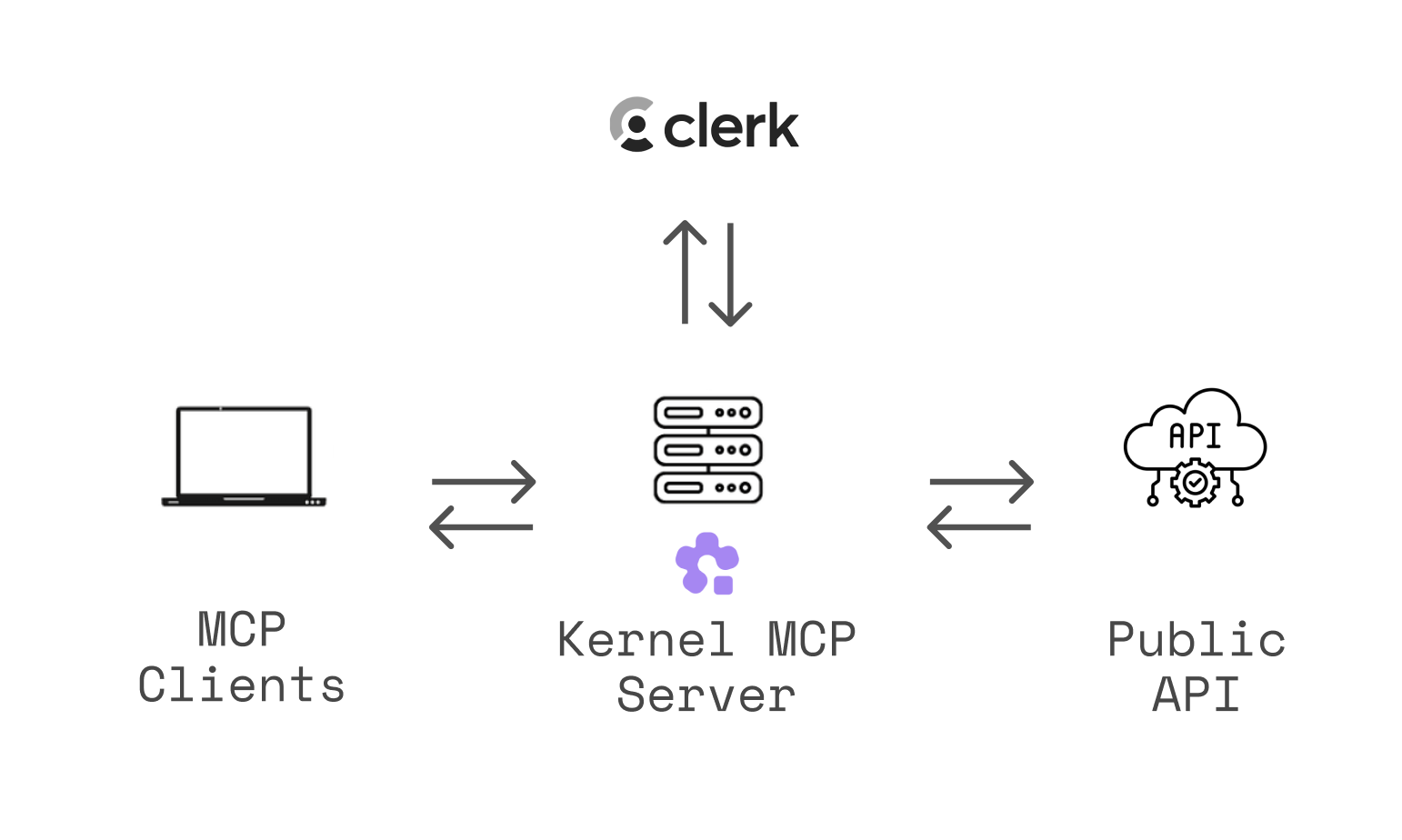
The Kernel MCP Server bridges AI assistants (like Claude, Cursor, or other MCP-compatible tools) with the Kernel platform, enabling them to:
🚀 Deploy and manage Kernel apps in the cloud
🌐 Launch and control headless Chromium sessions for web automation
📊 Monitor deployments and track invocations
🔍 Search Kernel documentation and inject context
💻 Execute arbitrary Playwright code against live browsers
🎥 Automatically record video replays of browser automation
Open-source & fully-managed — the complete codebase is available here, and we run the production instance so you don't need to deploy anything.
The server uses OAuth 2.0 authentication via Clerk to ensure secure access to your Kernel resources.
For a deeper dive into why and how we built this server, see our blog post: Introducing Kernel MCP Server.
Related MCP server: Kubectl MCP Tool
Setup Instructions
General (Transports)
Streamable HTTP (recommended):
https://mcp.onkernel.com/mcpstdio via
mcp-remote(for clients without remote MCP support):npx -y mcp-remote https://mcp.onkernel.com/mcp
Use the streamable HTTP endpoint where supported for increased reliability. If your client does not support remote MCP, use mcp-remote over stdio.
Kernel's server is a centrally hosted, authenticated remote MCP using OAuth 2.1 with dynamic client registration.
Quick Setup with Kernel CLI
The fastest way to configure the MCP server is using the Kernel CLI:
Supported Targets
Target | Command |
Cursor |
|
Claude Desktop |
|
Claude Code |
|
VS Code |
|
Windsurf |
|
Zed |
|
Goose |
|
The CLI automatically locates your tool's config file and adds the Kernel MCP server configuration.
Connect in your client
Claude
Our remote MCP server is not compatible with the method Free users of Claude use to add MCP servers.
Pro, Max, Team & Enterprise (Claude.ai and Claude Desktop)
Go to Settings → Connectors → Add custom connector.
Enter: Integration name:
Kernel, Integration URL:https://mcp.onkernel.com/mcp, then click Add.In Settings → Connectors, click Connect next to
Kernelto launch OAuth and approve.In chat, click Search and tools and enable the Kernel tools if needed.
On Claude for Work (Team/Enterprise), only Primary Owners or Owners can enable custom connectors for the org. After it's configured, each user still needs to go to Settings → Connectors and click Connect to authorize it for their account.
Claude Code CLI
Cursor
Automatic setup

Manual setup
Press ⌘/Ctrl Shift J.
Go to MCP & Integrations → New MCP server.
Add this configuration:
Save. The server will appear in Tools.
OpenCode
Add the following to your ~/.config/opencode/opencode.jsonc:
Then authenticate using the OpenCode CLI:
Goose
Click here to install Kernel on Goose in one click.
Goose Desktop
Click
Extensionsin the sidebar of the Goose Desktop.Click
Add custom extension.On the
Add custom extensionmodal, enter:Extension Name:
KernelType:
STDIODescription:
Access Kernel's cloud-based browsers via MCPCommand:
npx -y mcp-remote https://mcp.onkernel.com/mcpTimeout:
300
Click
Save Changesbutton.
Goose CLI
Run the following command:
goose configureSelect
Add Extensionfrom the menu.Choose
Command-line Extension.Follow the prompts:
Extension name:
KernelCommand:
npx -y mcp-remote https://mcp.onkernel.com/mcpTimeout:
300Description:
Access Kernel's cloud-based browsers via MCP
Visual Studio Code
Press ⌘/Ctrl P → search MCP: Add Server.
Select HTTP (HTTP or Server-Sent Events).
Enter:
https://mcp.onkernel.com/mcpName the server Kernel → Enter.
Windsurf
Press ⌘/Ctrl , to open settings.
Navigate Cascade → MCP servers → View raw config.
Paste:
On Manage MCPs, click Refresh to load Kernel MCP.
Zed
Press ⌘/Ctrl , to open settings.
Paste:
Smithery
You can connect directly to https://mcp.onkernel.com/mcp, or use Smithery as a proxy using its provided URL.
Use Smithery URL in any MCP client:
Open Smithery: Kernel.
Copy the URL from "Get connection URL".
Paste it into your MCP client's "Add server" flow.
Use Kernel in Smithery's Playground MCP client:
Open Smithery Playground.
Click "Add servers", search for "Kernel", and add it.
Sign in and authorize Kernel when prompted.
Others
Many other MCP-capable tools accept:
Command:
npxArguments:
-y mcp-remote https://mcp.onkernel.com/mcp
Configure these values wherever the tool expects MCP server settings.
Tools
Browser Automation
create_browser- Launch a new browser session with options (headless, stealth, timeout, profile)get_browser- Get browser session informationlist_browsers- List active browser sessionsdelete_browser- Terminate a browser sessionexecute_playwright_code- Execute Playwright/TypeScript code in a fresh browser session with automatic video replay and cleanuptake_screenshot- Capture a screenshot of the current browser page, optionally specifying a regioncreate_browser_tunnel- Create a browser session with SSH tunnel capability to connect a local dev server to the cloud browser
Profile Management
setup_profile- Create or update browser profiles with guided setup processlist_profiles- List all available browser profilesdelete_profile- Delete browser profile permanently
App Management
list_apps- List apps in your Kernel organization with optional filteringinvoke_action- Execute actions in Kernel appsget_deployment- Get deployment status and logslist_deployments- List all deployments with optional filteringget_invocation- Get action invocation details
Documentation & Search
search_docs- Search Kernel platform documentation and guides
Resources
browsers://- Access browser sessions (list all or get specific session)profiles://- Access browser profiles (list all or get specific profile)apps://- Access deployed apps (list all or get specific app)
Prompts
kernel-concepts- Get explanations of Kernel's core concepts (browsers, apps, overview)debug-browser-session- Get a comprehensive debugging guide for troubleshooting browser sessions (VM issues, network problems, Chrome errors)
Troubleshooting
Cursor clean reset: ⌘/Ctrl Shift P → run
Cursor: Clear All MCP Tokens(resets all MCP servers and auth; re-enable Kernel and re-authenticate).Clear saved auth and retry:
rm -rf ~/.mcp-authEnsure a recent Node.js version when using
npx mcp-remoteIf behind strict networks, try stdio via
mcp-remote, or explicitly set the transport your client supports
Examples
Invoke apps from anywhere
Execute Playwright code dynamically
Set up browser profiles for authentication
Debug a browser session
Note: Attach the
debug-browser-sessionprompt to your conversation first, then ask for help debugging.
Connect local dev server to cloud browser
This is perfect for AI coding workflows where you need to preview local changes in a real browser:
🤝 Contributing
We welcome contributions! Please see our contributing guidelines:
Fork the repository and create your feature branch
Make your changes and add tests if applicable
Run the linter and formatter:
bun run lint bun run formatTest your changes thoroughly
Submit a pull request with a clear description
Development Guidelines
Follow the existing code style and formatting
Add TypeScript types for new functions and components
Update documentation for any API changes
Ensure all tests pass before submitting
📄 License
This project is licensed under the MIT License - see the LICENSE file for details.
🔗 Related Projects
Model Context Protocol - The protocol specification
Kernel Platform - The platform this server integrates with
Clerk - Authentication provider
@onkernel/sdk - Kernel JavaScript SDK
💬 Support
Issues & Bugs: GitHub Issues
MCP Feedback: github.com/kernelxyz/mcp-feedback
Documentation: Kernel Docs • MCP Setup Guide
Community: Kernel Discord
Built with ❤️ by the Kernel Team
Running this server locally
This will start the server on port 3002.