
This server is an MCP (Model Context Protocol) agent that provides AI chat capabilities powered by Alibaba Cloud DashScope's large language models. You can engage in multi-turn conversations using the ai_chat tool with the default qwen-turbo model or other configurable models. Customize your interactions by adjusting temperature (0-1, default 0.7) to control response creativity and providing system prompts to guide AI behavior. Access the service through a web interface at http://localhost:3000 (npm run api) or integrate it as a pure MCP server via stdio communication (npm start) with MCP-compatible clients like Claude Desktop. The server supports MCP protocol features including tool calling, resource access, and extensible architecture with TypeScript for adding custom tools and resources in src/tools/ and src/resources/ directories.
Click on "Install Server".
Wait a few minutes for the server to deploy. Once ready, it will show a "Started" state.
In the chat, type
@followed by the MCP server name and your instructions, e.g., "@MCP Agent with DashScopeExplain the key advantages of using the Model Context Protocol."
That's it! The server will respond to your query, and you can continue using it as needed.
Here is a step-by-step guide with screenshots.
MCP Agent with DashScope
基于阿里百炼 DashScope 平台的 Model Context Protocol (MCP) Agent 样例工程。
功能特性
✅ 完整的 MCP 协议实现
✅ 已集成阿里百炼 DashScope 大模型(通过
ai_chat工具调用)✅ 支持工具调用(Tools):AI 对话工具
✅ 支持资源访问(Resources)
✅ TypeScript 类型安全
✅ 标准化的项目结构
系统要求
Node.js 18.0.0 或更高版本(需要内置 fetch API 支持)
快速开始
1. 安装依赖
2. 配置环境变量
项目已包含 .env 文件,API Key 已配置。如需修改,编辑 .env 文件:
3. 构建项目
4. 启动 Web 服务器(推荐)
用户通过 Web 界面(HTML 页面)访问,无需了解底层 stdio 通信:
然后在浏览器中访问:http://localhost:3000
其他运行方式
直接运行 MCP 服务器(用于集成到 Claude Desktop 等 MCP 客户端):
或开发模式(自动重新编译):
注意: npm start 启动的是纯 MCP 服务器,通过 stdio 与 MCP 客户端通信。如果要在浏览器中使用,请使用 npm run api 启动 Web 服务器。
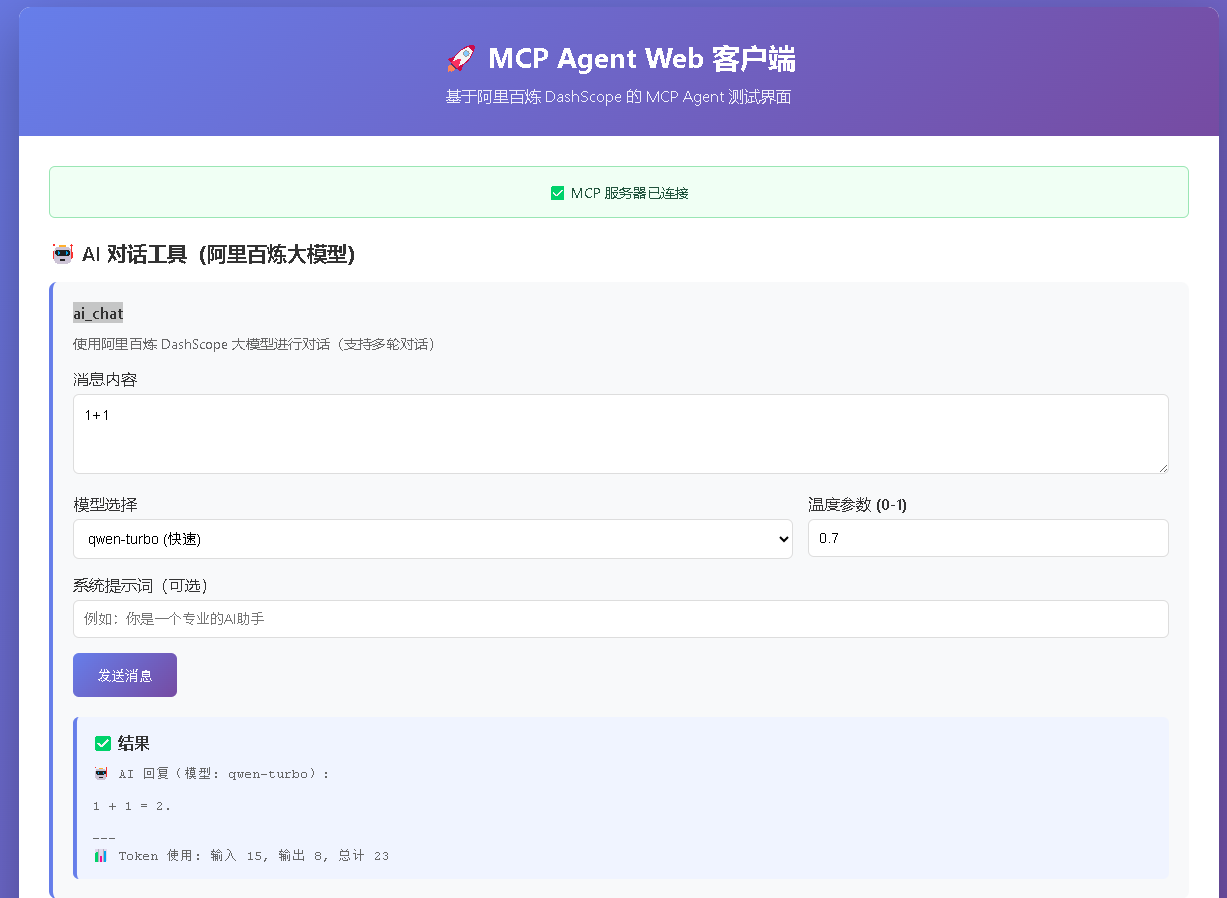
你将看到一个美观的 Web 界面,可以直接使用所有功能!
说明: 用户通过 Web 界面(HTML 页面)与系统交互,底层 MCP 服务器通过 stdio 通信是内部实现细节,用户无需关心。
项目结构
MCP 协议
本项目实现了 Model Context Protocol 的核心功能:
Tools: 可调用的工具函数
Resources: 可访问的资源
Prompts: 提示词模板
调用流程
当用户通过 Web 界面使用 AI 对话功能时,完整的调用流程如下:
详细说明
用户操作: 在 Web 界面输入消息,点击"发送消息"按钮
Web 界面: 调用
callAIChat()函数,发送 HTTP POST 请求到/api/mcp/tools/callHTTP API: API 服务器接收请求,通过 stdio 发送 JSON-RPC 请求到 MCP 服务器
MCP 协议: 使用 JSON-RPC 2.0 协议,通过标准输入输出(stdio)通信
MCP 服务器: 解析请求,路由到
ai_chat工具处理器ai_chat 工具: 执行工具函数,调用 DashScope 客户端
DashScope API: 发送 HTTP 请求到阿里百炼 DashScope API,获取 AI 回复
结果返回: 按照相反路径返回结果,最终显示在 Web 界面上
使用示例
Web 界面使用(主要方式)
启动 Web 服务器后,在浏览器中访问 http://localhost:3000,即可使用 AI 对话功能。
其他使用方式
直接运行 MCP 服务器(用于集成到其他 MCP 客户端):
注意: 直接运行 npm start 会启动纯 MCP 服务器,通过 stdio 与 MCP 客户端通信。如果要通过 Web 界面使用,请使用 npm run api 启动 Web 服务器。
开发
添加新工具
在 src/tools/ 目录下创建新的工具文件,然后在 src/server.ts 中注册。
添加新资源
在 src/resources/ 目录下创建新的资源文件,然后在 src/server.ts 中注册。
许可证
MIT
