
Click on "Install Server".
Wait a few minutes for the server to deploy. Once ready, it will show a "Started" state.
In the chat, type
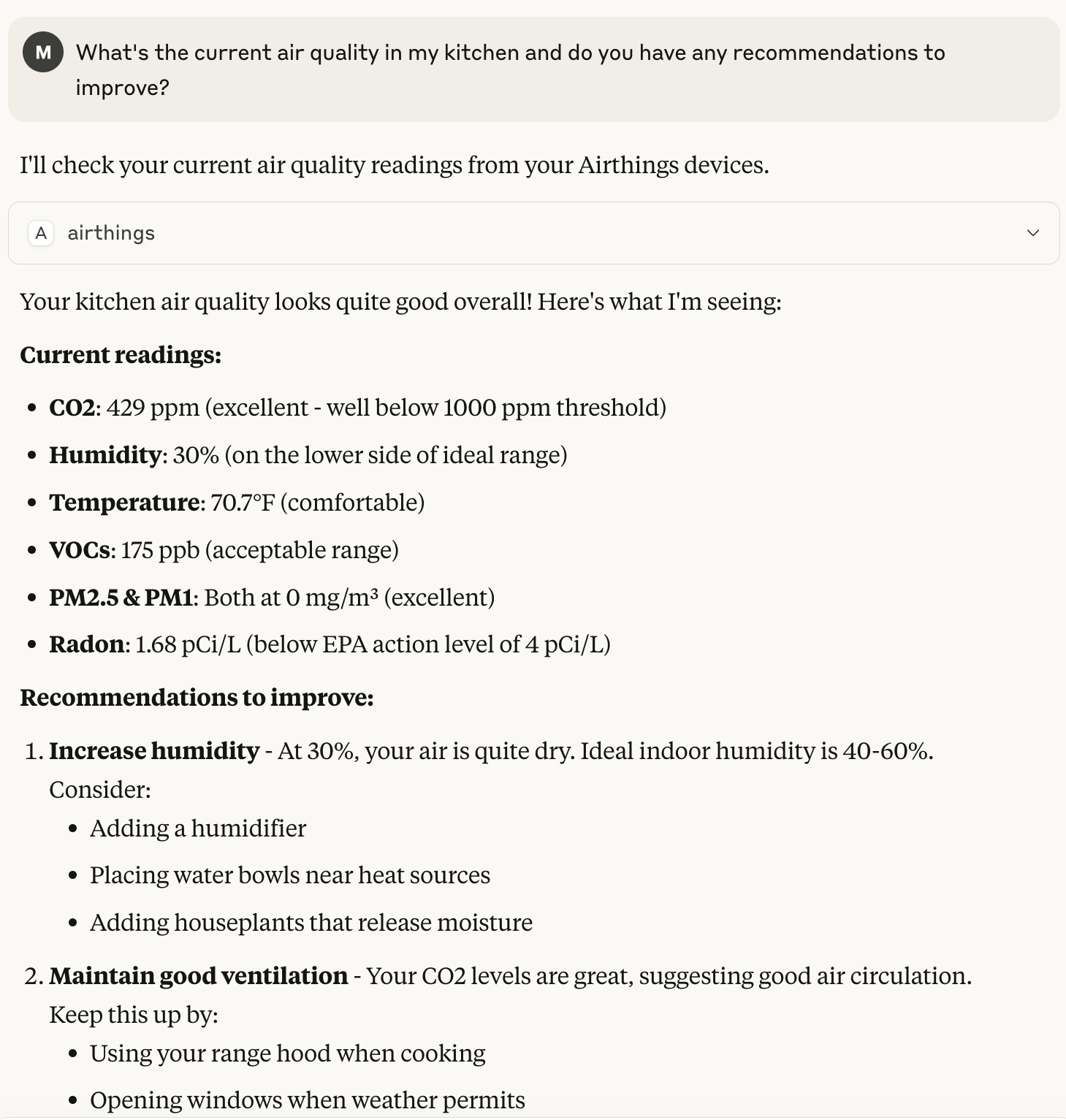
@followed by the MCP server name and your instructions, e.g., "@Airthings Consumer MCP Serverwhat's the air quality in my kitchen?"
That's it! The server will respond to your query, and you can continue using it as needed.
Here is a step-by-step guide with screenshots.
Airthings Consumer MCP Server

A Model Context Protocol (MCP) server for Airthings Air Quality Monitor devices.
Claude Desktop
Download airthings-consumer-mcp.mcpb from Releases
Installation
Screenshot
Related MCP server: Azure MCP Server
Claude Code
Config: .mcp.json
$ claude
╭───────────────────────────────────────────────────╮
│ ✻ Welcome to Claude Code! │
│ │
│ /help for help, /status for your current setup │
│ │
│ cwd: /workspaces/airthings-consumer-mcp │
╰───────────────────────────────────────────────────╯
> Use #airthings to get the current indoor air quality and provide an opinion on the current readings.
● Kitchen Air Quality - Very Good
Excellent readings:
- Radon: 0.89 pCi/L (well below EPA action level)
- CO2: 465 ppm (good ventilation)
- Temperature: 69.6°F (comfortable)
- VOCs: 114 ppb (improved from earlier, good level)
Good readings:
- PM2.5/PM1: 2 mg/m³ (low particulate matter)
Needs attention:
- Humidity: 34% (still low - add moisture to reach 40-60%)
Bedroom device appears offline or not reporting data.
Amazon Q
Config: .amazonq/mcp.json
$ q
✓ airthings_consumer_mcp loaded in 0.95 s
⢠⣶⣶⣦⠀⠀⠀⠀⠀⠀⠀⠀⠀⠀⠀⠀⠀⠀⠀⠀⠀⠀⠀⠀⠀⠀⠀⠀⠀⠀⠀⠀⠀⠀⠀⠀⠀⠀⠀⠀⠀⠀⠀⠀⠀⠀⠀⠀⠀⠀⠀⠀⠀⠀⠀⠀⠀⠀⠀⠀⠀⠀⠀⠀⢀⣤⣶⣿⣿⣿⣶⣦⡀⠀
⠀⠀⠀⣾⡿⢻⣿⡆⠀⠀⠀⢀⣄⡄⢀⣠⣤⣤⡀⢀⣠⣤⣤⡀⠀⠀⢀⣠⣤⣤⣤⣄⠀⠀⢀⣤⣤⣤⣤⣤⣤⡀⠀⠀⣀⣤⣤⣤⣀⠀⠀⠀⢠⣤⡀⣀⣤⣤⣄⡀⠀⠀⠀⠀⠀⠀⢠⣿⣿⠋⠀⠀⠀⠙⣿⣿⡆
⠀⠀⣼⣿⠇⠀⣿⣿⡄⠀⠀⢸⣿⣿⠛⠉⠻⣿⣿⠛⠉⠛⣿⣿⠀⠀⠘⠛⠉⠉⠻⣿⣧⠀⠈⠛⠛⠛⣻⣿⡿⠀⢀⣾⣿⠛⠉⠻⣿⣷⡀⠀⢸⣿⡟⠛⠉⢻⣿⣷⠀⠀⠀⠀⠀⠀⣼⣿⡏⠀⠀⠀⠀⠀⢸⣿⣿
⠀⢰⣿⣿⣤⣤⣼⣿⣷⠀⠀⢸⣿⣿⠀⠀⠀⣿⣿⠀⠀⠀⣿⣿⠀⠀⢀⣴⣶⣶⣶⣿⣿⠀⠀⠀⣠⣾⡿⠋⠀⠀⢸⣿⣿⠀⠀⠀⣿⣿⡇⠀⢸⣿⡇⠀⠀⢸⣿⣿⠀⠀⠀⠀⠀⠀⢹⣿⣇⠀⠀⠀⠀⠀⢸⣿⡿
⢀⣿⣿⠋⠉⠉⠉⢻⣿⣇⠀⢸⣿⣿⠀⠀⠀⣿⣿⠀⠀⠀⣿⣿⠀⠀⣿⣿⡀⠀⣠⣿⣿⠀⢀⣴⣿⣋⣀⣀⣀⡀⠘⣿⣿⣄⣀⣠⣿⣿⠃⠀⢸⣿⡇⠀⠀⢸⣿⣿⠀⠀⠀⠀⠀⠀⠈⢿⣿⣦⣀⣀⣀⣴⣿⡿⠃
⠚⠛⠋⠀⠀⠀⠀⠘⠛⠛⠀⠘⠛⠛⠀⠀⠀⠛⠛⠀⠀⠀⠛⠛⠀⠀⠙⠻⠿⠟⠋⠛⠛⠀⠘⠛⠛⠛⠛⠛⠛⠃⠀⠈⠛⠿⠿⠿⠛⠁⠀⠀⠘⠛⠃⠀⠀⠘⠛⠛⠀⠀⠀⠀⠀⠀⠀⠀⠙⠛⠿⢿⣿⣿⣋⠀⠀
⠀⠀⠀⠀⠀⠀⠀⠀⠀⠀⠀⠀⠀⠀⠀⠀⠀⠀⠀⠀⠀⠀⠀⠀⠀⠀⠀⠀⠀⠀⠀⠀⠀⠀⠀⠀⠀⠀⠀⠀⠀⠀⠀⠀⠀⠀⠀⠀⠀⠀⠀⠀⠀⠀⠀⠀⠀⠀⠀⠀⠀⠀⠀⠀⠀⠀⠀⠀⠀⠀⠀⠀⠈⠛⠿⢿⡧
╭─────────────────────────────── Did you know? ────────────────────────────────╮
│ │
│ You can enable custom tools with MCP servers. Learn more with │
│ /help │
│ │
╰──────────────────────────────────────────────────────────────────────────────╯
/help all commands • ctrl + j new lines • ctrl + s fuzzy search
━━━━━━━━━━━━━━━━━━━━━━━━━━━━━━━━━━━━━━━━━━━━━━━━━━━━━━━━━━━━━━━━━━━━━━━━━━━━━━━━
🤖 You are chatting with claude-4-sonnet
> Use #airthings to get the current indoor air quality and provide an opinion on the current readings.
> I'll get the current air quality readings from your Airthings devices and provide an analysis.
🛠️ Using tool: airthings from mcp server airthings_consumer_mcp
⋮
● Running airthings with the param:
⋮ {
⋮ "arguments": {},
⋮ "name": "airthings"
⋮ }
> ## Kitchen Air Quality - Very Good Overall
Excellent readings:
• **Radon**: 0.89 pCi/L (well below EPA action level of 4 pCi/L)
• **CO2**: 465 ppm (good ventilation - below 600 ppm is ideal)
• **Temperature**: 69.6°F (comfortable range)
• **VOCs**: 114 ppb (good level for indoor air)
Good readings:
• **PM2.5/PM1**: 2 mg/m³ (low particulate matter levels)
• **Pressure**: 79,226 Pa (normal atmospheric pressure)
Needs attention:
• **Humidity**: 34% (low - ideal range is 40-60% for comfort and health)
Recommendations:
• Consider adding a humidifier to bring humidity up to the 40-60% range
• The low humidity could cause dry skin, respiratory irritation, and static electricity
• All other readings indicate excellent air quality with good ventilation
Bedroom Status:
• Device appears offline or not reporting data - you may want to check the device connection or battery status
Overall, your kitchen has excellent air quality with just the humidity needing some attention!
