
Enables configuration management automation by allowing AI agents to execute Ansible commands for infrastructure provisioning and application deployment
Provides HTTP request capabilities, allowing AI agents to make web requests, test APIs, and retrieve web content from various endpoints
Enables container operations management, allowing AI agents to control Docker containers, images, and container lifecycle operations
Provides media processing capabilities, enabling AI agents to convert, manipulate, and process audio and video files using FFmpeg commands
Enables Kubernetes package management, allowing AI agents to deploy, upgrade, and manage applications in Kubernetes clusters using Helm charts
Provides Kubernetes cluster management capabilities, enabling AI agents to deploy, scale, and manage containerized applications and cluster resources using kubectl commands
Serves as the runtime environment for the MCP-Ables server, enabling the execution of shell commands through Python-based MCP tools
Enables infrastructure as code management, allowing AI agents to provision, modify, and destroy cloud infrastructure resources using Terraform commands
Uses YAML configuration files to define shell command mappings, enabling users to create MCP tools by writing simple YAML specifications instead of coding
Click on "Install Server".
Wait a few minutes for the server to deploy. Once ready, it will show a "Started" state.
In the chat, type
@followed by the MCP server name and your instructions, e.g., "@MCP-Ablesrun a port scan on example.com"
That's it! The server will respond to your query, and you can continue using it as needed.
Here is a step-by-step guide with screenshots.
MCP-Ables
Turn any shell command into MCP Server
Why bother coding long MCP servers for every need, when you can just use MCP-Ables?
What is MCP-Ables?
MCP-Ables bridges the gap between command-line tools and AI agents like Claude Code. Write a tiny YAML file describing your shell command, and MCP-Ables automatically generates an MCP (Model Context Protocol) server that AI agents can call.
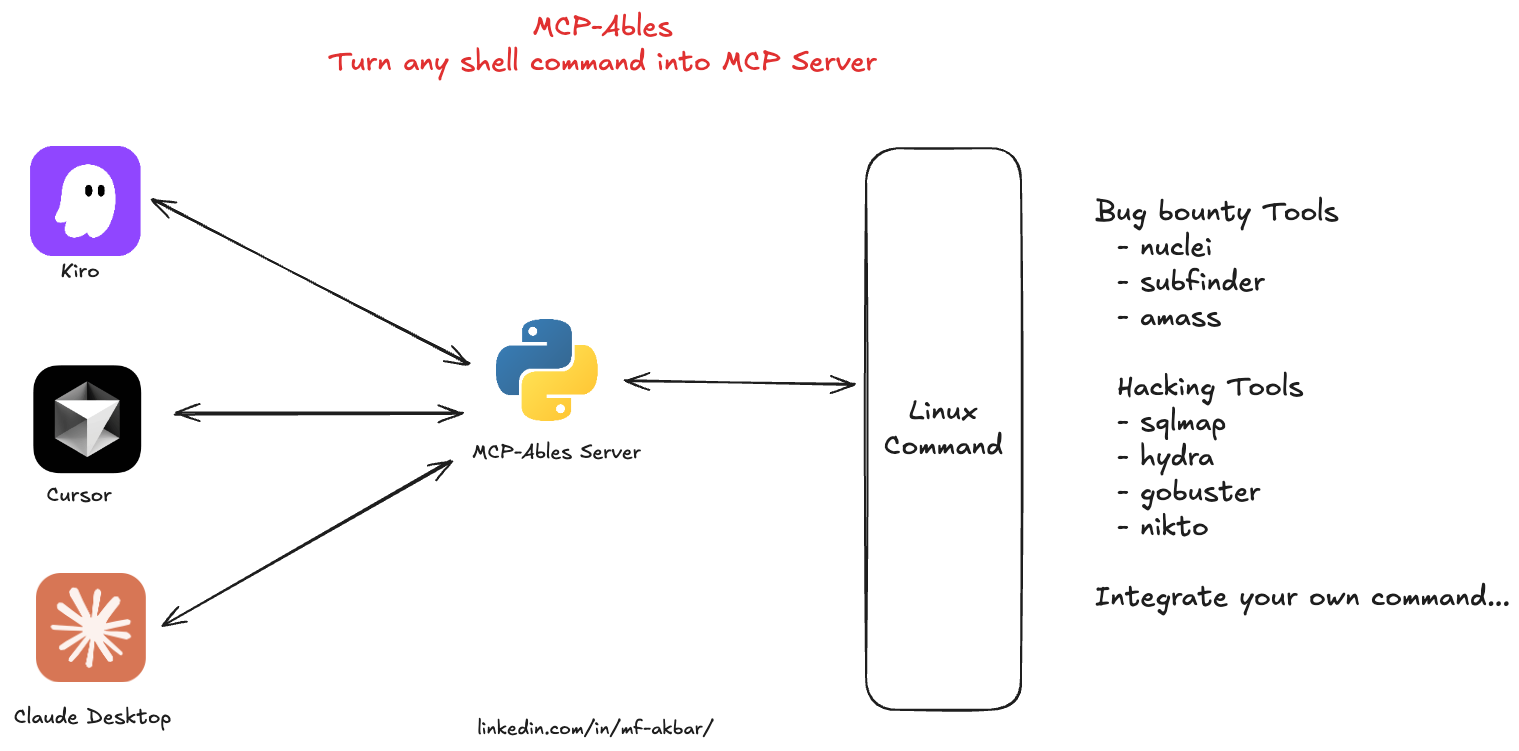
No Python coding. No complex setup. Just YAML → MCP → AI-callable tools.
Quick Start
Prerequisites
Python 3.11+
The command-line tool you want to expose (e.g.,
nuclei,nmap,kubectl, etc.)
Installation
git clone https://github.com/mfakbar127/MCP-Ables.git
cd MCP-Ables
pip install -r requirements.txt
Usage
Create a YAML file describing your tool(s) (see examples below)
Run MCP-Ables with a file or directory:
# Single file
python mcpables-main.py examples/nuclei.yaml

# Directory (scans recursively for .yaml/.yml files)
python mcpables-main.py examples/
The MCP server 'mcpables' is now running with all your tools!
Yaml Exampl - Simple Echo
examples/tools/echo.yaml:
name: echo_message
description: Echo a message to stdout (simple test tool)

run:
  kind: shell
  cmd: "echo {{message}}"

args:
  message:
    type: string
    description: "Message to echo"
    required: true
Run it:
python mcpables-main.py examples/tools/echo.yamlAvailable MCP Tools
Tool Name | Description | Category | Location |
cloudlist | Enumerate assets across cloud providers (ProjectDiscovery) | security | |
subfinder | Passive subdomain enumeration (ProjectDiscovery) | security | |
naabu | Fast port scanning of hosts (ProjectDiscovery) | security | |
asnmap | ASN, domain, IP, and org network range lookups (ProjectDiscovery) | security | |
mapcidr | CIDR/IP processing and slicing for mass scanning (ProjectDiscovery) | security | |
hacking-tools | Bundle of offensive tools (sqlmap, hydra, gobuster, nikto) | security |
Use Cases
🔐 SecOps Vibes
Run security scanners from chat to enumerate assets, discover vulnerabilities, and map attack surfaces; you can run commands such as nmap, nuclei, and subfinder.
🎯 Hacking Vibes
Trigger offensive workflows like SQLi testing, brute‑forcing, content discovery, and web scanning from chat; you can run commands such as sqlmap, hydra, gobuster, and nikto.
🚀 DevOps Vibes
Control infrastructure from chat for deployments, cluster operations, configuration management, and packaging; you can run commands such as kubectl, terraform, ansible, and helm.
🖥️ SysAdmin Vibes
Administer servers from chat, including services, containers, logs, and firewall rules; you can run commands such as systemctl, docker, journalctl, and iptables.
🌐 NetOps Vibes
Run network diagnostics like connectivity tests, path tracing, DNS queries, and domain lookups; you can run commands such as ping, traceroute, dig, and whois.
📊 Data Vibes
Process data from the CLI, including JSON parsing, HTTP requests, text filtering, and media conversion; you can run commands such as jq, curl, grep/awk, and ffmpeg.
YAML Schema
See examples/
Single-Tool Format
name: <tool_name>
description: <brief description for AI agents>

run:
  kind: shell
  cmd: "command {{arg1}} {{arg2}}"

args:
  arg1:
    type: string|int|float|bool
    description: "What this argument does"
    required: true|false
    default: <optional default value>
Multi-Tool Format
Define multiple tools in one YAML file:
tools:
  - name: tool1
    description: First tool description
    run:
      kind: shell
      cmd: "command1 {{arg1}}"
    args:
      arg1:
        type: string
        description: "Argument description"
        required: true

  - name: tool2
    description: Second tool description
    run:
      kind: shell
      cmd: "command2 {{arg2}}"
    args:
      arg2:
        type: int
        description: "Argument description"
        required: false
        default: 10
Argument Fields
type: Data type (
string,int,float,bool)description: Human-readable explanation for AI agents to understand usage
required: Whether the argument must be provided (
trueorfalse)default: Default value if not provided (only for optional arguments)
Examples
Nuclei Scanner
examples/tools/nuclei.yaml:
name: nuclei_scan
description: Run Nuclei vulnerability scanner against a target URL or IP address

run:
  kind: shell
  cmd: "nuclei -c {{concurrency}} -t {{target}} -t {{template_path}}"

args:
  target:
    type: string
    description: "Target URL or IP address to scan (e.g., https://example.com)"
    required: true

  template_path:
    type: string
    description: "Path to Nuclei templates directory (e.g., ~/nuclei-templates/)"
    required: true

  concurrency:
    type: int
    description: "Number of concurrent requests (1-100)"
    required: false
    default: 10
Multi-Tool Example
examples/security-tools.yaml:
tools:
  - name: nmap_scan
    description: Run Nmap network scanner against a target
    run:
      kind: shell
      cmd: "nmap {{scan_type}} {{target}}"
    args:
      target:
        type: string
        description: "Target IP or hostname"
        required: true
      scan_type:
        type: string
        description: "Scan type flag (e.g., -sV)"
        required: false
        default: "-sV"

  - name: whois_lookup
    description: Perform WHOIS lookup for a domain
    run:
      kind: shell
      cmd: "whois {{domain}}"
    args:
      domain:
        type: string
        description: "Domain name to lookup"
        required: true

  - name: dig_dns
    description: DNS lookup using dig command
    run:
      kind: shell
      cmd: "dig {{record_type}} {{domain}}"
    args:
      domain:
        type: string
        description: "Domain name to query"
        required: true
      record_type:
        type: string
        description: "DNS record type (A, MX, TXT, etc.)"
        required: false
        default: "A"
Run it:
python mcpables-main.py examples/security-tools.yaml
# Loads 3 tools: nmap_scan, whois_lookup, dig_dns
Directory Example
Organize tools in separate files:
examples/tools/
├── ping.yaml     (ping_host tool)
├── curl.yaml     (http_request tool)
└── ...
Run all tools from directory:
python mcpables-main.py examples/tools/
# Recursively loads all .yaml/.yml files
Claude Desktop Integration
Connect MCP-Ables to Claude Desktop so AI can use your tools directly from chat.
Configuration
Locate Claude Desktop config file:
macOS:
~/Library/Application Support/Claude/claude_desktop_config.jsonLinux:
~/.config/Claude/claude_desktop_config.jsonWindows:
%APPDATA%\Claude\claude_desktop_config.json
Add MCP-Ables server:
{
  "mcpServers": {
    "mcpables": {
      "command": "python",
      "args": [
        "/absolute/path/to/mcpables-main.py",
        "/absolute/path/to/examples/"
      ]
    }
  }
}
Restart Claude Desktop - Tools will automatically appear
Configuration Examples
Single file (specific vibe):
{
  "mcpServers": {
    "secops": {
      "command": "python",
      "args": ["/path/to/mcpables-main.py", "/path/to/examples/secops-tools.yaml"]
    }
  }
}
Directory (all tools):
{
  "mcpServers": {
    "mcpables-all": {
      "command": "python",
      "args": ["/path/to/mcpables-main.py", "/path/to/examples/"]
    }
  }
}
Multiple configurations (different vibes):
{
  "mcpServers": {
    "secops": {
      "command": "python",
      "args": ["/path/to/mcpables-main.py", "/path/to/examples/secops-tools.yaml"]
    },
    "devops": {
      "command": "python",
      "args": ["/path/to/mcpables-main.py", "/path/to/examples/devops-tools.yaml"]
    },
    "netops": {
      "command": "python",
      "args": ["/path/to/mcpables-main.py", "/path/to/examples/netops-tools.yaml"]
    }
  }
}
Verify Connection
After restarting Claude Desktop, you can verify the tools are available:
Type a message asking Claude about available tools
Tools will appear with names like
nuclei_scan,nmap_scan, etc.Claude can now execute commands directly!
Author
Created by Muh. Fani "Rama" Akbar linkedin.com/in/mf-akbar/