主持人
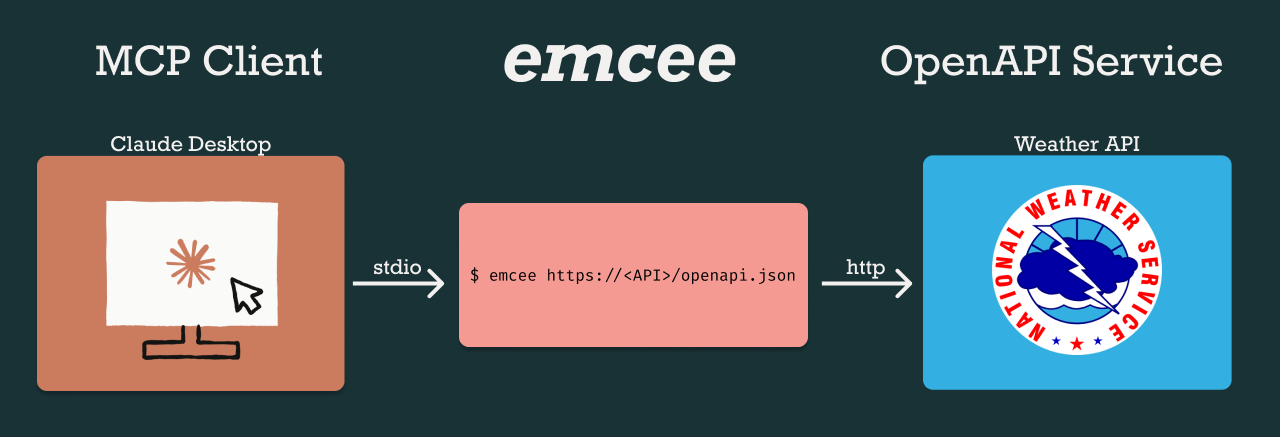
emcee是一款工具,可为任何符合OpenAPI规范的 Web 应用程序提供模型上下文协议 (MCP)服务器。您可以使用 emcee 将Claude Desktop和其他应用程序连接到外部工具和数据服务,类似于ChatGPT 插件。
快速入门
如果您使用的是 macOS 并且安装了Homebrew ,则可以快速启动并运行。
# Install emcee
brew install loopwork-ai/tap/emcee
确保您已安装Claude Desktop 。
要配置 Claude Desktop 以便与 emcee 一起使用:
打开 Claude 桌面设置 (⌘,)
选择侧边栏中的“开发者”部分
点击“编辑配置”打开配置文件
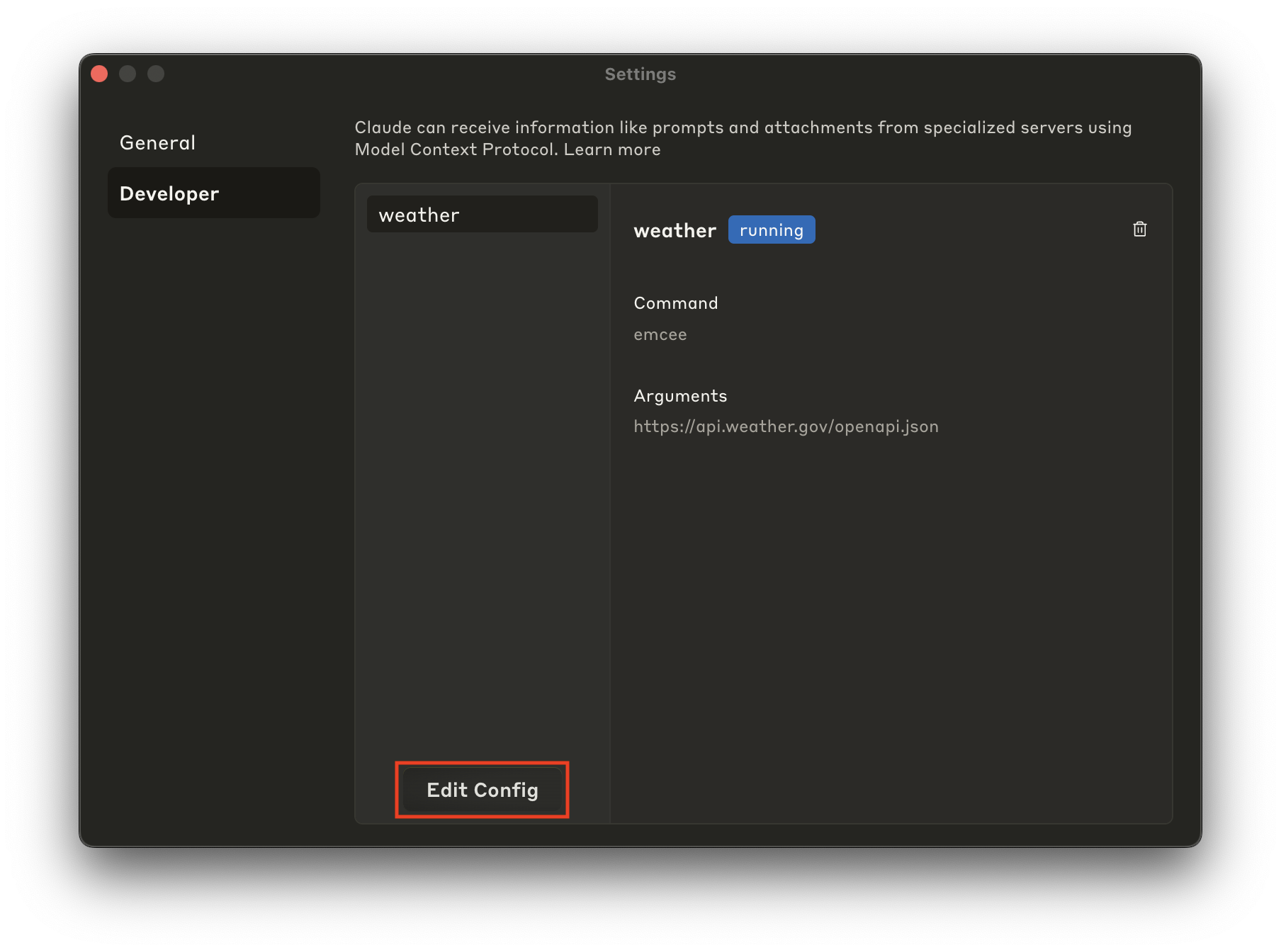
配置文件应该位于 Application Support 目录中。您也可以使用以下命令直接在 VSCode 中打开它:
code ~/Library/Application\ Support/Claude/claude_desktop_config.json
添加以下配置以添加 weather.gov MCP 服务器:
{
"mcpServers": {
"weather": {
"command": "emcee",
"args": [
"https://api.weather.gov/openapi.json"
]
}
}
}
保存文件后,退出并重新打开 Claude。您现在应该会在聊天框的右下角看到🔨57。点击它即可查看 Claude 通过 MCP 可以使用的所有工具列表。
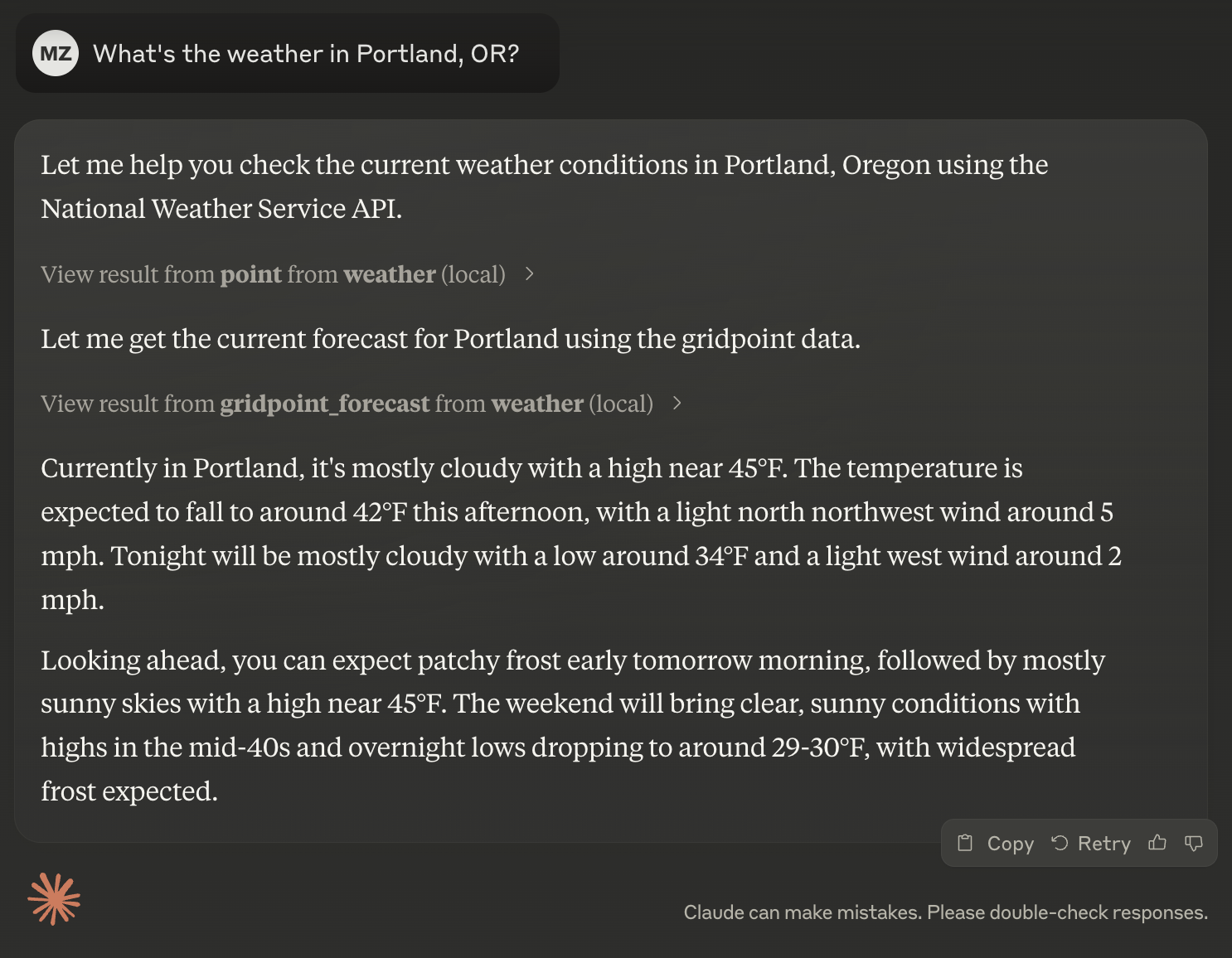
开始新的聊天并询问您所在地的天气。
俄勒冈州波特兰的天气怎么样?
Claude 将参考 MCP 提供的工具,如果其中一个工具被认为适合解答您的问题,Claude 将申请使用。您可以审核此请求,并决定批准或拒绝。
如果您允许,Claude 将与 MCP 进行通信并使用结果来通知其响应。
提示:正在构建代理?想要部署远程 MCP 服务器?请联系emcee@loopwork.com
Related MCP server: OpenAPI Client Generator MCP
为什么要使用 emcee?
MCP 提供了一种将 AI 模型连接到工具和数据源的标准化方法。虽然目前尚处于早期阶段,但目前已有多种可用于连接浏览器、开发者工具和其他系统的服务器。
我们认为 emcee 是一种便捷的方式,可以连接到尚未实现 MCP 服务器的服务,尤其适用于您自行构建的服务。您有一个符合 OpenAPI 规范的 Web 应用吗?您可能会惊讶地发现,即使没有仪表板或客户端库,您也能取得如此大的进展。
安装
安装程序脚本
使用安装程序脚本下载并安装适合您平台(Linux x86-64/i386/arm64 和 macOS Intel/Apple Silicon)的预构建版本emcee。
# fish
sh (curl -fsSL https://get.emcee.sh | psub)
# bash, zsh
sh <(curl -fsSL https://get.emcee.sh)
自制
使用Loopwork 的 tap中的Homebrew安装 emcee。
brew install loopwork-ai/tap/emcee
Docker
带有 emcee 的预构建Docker 镜像可供使用。
docker run -it ghcr.io/loopwork-ai/emcee
从源代码构建
需要1.24或更高版本。
git clone https://github.com/loopwork-ai/emcee.git
cd emcee
go build -o emcee cmd/emcee/main.go
一旦构建完成,您就可以就地运行( ./emcee )或将其移动到PATH中的某个位置,例如/usr/local/bin 。
用法
Usage:
emcee [spec-path-or-url] [flags]
Flags:
--basic-auth string Basic auth value (either user:pass or base64 encoded, will be prefixed with 'Basic ')
--bearer-auth string Bearer token value (will be prefixed with 'Bearer ')
-h, --help help for emcee
--raw-auth string Raw value for Authorization header
--retries int Maximum number of retries for failed requests (default 3)
-r, --rps int Maximum requests per second (0 for no limit)
-s, --silent Disable all logging
--timeout duration HTTP request timeout (default 1m0s)
-v, --verbose Enable debug level logging to stderr
--version version for emcee
emcee 为 MCP 实现标准输入/输出 (stdio)传输,使用JSON-RPC 2.0作为其传输格式。
当您从命令行运行 emcee 时,它会启动一个程序,该程序监听 stdin、输出到 stdout 并记录到 stderr。
验证
对于需要身份验证的API,emcee支持多种身份验证方法:
身份验证类型 | 示例用法 | 结果标题 |
持有者令牌 | --bearer-auth="abc123"
| Authorization: Bearer abc123
|
基本身份验证 | --basic-auth="user:pass"
| Authorization: Basic dXNlcjpwYXNz
|
原始值 | --raw-auth="Custom xyz789"
| Authorization: Custom xyz789
|
这些身份验证值可以直接提供,也可以作为1Password 秘密参考提供。
使用 1Password 参考时:
使用格式op://vault/item/field (例如--bearer-auth="op://Shared/X/credential" )
确保 1Password CLI( op )已安装并在您的PATH中可用
在运行 emcee 或启动 Claude Desktop 之前登录 1Password
# Install op
brew install 1password-cli
# Sign in 1Password CLI
op signin
{
"mcpServers": {
"twitter": {
"command": "emcee",
"args": [
"--bearer-auth=op://shared/x/credential",
"https://api.twitter.com/2/openapi.json"
]
}
}
}
[!重要的]
emcee 从命令参数提供的 URL 下载 OpenAPI 规范时不使用身份验证凭据。如果您的 OpenAPI 规范需要身份验证才能访问,请先使用您首选的 HTTP 客户端将其下载到本地文件,然后将本地文件路径提供给 emcee。
转型 OpenAPI 规范
您可以使用标准 Unix 实用程序转换 OpenAPI 规范,然后再将其传递给 emcee。这适用于:
例如,您可以使用jq仅包含来自weather.gov的point工具。
cat path/to/openapi.json | \
jq 'if .paths then .paths |= with_entries(select(.key == "/points/{point}")) else . end' | \
emcee
JSON-RPC
您可以通过发送 JSON-RPC 请求直接与提供的 MCP 服务器进行交互。
emcee 仅提供 MCP 工具功能。其他功能(例如资源、提示和采样)尚不受支持。
列表工具
{"jsonrpc": "2.0", "method": "tools/list", "params": {}, "id": 1}
{
"jsonrpc":"2.0",
"result": {
"tools": [
// ...
{
"name": "tafs",
"description": "Returns Terminal Aerodrome Forecasts for the specified airport station.",
"inputSchema": {
"type": "object",
"properties": {
"stationId": {
"description": "Observation station ID",
"type": "string"
}
},
"required": ["stationId"]
}
},
// ...
]
},
"id": 1
}
呼叫工具
{"jsonrpc": "2.0", "method": "tools/call", "params": { "name": "taf", "arguments": { "stationId": "KPDX" }}, "id": 1}
{
"jsonrpc":"2.0",
"content": [
{
"type": "text",
"text": /* Weather forecast in GeoJSON format */,
"annotations": {
"audience": ["assistant"]
}
}
]
"id": 1
}
调试
MCP 检查器是一款用于测试和调试 MCP 服务器的工具。如果 Claude 和/或 emcee 未按预期工作,检查器可以帮助您了解问题所在。
npx @modelcontextprotocol/inspector emcee https://api.weather.gov/openapi.json
# 🔍 MCP Inspector is up and running at http://localhost:5173 🚀
open http://localhost:5173
执照
emcee 已获得 Apache 许可证 2.0 版的许可。
