
Queries the GitHub Winget repository to retrieve application manifests, silent install arguments, and package metadata for Windows applications.
Click on "Install Server".
Wait a few minutes for the server to deploy. Once ready, it will show a "Started" state.
In the chat, type
@followed by the MCP server name and your instructions, e.g., "@Packager-MCPPackage Google Chrome for Intune with silent install and detection rules"
That's it! The server will respond to your query, and you can continue using it as needed.
Here is a step-by-step guide with screenshots.
Packager-MCP
An MCP (Model Context Protocol) server that transforms Claude CLI and compatible AI tools into expert Windows application packaging assistants for Microsoft Intune.
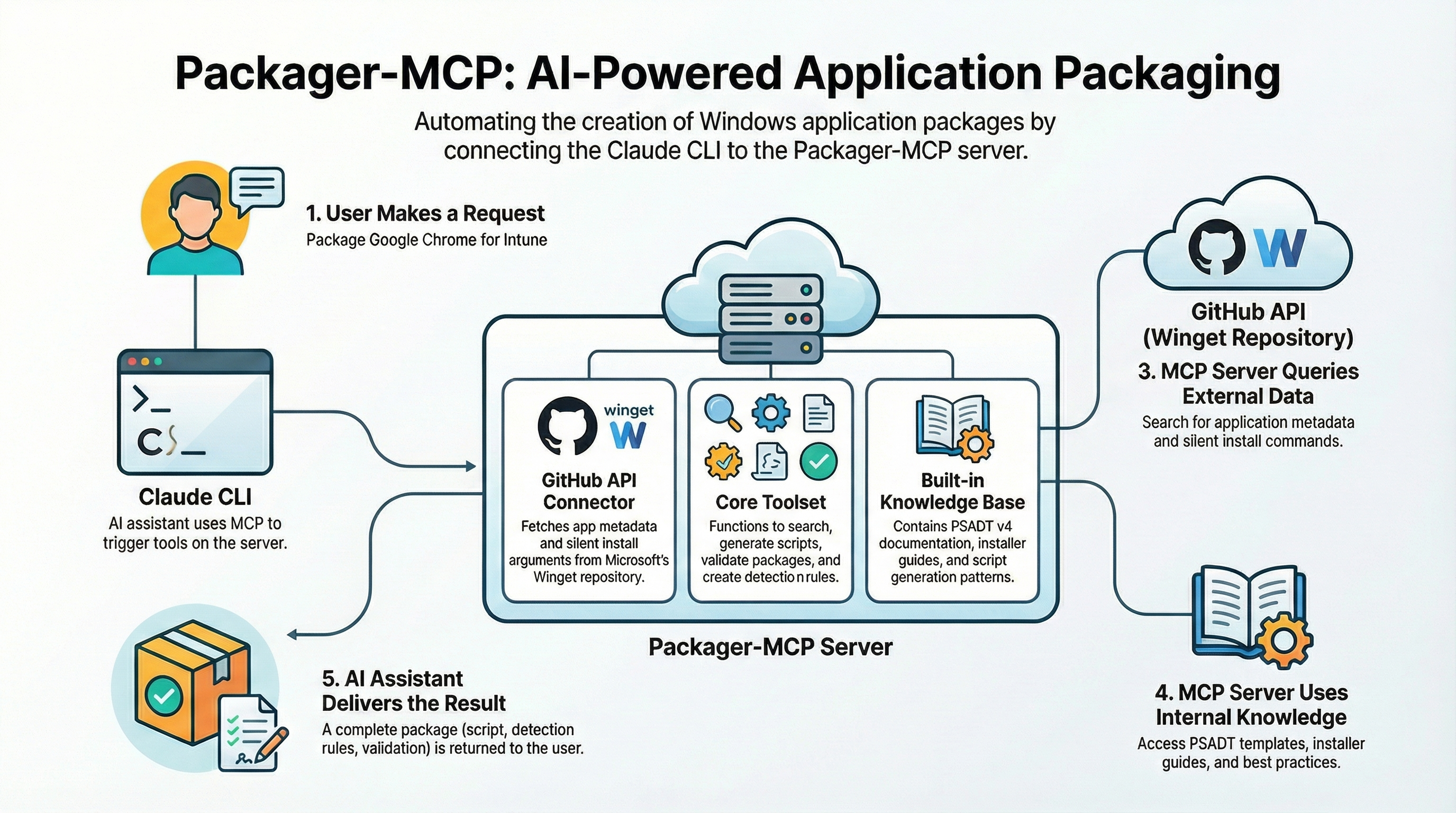
What is This?
This server gives your AI assistant (like Claude) superpowers for creating Windows application packages. Instead of manually researching silent install arguments, writing PSADT scripts from scratch, and figuring out Intune detection rules, you can just ask your AI to do it for you.
Before this server: "How do I silently install Chrome? What's the detection rule? How do I write a PSADT script?"
After this server: "Package Google Chrome for Intune" → Complete package with script, detection rules, and validation.
What is MCP?
MCP (Model Context Protocol) is a standard that enables AI assistants to integrate with external tools. Think of it like giving your AI assistant access to specialised functions it can call.
When you connect this server to Claude CLI (or another MCP-compatible client), Claude gains access to:
Tools - Functions it can call (search Winget, generate scripts, validate packages)
Resources - Documentation that can be read (PSADT guides, installer references)
Prompts - Pre-built workflows it can execute (package an app, troubleshoot issues)
Version Notes
Packager-MCP v0.8 - Beta. The server provides complete Windows application packaging assistance with PSADT v4.1.7 support.
Detailed Guide
Look for the PackagerMCP_Claude.docx in this repository.
Quick Start
Prerequisites
Node.js 20 or higher
MCP-compatible AI client (Claude CLI recommended, see detailed guide)
GitHub Token (recommended) - Create one here
Installation
# Install prerequisites (if not already installed)
winget install git.git
winget install OpenJS.NodeJS.LTS

# Clone the repository
git clone https://github.com/kkaminsk/Packager-MCP.git
cd Packager-MCP

# Install dependencies
npm install

# Build the project
npm run build
Add MCP to Your Client
For Windsurf/VS Code (mcp_config.json):
{
  "mcpServers": {
    "packager-mcp": {
      "command": "node",
      "args": ["C:/path/to/Packager-MCP/dist/server.js"],
      "env": {
        "GITHUB_TOKEN": "ghp_your_token_here"
      }
    }
  }
}
For Claude CLI:
claude mcp add packager-mcp node C:/Temp/Github/Packager-MCP/dist/server.js -e GITHUB_TOKEN=github_pat_changemeFor Claude Desktop (claude_desktop_config.json):
{
  "mcpServers": {
    "packager-mcp": {
      "command": "node",
      "args": ["C:/path/to/Packager-MCP/dist/server.js"],
      "env": {
        "GITHUB_TOKEN": "ghp_your_token_here"
      }
    }
  }
}
Verify It's Working
After adding the server to your MCP client, you should see packager-mcp in the list of available servers. The server provides 6 tools, 11 resources, and 4 prompts. Feel free to ask the agent if the MCP is working and test it.
What Can It Do?
Six Powerful Tools
Tool | What It Does | Example Use |
| Find apps in the Winget repository | "Search for Chrome in Winget" |
| Get silent install parameters | "What are the silent args for Firefox?" |
| Generate PSADT v4 deployment scripts | "Create a PSADT script for 7-Zip" |
| Check scripts for errors and best practices | "Validate my deployment script" |
| Create Intune detection rules | "Generate a file detection rule for Notepad++" |
| Verify PSADT scripts use valid v4.1.7 functions | "Verify my script has correct function names" |
Note: Use search_winget to get installer URLs, then download with PowerShell's Invoke-WebRequest. The PSADT toolkit is bundled in dist/knowledge/v4github/ - copy these files to your package directory.
Knowledge Resources
Claude can read these built-in guides to help you better:
PSADT Documentation:
psadt://docs/overview- Architecture and conceptspsadt://docs/functions- All 135 ADT-prefixed functionspsadt://docs/variables- Built-in variables and $ADTSessionpsadt://docs/migration- Guide for migrating from v3 to v4psadt://docs/best-practices- Recommended patterns
Installer Guides:
kb://installers/msi- MSI packaging guidekb://installers/exe- EXE installers (NSIS, Inno, InstallShield)kb://installers/msix- Modern MSIX packaging
Patterns & References:
kb://patterns/detection- Detection rule exampleskb://patterns/prerequisites- Handling dependenciesref://exit-codes- Common exit codes explained
Note: Silent install arguments are accessed via the get_silent_install_args tool rather than as a resource.
Four Guided Workflows (Prompts)
Prompt | Description |
| Complete workflow: search → template → detection → validate |
| Diagnose package failures from error codes and logs |
| Get info for multiple apps at once |
| Convert PSADT v3 scripts to v4 format with migration guidance |
Usage Examples
Example 1: Package an Application
Just tell Claude what you want:
Package Google Chrome for Intune deploymentClaude will:
Search Winget for Chrome metadata
Get the silent install arguments
Generate a PSADT v4 deployment script
Create Intune detection rules
Validate the script for issues
Example 2: Look Up Silent Install Arguments
What are the silent install arguments for Mozilla Firefox?Claude will query Winget and return verified arguments with confidence levels.
Example 3: Generate Detection Rules
Create an Intune detection rule that checks if Notepad++ version 8.6 or higher
is installed at C:\Program Files\Notepad++\notepad++.exe
Claude will generate both the Intune Graph API JSON and an equivalent PowerShell script.
Example 4: Validate a Script
Validate this PSADT script for Intune deployment:

[paste your script]
Claude will check for:
PSADT v4 syntax errors
Intune compatibility issues
Security vulnerabilities
Best practice violations
Example 5: Troubleshoot a Failure
My package failed with exit code 1603. The installer is an MSI.Claude will explain what exit code 1603 means and suggest solutions.
Configuration
Basic Setup
Copy the example config file:
cp packager-mcp.example.yaml packager-mcp.yamlConfiguration Options
# Server identification
name: intune-packaging-assistant
version: 1.0.0

# Cache settings (speeds up repeated queries)
cache:
  maxSize: 1000              # Maximum cached items
  defaultTtlMs: 900000       # 15 minutes default
  manifestTtlMs: 3600000     # 1 hour for manifests
  searchTtlMs: 900000        # 15 minutes for searches

# Logging
logging:
  level: info                # debug, info, warn, error
  format: json               # json or text

# GitHub API (for Winget repository access)
github:
  # token: ghp_xxx...        # Optional: increases rate limit from 60 to 5000/hour
  rateLimitRetries: 3
GitHub Token (Recommended)
The server queries GitHub's Winget repository. Without a token, you're limited to 60 requests/hour. With a token, you get 5000/hour.
# Set via environment variable
export GITHUB_TOKEN=ghp_your_token_here

# Or in the config file
github:
  token: ghp_your_token_here
To create a token: GitHub → Settings → Developer settings → Personal access tokens → Fine-grained tokens → Generate new token (no special permissions needed for public repos).
Project Structure
Packager-MCP/
├── src/
│   ├── server.ts           # MCP server entry point
│   ├── handlers/
│   │   ├── tools.ts        # Tool implementations (5 tools)
│   │   ├── resources.ts    # Resource handlers (11 resources)
│   │   └── prompts.ts      # Prompt workflows (4 prompts)
│   │   └── index.ts        # Handler registration
│   ├── services/
│   │   ├── winget.ts       # Winget API integration
│   │   ├── psadt.ts        # PSADT template generation
│   │   ├── validation.ts   # Package validation engine
│   │   ├── detection.ts    # Intune detection rules
│   │   └── index.ts        # Service exports
│   ├── workflows/          # Prompt workflow implementations
│   │   ├── package-app.ts  # /package-app workflow
│   │   ├── troubleshoot.ts # /troubleshoot workflow
│   │   ├── bulk-lookup.ts  # /bulk-lookup workflow
│   │   └── index.ts        # Workflow exports
│   ├── knowledge/          # Embedded documentation
│   │   ├── psadt/          # PSADT v4 docs (overview, functions, variables, best-practices)
│   │   ├── installers/     # Installer type guides (msi, exe, msix)
│   │   ├── patterns/       # Packaging patterns (detection, prerequisites, download)
│   │   ├── reference/      # Silent args (JSON), exit codes
│   │   └── v4github/       # Static PSADT v4.1.7 toolkit files
│   ├── templates/          # Handlebars templates for PSADT scripts
│   ├── cache/              # LRU cache implementation
│   ├── config/             # Configuration loader and schema
│   ├── utils/              # Logger and error utilities
│   ├── types/              # TypeScript type definitions
│   └── __tests__/          # Unit tests
├── dist/                   # Compiled JavaScript (after build)
├── packager-mcp.example.yaml
└── package.json
Understanding Installer Types
The server handles different installer types automatically:
Type | Description | Silent Args | Example |
MSI | Windows Installer |
| Office, SQL Server |
EXE (NSIS) | Nullsoft Installer |
| 7-Zip, VLC |
EXE (Inno) | Inno Setup |
| VS Code, Git |
EXE (InstallShield) | InstallShield |
| Adobe Reader |
MSIX/AppX | Modern packages |
| Store apps |
ZIP | Archive extraction | N/A | Portable apps |
Understanding PSADT v4
This server generates PSADT v4 (PowerShell App Deployment Toolkit version 4) scripts. Key things to know:
Key Concepts
Module-based architecture (Import-Module PSAppDeployToolkit)
ADTprefix on all 135 functions (e.g.,Show-ADTInstallationWelcome,Start-ADTProcess)$adtSessionobject for state management viaOpen-ADTSessionStructured error handling with
Close-ADTSession
Script Structure
# Import the module
Import-Module PSAppDeployToolkit

# Open a session
$adtSession = Open-ADTSession -AppName 'MyApp' -AppVersion '1.0'

# Do the installation
Install-ADTDeployment {
    Show-ADTInstallationWelcome -CloseApps 'myapp' -AllowDefer
    Show-ADTInstallationProgress -StatusMessage 'Installing...'
    Start-ADTMsiProcess -Path 'MyApp.msi'
}

# Close the session
Close-ADTSession
Troubleshooting
"Rate limit exceeded"
You've hit GitHub's API limit (60 requests/hour without a token).
Solution: Add a GitHub Personal Access Token to your config.
"Package not found"
The Winget repository doesn't have this exact package ID.
Solution: Try searching with a partial name: "Search Winget for Chrome" instead of using an exact ID.
"Server not responding"
The MCP connection may have dropped.
Solution:
claude mcp remove packager-mcp
claude mcp add packager-mcp node /path/to/dist/server.js
"Build failed"
TypeScript compilation errors.
Solution:
npm install
npm run build
Development
Run in Watch Mode
npm run devRun Tests
npm test

# Watch mode
npm run test:watch
Validate Knowledge Base
npm run validate:knowledgeHow It Works Under the Hood
┌─────────────────┐      ┌──────────────────┐     ┌─────────────────┐
│   Claude CLI    │────▶│  Packager-MCP    │────▶│  GitHub API     │
│   (MCP Client)  │◀────│  (MCP Server)    │◀────│  (Winget Repo)  │
└─────────────────┘      └──────────────────┘     └─────────────────┘
                               │
                               ▼
                        ┌──────────────────┐
                        │  Knowledge Base  │
                        │  - PSADT docs    │
                        │  - Silent args   │
                        │  - Exit codes    │
                        └──────────────────┘
You ask Claude to package an app
Claude calls tools on this MCP server
The server queries GitHub's Winget repository for metadata
The server generates PSADT scripts using templates and knowledge
Claude returns the complete package to you
FAQ
Q: Do I need Intune to use this? A: No! The scripts work standalone. Intune-specific features (detection rules) are optional.
Q: Does it support PSADT v3? A: No, this server focuses exclusively on PSADT v4. For v3 scripts, please refer to the official PSADT documentation for migration guidance.
Q: Can I use this with other tools? A: Yes, any MCP-compatible client works. Add the server to your MCP config.
Q: How accurate are the silent install arguments? A: Arguments come from Microsoft's Winget repository with confidence levels (verified, high, medium, low).
Q: Can I download the actual installers?
A: Use search_winget to get installer URLs and SHA256 hashes, then download with PowerShell's Invoke-WebRequest.
Q: Where do I get the PSADT toolkit files?
A: The PSADT v4.1.7 toolkit is bundled in dist/knowledge/v4github/. Copy these files to your package directory to create a complete deployment package.
Contributing
Contributions welcome! See the project structure above and feel free to:
Add more installer type patterns
Improve PSADT templates
Expand the knowledge base
Report issues
License
MIT
Links
This server cannot be installed
Resources
Unclaimed servers have limited discoverability.
Looking for Admin?
If you are the server author, to access and configure the admin panel.