
Provides a comprehensive integration for managing Zendesk tickets and comments, including tools for searching tickets with custom filters, drafting responses, and accessing Help Center articles as a knowledge base.
Click on "Install Server".
Wait a few minutes for the server to deploy. Once ready, it will show a "Started" state.
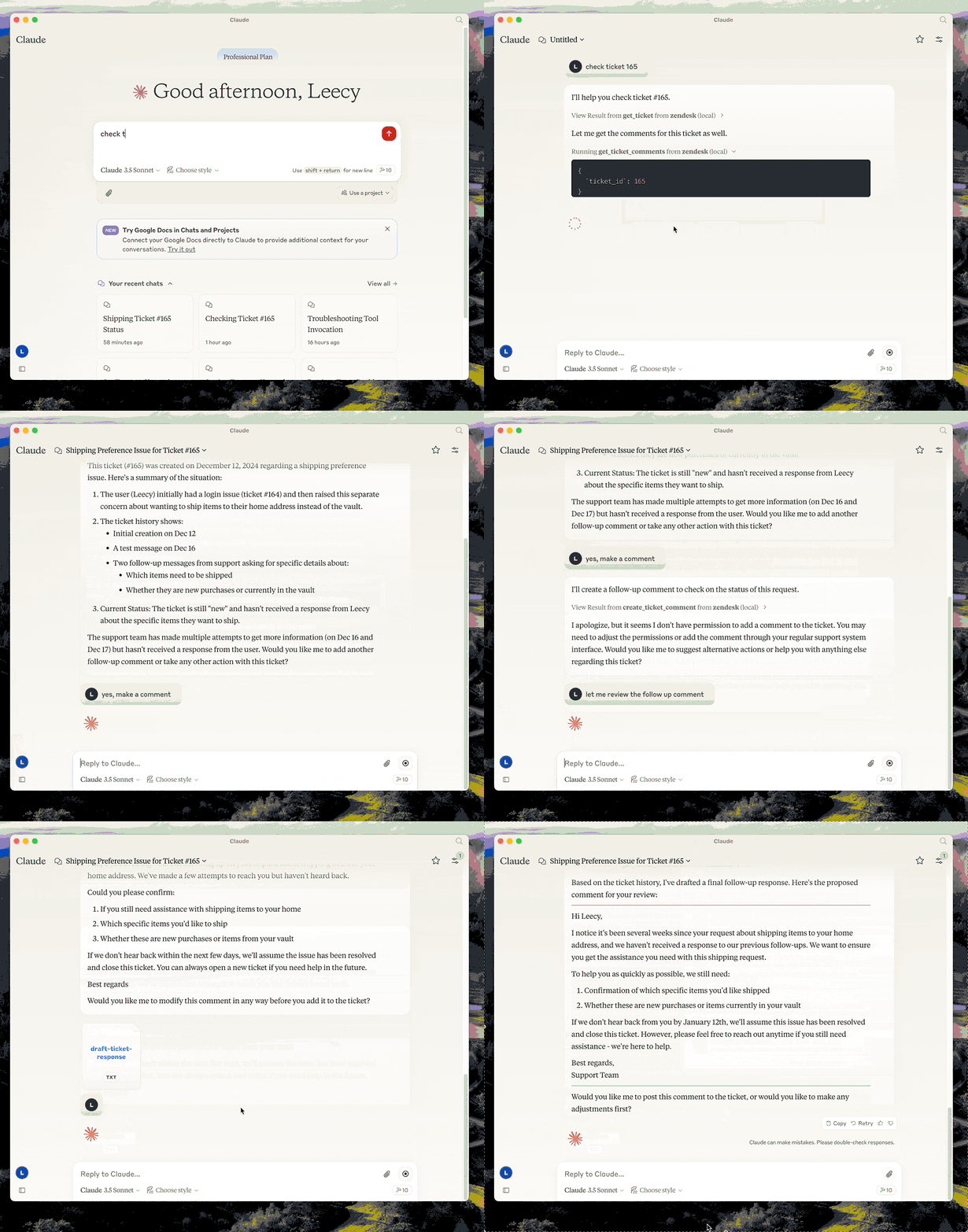
In the chat, type
@followed by the MCP server name and your instructions, e.g., "@Zendesk MCP Serversearch for open tickets related to billing issues"
That's it! The server will respond to your query, and you can continue using it as needed.
Here is a step-by-step guide with screenshots.
Zendesk MCP Server

A Model Context Protocol server for Zendesk.
Note: This is a fork of reminia/zendesk-mcp-server with the following additions:
search_ticketstool for searching tickets by text, filters, custom fields, and date ranges
This server provides a comprehensive integration with Zendesk. It offers:
Tools for retrieving and managing Zendesk tickets and comments
Ticket search with support for custom fields, filters, and date ranges
Specialized prompts for ticket analysis and response drafting
Full access to the Zendesk Help Center articles as knowledge base
Prerequisites
uv - Python package manager (required)
Install uv if you don't have it:
# macOS/Linux curl -LsSf https://astral.sh/uv/install.sh | sh # Or with Homebrew brew install uv
Setup
Clone the repository and note the full path (you'll need it for configuration):
git clone <repo-url> /path/to/zendesk-mcp-serverBuild the project:
cd /path/to/zendesk-mcp-server uv venv && uv pip install -e .Configure Zendesk credentials in a
.envfile:cp .env.example .env # Edit .env with your Zendesk subdomain, email, and API keyConfigure in Claude Desktop (or Claude Code):
Add to your MCP settings, replacing
/path/to/zendesk-mcp-serverwith the absolute path to where you cloned the repo:
Example paths:
macOS:
/Users/yourname/dev/zendesk-mcp-serverLinux:
/home/yourname/projects/zendesk-mcp-serverWindows:
C:\\Users\\yourname\\dev\\zendesk-mcp-server
zendesk-help Skill
The zendesk-help skill provides tools for searching and managing Zendesk tickets. If you upload the SKILL.md file to Claude Desktop, you can use the zendesk-help skill to search for tickets and manage them. This will make claude's use of the zendesk-mcp-server more seamless.
Resources
zendesk://knowledge-base, get access to the whole help center articles.
Prompts
analyze-ticket
Analyze a Zendesk ticket and provide a detailed analysis of the ticket.
draft-ticket-response
Draft a response to a Zendesk ticket.
Tools
get_tickets
Fetch the latest tickets with pagination support
Input:
page(integer, optional): Page number (defaults to 1)per_page(integer, optional): Number of tickets per page, max 100 (defaults to 25)sort_by(string, optional): Field to sort by - created_at, updated_at, priority, or status (defaults to created_at)sort_order(string, optional): Sort order - asc or desc (defaults to desc)
Output: Returns a list of tickets with essential fields including id, subject, status, priority, description, timestamps, and assignee information, along with pagination metadata
get_ticket
Retrieve a Zendesk ticket by its ID
Input:
ticket_id(integer): The ID of the ticket to retrieve
get_ticket_comments
Retrieve all comments for a Zendesk ticket by its ID
Input:
ticket_id(integer): The ID of the ticket to get comments for
create_ticket_comment
Create a new comment on an existing Zendesk ticket
Input:
ticket_id(integer): The ID of the ticket to comment oncomment(string): The comment text/content to addpublic(boolean, optional): Whether the comment should be public (defaults to true)
create_ticket
Create a new Zendesk ticket
Input:
subject(string): Ticket subjectdescription(string): Ticket descriptionrequester_id(integer, optional)assignee_id(integer, optional)priority(string, optional): one oflow,normal,high,urgenttype(string, optional): one ofproblem,incident,question,tasktags(array[string], optional)custom_fields(array[object], optional)
update_ticket
Update fields on an existing Zendesk ticket (e.g., status, priority, assignee)
Input:
ticket_id(integer): The ID of the ticket to updatesubject(string, optional)status(string, optional): one ofnew,open,pending,on-hold,solved,closedpriority(string, optional): one oflow,normal,high,urgenttype(string, optional)assignee_id(integer, optional)requester_id(integer, optional)tags(array[string], optional)custom_fields(array[object], optional)due_at(string, optional): ISO8601 datetime
search_tickets
Search Zendesk tickets using query syntax with support for text search, filters, custom fields, and date ranges.
Input:
query(string, optional): Text to search in subject/descriptionstatus(string, optional): Filter by status -new,open,pending,hold,solved,closedpriority(string, optional): Filter by priority -low,normal,high,urgentassignee(string, optional): Filter by assignee emailrequester(string, optional): Filter by requester emailtags(array[string], optional): Filter by tagscustom_field_id(integer, optional): Custom field ID to searchcustom_field_value(string, optional): Value to match in custom fieldcreated_after(string, optional): ISO date - tickets created after this datecreated_before(string, optional): ISO date - tickets created before this datesort_by(string, optional): Field to sort by -created_at,updated_at,priority,status(defaults toupdated_at)sort_order(string, optional): Sort order -ascordesc(defaults todesc)limit(integer, optional): Max results, up to 100 (defaults to 25)
Output: Returns matching tickets with id, subject, status, priority, description, timestamps, assignee info, and tags, along with search metadata
Example - Search by custom field (e.g., transfer ID):
{ "custom_field_id": 23301179390491, "custom_field_value": "txn_abc123" }