
Provides access to GitHub's Octodex API, enabling fetching and retrieval of Octocat characters from the Octodex collection.
Click on "Install Server".
Wait a few minutes for the server to deploy. Once ready, it will show a "Started" state.
In the chat, type
@followed by the MCP server name and your instructions, e.g., "@Octocat Harry Potter MCP Servershow me Gryffindor characters and match them with Octocats"
That's it! The server will respond to your query, and you can continue using it as needed.
Here is a step-by-step guide with screenshots.
Workshop slides:
https://drive.google.com/drive/folders/1CQaKkrcuD8Vxam559EEdCByX0z2s-Oxc?usp=sharing
Postman Agent Generator
Welcome to your generated agent! 🚀
This project was created with the Postman Agent Generator, configured to Model Context Provider (MCP) Server output mode. It provides you with:
✅ An MCP-compatible server (
mcpServer.js)✅ Automatically generated JavaScript tools for each selected Postman API request
Let's set things up!
🚦 Getting Started
⚙️ Prerequisites
Before starting, please ensure you have:
npm (included with Node)
📥 Installation & Setup
1. Install dependencies
Run from your project's root directory:
🔐 Set tool environment variables (not needed for octocat and harry potter api)
In the .env file, you'll see environment variable placeholders, one for each workspace that the selected tools are from. For example, if you selected requests from 2 workspaces, e.g. Acme and Widgets, you'll see two placeholders:
Update the values with actual API keys for each API. These environment variables are used inside of the generated tools to set the API key for each request. You can inspect a file in the tools directory to see how it works.
Caveat: This may not be correct for every API. The generation logic is relatively simple - for each workspace, we create an environment variable with the same name as the workspace slug, and then use that environment variable in each tool file that belongs to that workspace. If this isn't the right behavior for your chosen API, no problem! You can manually update anything in the .env file or tool files to accurately reflect the API's method of authentication.
🛠️ List Available Tools
List descriptions and parameters from all generated tools with:
Example:
🌐 Running the MCP Server
The MCP Server (mcpServer.js) exposes your automated API tools to MCP-compatible clients, such as Claude Desktop or the Postman Desktop Application.
Find node path:
Find
mcpServer.jspath:
A) 🖥️ Run with Postman
The Postman Desktop Application is the easiest way to run and test MCP servers.
Step 1: Download the latest Postman Desktop Application from https://www.postman.com/downloads/ or install the latest Postman Desktop Agent to work with Postman in your browser.
Step 2: Fork or modify the Octodex-HP-MCP Server Postman Collection from here and adjust the Octodex & HP Local Node server settings to point to your local MCP server:
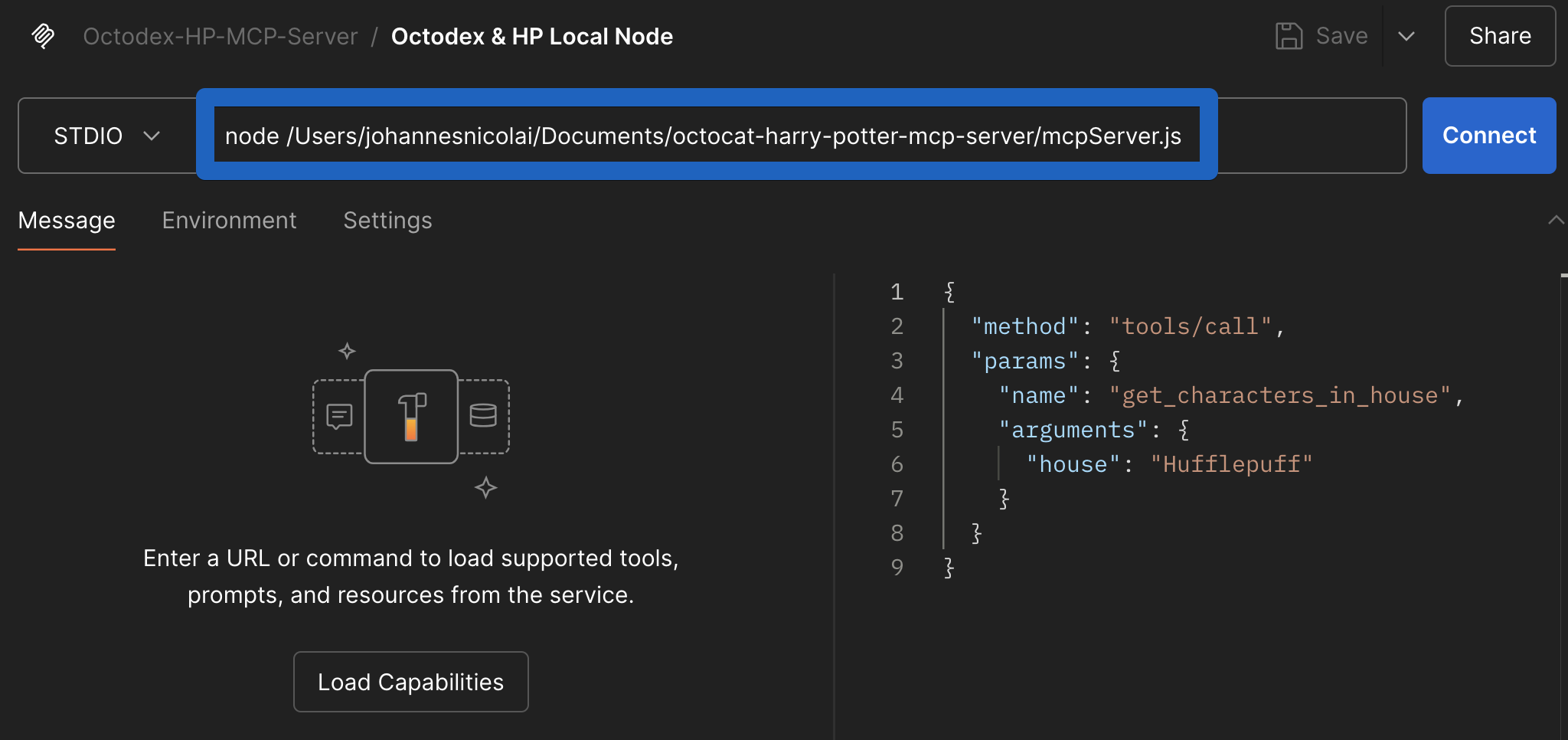
B) 👩💻 Run with Claude Desktop
To integrate with Claude Desktop:
Open Claude Desktop → Settings → Developers → Edit Config and add your server:
e.g.
Restart Claude Desktop to activate this change.
C) 🏃♂️ Run MCP Server in VSCode
In order to run the local MCP server in VSCode, you can adapt and start the octocat-hp-mcp-server-local server in the .vscode folder.
If you then select Agent mode in Co-Pilot Chat, the tools icon should should show API endpoints (tools) exposed by the octocat-hp-mcp-server-local server.
Additional Options
🐳 Docker Deployment (Production)
For production deployments, you can use Docker:
1. Build Docker image
Add your environment variables (API keys, etc.) inside the .env file.
Test it locally:
2. Claude Desktop Integration
Add Docker server configuration to Claude Desktop (Settings → Developers → Edit Config):
3. VS Code Integration
In order to run the Docker MCP server in VSCode, you can adapt and start the octocat-hp-mcp-server-docker server in the .vscode folder.
If you then select Agent mode in Co-Pilot Chat, the tools icon should should show API endpoints (tools) exposed by the octocat-hp-mcp-server-docker server.
🌐 Server-Sent Events (SSE)
To run the server with Server-Sent Events (SSE) support, use the --sse flag:
To run with SSE in Docker and expose on port 9000:
This will start the server in the background, mapping port 9000 on your host to port 9000 in the container, and enable SSE support.
🐳 Dockerfile (Included)
The project comes bundled with the following minimal Docker setup:
➕ Adding New Tools
Extend your agent with more tools easily:
Visit Postman Agent Generator.
Pick new API request(s), generate a new agent, and download it.
Copy new generated tool(s) into your existing project's
tools/folder.Update your
tools/paths.jsfile to include new tool references.
Example prompts and visualizations
prompts.md has some example prompts how to test the capabilities of the MCP server, which lead to visualizations like this
💬 Questions & Support
Visit the Postman Agent Generator page for updates and new capabilities.
Visit the Postman Community to share what you've built, ask questions and get help.
