
Bridges locally installed Raycast extensions to the Model Context Protocol, enabling AI agents to discover and execute tools from extensions headlessly, including those requiring OAuth authentication and configuration preferences.
Click on "Install Server".
Wait a few minutes for the server to deploy. Once ready, it will show a "Started" state.
In the chat, type
@followed by the MCP server name and your instructions, e.g., "@RayBridgesearch for my pending tasks in Notion"
That's it! The server will respond to your query, and you can continue using it as needed.
Here is a step-by-step guide with screenshots.
RayBridge
MCP server that bridges Raycast extensions to any MCP-compatible client.
Discovers locally installed Raycast extensions, loads their tool definitions, and serves them over the Model Context Protocol via stdio or HTTP.
How it works
Scans
~/.config/raycast/extensions/for installed extensions withtoolsdefinitionsLoads OAuth tokens from Raycast's encrypted SQLite database
Registers tools as MCP tools accessible to any MCP client
Extensions that use Raycast UI APIs (List, Detail, Form, etc.) are supported — the UI components are shimmed to no-ops so the underlying tool logic can execute headlessly. Extensions whose tools perform background work (API calls, data lookups, transformations) work best.
Setup
Prerequisites
Install
Configure MCP client
Claude Code (~/.claude/settings.json):
Cursor (~/.cursor/mcp.json):
HTTP Transport
The server can also run as an HTTP server for remote MCP clients.
Start the server:
Endpoints:
Endpoint | Method | Description |
| GET | Health check (no auth required) |
| POST | MCP requests (requires auth if |
| DELETE | Terminate session |
Authentication:
When MCP_API_KEY is set, requests to /mcp must include a Bearer token (per MCP spec):
Example session:
Sessions auto-expire after 30 minutes of inactivity.
CLI
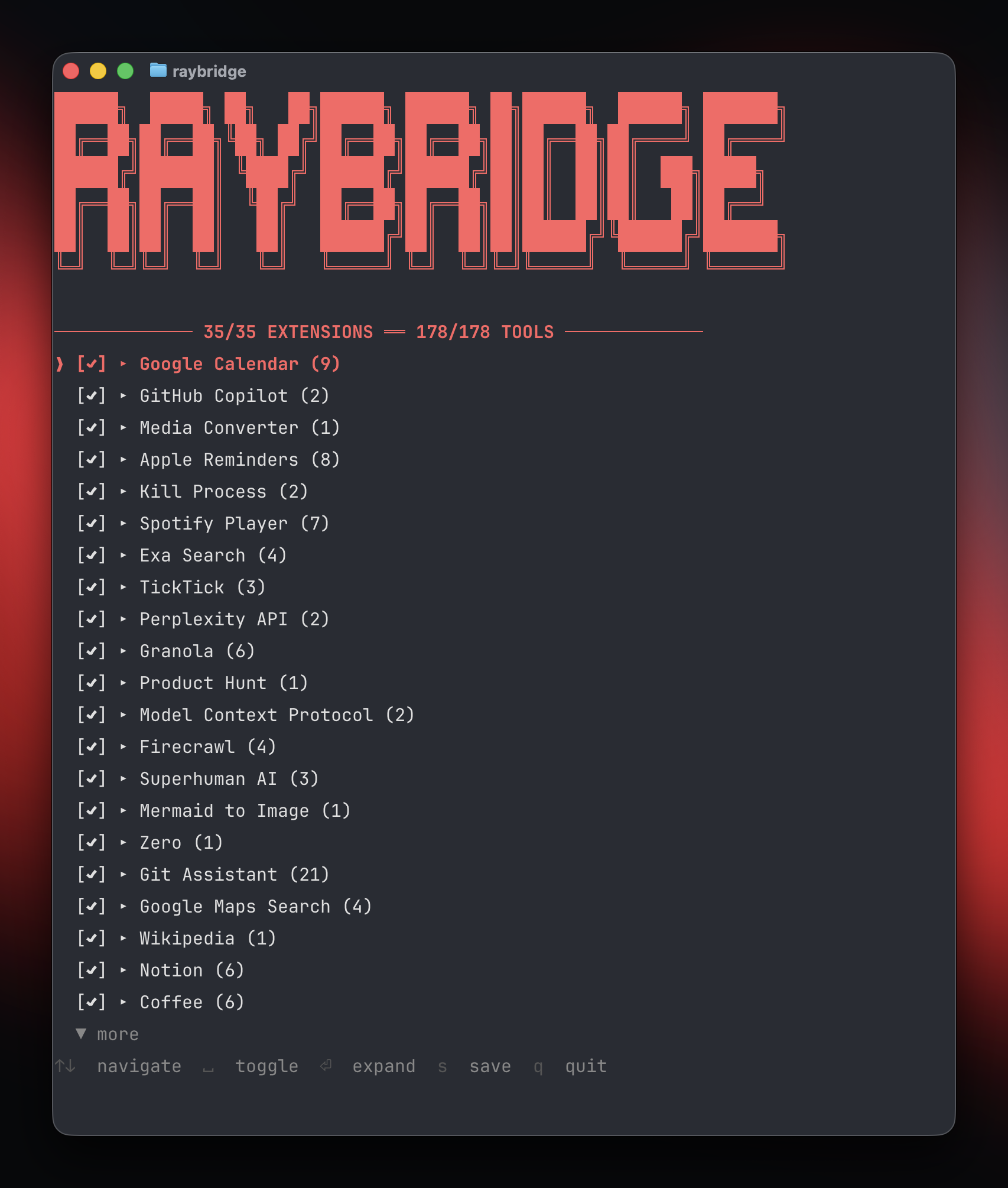
RayBridge includes a CLI for managing which extensions and tools are exposed:
The TUI allows you to:
Toggle extensions on/off
Expand extensions to toggle individual tools
Switch between blocklist mode (all enabled by default) and allowlist mode
Save configuration to
~/.config/raybridge/tools.json
Configuration
Tools configuration
Control which extensions and tools are exposed via ~/.config/raybridge/tools.json:
blocklist mode (default): All extensions enabled unless explicitly disabled
allowlist mode: All extensions disabled unless explicitly enabled
Extension preferences
Extensions that require configuration (API keys, personal access tokens, etc.) read from:
The extension name matches the name field in the extension's package.json.
Architecture
Tool discovery
Local extensions are discovered from ~/.config/raycast/extensions/. Each extension's package.json must have a tools array defining available tools with names, descriptions, and input schemas. Compiled tool code lives at tools/{toolName}.js within each extension directory.
When duplicates exist (same extension name in multiple directories), the most recently modified version wins.
Tool execution
Tools are loaded by installing Raycast API shims into Node's module system, then requiring the tool's compiled JS file and calling its default export with the provided input.
Raycast API shims
The following @raycast/api features are shimmed:
Feature | Behavior |
| Returns tokens from Raycast's encrypted DB |
| Returns values from |
| Provides extension name, paths, version info |
| In-memory key-value store |
| No-op (logs to stderr in some cases) |
| No-op |
| Returns |
UI components ( | Return |
| No-op |
| No-op |
React and JSX runtime are also shimmed with minimal mocks (createElement → null, hooks are no-ops).
Authentication
OAuth tokens are read from Raycast's encrypted SQLite database at:
The database key is retrieved from macOS Keychain and derived with a salt via SHA256. Tokens are extracted per-extension and provided to tools through the OAuth.PKCEClient shim.
MCP tool schema
Extensions are grouped — each extension becomes one MCP tool. The input schema follows this pattern:
Tool descriptions include per-tool documentation, parameter details, and any extension-wide AI instructions from the extension's ai.instructions field.
Limitations
No interactive UI — extensions that depend on rendering Lists, Forms, or other visual components to the user won't behave meaningfully
No persistent LocalStorage — shimmed as no-op; extensions relying on it lose state between calls
OAuth tokens are not refreshed — expired tokens will cause failures until Raycast refreshes them
macOS only — depends on macOS Keychain and Raycast's macOS app paths
