# PlantUML MCP Server
[](https://smithery.ai/server/@infobip/plantuml-mcp-server)
A [Model Context Protocol (MCP)](https://modelcontextprotocol.io/) server that provides PlantUML diagram generation capabilities for Claude Desktop and Claude Code.
### Available Tools
1. **`generate_plantuml_diagram`** - Generate diagrams and get embeddable URLs (SVG/PNG), optionally save locally
2. **`encode_plantuml`** - Encode PlantUML code for URL sharing
3. **`decode_plantuml`** - Decode PlantUML from encoded strings
### Available Prompts
1. **`plantuml_error_handling`** - Guidelines for handling PlantUML syntax errors and implementing auto-fix workflows
This prompt provides Claude instances with comprehensive instructions on how to:
- Detect PlantUML syntax errors using native server validation
- Implement intelligent auto-fix workflows for common syntax issues
- Parse structured error responses and apply appropriate corrections
- Handle validation failures gracefully with retry logic
The prompt enables Claude to automatically detect and fix common PlantUML errors like missing tags, invalid arrow syntax, typos in keywords, and missing quotes, making PlantUML diagram generation more reliable and user-friendly.
## Quick Setup
### For Claude Code
```bash
# Using default PlantUML server
claude mcp add plantuml --scope user --env PLANTUML_SERVER_URL=https://www.plantuml.com/plantuml -- npx plantuml-mcp-server
```
### For Claude Desktop
Add this to your Claude Desktop MCP configuration (`~/Library/Application Support/Claude/claude_desktop_config.json` on macOS):
```json
{
"mcpServers": {
"plantuml": {
"command": "npx",
"args": ["plantuml-mcp-server"],
"env": {
"PLANTUML_SERVER_URL": "https://www.plantuml.com/plantuml"
}
}
}
}
```
To use your own PlantUML server, change the `PLANTUML_SERVER_URL` environment variable.
Then restart Claude Desktop/Code to activate the MCP server.
## What You Can Do
After setup, you can ask Claude to:
- **Generate PlantUML diagrams** and get embeddable SVG/PNG URLs
- **Create sequence diagrams, class diagrams, architecture diagrams**
- **Use advanced PlantUML features** like `!include` directives and external libraries
- **Encode/decode PlantUML** for URL sharing
- **Save diagrams locally** with secure path restrictions
### Saving Diagrams Locally
The `generate_plantuml_diagram` tool supports saving diagrams to local files via the `output_path` parameter.
**Security:** By default, files can only be saved within the current working directory. Only `.svg` and `.png` extensions are allowed.
To allow additional directories, set the `PLANTUML_ALLOWED_DIRS` environment variable:
```bash
# Allow specific directories (colon-separated)
PLANTUML_ALLOWED_DIRS=/home/user/diagrams:/tmp/output
# Allow any directory (use with caution)
PLANTUML_ALLOWED_DIRS=*
```
---
## Examples
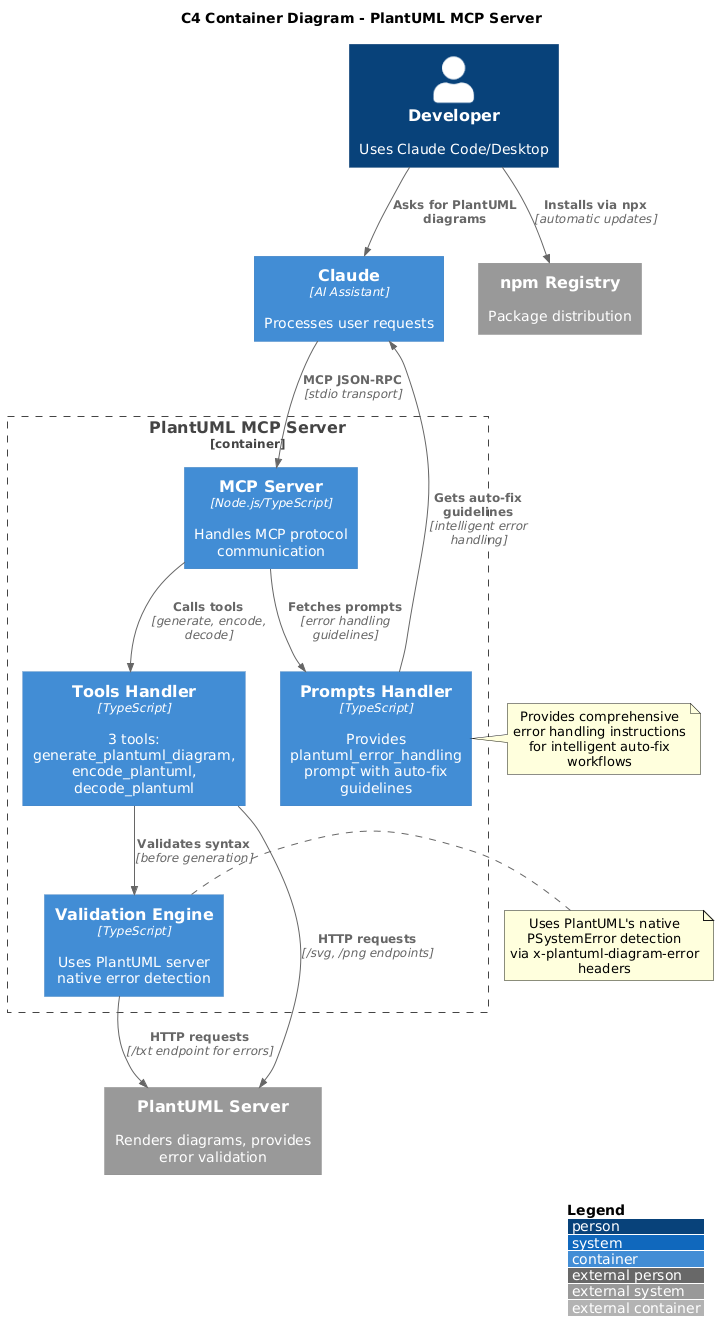
### C4 diagram for plantuml-mcp-server
```
> add c4 diagram for this project in readme 'C4 diagram for plantuml-mcp-server' section
```
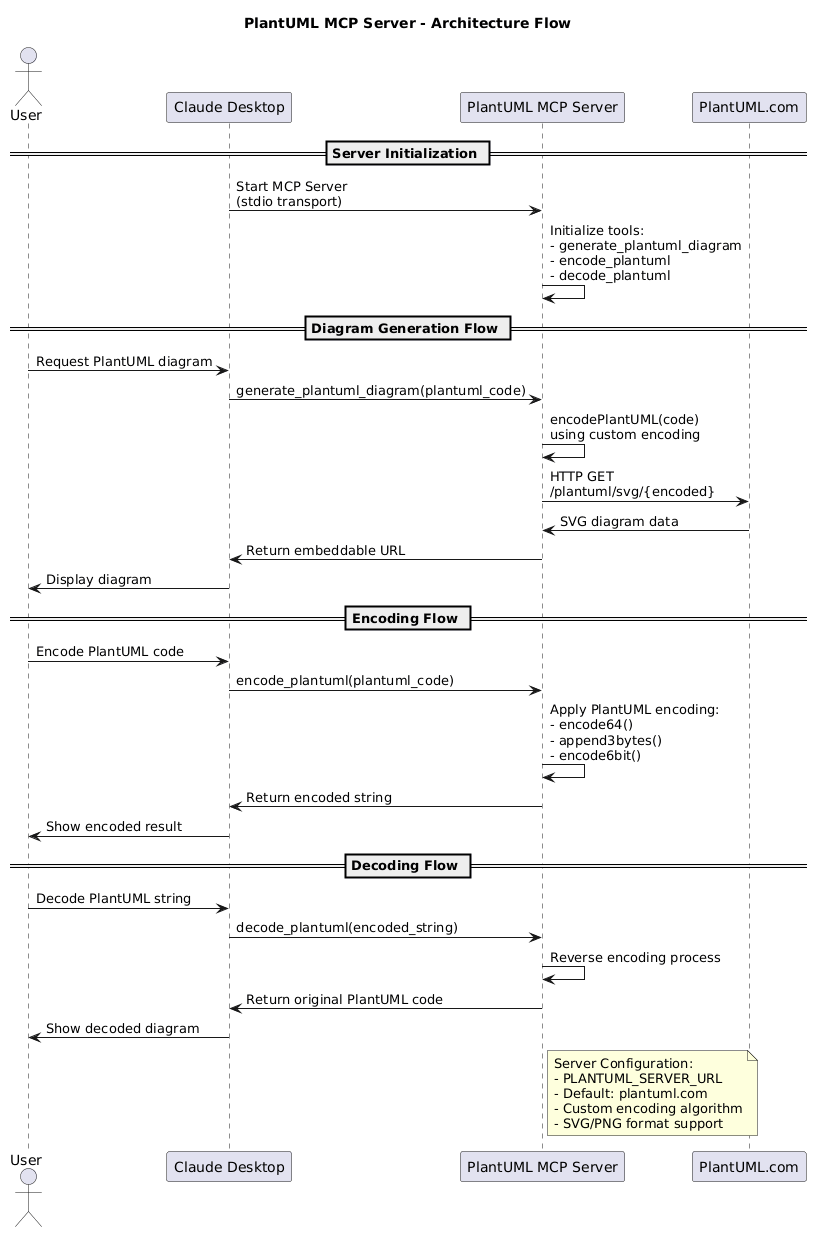
### Sequence diagram for plantuml-mcp-server
```
> add sequence diagram in readme in architecture section
```
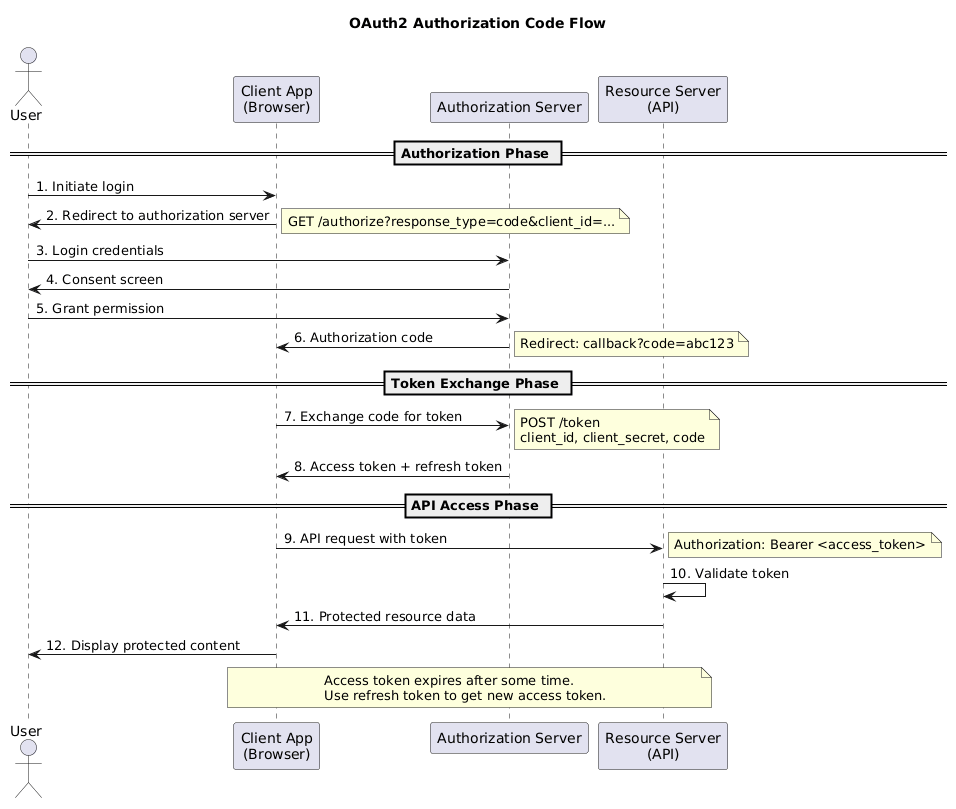
### OAuth2 Authorization Code Flow Diagram
```
> show me basic oauth2 flow png, open it in browser
```
---
## Development Setup
### Prerequisites
- Node.js 18+
- npm
### Local Installation
```bash
# Clone and setup
git clone https://github.com/mzagar/plantuml-mcp-server.git
cd plantuml-mcp-server
make setup
```
### Development Commands
```bash
# Show all available commands
make help
# Build and run all tests
make clean build test-all
```
### Environment Variables
| Variable | Description | Default |
|----------|-------------|---------|
| `PLANTUML_SERVER_URL` | PlantUML server URL | `https://www.plantuml.com/plantuml` |
| `PLANTUML_ALLOWED_DIRS` | Additional directories for `output_path` (colon-separated, or `*` for any) | CWD only |
## License
MIT License - see [LICENSE](LICENSE) file for details.
