
Apple Mail MCP
The JXA Mail MCP server provides fast programmatic access to Apple Mail on macOS through 7 tools, enabling email management, search, and automation via the Model Context Protocol.
Core Capabilities:
Account & Mailbox Management - List all configured email accounts and their mailboxes with unread counts
Email Retrieval - Fetch emails with standard properties (ID, subject, sender, date, read/flagged status) with filters for all emails, today's emails, unread emails, or flagged emails from specific accounts/mailboxes
Search & Discovery - Search emails by query string across subject and sender fields (case-insensitive), with optional FTS5 full-text search index for body content searches
Performance Optimizations:
87x faster email retrieval using JXA batch property fetching vs. traditional per-message iteration
700-3500x faster body search (~2ms vs ~7s) with optional SQLite FTS5 search index
Real-time index updates via
--watchflag for automatic synchronization when new emails arriveFast startup times (<5s) using disk-first sync approach
Configuration & Security:
Customizable via environment variables for default accounts, mailboxes, index location, and email limits
Built-in protections against SQL injection, JXA injection, XSS, DoS attacks, and path traversal
Works with Claude Desktop and other MCP-compatible tools through natural conversation
Enables programmatic interaction with Apple Mail on macOS, allowing for listing accounts and mailboxes, fetching recent, unread, or flagged emails, and searching for messages by sender or subject.
Allows for managing and retrieving email content from iCloud accounts configured within the Apple Mail application.
Click on "Install Server".
Wait a few minutes for the server to deploy. Once ready, it will show a "Started" state.
In the chat, type
@followed by the MCP server name and your instructions, e.g., "@Apple Mail MCPShow me my unread emails from today"
That's it! The server will respond to your query, and you can continue using it as needed.
Here is a step-by-step guide with screenshots.
Apple Mail MCP






The only Apple Mail MCP server with full-text email search. Reliable on large mailboxes where other servers timeout — with 8 tools for reading, searching, and extracting email content.
Read the docs for the full guide.
Quick Start
pipx install apple-mail-mcpAdd to your MCP client:
{
  "mcpServers": {
    "mail": {
      "command": "apple-mail-mcp"
    }
  }
}
Build the Search Index (Recommended)
# Requires Full Disk Access for Terminal
# System Settings → Privacy & Security → Full Disk Access → Add Terminal

apple-mail-mcp index --verbose
Tools
Tool | Purpose |
| List email accounts |
| List mailboxes |
| Get emails — all, unread, flagged, today, last_7_days |
| Get single email with full content + attachments |
| Search — all, subject, sender, body, attachments |
| Extract links from an email |
| Extract attachment content |
| Deprecated — use |
Performance
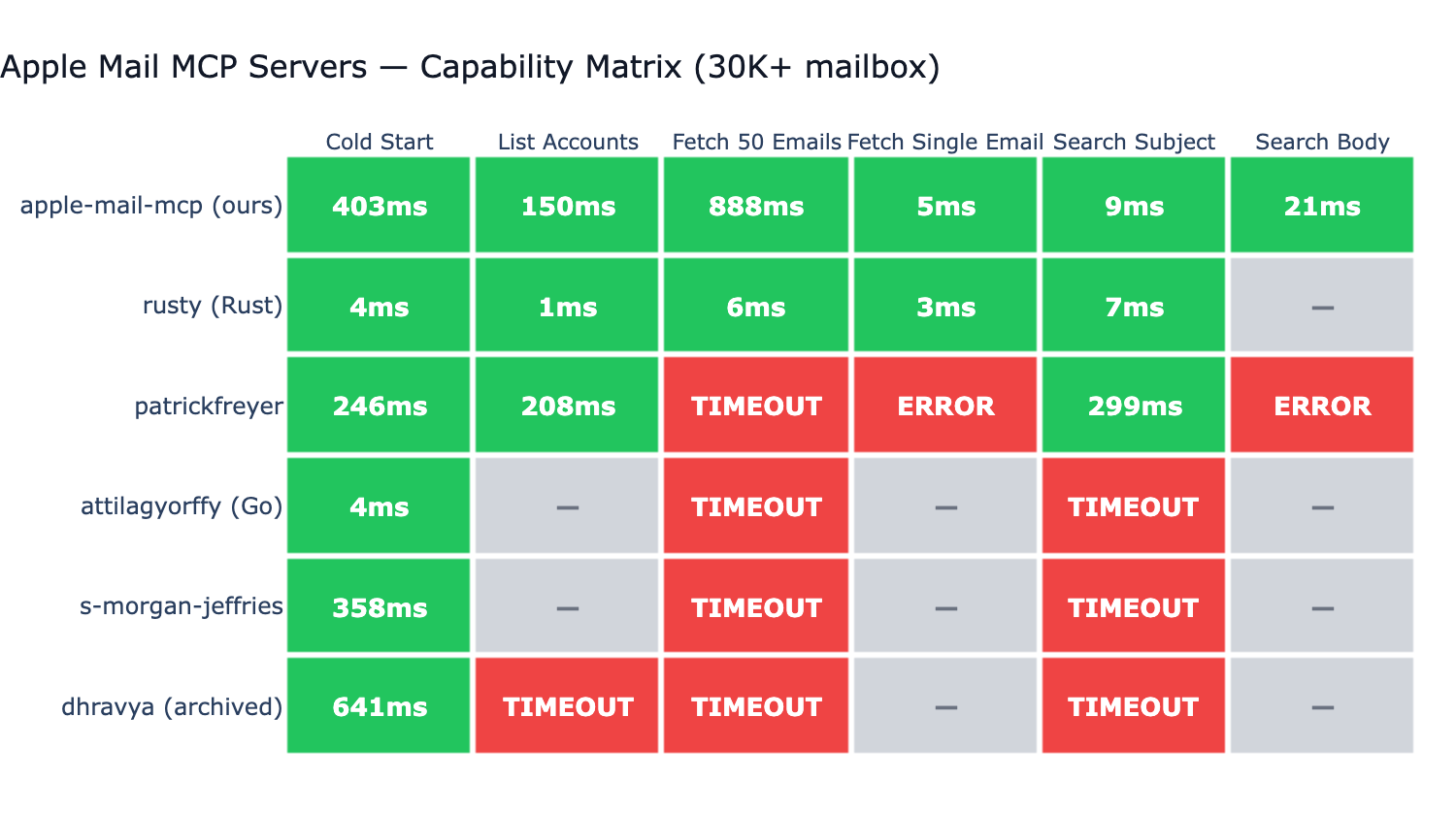
Tested against 6 other Apple Mail MCP servers on a 30K+ email mailbox:
Only server that completes all operations without timing out
Only server with full-text body search (FTS5 index, ~20ms)
5ms single email fetch via disk-first
.emlxreading7–9ms subject search via FTS5 (vs 230ms+ for AppleScript-based servers)
Configuration
Variable | Default | Description |
| First account | Default email account |
|
| Default mailbox |
|
| Index location |
|
| Max emails indexed per mailbox |
|
| Mailboxes to skip in search |
|
| Disable write operations |
{
  "mcpServers": {
    "mail": {
      "command": "apple-mail-mcp",
      "args": ["--watch"],
      "env": {
        "APPLE_MAIL_DEFAULT_ACCOUNT": "Work"
      }
    }
  }
}
CLI Usage
All tools are also available as standalone CLI commands (no MCP server needed):
apple-mail-mcp search "quarterly report" --scope subject
apple-mail-mcp search "invoice" --after 2026-01-01 --limit 10
apple-mail-mcp read 12345
apple-mail-mcp emails --filter unread --limit 10
apple-mail-mcp accounts
apple-mail-mcp mailboxes --account Work
apple-mail-mcp extract 12345 invoice.pdf
All commands output JSON. Generate a Claude Code skill for CLI-based access:
apple-mail-mcp integrate claude > ~/.claude/skills/apple-mail.mdMigrating from apple-mcp?
If you used supermemoryai/apple-mcp (archived January 2026), apple-mail-mcp is a maintained alternative for the Mail portion specifically. Notes, Messages, Contacts, Calendar, and Reminders are out of scope.
apple-mcp ( | apple-mail-mcp |
|
|
|
|
| Not yet supported (planned) |
What's different: available on PyPI (pipx install apple-mail-mcp), full-text body search via FTS5 (~20ms), disk-first single-email reads (~5ms), reliable on large mailboxes (30K+) where AppleScript-based servers timeout.
Development
git clone https://github.com/imdinu/apple-mail-mcp
cd apple-mail-mcp
uv sync
uv run ruff check src/
uv run pytest
License
GPL-3.0-or-later
Latest Blog Posts
MCP directory API
We provide all the information about MCP servers via our MCP API.
curl -X GET 'https://glama.ai/api/mcp/v1/servers/imdinu/jxa-mail-mcp'
If you have feedback or need assistance with the MCP directory API, please join our Discord server