---
url: "https://docs.portone.cloud/docs/refund"
title: "Refund"
---
## Initiate refunds via Merchant Portal [Skip link to Initiate refunds via Merchant Portal](https://docs.portone.cloud/docs/refund\#initiate-refunds-via-merchant-portal)
PortOne also provides refund functionality through its dashboard, allowing merchants to create and manage refunds directly within the interface. The workflow below illustrates the refund process via the PortOne dashboard.
Scribe \| Embed How\_to\_Process\_Refunds\_via\_PortOne\_Dashboard\_\_NoF1IXLFRsOAJALq 18wjw



# How to Process Refunds via PortOne Dashboard
This guide offers a step-by-step walkthrough for processing refunds through the PortOne Dashboard, making it easy for users to navigate the platform efficiently
8 Steps
14 seconds
Portone
Step 0 of 8
Get Started
Made with

[open scrolling step version in new tab for improved accessibility](https://scribehow.com/shared/How_to_Process_Refunds_via_PortOne_Dashboard__NoF1IXLFRsOAJALq-18wjw)
## Initiating refund via API [Skip link to Initiating refund via API](https://docs.portone.cloud/docs/refund\#initiating-refund-via-api)
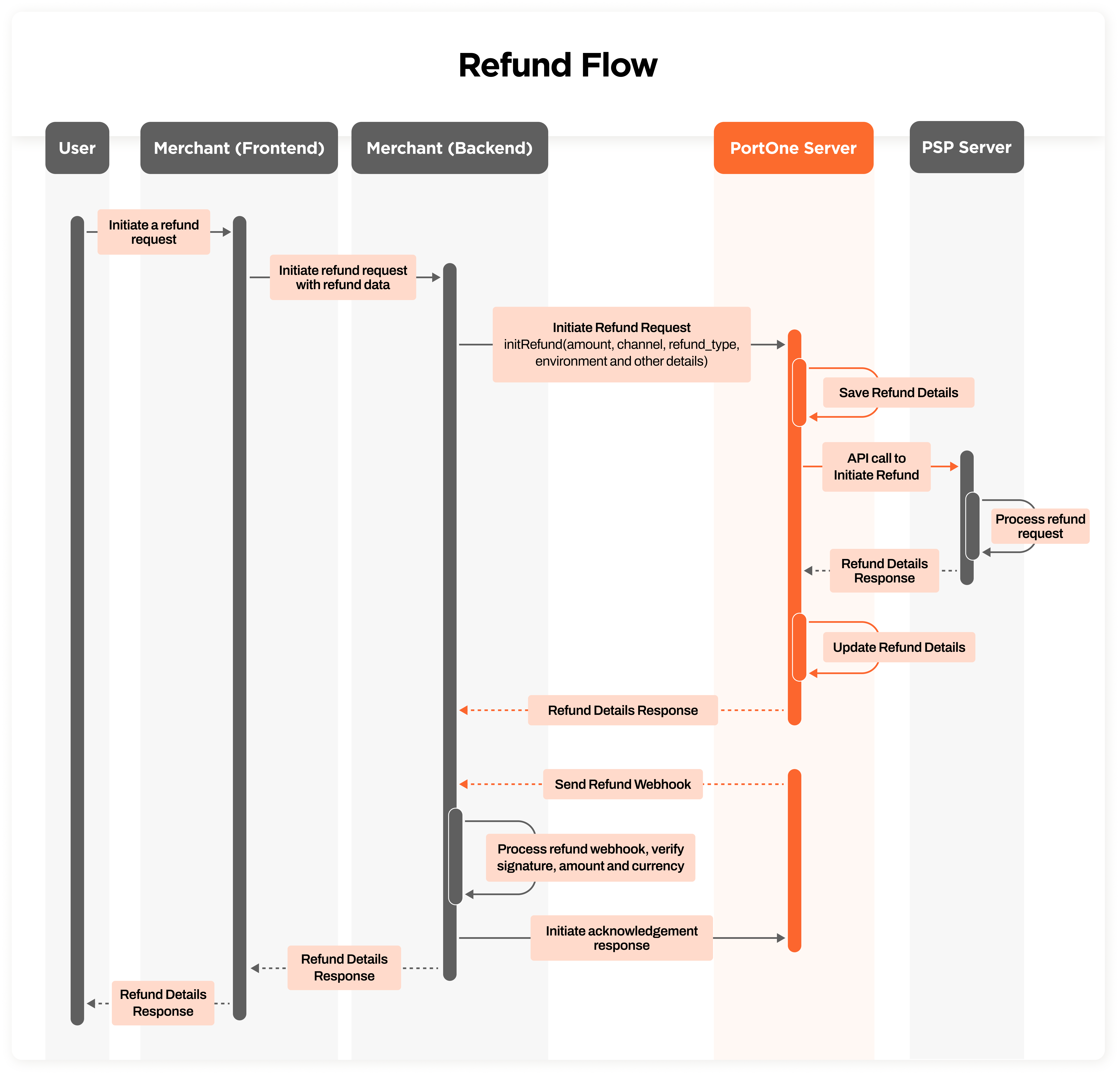
PortOne also provides refund APIs, allowing merchants to create and retrieve refunds directly, without needing to access the PortOne dashboard. The sequence diagram below demonstrates the refund process using the API.
#### Steps to generate refund via API [Skip link to Steps to generate refund via API](https://docs.portone.cloud/docs/refund\#steps-to-generate-refund-via-api)
- The user requests a refund from the Merchant
- The merchant (front) sends the refund request to the Merchant (Backend).
- The merchant (Backend) calls the PortOne Server to process the refund.
- PortOne Server processes the refund with the PSP Server and updates the refund details.
- PortOne Server sends a response and a webhook to the Merchant (Backend).
- The merchant (Backend) verifies the webhook, acknowledges it, and uses the refund details
### Create Refund API [Skip link to Create Refund API](https://docs.portone.cloud/docs/refund\#create-refund-api)
```rdmd-code lang- theme-light
POST /api/refund/:portone_order_ref
```
Creates a new refund against given orderId and returns all refund.
[Create Refund](https://docs.portone.cloud/reference/post_api-refund-portone-order-ref)
**Request Payload**
JSON
```rdmd-code lang-json theme-light
{
"amount": 700000,
"channel": "MOMOPAY",
"description": "momo refund",
"refund_type": "partial",
"refund_reason": "customer request",
"environment": "live"
}
```
**Response:**
JSON
```rdmd-code lang-json theme-light
{
"amountToRefund": 100000,
"refundDetails": [\
{\
"refund_date": "2021-07-08T23:58:05.190121+05:30",\
"refund_id": "508e2ee9a010166",\
"psp_refund_id": "2542509707",\
"amount": 200000,\
"currency": "usd",\
"refund_status": "SUCCESS",\
"refund_type": "partial",\
"refund_reason": "customer request"\
},\
{\
"refund_date": "2021-07-08T23:59:08.442882+05:30",\
"refund_id": "508e30f1d010166",\
"psp_refund_id": "2542509711",\
"amount": 700000,\
"currency": "usd",\
"refund_status": "SUCCESS",\
"refund_type": "partial",\
"refund_reason": "customer request"\
}\
]
}
```
### Get All Refunds API [Skip link to Get All Refunds API](https://docs.portone.cloud/docs/refund\#get-all-refunds-api)
```rdmd-code lang- theme-light
GET /api/refund/:portone_order_ref
```
Get all refund transactions against an orderId, this request doesn't require any payload.
[Fetch Refunds List](https://docs.portone.cloud/reference/get_api-refund-portone-order-ref)
**Response:**
JSON
```rdmd-code lang-json theme-light
{
"amountToRefund": 100000,
"refundDetails": [\
{\
"refund_date": "2021-07-08T23:58:05.190121+05:30",\
"refund_id": "508e2ee9a010166",\
"psp_refund_id": "2542509707",\
"amount": 200000,\
"currency": "usd",\
"refund_status": "SUCCESS",\
"refund_type": "partial",\
"refund_reason": "customer request"\
},\
{\
"refund_date": "2021-07-08T23:59:08.442882+05:30",\
"refund_id": "508e30f1d010166",\
"psp_refund_id": "2542509711",\
"amount": 700000,\
"currency": "usd",\
"refund_status": "SUCCESS",\
"refund_type": "partial",\
"refund_reason": "customer request"\
}\
]
}
```
