---
url: "https://docs.portone.cloud/docs/ios-connect"
title: "iOS Connect"
---
The PortOne iOS SDK offers merchants a seamless way to integrate the PortOne Payment Gateway into their iOS applications, enabling them to accept payments securely and efficiently. This SDK serves as a bridge between a merchant's app and the PortOne Payment Gateway, providing a comprehensive set of features tailored specifically for handling payment transactions.
Follow the below steps to integrate the PortOne iOS SDK with your native iOS Application.
* * *
## Video Tutorial [Skip link to Video Tutorial](https://docs.portone.cloud/docs/ios-connect\#video-tutorial)
The following video tutorials provide a detailed guide on integrating the PortOne iOS SDK and using one of the payment method flow with your application to enable seamless payment processing:
Integration+Connect Flow:
iOS Integration+ connect flow with new Docs

[iOS Integration+ connect flow with new Docs](https://www.loom.com/share/adba68df60744a9cb58fa390a5a48f51?source=embed_watch_on_loom_cta "iOS Integration+ connect flow with new Docs")
5 min
3 views
0
[Open video in Loom](https://www.loom.com/share/adba68df60744a9cb58fa390a5a48f51?source=embed_watch_on_loom_cta "Open video in Loom")
1×
5 min⚡️5 min 40 sec4 min 32 sec3 min 46 sec3 min 1 sec2 min 40 sec2 min 16 sec1 min 48 sec
Your user agent does not support the HTML5 Video element.

[iOS Integration+ connect flow with new Docs](https://www.loom.com/share/adba68df60744a9cb58fa390a5a48f51?source=embed_watch_on_loom_cta "iOS Integration+ connect flow with new Docs")
5 min
3 views
0
[Open video in Loom](https://www.loom.com/share/adba68df60744a9cb58fa390a5a48f51?source=embed_watch_on_loom_cta "Open video in Loom")
1×
5 min⚡️5 min 40 sec4 min 32 sec3 min 46 sec3 min 1 sec2 min 40 sec2 min 16 sec1 min 48 sec
* * *
## Sample App [Skip link to Sample App](https://docs.portone.cloud/docs/ios-connect\#sample-app)
Check the sample app to integrate on [GitHub](https://github.com/iamport-intl/chaipay-ios-native-demo-app)
* * *
## Prerequisites [Skip link to Prerequisites](https://docs.portone.cloud/docs/ios-connect\#prerequisites)
- **[Create an account](https://docs.portone.cloud/docs/create-an-account) on PortOne:**
Before proceeding with the integration, ensure you have created an account on PortOne to access their services and functionalities.
- **[Access API Keys](https://docs.portone.cloud/docs/2-collect-api-keys)**
Login to the portone portal where you can access the API Keys (client key and secret key) for integrations under Settings -> API tab.
- **[Enable Payment Channels and Methods](https://docs.portone.cloud/docs/3-payment-channels-configuration)**:
Customize and enable the specific payment channels and methods that align with your business requirements and preferences.
- **iOS application for the integration**:
You will need an iOS application in which you intend to integrate the PortOne iOS SDK for payment processing capabilities.
- **Download the framework**:
Download the latest framework from [here](https://github.com/iamport-intl/portone-ios-native-frameworks/releases)
* * *
## Integration [Skip link to Integration](https://docs.portone.cloud/docs/ios-connect\#integration)
Steps to integrate your native iOS application with PortOne iOS SDK.
1. Embed the framework in project
2. Enable deep link in iOS
3. Get JWT Token
4. Generate Signature hash
📱
iOS SDK: Integration
Open Recipe
5. Initialise and Authorise SDK
📱
Checkout: iOS Connect
Open Recipe
* * *
### 1\. **`Embed the framework in project`** [Skip link to 1. ](https://docs.portone.cloud/docs/ios-connect\#1-embed-the-framework-in-project)
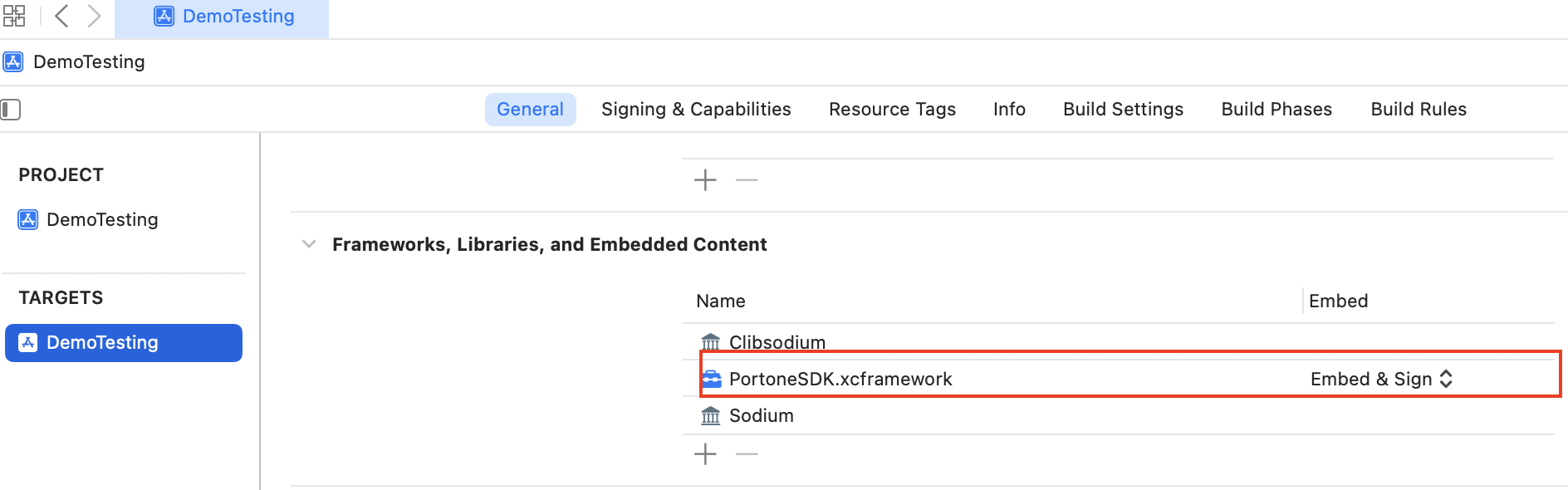
1. After downloading the .xcframework inside the version folder, drag and drop it in the project
- Go to General → Frameworks, Library and Embedded Content and then drop the framework and change the Embed to Embed & sign.
* * *
### 2\. Enable deep link in iOS [Skip link to 2. Enable deep link in iOS](https://docs.portone.cloud/docs/ios-connect\#2-enable-deep-link-in-ios)
1. To open your application, add the url schemes to the app, Go to **ProjectSettings -> info**
2. Add url schemes and identifier inside the **URL types.**
You can see the scheme and identifier details in **info.plist** as below:
Swift
```rdmd-code lang-Text theme-light
<key>CFBundleURLTypes</key>
<array>
<dict>
<key>CFBundleTypeRole</key>
<string>Editor</string>
<key>CFBundleURLName</key>
<string>checkout</string>
<key>CFBundleURLSchemes</key>
<array>
<string>portone</string>
</array>
</dict>
</array>
```
3. To open the other applications, should include the url schemes in info.plist
Swift
```rdmd-code lang-swift theme-light
<key>LSApplicationQueriesSchemes</key>
<array>
<string>itms-appss</string>
<string>zalopay</string>
<string>line</string>
<string>ascendmoney</string>
</array>
```
LSApplicationQueriesSchemes - Specifies the URL schemes you want the app to be able to use with the canOpenURL: method of the UIApplication class.
4. To support HTTP connections, add this source code in app info.plist
Swift
```rdmd-code lang-swift theme-light
<key>NSAppTransportSecurity</key>
<dict>
<key>NSAllowsArbitraryLoads</key>
<true/>
<key>NSAllowsLocalNetworking</key>
<true/>
<key>NSTemporaryExceptionAllowsInsecureHTTPLoads</key>
<true/>
</dict>
```
* * *
### 3\. **Get JWT token from the server** [Skip link to 3. ](https://docs.portone.cloud/docs/ios-connect\#3-get-jwt-token-from-the-server)
To set up the process of obtaining a JWT token from the server, you need to construct a JWT token that accepts the `portoneKey` as input. Here's an outline of the steps involved in setting up this process:
1. **JWT Token Construction:**
Implement the server-side logic to generate a JWT token using the `portoneKey` as a key component of the token payload.
2. **Token Retrieval in iOS App:**
- Implement logic in your iOS application to make a server request to retrieve the JWT token using the `portoneKey`.
- Receive and store the returned token securely within the app for subsequent API authentication.
Further information on JWT token generation is described in the link below.
[Authentication \| PortOne](https://docs.portone.cloud/docs/jwt-authentication)
* * *
### 4\. Generate Signture Hash [Skip link to 4. Generate Signture Hash](https://docs.portone.cloud/docs/ios-connect\#4-generate-signture-hash)
- Generate a Signature Hash using HmacSHA256 which needs to be included in the payload.
- To generate a signature hash on the server side using a secret key follow the below steps.
[Payment Request \| PortOne](https://www.docs.portone.cloud/docs/integration_guide/signatures/payment_request)
* * *
### 5\. Initialise PortOne iOS SDK and authorise it. [Skip link to 5. Initialise PortOne iOS SDK and authorise it.](https://docs.portone.cloud/docs/ios-connect\#5-initialise-portone-ios-sdk-and-authorise-it)
1. Import library of portone SDK
Swift
```rdmd-code lang-swift theme-light
import PortoneSDK
```
2. Initialize the checkout instance to get the available methods in SDK as below
Swift
```rdmd-code lang-swift theme-light
var checkout = Checkout(delegate: self, environment: "sandbox", redirectURL: "chaiport//checkout", appIdentifier: "App Unique id")
// redirectURL: your app scheme
//appIdentifier: (unique App identifier) Passing the signature hash can be skipped if you whitelist your domain/IP/App.
```
- Should pass the delegate to the initialisation
- Should implement the delegate methods as below to get the response of failure and success callbacks from the webView.
Swift
```rdmd-code lang-swift theme-light
extension ViewController: CheckoutDelegate {
func transactionResponse(transactionResponse: TransactionResponse?) {
if let response = transactionResponse {
// Do the needful with response
}
}
//For webview to be open on top of the View controller.
//Pass the UINavigation controller
var viewController: UIViewController? {
return self
}
func transactionErrorResponse(error: Error?) {
print("Error",error)
}
}
```
* * *
## Different Payment Methods [Skip link to Different Payment Methods](https://docs.portone.cloud/docs/ios-connect\#different-payment-methods)
### **`Non Tokenisation flow`** [Skip link to [object Object]](https://docs.portone.cloud/docs/ios-connect\#non-tokenisation-flow)
Pass the _TransactionRequest as payload to initiatePayment as below:_
Swift
```rdmd-code lang-swift theme-light
// payload with proper payment channel and method
let payload = prepareConfig()
checkout?.initiatePayment(config, subMerchantKey: nil) { result in
switch result {
case .success(let data):
// Do nothing
print("data", data);
break;
case .failure(let error):
// Handle the error part
print("error", error)
break
}
}
```
Handle the success and failure cases from the delegate method as below:
Swift
```rdmd-code lang-swift theme-light
extension ViewController: CheckoutDelegate {
func transactionResponse(_ transactionResponse: TransactionResponse?) {
if let response = transactionResponse {
//Todo: Populate date or do the needful
}
}
}
```
### **`New Credit card for a particular number`** [Skip link to [object Object]](https://docs.portone.cloud/docs/ios-connect\#new-credit-card-for-a-particular-number)
1. Initialize the new card payment with _transactionRequest_ as below:
Swift
```rdmd-code lang-swift theme-light
let config = prepareConfig()
let cardDetails = CardDetails(token: nil, cardNumber: "424242424242424242", expiryMonth: "09", expiryYear: "25", cardHolderName: "SAM", type: "mastercard", cvv: "123", key: "clientKey")
checkout?.initiateNewCardPayment(config: config, cardDetails: cardDetails, jwtToken: "jwtToken", clientKey: "portoneKey", subMerchantKey: nil, customerUUID: nil, onCompletionHandler: { (result) in
switch result {
case .success(let response):
print(resposne)
// Do the needful with the response
print("data", data);
break;
case .failure(let error):
print(error)
// Handle the error cases
break;
})
}
```
All the data types in the form of an object
| Parameters | Data Type | mandatory |
| --- | --- | --- |
| cardDetails | Object | Yes |
| JWTToken | string | Yes |
| clientKey | String | yes |
| On completionHandler | func | yes |
CardDetails
| Parameters | Data Type | Description | mandatory |
| --- | --- | --- | --- |
| token | String | Always nil for new card. For saved card this token will be used. | no |
| cardNumber | string | Card number | Yes |
| expiryMonth | String | Expiry Month | yes |
| expiryYear | String | Expiry Year | yes |
| cardHolderName | String | Card holder name | |
| type | String | Card type | |
| cvv | String | cvv | |
Swift
```rdmd-code lang-swift theme-light
func prepareConfig() -> TransactionRequest {
let billingAddress = BillingAddress(city: "VND", countryCode: "VN", locale: "en", line1: "address1", line2: "address2", postalCode: "400202", state: "Mah")
let billingDetails = BillingDetails(billingName: "Test mark", billingEmail: "markweins@gmail.com", billingPhone: "+918341469169", billingAddress: billingAddress )
let shippingAddress = ShippingAddress(city: "abc", countryCode: "VN", locale: "en", line1: "address_1", line2: "address_2", postalCode: "400202", state: "Mah")
let shippingDetails = ShippingDetails(shippingName: "xyz", shippingEmail: "xyz@gmail.com", shippingPhone: "1234567890", shippingAddress: shippingAddress)
let orderDetails = OrderDetails(id: "knb", name: "kim nguyen bao", price: 1000, quantity: 1)
let promoDiscount = 110.0
let charges = 100.0
self.totalAmount = totalAmount + charges - promoDiscount
let merchantDetails = MerchantDetails(name: "Downy", logo: "https://upload.wikimedia.org/wikipedia/commons/a/a6/Logo_NIKE.svg", backUrl: "https://demo.chaiport.io/checkout.html", promoCode: "Downy350", promoDiscount: 35000, shippingCharges: 0.0)
return TransactionRequest(portOneKey: "portoneKey" , key: "portoneKey" , merchantDetails: merchantDetails, paymentChannel: "VNPAY" , paymentMethod: "VNPAY_ALL" , merchantOrderId: "MERCHANT\(Int(Date().timeIntervalSince1970 * 1000))", amount: self.totalAmount, currency: countryCode, signatureHash: "123", billingAddress: billingDetails, shippingAddress: shippingDetails, orderDetails: orderDetails, successURL: "https://test-checkout.chaiport.io/success.html", failureURL: "https://test-checkout.chaiport.io/failure.html", redirectURL: "portone1://checkout", countryCode: countryCode, routingEnabled: false, routingParams: nil, transactionType: UserDefaults.getTransactionType.code, bankDetails: nil, directBankTransferDetails: nil)
}
```
2. Handle the success and failure cases from the delegate method as below:
Swift
```rdmd-code lang-swift theme-light
extension ViewController: CheckoutDelegate {
func transactionResponse(transactionResponse: TransactionResponse?) {
if let response = transactionResponse {
// Do the needful with response
}
}
//For webview to be open on top of the View controller.
//Pass the UINavigation controller
var viewController: UIViewController? {
return self
}
func transactionErrorResponse(error: Error?) {
print("Error",error)
}
}
```
3. Sample **Success and failure callback :**
Swift
```rdmd-code lang-swift theme-light
// Success
TransactionResponse(
statusCode: Optional("2000"),
redirectUrl: nil,
channelOrderRef: Optional("chrg_test_5zoxqylqa9nzjfu1tn6"),
status: Optional("Success"),
merchantOrderRef: Optional("MERCHANT1715253092990"),
statusReason: Optional("SUCCESS"),
chaipayOrderRef: nil,
isSuccess: nil,
orderRef: Optional("2gEBwTPb4W41RVYbjerMQaK2oGR"),
deepLink: nil,
amount: Optional("15001"),
linkOrderRef: Optional(""),
tokenizationPossible: nil,
message: Optional("The transaction was successful"))
// Failure
NetworkError(
httpStatusCode: 400,
code: nil,
message: Optional("should be a valid card number"),
statusReason: nil,
isSuccess: nil)
```
sample JWT token
Swift
```rdmd-code lang-swift theme-light
let jwtToken = 'eyJhbGciOiJIUzI1NiIsInR5cCI6IkpXVCJ9.eyJpc3MiOiJDSEFJUEFZIiwic3ViIjoibHpyWUZQZnlNTFJPYWxsWiIsImlhdCI6MTYzMjM5MDkyMCwiZXhwIjoyNzMyMzkwOTIwfQ.IRgiM-zjAdJEVDuPSNfxmDszZQi_csE1q7xjVRvPvoc';
```
* * *
### **`Fetch Saved cards`** [Skip link to [object Object]](https://docs.portone.cloud/docs/ios-connect\#fetch-saved-cards)
1. To get the saved card details , Capture the mobile number and OTP to fetch the saved credit cards for a particular user.
1. To generate the OTP, call the method as below:
Swift
```rdmd-code lang-swift theme-light
checkOut?.getOTP(self.numberTextField.text ?? "") {result in
switch result {
case .success(let data):
print("data" , data)
case .failure(let error):
print("error", error)
break
}
}
```
2. After receiving the OTP to the given mobile number, the captured mobile number and OTP should pass to the _fetchSavedCards_ as below to fetch the saved credit cards for the particular number.
Swift
```rdmd-code lang-swift theme-light
checkOut?.fetchSavedCards(portOneKey: UserDefaults.getPortoneKey!, mobileNumber, otp: OTP, token: nil, onCompletionHandler: { (result) in
switch result {
case .success(let data):
//Do the needful
print("data", data)
case .failure(let error):
// handle the error cases
print("errror", error)
}
}
```
3. sample Success and failure cases
Swift
```rdmd-code lang-swift theme-light
//Success case
{
"content": [\
{\
"token": "97daee740bb84a6d907dfe46fca1139e",\
"partial_card_number": "4242 4242 4242 4242",\
"expiry_month": "09",\
"expiry_year": "2034",\
"type": "visa",\
"payment_channel_token": {\
"OMISE_CUSTOMER_TOKEN": "cust_test_5va5euv4r4cf68gwcmm",\
"STRIPE_CHANNEL_TOKEN": "pm_1Mqyk7CzOuxzGzz2njn9bFFE",\
"STRIPE_CUSTOMER_TOKEN": "cus_NcDA43aAVrjiMp"\
}\
},\
{\
"token": "fb104ae5e67f48dc96119e24a15382e5",\
"partial_card_number": "4242 4242 4242 4242",\
"expiry_month": "05",\
"expiry_year": "2043",\
"type": "visa",\
"payment_channel_token": {\
"OMISE_CUSTOMER_TOKEN": "cust_test_5va5bi1s74v1lx83p1c",\
"STRIPE_CHANNEL_TOKEN": "pm_1N6x36CyiCSpXZcy4wCTC97z",\
"STRIPE_CUSTOMER_TOKEN": "cus_NsiUmQBa5K0skZ"\
}\
}\
],
"status_code": "2000",
"status_reason": "SUCCESS"
}
//Failure case:
{
"message": "Invalid JWT Token / Client Key. Error in parsing JWT Token.",
"status_code": "4010",
"status_reason": "INVALID_UNAUTHORISED_TRANSACTION_ERROR"
}
```
**Params:**
| Parameters | Data Type | Mandatory | Description |
| --- | --- | --- | --- |
| portOneKey | string | yes | pass the portOne key |
| formattedText | string | Yes | Contains mobile number with Country code. (eg: +16625655248 , +918341234123) |
| OTP | String | Yes | Otp received to the given mobile number |
| token | String | Yes | Token received from this api, if token is passed. then we can skip entering the otp part until the token is expiry. |
### **`Saved Card for a particular number`** [Skip link to [object Object]](https://docs.portone.cloud/docs/ios-connect\#saved-card-for-a-particular-number)
Initialize the saved card payment with _transactionRequest_ as below:
Swift
```rdmd-code lang-swift theme-light
let cardDetails = CardDetails(token: savedCard.token, cardNumber: savedCard.partialCardNumber, expiryMonth: savedCard.expiryMonth, expiryYear: savedCard.expiryYear, cardHolderName: " ", type: savedCard.type, cvv: "100", savedCard: true,key: "portoneKey"!)
checkout?.initiateSavedCardPayment(config: config, cardDetails: cardDetails, onCompletionHandler: { result in
guard let self = self else {
return
}
switch result {
case .success(let response):
// Do the needful with the response
print("data", data)
case .failure(let error):
print(error)
// Handle the error cases
}
}
```
Sample Response
Swift
```rdmd-code lang-swift theme-light
func prepareConfig(type: PaymentMethod) -> TransactionRequest {
let countryCode = UserDefaults.getCurrency.code
let billingDetails = BillingDetails(billingName: "Test mark", billingEmail: "markweins@gmail.com", billingPhone: number ?? "+66900002001", billingAddress: getBillingadress())
let shippingAddress = ShippingAddress(city: "abc", countryCode: "TH", locale: "en", line1: "address_1", line2: "address_2", postalCode: "400202", state: "Mah")
let shippingDetails = ShippingDetails(shippingName: "xyz", shippingEmail: "xyz@gmail.com", shippingPhone: "1234567890", shippingAddress: shippingAddress)
var orderDetails: [OrderDetails] = []
for details in self.selectedProducts {
let product = OrderDetails(id: details.id ?? "", name: details.title ?? "", price: details.price ?? 0, quantity: 1, imageUrl: details.imageName ?? "")
orderDetails.append(product)
totalAmount = totalAmount + ((details.price ?? 0)* details.quantity)
}
let promoDiscount = 110.0
let charges = 100.0
self.totalAmount = totalAmount + charges - promoDiscount
let merchantDetails = MerchantDetails(name: "Downy", logo: "https://upload.wikimedia.org/wikipedia/commons/a/a6/Logo_NIKE.svg", backUrl: "https://demo.chaiport.io/checkout.html", promoCode: "Downy350", promoDiscount: promoDiscount, shippingCharges: charges)
var transactionRequest = TransactionRequest(
portOneKey: clientKey ,
key: clientKey ,
merchantDetails: merchantDetails,
paymentChannel: "VNPAY",
paymentMethod: "VNPAY_ALL" ,
merchantOrderId: "MERCHANT\(Int(Date().timeIntervalSince1970 * 1000))",
amount: Int(self.totalAmount),
currency: countryCode,
signatureHash: "123",
billingAddress: billingDetails,
shippingAddress: shippingDetails,
orderDetails: orderDetails,
successURL: "https://test-checkout.chaiport.io/success.html",
failureURL: "https://test-checkout.chaiport.io/failure.html",
redirectURL: "chaiport://checkout",
countryCode: countryCode,
routingEnabled: false,
routingParams: nil,
transactionType: UserDefaults.getTransactionType.code,
bankDetails: nil,
directBankTransferDetails: nil
)
let signatureHash = createSignatureHash(transactionRequest)
transactionRequest.signatureHash = signatureHash
return transactionRequest
}
```
### **`Wallet`** [Skip link to [object Object]](https://docs.portone.cloud/docs/ios-connect\#wallet)
Pass the _TransactionRequest as payload to initiateWalletPayments as below:_
Swift
```rdmd-code lang-swift theme-light
// payload with proper payment channel and method
let payload = prepareConfig()
checkout?.initiatePayment(config, subMerchantKey: nil) { result in
switch result {
case .success(let data):
// Do nothing
print("data", data);
break;
case .failure(let error):
// Handle the error part
print("error", error)
break
}
}
```
Handle the success and failure cases from the delegate method as below:
Swift
```rdmd-code lang-swift theme-light
extension ViewController: CheckoutDelegate {
func transactionResponse(_ transactionResponse: TransactionResponse?) {
if let response = transactionResponse {
//Todo: Populate date or do the needful
}
}
}
```
Sample Response
Swift
```rdmd-code lang-swift theme-light
// Success
{
"is_success": true,
"redirect_url": "https://api.omise.co/payments/paym_test_5vs49nt75qk2i3jbkvi/authorize",
"channel_order_ref": "chrg_test_5vs49nqfr5bqq2er4ae",
"merchant_order_ref": "MERCHANT1683899406422",
"order_ref": "2PpGPD8ccxL5thPjMwwPN6KaNMc",
"message": "3DS is forced for this transaction",
"deep_link": "",
"additional_data": null
}
// failure
{
"chaipay_order_ref": "1wa0choxhAy2QtE9ix8aNt8T3Mf",
"channel_order_ref": "0",
"merchant_order_ref": "MERCHANT1628681469666",
"status": "Initiated",
"status_code": "4000",
"status_reason": "INVALID_TRANSACTION_ERROR"
}
```
Sample Payload
Swift
```rdmd-code lang-swift theme-light
func prepareConfig(type: PaymentMethod) -> TransactionRequest {
let countryCode = UserDefaults.getCurrency.code
let billingDetails = BillingDetails(billingName: "Test mark", billingEmail: "markweins@gmail.com", billingPhone: number ?? "+66900002001", billingAddress: getBillingadress())
let shippingAddress = ShippingAddress(city: "abc", countryCode: "TH", locale: "en", line1: "address_1", line2: "address_2", postalCode: "400202", state: "Mah")
let shippingDetails = ShippingDetails(shippingName: "xyz", shippingEmail: "xyz@gmail.com", shippingPhone: "1234567890", shippingAddress: shippingAddress)
var orderDetails: [OrderDetails] = []
for details in self.selectedProducts {
let product = OrderDetails(id: details.id ?? "", name: details.title ?? "", price: details.price ?? 0, quantity: 1, imageUrl: details.imageName ?? "")
orderDetails.append(product)
totalAmount = totalAmount + ((details.price ?? 0)* details.quantity)
}
let promoDiscount = 110.0
let charges = 100.0
self.totalAmount = totalAmount + charges - promoDiscount
let merchantDetails = MerchantDetails(name: "Downy", logo: "https://upload.wikimedia.org/wikipedia/commons/a/a6/Logo_NIKE.svg", backUrl: "https://demo.chaiport.io/checkout.html", promoCode: "Downy350", promoDiscount: promoDiscount, shippingCharges: charges)
var transactionRequest = TransactionRequest(
portOneKey: clientKey ,
key: clientKey ,
merchantDetails: merchantDetails,
paymentChannel: "VNPAY",
paymentMethod: "VNPAY_ALL" ,
merchantOrderId: "MERCHANT\(Int(Date().timeIntervalSince1970 * 1000))",
amount: Int(self.totalAmount),
currency: countryCode,
signatureHash: "123",
billingAddress: billingDetails,
shippingAddress: shippingDetails,
orderDetails: orderDetails,
successURL: "https://test-checkout.chaiport.io/success.html",
failureURL: "https://test-checkout.chaiport.io/failure.html",
redirectURL: "chaiport://checkout",
countryCode: countryCode,
routingEnabled: false,
routingParams: nil,
transactionType: UserDefaults.getTransactionType.code,
bankDetails: nil,
directBankTransferDetails: nil
)
let signatureHash = createSignatureHash(transactionRequest)
transactionRequest.signatureHash = signatureHash
return transactionRequest
}
```
### **`Direct Bank Transfer`** [Skip link to [object Object]](https://docs.portone.cloud/docs/ios-connect\#direct-bank-transfer)
For Direct Bank Transfer checkout the following steps are required to be followed:
1. Fetch the Direct Bank Transfer details using the following method
Swift
```rdmd-code lang-swift theme-light
checkout?.fetchDBTDetails(clientKey: "portoneKey" ,completionHandler: { [weak self] result in
guard let self = self else { return }
switch result {
case .success(let response):
print("data", data);
break;
case .failure(let error):
print("error", error)
break
}
})
```
2. After getting the bank details we can pass the details to payload and process checkout.
Swift
```rdmd-code lang-swift theme-light
let payload = prepareConfig()
checkOut?.initiatePayment(payload, nil) { result in
switch result {
case .success(let data):
// Do nothing
print("data", data);
break;
case .failure(let error):
// Handle the error part
print("error", error)
break
}
}
```
Handle the success and failure cases from the delegate method as below:
Swift
```rdmd-code lang-swift theme-light
extension ViewController: CheckoutDelegate {
func transactionResponse(_ transactionResponse: TransactionResponse?) {
if let response = transactionResponse {
//Todo: Populate date or do the needful
}
}
}
```
Sample Payload
Swift
```rdmd-code lang-swift theme-light
func prepareConfig(type: PaymentMethod) -> TransactionRequest {
let countryCode = UserDefaults.getCurrency.code
let billingDetails = BillingDetails(billingName: "Test mark", billingEmail: "markweins@gmail.com", billingPhone: number ?? "+66900002001", billingAddress: getBillingadress())
let shippingAddress = ShippingAddress(city: "abc", countryCode: "TH", locale: "en", line1: "address_1", line2: "address_2", postalCode: "400202", state: "Mah")
let shippingDetails = ShippingDetails(shippingName: "xyz", shippingEmail: "xyz@gmail.com", shippingPhone: "1234567890", shippingAddress: shippingAddress)
var orderDetails: [OrderDetails] = []
for details in self.selectedProducts {
let product = OrderDetails(id: details.id ?? "", name: details.title ?? "", price: details.price ?? 0, quantity: 1, imageUrl: details.imageName ?? "")
orderDetails.append(product)
totalAmount = totalAmount + ((details.price ?? 0)* details.quantity)
}
let promoDiscount = 110.0
let charges = 100.0
self.totalAmount = totalAmount + charges - promoDiscount
let merchantDetails = MerchantDetails(name: "Downy", logo: "https://upload.wikimedia.org/wikipedia/commons/a/a6/Logo_NIKE.svg", backUrl: "https://demo.chaiport.io/checkout.html", promoCode: "Downy350", promoDiscount: promoDiscount, shippingCharges: charges)
**let directBankTransferDetails = DirectBankTransferDetails(amountPaid: 1123, customerName: "sam", paymentSlip: nil, transactionTime: "2024-04-17T07:39:44.000Z")**
var transactionRequest = TransactionRequest(
portOneKey: clientKey ,
key: clientKey ,
merchantDetails: merchantDetails,
paymentChannel: "VNPAY",
paymentMethod: "VNPAY_ALL",
merchantOrderId: "MERCHANT\(Int(Date().timeIntervalSince1970 * 1000))",
amount: Int(self.totalAmount),
currency: countryCode,
signatureHash: "123",
billingAddress: billingDetails,
shippingAddress: shippingDetails,
orderDetails: orderDetails,
successURL: "https://test-checkout.chaiport.io/success.html",
failureURL: "https://test-checkout.chaiport.io/failure.html",
redirectURL: "chaiport://checkout",
countryCode: countryCode,
routingEnabled: false,
routingParams: nil,
transactionType: UserDefaults.getTransactionType.code,
bankDetails: nil,
directBankTransferDetails: **directBankTransferDetails**
)
let signatureHash = createSignatureHash(transactionRequest)
transactionRequest.signatureHash = signatureHash
return transactionRequest
}
```
`**Direct Bank transfer details**`
| Parameters | Data Type | mandatory |
| --- | --- | --- |
| customerName | String | yes |
| transactionTime | String | yes |
| amountPaid | Double | yes |
### **`Instalments `** [Skip link to [object Object]](https://docs.portone.cloud/docs/ios-connect\#instalments)
1. To process the instalment fetching the bank list which provides instalments is required.
Swift
```rdmd-code lang-swift theme-light
checkout?.postbankDetails(paymentChannel: channelName, bankListBody: bankListBody,completionHandler: { [weak self] result in
print("result", result)
guard let self = self else { return }
switch result {
case .success(let response):
print("data", data);
break;
case .failure(let error):
print("error", error)
break
}
})
```
Bank list body Params
| Parameters | Data Type | mandatory |
| --- | --- | --- |
| amount | Double | yes |
| environment | String | yes |
| portoneKey | String | yes |
| isMerchantSponsored | Boolean | yes |
| paymentMethod | String | yes |
| overrideDefault | Boolean | yes |
| currency | String | yes |
In the response a list of banks and terms will be provided which are needed to be pass in the request body.
Swift
```rdmd-code lang-swift theme-light
func prepareConfig(type: PaymentMethod) -> TransactionRequest {
let countryCode = UserDefaults.getCurrency.code
let billingDetails = BillingDetails(billingName: "Test mark", billingEmail: "markweins@gmail.com", billingPhone: number ?? "+66900002001", billingAddress: getBillingadress())
let shippingAddress = ShippingAddress(city: "abc", countryCode: "TH", locale: "en", line1: "address_1", line2: "address_2", postalCode: "400202", state: "Mah")
let shippingDetails = ShippingDetails(shippingName: "xyz", shippingEmail: "xyz@gmail.com", shippingPhone: "1234567890", shippingAddress: shippingAddress)
var orderDetails: [OrderDetails] = []
for details in self.selectedProducts {
let product = OrderDetails(id: details.id ?? "", name: details.title ?? "", price: details.price ?? 0, quantity: 1, imageUrl: details.imageName ?? "")
orderDetails.append(product)
totalAmount = totalAmount + ((details.price ?? 0)* details.quantity)
}
let promoDiscount = 110.0
let charges = 100.0
self.totalAmount = totalAmount + charges - promoDiscount
let merchantDetails = MerchantDetails(name: "Downy", logo: "https://upload.wikimedia.org/wikipedia/commons/a/a6/Logo_NIKE.svg", backUrl: "https://demo.chaiport.io/checkout.html", promoCode: "Downy350", promoDiscount: promoDiscount, shippingCharges: charges)
**let bankDetails = BankDetails(bankName: "Krungsri Bank", bankCode: "installment_bay", isMerchantSponsored: false, instalmentPeriod: InstalmentPeriod(interest: 0.8, month: 4))**
var transactionRequest = TransactionRequest(
portOneKey: clientKey ,
key: clientKey ,
merchantDetails: merchantDetails,
paymentChannel: "VNPAY",
paymentMethod: "VNPAY_ALL",
merchantOrderId: "MERCHANT\(Int(Date().timeIntervalSince1970 * 1000))",
amount: Int(self.totalAmount),
currency: countryCode,
signatureHash: "123",
billingAddress: billingDetails,
shippingAddress: shippingDetails,
orderDetails: orderDetails,
successURL: "https://test-checkout.chaiport.io/success.html",
failureURL: "https://test-checkout.chaiport.io/failure.html",
redirectURL: "chaiport://checkout",
countryCode: countryCode,
routingEnabled: false,
routingParams: nil,
transactionType: UserDefaults.getTransactionType.code,
bankDetails: **bankDetails**,
directBankTransferDetails: nil)
let signatureHash = createSignatureHash(transactionRequest)
transactionRequest.signatureHash = signatureHash
return transactionRequest
}
```
### **`Fetch Available payment methods`** [Skip link to [object Object]](https://docs.portone.cloud/docs/ios-connect\#fetch-available-payment-methods)
Collect the portOneKey, currency and provide them to the _getAvailablePaymentMethods_ method as below:
Swift
```rdmd-code lang-swift theme-light
checkout?.getAvailablePaymentGateways(portOneKey: "Portonekey", currency: UserDefaults.getCurrency.code, subMerchantKey: nil ,completionHandler: { [weak self] result in
print("result", result)
guard let self = self else { return }
switch result {
case .success(let response):
print("data", data);
break;
case .failure(let error):
// Do the needful
break
}
})
```
Sample Response
Swift
```rdmd-code lang-swift theme-light
// Success case
{
"ALL": [],
"BANK_TRANSFER": [],
"BNPL": [\
{\
"payment_channel_key": "ATOME",\
"payment_method_key": "ATOME_BNPL",\
"sub_type": "BNPL",\
"logo": "https://chaiport-pg-icons-latest-nov.s3.ap-southeast-1.amazonaws.com/atome_short.png",\
"display_name": "Atome",\
"is_default": false,\
"is_enabled": true,\
"is_merchant_sponsored": false,\
"collect_payslip": false,\
"tokenization_possible": false,\
"name": "Atome",\
"country": "TH",\
"currency": "THB"\
}\
],
"CARD": [\
{\
"payment_channel_key": "STRIPE",\
"payment_method_key": "STRIPE_CARD",\
"sub_type": "INT_CREDIT_CARD",\
"logo": "https://chaiport-pg-icons-latest-nov.s3.ap-southeast-1.amazonaws.com/card.png",\
"display_name": "Stripe",\
"is_default": true,\
"is_enabled": true,\
"is_merchant_sponsored": false,\
"collect_payslip": false,\
"tokenization_possible": true,\
"name": "Stripe CreditCard",\
"country": "GLOBAL",\
"currency": "USD,VND,SGD,THB,INR,PHP,IDR,MYR,AUD,EUR,HKD"\
}\
],
"COD": [],
"CRYPTO": [],
"DIRECT_BANK_TRANSFER": [],
"DIRECT_DEBIT": [],
"INSTALLMENT": [\
{\
"payment_channel_key": "OMISE",\
"payment_method_key": "OMISE_INSTALLMENT",\
"sub_type": "INSTALLMENT",\
"logo": "https://chaiport-pg-icons-latest-nov.s3.ap-southeast-1.amazonaws.com/omise_short.png",\
"display_name": "Omise",\
"is_default": true,\
"is_enabled": true,\
"is_merchant_sponsored": false,\
"collect_payslip": false,\
"tokenization_possible": false,\
"name": "Omise installment",\
"country": "TH",\
"currency": "THB"\
}\
],
"NET_BANKING": [],
"OTC": [],
"QR_CODE": [\
{\
"payment_channel_key": "OMISE",\
"payment_method_key": "OMISE_PROMPTPAY",\
"sub_type": "QR_CODE",\
"logo": "https://chaiport-pg-icons-latest-nov.s3.ap-southeast-1.amazonaws.com/promptpay_short.png",\
"display_name": "PromptPay",\
"is_default": false,\
"is_enabled": true,\
"is_merchant_sponsored": false,\
"collect_payslip": false,\
"tokenization_possible": false,\
"name": "PromptPay via Omise",\
"country": "TH",\
"currency": "THB"\
}\
],
"VA_BANK_TRANSFER": [],
"WALLET": [\
{\
"payment_channel_key": "OMISE",\
"payment_method_key": "OMISE_RABBIT_LINEPAY",\
"sub_type": "WALLET",\
"logo": "https://chaiport-pg-icons-latest-nov.s3.ap-southeast-1.amazonaws.com/linepay_short1.png",\
"display_name": "Rabbit LinePay",\
"is_default": false,\
"is_enabled": true,\
"is_merchant_sponsored": false,\
"collect_payslip": false,\
"tokenization_possible": false,\
"name": "RabbitLinepay via Omise",\
"country": "TH",\
"currency": "THB"\
}\
]
}
// Failed case
{
"message": "Invalid JWT Token / Client Key. Error in parsing JWT Token.",
"status_code": "4010",
"status_reason": "INVALID_UNAUTHORISED_TRANSACTION_ERROR"
}
```
### **`Merchant centric card vault`** [Skip link to [object Object]](https://docs.portone.cloud/docs/ios-connect\#merchant-centric-card-vault)
1. Collect the customerId, clientKey, JWTToken and cardData and provide them to the _addCardForCustomerId_ method as below:
1. **_Add customer card_**
To add the card data for a customer, need to pass the customerId, client key, jwtToken and card details to the below method
Swift
```rdmd-code lang-swift theme-light
checkout?.addCardForCustomerId(customerId: customerId, clientKey: UserDefaults.getChaipayKey ?? " ", cardData: self.cardDetails, jwtToken: token, subMerchantKey: nil, onCompletionHandler: { (result) in
switch result {
case .success(let data):
self.showData(data: "\(data)")
return
case.failure(let error):
self.showData(data: "\(error)")
break
}
})
```
cardData:
Swift
```rdmd-code lang-swift theme-light
CardDetails(
token: "",
cardNumber: "424242******4242",
expiryMonth: "07",
expiryYear: "2031",
cardHolderName: "sam",
type: "visa",
cvv: "123")
```
Sample response
Swift
```rdmd-code lang-swift theme-light
//Success
{
"content": {
"token": "cdec91449d3a4b4bae9144d586a2b972",
"partial_card_number": "424242******4242",
"expiry_month": "07",
"expiry_year": "2031",
"type": "visa",
"payment_channel_token": {}
},
"message": "Card record added successfully for customer!",
"status_code": "2000",
"status_reason": "SUCCESS"
}
// failed
{
"message": "Card with given token already exists in the database for this customer",
"status_code": "4001",
"status_reason": "INVALID_PAYMENT_REQUEST"
}
```
2. **_Delete customer card_**
To delete the card data for a customer, need to pass the card token, customer id, client key, jwtToken to the below method
Swift
```rdmd-code lang-swift theme-light
checkout?.deleteCardForCustomerId(customerId: customerId, clientKey: clientKey, jwtToken: createJWTToken(), cardData: DeleteCardDataObject(token: token), subMerchantKey: nil, onCompletionHandler: { (result) in
switch result {
case .success(let data):
// Do the needful
print("data", data);
break;
case.failure(let error):
// Do the needful
break
}
})
```
- DeleteCardDataObject
Swift
```rdmd-code lang-swift theme-light
let token = "cdec91449d3a4b4bae9144d586a2b972",
DeleteCardDataObject(token: token)
```
Sample response:
Swift
```rdmd-code lang-swift theme-light
//Success
{
"message": "Card record deleted successfully for the customer!",
"status_code": "2000",
"status_reason": "SUCCESS"
}
// failed
{
"message": "Customer card not found with the token: cdec91449d3a4b4bae9144d586a2b972",
"status_code": "4016",
"status_reason": "MERCHANT_NOT_FOUND"
}
```
3. **_Fetch all customer cards_**
To fetch all the cards data for a customer, need to pass the customer id, client key, jwtToken to the below method
Swift
```rdmd-code lang-swift theme-light
checkout?.fetchCustomerCards(customerId: customerId, clientKey: clientKey, jwtToken: token,subMerchantKey: nil, onCompletionHandler: {(result) in
switch result {
case .success(let data):
// Do the needful
print("data", data);
break;
case .failure(let error):
// Do the needful
break
}})
```
Sample response
Swift
```rdmd-code lang-swift theme-light
//Success
{
"content": {
"data": [\
{\
"token": "a6a868835098431b83fc05edf16a2d81",\
"partial_card_number": "424242******4242",\
"expiry_month": "09",\
"expiry_year": "2043",\
"type": "visa",\
"payment_channel_token": {}\
}\
]
},
"message": "List of cards for Customer with UUID: 8e52c57d-9bda-437e-973d-fb4f9756d15f fetched successfully.",
"status_code": "2000",
"status_reason": "SUCCESS"
}
// failed
{
"message": "Customer not found with customerUUID: 8e52c57d-9bda-437e-973d-fb4f9756d15",
"status_code": "4016",
"status_reason": "MERCHANT_NOT_FOUND"
}
```
4. **_add Customer_**
Swift
```rdmd-code lang-swift theme-light
checkout?.addCustomer(clientKey: clientKey, customerData: AddCustomerObject(name: name.text, phoneNumber: phoneNumber.text, emailAddress: email.text, customerRef: customerRef.text), jwtToken: token, subMerchantKey: nil, onCompletionHandler: { result in
switch result {
case .success(let response):
print("response", response)
break
case .failure(let error):
print("error", error);
break
}
})
```
- customerData
Swift
```rdmd-code lang-objectivec theme-light
AddCustomerObject(name: name.text, phoneNumber: phoneNumber.text, emailAddress: email.text, customerRef: customerRef.text)
```
5. **_get Customer Data_**
Collect the customerID, customerData, clientKey, JWTToken and provide them to the _getCustomerData_ method as below:
Swift
```rdmd-code lang-swift theme-light
checkout?.getCustomerData(customerID: self.customerRef.text?.removeWhitespace(), clientKey: clientKey, jwtToken: token, subMerchantKey: nil, onCompletionHandler: { result in
switch result {
case .success(let response):
print("response", response)
break
case .failure(let error):
print("Failure", error)
break
}
})
```
- customerID
Swift
```rdmd-code lang-swift theme-light
customerID : customerRef provided while adding a customer.
```
### **`Failover Routing`** [Skip link to [object Object]](https://docs.portone.cloud/docs/ios-connect\#failover-routing)
1. To support failover routing add the following two parameters to payload:
- isRoutingEnabled= true
- Routing Param type should be failover.
- provide the Routing Ref which is set in the merchant portal.
Swift
```rdmd-code lang-swift theme-light
let payload = getDefaultPayload()
payload.isRoutingEnabled = true
payload.routingParams= RoutingParams(type: "failover", routeRef: UserDefaults.getRouteRef)
checkOut?.initiatePayment(payload, nil) { result in
switch result {
case .success(let data):
// Do nothing
print("data", data);
break;
case .failure(let error):
// Handle the error part
print("error", error)
break
}
}
```
2. To Fetch the List of Routes which are created from merchant portal
Collect the clientKey, JWTToken and provide them to the _fetchRoutes_ method as below:
Swift
```rdmd-code lang-swift theme-light
checkout?.fetchRoutes(clientKey: clientKey, jwtToken: token, subMerchantKey: nil, onCompletionHandler: {(result) in
switch result {
case .success(let data):
//Do the needful
print("data", data);
break;
case .failure(let error):
// Do the needful
break
}})
```
### **PreAuth and Capture Payment** [Skip link to [object Object]](https://docs.portone.cloud/docs/ios-connect\#preauth-and-capture-payment)
1. To implement PreAuth one parameter has to be set: transactionType= PREAUTH \|\| PURCHASE
Swift
```rdmd-code lang-swift theme-light
let payload = getDefaultPayload()
payload.transactionType = "PREAUTH"
```
2. To Capture the Payment
• Collect the transactionOrderRef, clientKey, JWTToken and provide them to the _captureTransactionAPI_ method as below:
Swift
```rdmd-code lang-swift theme-light
checkout?.captureTransactionAPI(transactionOrderRef: self.transactionId ?? "", clientKey: UserDefaults.getPortoneKey!, jwtToken: jwtToken, subMerchantKey: nil) { result in
switch result {
case .success(let response):
// Do the needful
print("data", data);
break;
case .failure(let error):
// Do the needful
break
}
}
```
### `Payload` [Skip link to [object Object]](https://docs.portone.cloud/docs/ios-connect\#payload)
All of the web checkout request's parameters are listed here, along with the appropriate data type.
| Parameters | Data Type | |
| --- | --- | --- |
| portOneKey | String | mandatory |
| merchantDetails | object MerchantDetails | |
| merchantOrderId | String | mandatory |
| signatureHash | String | mandatory |
| amount | Double | mandatory |
| currency | String | mandatory |
| countryCode | String | mandatory |
| billingDetails | object BillingDetails | Optional |
| shippingDetails | object ShippingDetails | Optional |
| orderDetails | array \[OrderDetail\] | Optional |
| successUrl | String | mandatory |
| failureUrl | String | mandatory |
| expiryHours | Int | mandatory |
| source | String | mandatory |
| description | String | Optional |
| showShippingDetails | Boolean | Optional |
| showBackButton | Boolean | Optional |
| defaultGuestCheckout | Boolean | Optional |
| isCheckoutEmbed | Boolean | Optional |
| redirectUrl | String | mandatory |
| environment | String | mandatory |
| bankDetails | BankDetails | Optional |
| directBankTransfer | DirectBankTransferDetails | Optional |
**`MerchantDetails`**
| Parameters | Data Type | |
| --- | --- | --- |
| name | String | Optional |
| logo | String | Optional |
| backUrl | String | Optional |
| promoCode | String | Optional |
| promoDiscount | Int | Optional |
| shippingCharges | Double | Optional |
**`ShippingDetails`**
| Parameters | Data Type | |
| --- | --- | --- |
| shippingName | String | Optional |
| shippingEmail | String | Optional |
| shippingPhone | String | Optional |
| shippingAddress | Object Address | Optional |
**`BillingDetails`**
| Parameters | Data Type | |
| --- | --- | --- |
| billingName | String | Optional |
| billingEmail | String | Optional |
| billingPhone | String | Optional |
| billingAddress | Object Address | Optional |
**`Address`**
| Parameters | Data Type | |
| --- | --- | --- |
| city | String | Optional |
| countryCode | String | Optional |
| locale | String | Optional |
| line1 | String | Optional |
| line2 | String | Optional |
| postalCode | String | Optional |
| state | String | Optional |
**`Direct Bank transfer details`**
| Parameters | Data Type | mandatory |
| --- | --- | --- |
| customerName | String | yes |
| transactionTime | String | yes |
| amountPaid | Double | yes |
**`Bank details`**
| Parameters | Data Type | mandatory |
| --- | --- | --- |
| bankName | String | yes |
| bankCode | String | yes |
| isMerchantSponsored | bool | yes |
| instalmentPeriod | InstalmentPeriod | yes |
**`InstalmentPeriod`**
| Parameters | Data Type | mandatory |
| --- | --- | --- |
| month | int | yes |
| interest | double | yes |
**`OrderDetail`**
| Parameters | Data Type | |
| --- | --- | --- |
| id | String | Optional |
| price | Double | Optional |
| name | String | Optional |
| quantity | Int | Optional |
| image | String (in the form of web url) | Optional |
* * *
# Probable Errors [Skip link to Probable Errors](https://docs.portone.cloud/docs/ios-connect\#probable-errors)
### `Pass the viewcontroller which is embedded in navigation controller to checkout delegate` [Skip link to [object Object]](https://docs.portone.cloud/docs/ios-connect\#pass-the-viewcontroller-which-is-embedded-in-navigation-controller-to-checkout-delegate)
1. if the passed view controller does not have any navigation by default [UIApplication](http://uiapplication.shared.windows/) top view controller will be taken.
### `INVALID_UNAUTHORIZED_JWT_TOKEN_ERROR` [Skip link to [object Object]](https://docs.portone.cloud/docs/ios-connect\#invalid_unauthorized_jwt_token_error)
1. Check whether PortOne Key and the Secret Key are of the same account
2. Check whether the Secret Key is not modified
3. Check whether `Bearer` keyword is added before the generated token with a white space. `Bearer $jwtToken`
4. Verify if the expiration time should be greater than the current time
### `INVALID_UNAUTHORISED_TRANSACTION_SIGNATURE_ERROR` [Skip link to [object Object]](https://docs.portone.cloud/docs/ios-connect\#invalid_unauthorised_transaction_signature_error)
1. Check whether all params match with the payload/request
2. Check whether the portone key match with the payload and the account
### `INVALID_UNAUTHORISED_TRANSACTION_IAMPORTKEY_ERROR` [Skip link to [object Object]](https://docs.portone.cloud/docs/ios-connect\#invalid_unauthorised_transaction_iamportkey_error)
1. Check whether the portone key match with the payload and the account
### `INVALID_PAYMENT_CHANNEL` [Skip link to [object Object]](https://docs.portone.cloud/docs/ios-connect\#invalid_payment_channel)
1. Make sure the payment channels and payment methods which are added in the payload are enable from the portone portal
### `INVALID_ENVIRONMENT` [Skip link to [object Object]](https://docs.portone.cloud/docs/ios-connect\#invalid_environment)
1. Make sure you have added environment either `sandbox` or `live`
### `Summation of order value, tax, duties, shipping and discount is equal to amount` [Skip link to [object Object]](https://docs.portone.cloud/docs/ios-connect\#summation-of-order-value-tax-duties-shipping-and-discount-is-equal-to-amount)
1. If items are provided then please verify the values provided should match the total amount: `sum(items price * items quantity) + shipping charge - discount = amount`
2. Mandatory params in payload:
```rdmd-code lang- theme-light
price
promo_discount (0 is also acceptable)
shipping_charges (0 is also acceptable)
```
Updated7 months ago
* * *
Did this page help you?
Yes
No
🦉
# Recipe Title
Recipe Description
x
```
```
1{"success":true}
🦉
# Recipe Title
Recipe Description
x
```
```
1{"success":true}

