
mcp-vnc
Click on "Install Server".
Wait a few minutes for the server to deploy. Once ready, it will show a "Started" state.
In the chat, type
@followed by the MCP server name and your instructions, e.g., "@mcp-vncTake a screenshot of the desktop so I can see what's on the screen"
That's it! The server will respond to your query, and you can continue using it as needed.
Here is a step-by-step guide with screenshots.
💻 mcp-vnc


A Model Context Protocol (MCP) server that enables AI agents to remotely control Windows, Linux, macOS or anything else that can run a VNC server (don't worry, it's probably fine).
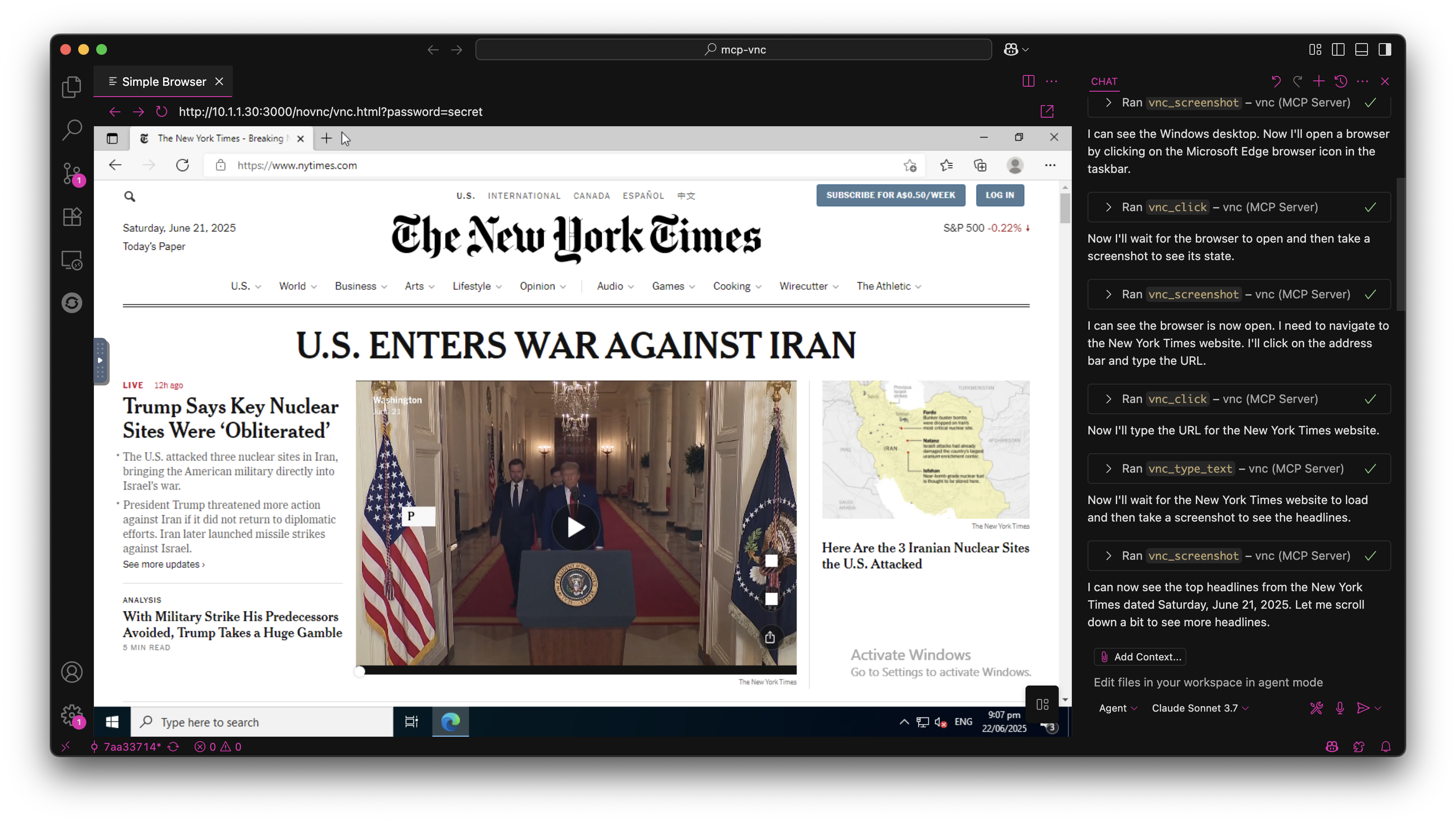
🚀 Quick Start
Install from NPM
npm install -g @hrrrsn/mcp-vncInstall from Source
git clone https://github.com/hrrrsn/mcp-vnc
cd mcp-vnc
npm install
npm run build
⚙️ Configuration
Claude Desktop
Locate and open your Claude Desktop configuration file:
macOS:
~/Library/Application Support/Claude/claude_desktop_config.jsonWindows:
%APPDATA%\Claude\claude_desktop_config.jsonLinux:
~/.config/Claude/claude_desktop_config.json
Add the following configuration:
Using NPM Install:
{
  "mcpServers": {
    "vnc-controller": {
      "type": "stdio",
      "command": "mcp-vnc",
      "env": {
        "VNC_HOST": "192.168.1.100",
        "VNC_PORT": "5900",
        "VNC_PASSWORD": "your-vnc-password"
      }
    }
  }
}
Built from Source:
{
  "mcpServers": {
    "vnc-controller": {
      "type": "stdio",
      "command": "node",
      "args": ["dist/index.js"],
      "cwd": "/path/to/mcp-vnc",
      "env": {
        "VNC_HOST": "192.168.1.100",
        "VNC_PORT": "5900",
        "VNC_PASSWORD": "your-vnc-password"
      }
    }
  }
}
VS Code
Please refer to the VS Code documentation
🛠️ Available Tools
The MCP server provides the following tools for remote desktop control:
🖱️ Mouse Control
Parameter | Required | Type | Description | Default |
| ✅ | number | X coordinate | - |
| ✅ | number | Y coordinate | - |
| ❌ | string | Mouse button ( |
|
| ❌ | boolean | Double-click instead of single click |
|
Example: vnc_click(x=100, y=200, button="right", double=true)
Parameter | Required | Type | Description |
| ✅ | number | X coordinate |
| ✅ | number | Y coordinate |
Example: vnc_move_mouse(x=500, y=300)
⌨️ Keyboard Control
Parameter | Required | Type | Description |
| ✅ | string | Key or key combination to press |
Supported Keys:
Single keys:
a,Enter,F1,Escape,Up,Down,Tab,SpaceKey combinations:
Ctrl+c,Alt+F4,Ctrl+Alt+Delete,Shift+TabModifiers:
Ctrl,Alt,Shift,Super/Win,Meta/Cmd
Examples:
vnc_key_press(key="Enter")vnc_key_press(key="Ctrl+Alt+Delete")
📝 Text Input
Parameter | Required | Type | Description | Default |
| ✅ | string | Text to type | - |
| ❌ | boolean | Press Enter after typing |
|
Example: vnc_type_text(text="Hello World!", enter=true)
Parameter | Required | Type | Description |
| ✅ | string[] | Array of lines to type |
Example: vnc_type_multiline(lines=["Line 1", "Line 2", "Line 3"])
📸 Screen Capture
Parameter | Required | Type | Description | Default |
| ❌ | number | Delay before screenshot (0-300000ms) |
|
Example: vnc_screenshot(delay=1000) - Wait 1 second before capture
🤝 Contributing
Contributions are welcome! Please feel free to submit a Pull Request.
📄 License
This project is licensed under the MIT License - see the LICENSE file for details.
Maintenance
Resources
Unclaimed servers have limited discoverability.
Looking for Admin?
If you are the server author, to access and configure the admin panel.
Latest Blog Posts
MCP directory API
We provide all the information about MCP servers via our MCP API.
curl -X GET 'https://glama.ai/api/mcp/v1/servers/hrrrsn/mcp-vnc'
If you have feedback or need assistance with the MCP directory API, please join our Discord server