
Click on "Install Server".
Wait a few minutes for the server to deploy. Once ready, it will show a "Started" state.
In the chat, type
@followed by the MCP server name and your instructions, e.g., "@Claude Runner MCPschedule a daily job to summarize my git commits every morning at 9am"
That's it! The server will respond to your query, and you can continue using it as needed.
Here is a step-by-step guide with screenshots.
Claude Runner - MCP Server with Job Scheduling
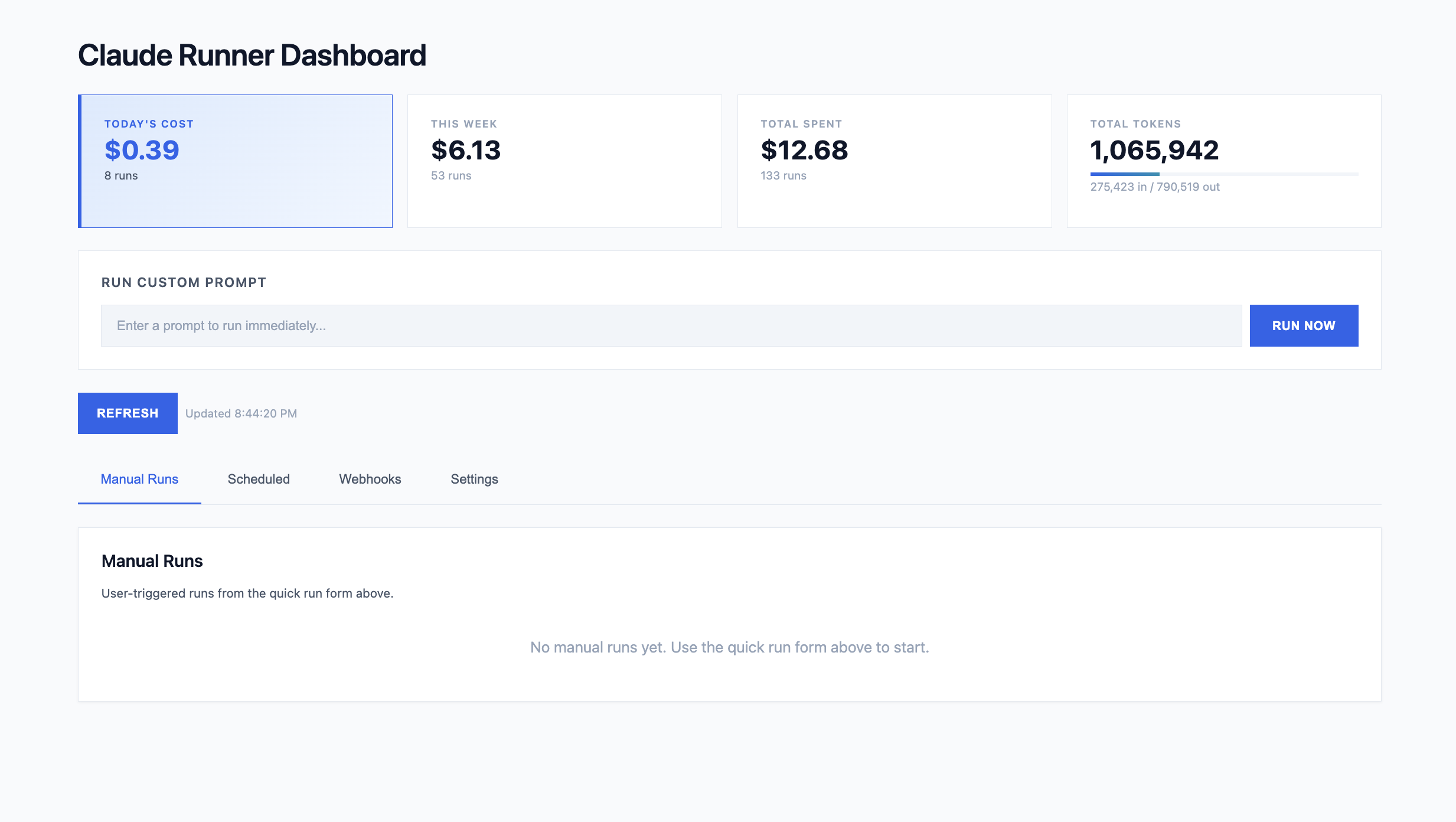
A single-file MCP server that schedules and executes Claude Code CLI tasks via cron expressions. Features a web dashboard, webhook support, dynamic MCP server creation, and token/cost tracking.
Prerequisites
Python 3.11+ (required for
asyncio.timeout())Claude Agent SDK (
pip install claude-agent-sdk)SQLite3 (usually pre-installed on macOS/Linux)
Anthropic API key - Jobs are executed via the Claude Agent SDK, which requires an
ANTHROPIC_API_KEY. Do not rely on a personal Max/Pro subscription — the SDK needs an API key from console.anthropic.com. Set it in your environment or.envfile:export ANTHROPIC_API_KEY=sk-ant-...
Quick Start
# Clone the repository
git clone https://github.com/floriansmeyers/SFLOW-AIRunner-MCP-PRD.git
cd SFLOW-AIRunner-MCP-PRD

# Create and activate virtual environment
python3 -m venv .venv
source .venv/bin/activate  # On Windows: .venv\Scripts\activate

# Install dependencies
pip install -r requirements.txt

# Run the server (stdio transport for Claude Desktop)
python server.py
On first run, the server will:
Create
jobs.dbSQLite database with all tablesAuto-generate OAuth credentials (printed to stderr - save these!)
Start the scheduler loop (checks every 60 seconds)
Running
Local (stdio transport - for Claude Desktop)
python server.pyAdd to Claude Desktop config (~/Library/Application Support/Claude/claude_desktop_config.json on macOS):
{
  "mcpServers": {
    "claude-runner": {
      "command": "/path/to/SFLOW-AIagents-MCP-Spinner/.venv/bin/python",
      "args": ["/path/to/SFLOW-AIagents-MCP-Spinner/server.py"]
    }
  }
}
Important: Use the full path to the Python interpreter inside your .venv to ensure dependencies are available.
Remote (SSE transport - for web dashboard)
MCP_TRANSPORT=sse python server.py
# Server accessible at http://localhost:8080
# Web dashboard at http://localhost:8080/
Both Transports
MCP_TRANSPORT=both python server.py
# stdio for Claude Desktop + SSE for web dashboard
Environment Variables
Variable | Required | Default | Description |
| Yes | - | API key from console.anthropic.com — required for job execution via the Claude Agent SDK. Do not use a personal Max/Pro subscription. |
| No |
| Transport mode: |
| No | auto-generated | OAuth client ID |
| No | auto-generated | OAuth client secret |
| No | auto-generated | Secret key for signing JWT tokens |
| No | - | Basic auth username for dashboard |
| No | - | Basic auth password for dashboard |
| No | - | ngrok auth token for remote tunneling |
| No | - | Override base URL for OAuth callbacks (e.g., |
Create a .env file to persist these:
ANTHROPIC_API_KEY=sk-ant-...
OAUTH_CLIENT_ID=your_client_id
OAUTH_CLIENT_SECRET=your_client_secret
OAUTH_SECRET_KEY=your_secret_key
DASHBOARD_USERNAME=admin
DASHBOARD_PASSWORD=secure_password
NGROK_AUTHTOKEN=your_ngrok_token
Authentication (OAuth 2.1)
SSE transport requires OAuth 2.1 authentication. On first startup, the server auto-generates credentials and prints them to stderr:
============================================================
OAUTH CREDENTIALS FOR CLAUDE CONNECTOR
============================================================
Client ID:     abc123...
Client Secret: xyz789...

Save these to your .env file:
  OAUTH_CLIENT_ID=abc123...
  OAUTH_CLIENT_SECRET=xyz789...
============================================================
Important: Save these credentials immediately. The secret is only shown once and cannot be recovered.
OAuth Endpoints
Endpoint | Description |
| Server metadata |
| Protected resource metadata |
| Authorization endpoint |
| Token endpoint |
Regenerating Credentials
If you lose your credentials, delete the client from the database:
sqlite3 jobs.db "DELETE FROM oauth_clients WHERE client_name = 'Claude (auto)'"Then restart the server to generate new credentials.
Directory Structure
SFLOW-AIRunner-MCP-PRD/
├── server.py              # Main MCP server
├── requirements.txt       # Python dependencies
├── jobs.db               # SQLite database (auto-created)
├── .env                  # Environment variables (optional)
├── fixed-servers/        # Built-in MCP servers
│   └── email/
│       ├── server.py
│       └── metadata.json
├── dynamic_servers/      # User-created MCP servers (auto-created)
│   ├── cat-facts/
│   └── r2-images/
├── deploy/               # Deployment configs (systemd, nginx, deploy script)
│   ├── deploy.sh
│   ├── mcpserver.service
│   ├── nginx.conf
│   └── README-HETZNER.md
└── claude_playground/    # Working directory for job execution (auto-created)
Database
SQLite database at ./jobs.db with the following tables:
Tables
Table | Description |
| Scheduled tasks with cron expressions |
| Execution history with output, tokens, cost |
| Configuration (allowed tools, MCP servers, credentials) |
| HTTP endpoints that trigger prompts |
| OAuth client credentials |
| OAuth authorization codes |
| OAuth refresh tokens |
Default Settings
On first run, these defaults are created:
Key | Default Value |
|
|
|
|
|
|
|
|
|
|
Clean Reset
To completely reset the database:
rm jobs.db
python server.py  # Creates fresh database
MCP Tools Available
Job Management
Tool | Description |
| List all scheduled jobs |
| Get a specific job |
| Create a new scheduled job |
| Update an existing job |
| Delete a job and its runs |
| Manually trigger a job now |
Run Management
Tool | Description |
| List recent runs |
| Get full run details including output |
| Cancel a pending/running run |
Webhooks
Tool | Description |
| Create a webhook endpoint |
| List all webhooks |
| Get webhook details |
| Update a webhook |
| Delete a webhook |
Dynamic MCP Servers
Tool | Description |
| Create a custom MCP server |
| List user-created servers |
| Get server details |
| Update a dynamic server's code/description |
| Delete a dynamic server |
| Enable a dynamic MCP server |
| Disable a dynamic MCP server |
Fixed MCP Servers
Tool | Description |
| List built-in servers |
| Enable a fixed server |
| Disable a fixed server |
Internal MCP Tools
Tool | Description |
| Invoke a tool on an internal MCP server |
Credentials
Tool | Description |
| Set a credential |
| View credentials (masked) |
| See required credentials |
| Find servers missing credentials |
| Delete a credential |
Usage via claude.ai
Once connected, you interact with the server entirely through natural language. Claude translates your requests into the appropriate MCP tool calls behind the scenes.
Important: Jobs are executed via the Claude Agent SDK, which runs the local Claude Code CLI under the hood. You need Claude Code installed and authenticated (claude must be available on the system PATH and logged in) on the machine running the server.
Below are the main workflows.
Creating Custom Tools
You can ask Claude to build new MCP tool servers on the fly. The server code is saved to dynamic_servers/<name>/ and each server gets a DATA_DIR path variable for local file storage. Environment variables referenced via os.environ.get() or os.getenv() in the code are auto-detected and marked as required credentials.
You: Create a tool that fetches the current weather for a given city using the
     OpenWeatherMap API.

Claude: [calls create_mcp_server — saves server to dynamic_servers/weather/,
         detects OPENWEATHERMAP_API_KEY from code]
  Done! I created the "weather" server with a get_weather(city) tool.
  It needs an API key — want me to store yours now?

You: Yes, the key is abc123

Claude: [calls set_server_credential("weather", "OPENWEATHERMAP_API_KEY", "abc123")]
  Credential saved. The weather server is ready to use.
Scheduling Recurring Jobs
Jobs run on cron schedules using the Claude Agent SDK. You can specify which tools the job is allowed to use (empty array [] means all tools).
You: Create a job that runs every weekday at 9am to summarize our Azure DevOps sprint

Claude: [calls create_job with:]
  name: "Daily Sprint Summary"
  cron: "0 9 * * 1-5"
  prompt: "Connect to Azure DevOps and summarize the current sprint..."
  tools: ["mcp__azure-devops__wit_my_work_items", "mcp__email__send_email"]
  Job created (id: a1b2c3d4). Next run: tomorrow at 9:00 AM.

You: Show me the last 5 runs

Claude: [calls list_runs with limit=5]
  Here are the recent runs — 4 completed successfully, 1 errored out...
Setting Up Webhooks
Webhooks let external services trigger a prompt via HTTP POST. The prompt_template supports {{payload}} for the full body or {{payload.field.subfield}} for nested values.
You: Create a webhook that sends a Slack summary whenever a new Azure DevOps
     work item is created. The POST body will have the item title at
     resource.fields.System.Title.

Claude: [calls create_webhook with:]
  name: "New Work Item Notifier"
  prompt_template: "A new work item was created: {{payload.resource.fields.System.Title}}.
                    Summarize it and post to Slack."
  Webhook created! POST to this URL to trigger it:
  https://your-server.com/webhook/abc123def456...

You: Test it — trigger the webhook manually

Claude: I can't trigger webhooks via MCP, but you can test with curl:
  curl -X POST https://your-server.com/webhook/abc123def456... \
    -H "Content-Type: application/json" \
    -d '{"resource":{"fields":{"System":{"Title":"Bug: login broken"}}}}'
Invoking Tools Directly
Use invoke_internal_mcp_tool to call a tool on any enabled MCP server immediately, without creating a job.
You: Use the weather tool to check the forecast in Berlin

Claude: [calls invoke_internal_mcp_tool with:]
  tool: "mcp__weather__get_weather"
  payload: {"city": "Berlin"}
  Currently 12°C and cloudy in Berlin, with rain expected this afternoon.
Managing Servers & Credentials
You can enable, disable, and update both built-in (fixed) and user-created (dynamic) servers, and manage their credentials.
You: What servers are available?

Claude: [calls list_fixed_mcp_servers and list_dynamic_mcp_servers]
  Fixed servers: email (enabled), playwright (disabled)
  Dynamic servers: weather (enabled), url-shortener (disabled)

You: Enable playwright and disable the weather server

Claude: [calls enable_fixed_server("playwright") and disable_mcp_server("weather")]
  Done — playwright is now enabled and weather is disabled.

You: Which servers are missing credentials?

Claude: [calls get_unconfigured_servers]
  The email server needs SENDGRID_API_KEY and SENDER_EMAIL.
Ad-hoc Prompts
For one-off tasks, use the Quick Run feature in the web dashboard (SSE mode) to execute a prompt immediately without creating a job. From claude.ai, you can also manually trigger any existing job:
You: Run the "Daily Sprint Summary" job right now

Claude: [calls trigger_job("a1b2c3d4")]
  Run queued (run_id: e5f6g7h8). I'll check back for results.
Cron Examples
Expression | Description |
| Weekdays at 9:00 AM |
| Every 2 hours |
| Mondays at 9:00 AM |
| Every 30 minutes |
| First day of month at midnight |
Troubleshooting
ModuleNotFoundError: No module named 'dotenv'
Claude Desktop is using system Python instead of your venv. Update your config to use the full venv path:
{
  "command": "/full/path/to/.venv/bin/python",
  "args": ["/full/path/to/server.py"]
}
OAuth credentials lost
Delete the auto-generated client and restart:
sqlite3 jobs.db "DELETE FROM oauth_clients WHERE client_name = 'Claude (auto)'"
python server.py  # New credentials printed to stderr
Jobs not running
Check the scheduler is running (look for "Scheduler loop started" in logs)
Verify job is enabled:
sqlite3 jobs.db "SELECT enabled FROM jobs"Check cron expression is valid
Look for errors in runs:
sqlite3 jobs.db "SELECT error FROM runs ORDER BY started_at DESC LIMIT 1"
MCP tools not available in jobs
If a job reports "I don't have access to [MCP server] tools", check the tool name format:
Correct format: mcp__<server>__<tool> (double underscores)
Example:
mcp__email__send_emailExample:
mcp__playwright__navigate
Auto-normalized formats: These are automatically converted:
email:send_email→mcp__email__send_emailemail.send_email→mcp__email__send_email
Tip: Use an empty tools array [] to allow all available tools, or check the response for tool_warnings to see if any tools were normalized.
Server disconnects immediately
Check stderr output for errors. Common causes:
Missing dependencies (run
pip install -r requirements.txt)Python version < 3.11
Database locked by another process
Git "dubious ownership" error
If auto-deploy fails with "fatal: detected dubious ownership in repository":
git config --system --add safe.directory /opt/mcpserver/appThis happens when the repository is owned by a different user than the one running the deploy script.
Playwright browser not found
If Playwright fails with browser not found errors, install Chromium manually:
# Install system dependencies first (as root) - Ubuntu 24.04
apt install -y libnss3 libnspr4 libatk1.0-0t64 libatk-bridge2.0-0t64 libcups2t64 \
  libxkbcommon0 libxcomposite1 libxdamage1 libxfixes3 libxrandr2 libgbm1 \
  libpango-1.0-0 libcairo2 libasound2t64

# Then install browser (as application user)
su - mcpuser
cd /opt/mcpserver/app
source venv/bin/activate
playwright install chromium
Verify it works:
python -c "from playwright.sync_api import sync_playwright; p = sync_playwright().start(); b = p.chromium.launch(); print('OK'); b.close(); p.stop()"Architecture
┌─────────────────────────────────────────────────────────────┐
│                       MCP Server                            │
│  ┌───────────┐  ┌───────────────┐  ┌───────────────────┐   │
│  │ Job CRUD  │  │   Scheduler   │  │   Run Processor   │   │
│  │  Tools    │  │  (60s loop)   │  │     (async)       │   │
│  └─────┬─────┘  └───────┬───────┘  └─────────┬─────────┘   │
│        │                │                    │             │
│        └────────────────┼────────────────────┘             │
│                         ▼                                  │
│                ┌────────────────┐                          │
│                │    SQLite      │                          │
│                │   (jobs.db)    │                          │
│                └────────────────┘                          │
│                         │                                  │
│                         ▼                                  │
│                ┌────────────────┐                          │
│                │ Claude Agent   │                          │
│                │     SDK        │                          │
│                └────────────────┘                          │
└─────────────────────────────────────────────────────────────┘
The server runs three concurrent async components:
MCP Server - Exposes 25+ tools via FastMCP
Scheduler Loop - Checks every 60 seconds for jobs due based on cron
Run Processor Loop - Picks up pending runs and executes them
Key Dependencies
fastmcp- MCP protocol implementationclaude-agent-sdk- Core execution engine for running jobscroniter- Cron expression parsingsendgrid,requests- Email provider integrationsuvicorn- ASGI server for SSE transportpyngrok- ngrok tunnel for remote access from claude.aipython-dotenv-.envfile loadingPyJWT- JWT token handling for OAuthbeautifulsoup4- Web scrapingboto3- AWS integrationplaywright- Browser automation
This server cannot be installed
Resources
Unclaimed servers have limited discoverability.
Looking for Admin?
If you are the server author, to access and configure the admin panel.