
Generates storybook-style images and matching children's stories using Google's Gemini AI, supporting multiple art styles including 3D cartoon, watercolor, pixel art, hand drawn, and claymation
Click on "Install Server".
Wait a few minutes for the server to deploy. Once ready, it will show a "Started" state.
In the chat, type
@followed by the MCP server name and your instructions, e.g., "@MCP Storybook Image Generatorcreate a watercolor illustration of a magical garden with fairies"
That's it! The server will respond to your query, and you can continue using it as needed.
Here is a step-by-step guide with screenshots.
MCP Storybook Image Generator
A professional-grade server that generates beautiful storybook images with matching children's stories using Google's Gemini AI.
🎬 Demo
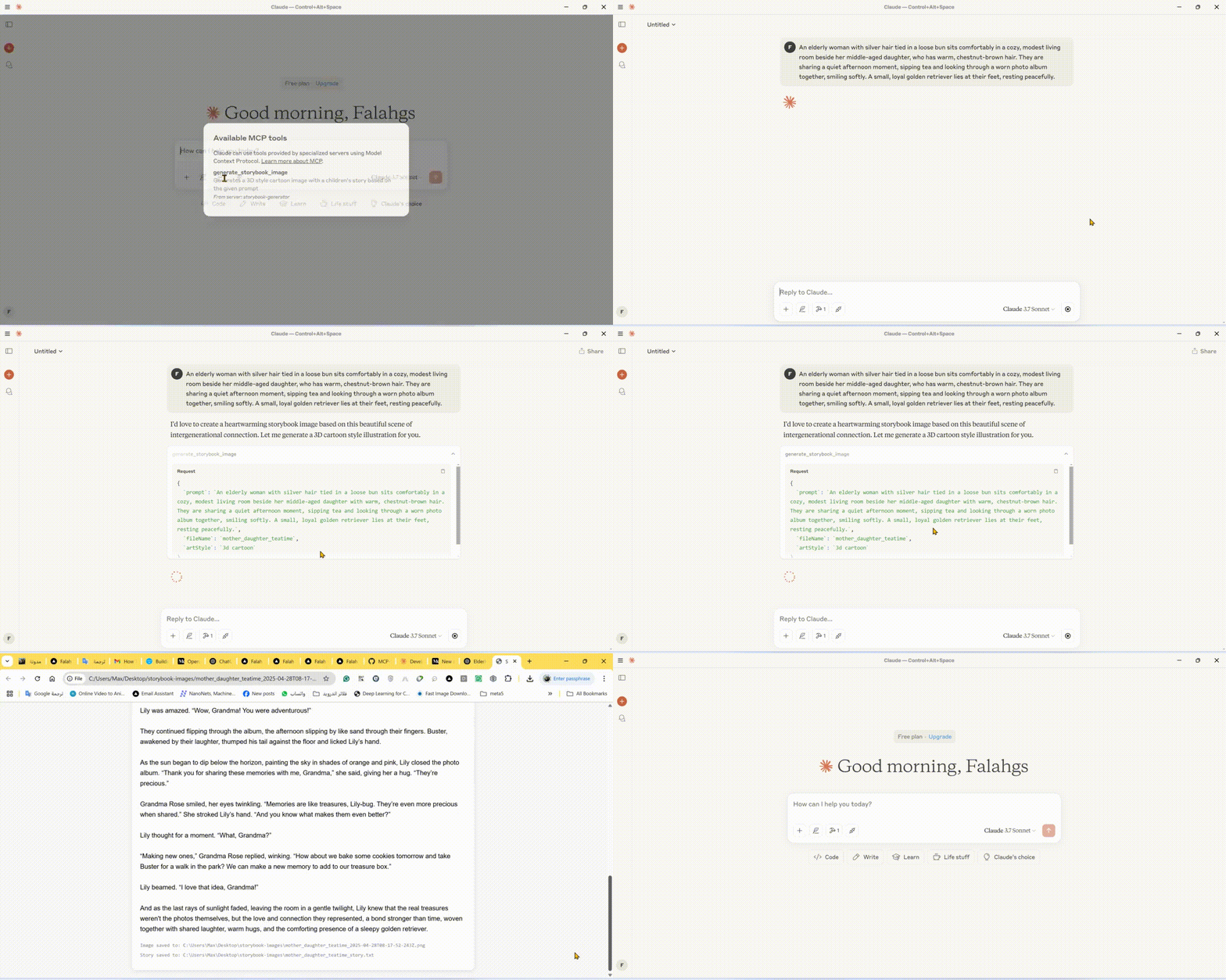
🌟 Features
Storybook Image Generation: Creates high-quality images in various art styles for children's stories
Automatic Story Creation: Generates engaging children's stories to match the images
Multiple Art Styles: Choose from 3D cartoon, watercolor, pixel art, hand drawn, or claymation styles
Instant Preview: Automatically opens generated images and stories in your browser
Local Storage: Saves images and stories in an organized output directory
🛠️ Technical Stack
Core Framework: Model Context Protocol (MCP) SDK
AI Integration: Google Generative AI (Gemini)
Runtime: Node.js v14+
Language: TypeScript
Package Manager: npm
📋 Prerequisites
Node.js (v14 or higher)
Google Gemini API key
TypeScript
⚙️ Installation
Install dependencies:
Configure environment: Create a
.envfile in the root directory:
Build the project:
🚀 Using the CLI
You can use the storybook generator directly from the command line:
Command Line Options
Option | Description |
| Set your Gemini API key |
| Save generated files to desktop |
| Enable debug logging |
| Show help information |
🔧 Configuring Claude Desktop with MCP Server
To integrate this server with Claude Desktop:
Locate the Claude Desktop Configuration File:
Windows:
%APPDATA%\Claude\claude_desktop_config.jsonmacOS:
~/Library/Application Support/Claude/claude_desktop_config.jsonLinux:
~/.config/Claude/claude_desktop_config.json
Add the following configuration:
🚀 Available Tool
Storybook Image Generator Tool
📄 Example Usage
Storybook Generation Examples
⚙️ Configuration Options
Environment Variables
Variable | Description | Default |
| Google Gemini API key for AI generation | (Required) |
| Force saving to desktop directory | false |
| Enable verbose debug logging | false |
📝 Output Files
For each storybook generation request, the server produces:
PNG Image: The generated illustration matching your prompt in the requested art style
Text File: The matching children's story in plain text format
HTML Preview: A combined view showing both the image and story together
These files are saved to either:
Your desktop in a folder called "storybook-images" (if
SAVE_TO_DESKTOP=true)The server's directory in a folder called "storybook-images"
🤝 Contributing
Contributions, issues, and feature requests are welcome! Feel free to check issues page.
📄 License
This project is licensed under the MIT License - see the LICENSE file for details.