Cloudflare 上でリモート MCP サーバーを構築する (認証なし)
この例では、Cloudflare Workers上で認証を必要としないリモートMCPサーバーをデプロイできます。このサーバーには、Cloudflareのブラウザレンダリング機能とAI機能を利用したウェブサイト分析およびコンテンツ抽出ツールが含まれています。 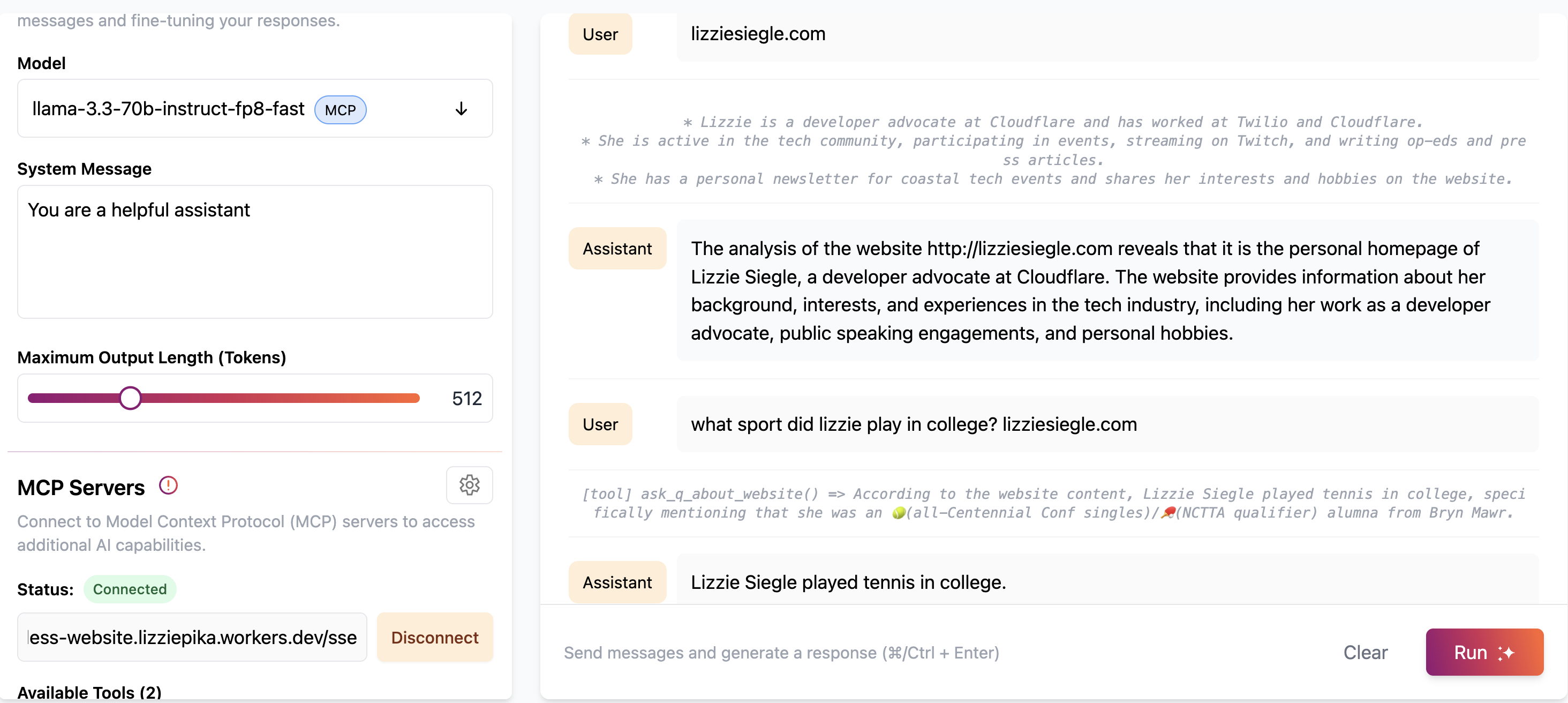
始めましょう:

これにより、MCP サーバーが次のような URL にデプロイされます: remote-mcp-server-authless.<your-account>.workers.dev/sse
あるいは、以下のコマンド ラインを使用して、ローカル マシンにリモート MCP サーバーを作成することもできます。
npm create cloudflare@latest -- my-mcp-server --template=cloudflare/ai/demos/remote-mcp-authless
Related MCP server: Cloudflare Playwright MCP
利用可能なツール
ウェブサイト分析ツール
ウェブサイトを分析する
Cloudflareのブラウザレンダリングを使用してウェブサイトをスクレイピングして分析する
Cloudflare AIを使用してウェブサイトのコンテンツの概要を提供します
入力: url (文字列) - 分析するウェブサイトのURL
例: [tool] analyze_website(url: "https://example.com")
ウェブサイトについて質問する
ウェブサイトをスクレイピングし、そのコンテンツに関する特定の質問に答えます
Cloudflare AIを使用して、ウェブサイトに関する質問を理解し、回答します
入力:
例: [tool] ask_q_about_website(url: "https://example.com", question: "What services does this company offer?")
MCPサーバーのカスタマイズ
独自のツールを MCP サーバーに追加するには、 this.server.tool(...)を使用してsrc/index.tsのinit()メソッド内で各ツールを定義します。
Cloudflare AI Playgroundに接続する
リモート MCP クライアントである Cloudflare AI Playground から MCP サーバーに接続できます。
https://playground.ai.cloudflare.com/にアクセスしてください
デプロイされた MCP サーバーの URL を入力します ( remote-mcp-server-authless.<your-account>.workers.dev/sse )
MCP ツールをプレイグラウンドから直接使用できるようになりました。
Claude DesktopをMCPサーバーに接続する
mcp-remote プロキシを使用して、ローカル MCP クライアントからリモート MCP サーバーに接続することもできます。
Claude Desktop から MCP サーバーに接続するには、 Anthropic のクイックスタートに従い、Claude Desktop 内で [設定] > [開発] > [構成の編集] に移動します。
次の構成で更新します。
{
  "mcpServers": {
    "calculator": {
      "command": "npx",
      "args": [
        "mcp-remote",
        "http://localhost:8787/sse"  // or remote-mcp-server-authless.your-account.workers.dev/sse
      ]
    }
  }
}
Claude を再起動すると、ツールが利用可能になるはずです。
要件
ウェブサイト分析ツールを使用するには、次のものが必要です。
ブラウザバインディングが有効になっているCloudflare Workers
Cloudflare AIバインディングが構成されました
両方のバインディングに適切な権限
wrangler.jsoncに以下の内容が含まれていることを確認します。
{
  "browser": {
    "binding": "BROWSER"
  },
  "ai": {
    "binding": "AI"
  }
}


