<div align="center">
# SEO Research MCP
**Free SEO research tools for AI-powered IDEs**
[](https://www.python.org/downloads/)
[](https://opensource.org/licenses/MIT)
[](https://modelcontextprotocol.io/)
[Features](#-features) • [Installation](#-installation) • [IDE Setup](#-ide-setup-guides) • [API Reference](#-api-reference) • [Contributing](#-contributing) • [Credits](#-credits)
</div>
---
> [!CAUTION]
> ## ⚠️ Educational Use Only
>
> **This project is for educational and research purposes only.**
>
> - This tool interfaces with third-party services (Ahrefs, CapSolver)
> - Users must comply with all applicable terms of service
> - The authors do not endorse any use that violates third-party ToS
> - Use responsibly and at your own risk
>
> By using this software, you acknowledge that you understand and accept these terms.
---
## 🎯 What is this?
SEO Research MCP brings powerful SEO research capabilities directly into your AI coding assistant. Using the [Model Context Protocol (MCP)](https://modelcontextprotocol.io/), it connects your IDE to Ahrefs' SEO data, allowing you to:
- Research competitor backlinks while coding
- Generate keyword ideas without leaving your editor
- Analyze traffic patterns for any website
- Check keyword difficulty before creating content
---
## ✨ Features
| Feature | Description | Example Use |
|---------|-------------|-------------|
| **🔗 Backlink Analysis** | Domain rating, anchor text, edu/gov links | "Show me backlinks for competitor.com" |
| **🔑 Keyword Research** | Generate ideas from seed keywords | "Find keywords related to 'python tutorial'" |
| **📊 Traffic Analysis** | Monthly traffic, top pages, countries | "What's the traffic for example.com?" |
| **📈 Keyword Difficulty** | KD score with full SERP breakdown | "How hard is 'best laptop 2025' to rank for?" |
---
## 📋 Prerequisites
Before you start, you'll need:
1. **Python 3.10 or higher**
```bash
python --version # Should be 3.10+
```
2. **CapSolver API Key** (for CAPTCHA solving)
👉 [Get your API key here](https://dashboard.capsolver.com/passport/register?inviteCode=VK9BLtwYlZxi)
---
## 📦 Installation
### Option 1: From PyPI (Recommended)
```bash
pip install seo-mcp
```
Or using `uv`:
```bash
uv pip install seo-mcp
```
### Option 2: From Source
```bash
git clone https://github.com/egebese/seo-research-mcp.git
cd seo-research-mcp
pip install -e .
```
---
## 🛠️ IDE Setup Guides
Choose your IDE and follow the setup instructions:
<details>
<summary><h3>🟣 Claude Desktop</h3></summary>
#### Step 1: Open Config File
1. Open Claude Desktop
2. Go to **Settings** → **Developer** → **Edit Config**
#### Step 2: Add Configuration
Add this to your `claude_desktop_config.json`:
```json
{
"mcpServers": {
"seo-research": {
"command": "uvx",
"args": ["--python", "3.10", "seo-mcp"],
"env": {
"CAPSOLVER_API_KEY": "YOUR_API_KEY_HERE"
}
}
}
}
```
#### Step 3: Restart & Verify
1. Restart Claude Desktop
2. Look for the **hammer/tools icon** in the bottom-right corner
**📁 Config file locations:**
| OS | Path |
|----|------|
| macOS | `~/Library/Application Support/Claude/claude_desktop_config.json` |
| Windows | `%APPDATA%\Claude\claude_desktop_config.json` |
</details>
<details>
<summary><h3>🔵 Claude Code (CLI)</h3></summary>
#### Option A: Quick Setup (CLI)
```bash
# Add the MCP server
claude mcp add seo-research --scope user -- uvx --python 3.10 seo-mcp
# Set your API key
export CAPSOLVER_API_KEY="YOUR_API_KEY_HERE"
```
#### Option B: Config File
Add to `~/.claude.json`:
```json
{
"mcpServers": {
"seo-research": {
"command": "uvx",
"args": ["--python", "3.10", "seo-mcp"],
"env": {
"CAPSOLVER_API_KEY": "YOUR_API_KEY_HERE"
}
}
}
}
```
#### Verify Installation
```bash
claude mcp list
```
</details>
<details>
<summary><h3>🟢 Cursor</h3></summary>
#### Global Setup (All Projects)
Create `~/.cursor/mcp.json`:
```json
{
"mcpServers": {
"seo-research": {
"command": "uvx",
"args": ["--python", "3.10", "seo-mcp"],
"env": {
"CAPSOLVER_API_KEY": "YOUR_API_KEY_HERE"
}
}
}
}
```
#### Project Setup (Single Project)
Create `.cursor/mcp.json` in your project root with the same content.
#### Verify Installation
1. Go to **File** → **Preferences** → **Cursor Settings**
2. Select **MCP** in the sidebar
3. Check that `seo-research` appears under **Available Tools**
</details>
<details>
<summary><h3>🌊 Windsurf</h3></summary>
#### Step 1: Open Settings
- **Mac:** `Cmd + Shift + P` → "Open Windsurf Settings"
- **Windows/Linux:** `Ctrl + Shift + P` → "Open Windsurf Settings"
#### Step 2: Add Configuration
Navigate to **Cascade** → **MCP Servers** → **Edit raw mcp_config.json**:
```json
{
"mcpServers": {
"seo-research": {
"command": "uvx",
"args": ["--python", "3.10", "seo-mcp"],
"env": {
"CAPSOLVER_API_KEY": "YOUR_API_KEY_HERE"
}
}
}
}
```
**📁 Config location:** `~/.codeium/windsurf/mcp_config.json`
</details>
<details>
<summary><h3>💜 VS Code (GitHub Copilot)</h3></summary>
> ⚠️ Requires VS Code 1.102+ with GitHub Copilot
#### Setup
Create `.vscode/mcp.json` in your workspace:
```json
{
"servers": {
"seo-research": {
"command": "uvx",
"args": ["--python", "3.10", "seo-mcp"],
"env": {
"CAPSOLVER_API_KEY": "YOUR_API_KEY_HERE"
}
}
}
}
```
#### Activate
1. Open the `.vscode/mcp.json` file
2. Click the **Start** button that appears
3. In Chat view, click **Tools** to toggle MCP tools
4. Use `#tool_name` in prompts to invoke tools
</details>
<details>
<summary><h3>⚡ Zed</h3></summary>
#### Setup
Add to your Zed `settings.json`:
```json
{
"context_servers": {
"seo-research": {
"command": {
"path": "uvx",
"args": ["--python", "3.10", "seo-mcp"],
"env": {
"CAPSOLVER_API_KEY": "YOUR_API_KEY_HERE"
}
}
}
}
}
```
#### Verify
1. Open **Agent Panel** settings
2. Check the indicator dot next to `seo-research`
3. **Green dot** = Server is active
</details>
---
## 📖 API Reference
### `get_backlinks_list(domain)`
Get backlink data for any domain.
```python
# Input
domain: str # e.g., "example.com"
# Output
{
"overview": {
"domainRating": 76,
"backlinks": 1500,
"refDomains": 300
},
"backlinks": [
{
"anchor": "Example link",
"domainRating": 76,
"title": "Page title",
"urlFrom": "https://source.com/page",
"urlTo": "https://example.com/page",
"edu": false,
"gov": false
}
]
}
```
---
### `keyword_generator(keyword, country?, search_engine?)`
Generate keyword ideas from a seed keyword.
```python
# Input
keyword: str # Seed keyword
country: str # Default: "us"
search_engine: str # Default: "Google"
# Output
[
{
"keyword": "example keyword",
"volume": 1000,
"difficulty": 45
}
]
```
---
### `get_traffic(domain_or_url, country?, mode?)`
Estimate search traffic for a website.
```python
# Input
domain_or_url: str # Domain or full URL
country: str # Default: "None" (all countries)
mode: str # "subdomains" | "exact"
# Output
{
"traffic": {
"trafficMonthlyAvg": 50000,
"costMontlyAvg": 25000
},
"top_pages": [...],
"top_countries": [...],
"top_keywords": [...]
}
```
---
### `keyword_difficulty(keyword, country?)`
Get keyword difficulty score with SERP analysis.
```python
# Input
keyword: str # Keyword to analyze
country: str # Default: "us"
# Output
{
"difficulty": 45,
"serp": [...]
}
```
---
## ⚙️ How It Works
```
┌──────────────┐ ┌──────────────┐ ┌──────────────┐ ┌──────────────┐
│ Your │ │ CapSolver │ │ Ahrefs │ │ Formatted │
│ AI IDE │────▶│ (CAPTCHA) │────▶│ API │────▶│ Results │
└──────────────┘ └──────────────┘ └──────────────┘ └──────────────┘
```
1. **Request** → Your AI assistant calls an MCP tool
2. **CAPTCHA** → CapSolver handles Cloudflare verification
3. **Data** → Ahrefs API returns SEO data
4. **Response** → Formatted results appear in your IDE
---
## 🐛 Troubleshooting
| Problem | Solution |
|---------|----------|
| "CapSolver API key error" | Check `CAPSOLVER_API_KEY` is set correctly |
| Rate limiting | Wait a few minutes, reduce request frequency |
| No results | Domain may not be indexed by Ahrefs |
| Server not appearing | Restart your IDE after config changes |
| Connection timeout | Check your internet connection |
---
## 🤝 Contributing
Contributions are welcome! Here's how you can help:
### Ways to Contribute
- **🐛 Report Bugs** - Found an issue? [Open a bug report](https://github.com/egebese/seo-research-mcp/issues/new?template=bug_report.md)
- **💡 Suggest Features** - Have an idea? [Request a feature](https://github.com/egebese/seo-research-mcp/issues/new?template=feature_request.md)
- **📝 Improve Docs** - Fix typos, clarify instructions, add examples
- **🔧 Submit Code** - Bug fixes, new features, optimizations
### Development Setup
```bash
# Clone the repo
git clone https://github.com/egebese/seo-research-mcp.git
cd seo-research-mcp
# Install dependencies
uv sync
# Run locally
python main.py
```
### Pull Request Process
1. **Fork** the repository
2. **Create** a feature branch (`git checkout -b feature/amazing-feature`)
3. **Commit** your changes (`git commit -m 'Add amazing feature'`)
4. **Push** to your branch (`git push origin feature/amazing-feature`)
5. **Open** a Pull Request
### Code Guidelines
- Keep code simple and readable
- Add comments for complex logic
- Test your changes before submitting
- Follow existing code style
---
## 📊 Star History
[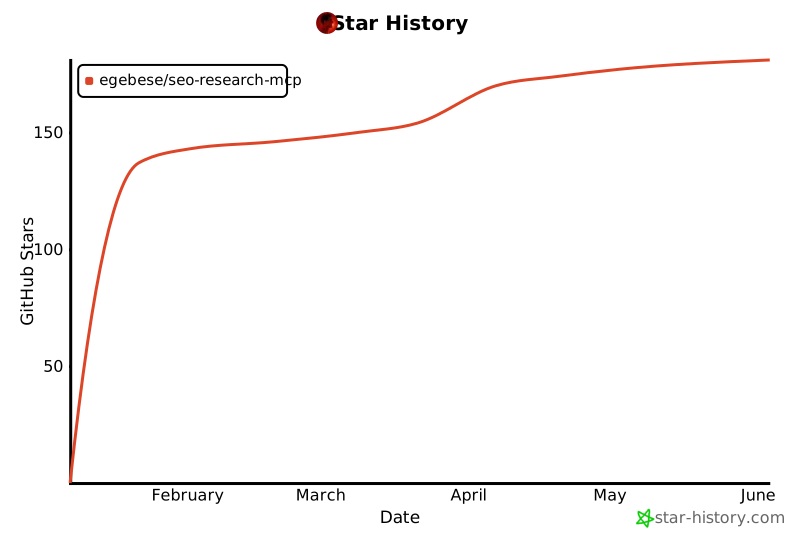](https://star-history.com/#egebese/seo-research-mcp&Date)
---
## 📄 License
This project is licensed under the **MIT License** with an educational use notice.
See [LICENSE](LICENSE) for full details.
---
## 🙏 Credits
This project is a fork of [seo-mcp](https://github.com/cnych/seo-mcp) by [@cnych](https://github.com/cnych).
Special thanks to the original author for creating this tool.
---
<div align="center">
**⭐ If this helps your SEO research, consider giving it a star! ⭐**
</div>
