[](https://docfork.com)
# Docfork MCP - Up-to-date Docs for AI Agents
<a href="https://cursor.com/en/install-mcp?name=docfork&config=eyJ1cmwiOiJodHRwczovL21jcC5kb2Nmb3JrLmNvbS9tY3AifQ%3D%3D"><img src="https://cursor.com/deeplink/mcp-install-dark.svg" height="32" alt="Add to Cursor"/></a> <a href="https://insiders.vscode.dev/redirect?url=vscode%3Amcp%2Finstall%3F%7B%22name%22%3A%22docfork%22%2C%22command%22%3A%22npx%22%2C%22args%22%3A%5B%22-y%22%2C%22docfork%40latest%22%5D%7D"><img src="https://img.shields.io/badge/Add%20to%20VS%20Code-007ACC?style=for-the-badge&logo=visualstudiocode&logoColor=white" height="32" alt="Add to VS Code"/></a> <a href="https://app.docfork.com/signup"><img src="https://img.shields.io/badge/Get%20Free%20API%20Key-F02A2B?style=for-the-badge&logo=fire&logoColor=white" height="32" alt="Get Free API Key"/></a>
<a href="https://docfork.com"><img alt="Website" src="https://img.shields.io/badge/Website-docfork.com-blue?style=flat-square" /></a> <a href="https://www.npmjs.com/package/docfork"><img alt="npm" src="https://img.shields.io/npm/v/docfork?style=flat-square&color=red" /></a> <a href="https://www.npmjs.com/package/docfork"><img alt="npm downloads" src="https://img.shields.io/npm/dm/docfork?style=flat-square" /></a> <a href="./LICENSE"><img alt="License" src="https://img.shields.io/npm/l/docfork?style=flat-square" /></a>
**Lock your agent's context to your stack.**
Define a **Docfork Cabinet** — `Next.js 16` + `Drizzle ORM` + `Better Auth` — and every query returns only docs from your stack. No more bloated results. No more hallucinations.
## ⚡ Built for Precision
Documentation context as precise as your dependency lockfile:
- **Cabinets** — Lock your agent to a verified stack. Only your libraries. Fully isolated.
- **10,000+ libraries** — Pre-chunked docs and code examples. ~200ms edge retrieval.
- **Team-ready** — Share Cabinets and API keys across your org. Same context, every engineer.
> **Set a Cabinet:** `Next.js 16` + `Drizzle ORM` + `Better Auth`.
> Your agent only sees docs for your stack. No stray Express docs. No Prisma confusion.
## 🚀 Quick Start
### 1. Get your Free API Key
Sign up at **[docfork.com](https://app.docfork.com/signup)** — free: 1,000 requests/month, 5 team seats.
### 2. Install MCP
<details>
<summary><b>Install in Cursor</b></summary>
Go to: `Settings` -> `Cursor Settings` -> `MCP` -> `Add new global MCP server`
Paste this into `~/.cursor/mcp.json`. For project-scoped config, create `.cursor/mcp.json` in your project folder. See [Cursor MCP docs](https://cursor.com/docs/context/mcp) for more info.
> Since Cursor 1.0, click the buttons below to install instantly.
#### Cursor Remote Server Connection
[](https://cursor.com/en/install-mcp?name=docfork&config=eyJ1cmwiOiJodHRwczovL21jcC5kb2Nmb3JrLmNvbS9tY3AifQ%3D%3D)
```json
{
"mcpServers": {
"docfork": {
"url": "https://mcp.docfork.com/mcp",
"headers": {
"DOCFORK_API_KEY": "YOUR_API_KEY"
}
}
}
}
```
#### Cursor Local Server Connection
[](https://cursor.com/en/install-mcp?name=docfork&config=eyJjb21tYW5kIjoibnB4IC15IGRvY2ZvcmsifQ%3D%3D)
```json
{
"mcpServers": {
"docfork": {
"command": "npx",
"args": ["-y", "docfork", "--api-key", "YOUR_API_KEY"]
}
}
}
```
</details>
<details>
<summary><b>Install in Claude Code</b></summary>
Run this command. See [Claude Code MCP docs](https://code.claude.com/docs/en/mcp) for more info.
#### Claude Code Local Server Connection
```sh
claude mcp add docfork -- npx -y docfork --api-key YOUR_API_KEY
```
#### Claude Code Remote Server Connection
```sh
claude mcp add --header "DOCFORK_API_KEY: YOUR_API_KEY" --transport http docfork https://mcp.docfork.com/mcp
```
</details>
<details>
<summary><b>Install in OpenCode</b></summary>
Add this to your OpenCode configuration file. See [OpenCode MCP docs](https://opencode.ai/docs/mcp-servers) for more info.
#### OpenCode Remote Server Connection
```jsonc
{
"$schema": "https://opencode.ai/config.json",
"mcp": {
"docfork": {
"type": "remote",
"url": "https://mcp.docfork.com/mcp",
"headers": {
"DOCFORK_API_KEY": "YOUR_API_KEY",
},
"enabled": true,
},
},
}
```
#### OpenCode Local Server Connection
```jsonc
{
"$schema": "https://opencode.ai/config.json",
"mcp": {
"docfork": {
"type": "local",
"command": ["npx", "-y", "docfork", "--api-key", "YOUR_API_KEY"],
"enabled": true,
},
},
}
```
</details>
<details>
<summary><b>Install in Cline</b></summary>
Add this to your Cline `cline_mcp_settings.json` file. To access it: Click the MCP Servers icon in the top navigation bar → Select the "Configure" tab → Click "Configure MCP Servers" at the bottom. See [Cline MCP docs](https://docs.cline.bot/mcp/configuring-mcp-servers) for more info.
#### Cline Remote Server Connection
```json
{
"mcpServers": {
"docfork": {
"url": "https://mcp.docfork.com/mcp",
"type": "streamableHttp",
"headers": {
"DOCFORK_API_KEY": "YOUR_API_KEY"
},
"alwaysAllow": ["query_docs", "fetch_url"],
"disabled": false
}
}
}
```
#### Cline Local Server Connection
```json
{
"mcpServers": {
"docfork": {
"command": "npx",
"args": ["-y", "docfork", "--api-key", "YOUR_API_KEY"],
"alwaysAllow": ["query_docs", "fetch_url"],
"disabled": false
}
}
}
```
</details>
**[Windsurf, Roo Code, and 40+ more →](https://docs.docfork.com/clients/overview)**
<details>
<summary><b>OAuth Authentication</b></summary>
Docfork supports [MCP OAuth specs](https://modelcontextprotocol.io/specification/latest/basic/authorization). Change your endpoint to use OAuth:
```diff
- "url": "https://mcp.docfork.com/mcp"
+ "url": "https://mcp.docfork.com/mcp/oauth"
```
_Note: OAuth is for remote HTTP connections only. [View OAuth Guide →](https://docs.docfork.com/core/authentication)_
</details>
### 3. Just say `use docfork`
Add `use docfork` to any prompt:
```txt
Implement a secure authentication flow using Better Auth and Supabase. use docfork
```
### 4. Make it automatic
Add a rule so Docfork stays active — skip the prompt suffix.
> [!NOTE]
> **[Add Rule to Cursor (One-Click)](<https://cursor.com/link/rule?name=docfork-policy&text=You+have+access+to+the+docfork+MCP+server.+To+ensure+the+code+you+write+is+accurate+and+up-to-date%2C+you+must+follow+these+requirements%3A%0A%0A1.+Auto-Invoke%3A+Always+use+%60query_docs%60+when+asked+for+library+implementation%2C+API+setup%2C+or+debugging.%0A2.+Context+Strategy%3A%0A+++-+Search%3A+Call+%60query_docs%60+and+review+the+content+chunks+in+the+results.%0A+++-+Fetch%3A+Only+call+%60fetch_url%60+if+the+chunks+are+incomplete+or+you+need+the+full+file+context+for+a+complex+implementation.%0A+++-+Identity%3A+%60library%60+is+required.+Start+with+a+best-guess+library+name+(e.g.%2C+%60react%60).+Once+you+identify+the+exact+repo%2C+always+switch+%60library%60+to+the+exact+%60owner%2Frepo%60+(e.g.%2C+%60facebook%2Freact%60)+for+follow-up+queries.+If+you+have+%60%2Fowner%2Frepo%60%2C+remove+the+leading+slash.%0A%0AIf+you+are+unsure+of+a+library%27s+latest+syntax%2C+search+with+docfork+first.>)**
Copy rule:
```markdown title=".cursor/rules/docfork-policy.md"
You have access to the docfork MCP server. To ensure the code you write is accurate and up-to-date, you must follow these requirements:
1. Auto-Invoke: Always use `query_docs` when asked for library implementation, API setup, or debugging.
2. Context Strategy:
- Search: Call `query_docs` and review the content chunks in the results.
- Fetch: Only call `fetch_url` if the chunks are incomplete or you need the full file context for a complex implementation.
- Identity: `library` is required. Start with a best-guess library name (e.g., `react`). Once you identify the exact repo, always switch `library` to the exact `owner/repo` (e.g., `facebook/react`) for follow-up queries.
If you are unsure of a library's latest syntax, search with docfork first.
```
Now your AI fetches the latest docs automatically:
```txt
Add a Prisma schema for a multi-tenant SaaS and generate the client.
```
## 🔨 Tools
| Tool | Purpose |
| ------------ | ----------------------------------------------------------------------------------------------------------------------- |
| `query_docs` | **Context-Aware Search.** Respects your `DOCFORK_CABINET` header to strictly limit results to your approved tech stack. |
| `fetch_url` | **Fetch URL.** Fetches full Markdown content from a URL when chunks aren't enough. |
## 📖 Docs
- **[Search Public Libraries](https://docfork.com/search)** – Find libraries to add to your Cabinet.
- **[Installation Guides](https://docs.docfork.com/get-started/installation)** – Setup guides for every IDE.
- **[Cabinets](https://docs.docfork.com/core/cabinets)** – Lock your agent to specific libraries.
- **[Library Identifiers](https://docs.docfork.com/context/identifiers)** – Target exact repos with `owner/repo`.
- **[Troubleshooting](https://docs.docfork.com/troubleshooting/common-fixes)** – Fix connection or auth issues.
## 💬 Community
- **[Changelog](https://docfork.com/changelog)** – We ship constantly. Every release, documented.
- **[X (Twitter)](https://x.com/docfork_ai)** – Product updates and what's next.
- Found an issue? [Raise a GitHub issue](https://github.com/docfork/mcp/issues/new?labels=library&title=LIBRARY:%20) or [contact support](mailto:support@docfork.com).
## Star History
[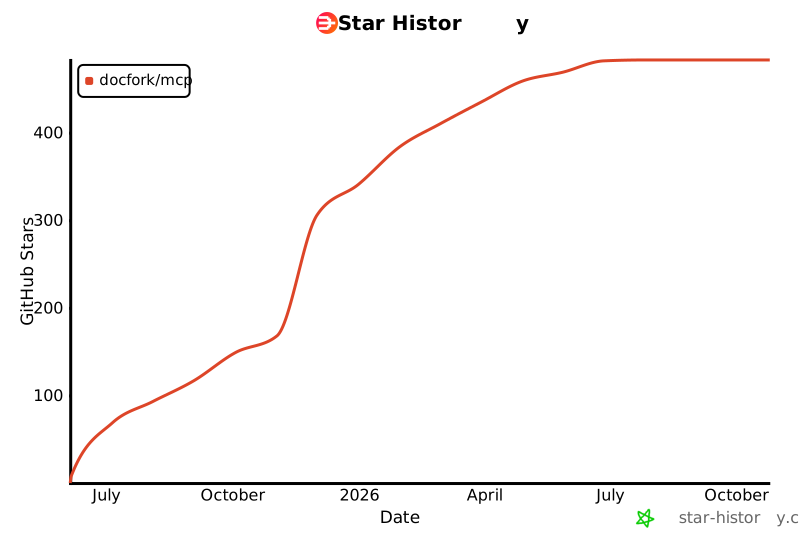](https://www.star-history.com/#docfork/mcp&Date)
## Disclaimer
Docfork is an open, community-driven catalogue. We review submissions but can't guarantee accuracy for every project. Spot an issue? [Raise a GitHub issue](https://github.com/docfork/mcp/issues/new?labels=library&title=LIBRARY:%20) or [contact support](mailto:support@docfork.com).
## License
MIT
