
[](https://cursor.com/en/install-mcp?name=docfork&config=eyJ1cmwiOiJodHRwczovL21jcC5kb2Nmb3JrLmNvbS9tY3AifQ%3D%3D) [<img alt="Install in VS Code (http)" src="https://img.shields.io/badge/Install%20in%20VS%20Code-0098FF?style=for-the-badge&logo=visualstudiocode&logoColor=white">](https://insiders.vscode.dev/redirect?url=vscode%3Amcp%2Finstall%3F%7B%22name%22%3A%22docfork%22%2C%22type%22%3A%22http%22%2C%22url%22%3A%22http%3A%2F%2Fmcp.docfork.com%2Fmcp%22%7D)
# Docfork MCP - Up-to-date Docs for AI Agents.
[](https://docfork.com) [](https://smithery.ai/server/@docfork/mcp) [](https://www.npmjs.com/package/docfork) [](./LICENSE)
## ⚡ Why Docfork?
Standard AI models (Claude 4.5, GPT-5.1) have a knowledge cutoff. They don't know about the framework changes released last week.
**The Problem:**
- ❌ AI hallucinates syntax from year-old docs.
- ❌ AI guesses APIs that don't exist.
- ❌ Valuable coding time is lost debugging deprecated patterns.
**The Solution:**
- ✅ **Live Sync:** We pull documentation from the source automatically.
- ✅ **Private Cabinets:** Scope your search to your specific tech stack (Next.js + Supabase + Tailwind), avoiding generic results.
- ✅ **Team Ready:** Share context with your whole organization.
## 🚀 Quick Start
### 1. Get your Free API Key
Go to **[app.docfork.com](https://app.docfork.com/sign-up)**.
- **Free Tier:** 1,000 requests/month org-wide (2x industry standard).
- **Team:** 5 free seats included.
- **Pro Tier & Private Docs**: Coming soon 🚀
### 2. Install MCP
<details open>
<summary><b>Cursor (One-Click)</b></summary>
1. Click the button below:
[](https://cursor.com/en/install-mcp?name=docfork&config=eyJ1cmwiOiJodHRwczovL21jcC5kb2Nmb3JrLmNvbS9tY3AifQ%3D%3D)
2. Or manually add to `Cursor Settings` > `Tools & MCP` > `New MCP Server`:
**Remote (Recommended):**
```json
{
"mcpServers": {
"docfork": {
"url": "https://mcp.docfork.com/mcp",
"headers": {
"DOCFORK_API_KEY": "YOUR_API_KEY"
}
}
}
}
```
**Local:**
```json
{
"mcpServers": {
"docfork": {
"command": "npx",
"args": ["-y", "docfork", "--api-key", "YOUR_API_KEY"]
}
}
}
```
</details>
<details open>
<summary><b>Claude Code</b></summary>
**Remote:**
```bash
claude mcp add --transport http docfork https://mcp.docfork.com/mcp --header "DOCFORK_API_KEY: YOUR_API_KEY"
```
**Local:**
```bash
claude mcp add docfork -- npx -y docfork --api-key YOUR_API_KEY
```
</details>
<details open>
<summary><b>Opencode</b></summary>
**Remote:**
```json
{
"mcp": {
"docfork": {
"type": "remote",
"url": "https://mcp.docfork.com/mcp",
"headers": {
"DOCFORK_API_KEY": "YOUR_API_KEY"
},
"enabled": true
}
}
}
```
**Local:**
```json
{
"mcp": {
"docfork": {
"type": "local",
"command": ["npx", "-y", "docfork", "--api-key", "YOUR_API_KEY"],
"enabled": true
}
}
}
```
</details>
**[See Installation for Other MCP Clients (VS Code, Windsurf, Claude Desktop, etc.) → ](https://docs.docfork.com/integrations/overview)**
### 3. Usage
Just tell your AI to `use docfork`:
```txt
Create a basic Next.js app with the App Router. use docfork
```
## 🛡️ The Docfork Difference: Cabinets
Unlike other tools that search the "entire internet" and return bloated results, Docfork lets you create **Cabinets**.
Cabinets are curated, private indexes specific to your project stack.
1. Create a Cabinet in your **[Dashboard](https://app.docfork.com/sign-up)**.
2. Add the libraries you need.
3. Add the `DOCFORK_CABINET` header to your MCP config.
```json
{
"mcpServers": {
"docfork": {
"url": "https://mcp.docfork.com/mcp",
"headers": {
"DOCFORK_API_KEY": "YOUR_API_KEY",
"DOCFORK_CABINET": "general"
}
}
}
}
```
Now your AI knows you mean **Better Auth**, not Firebase or Auth0, because it's **_locked to your Cabinet_**.
## 💡 Pro Tips
### Set & Forget: Auto-Invoke Docfork
**Add a Rule** to make your AI automatically fetch documentation whenever you mention a library:
**[Add Rule to Cursor (One-Click)](https://cursor.com/link/rule?name=docfork-policy&text=You+have+access+to+the+docfork+MCP+server.+To+ensure+the+code+you+write+is+accurate+and+up-to-date%2C+you+must+follow+these+requirements%3A%0A%0A1.+Auto-Invoke%3A+Always+use+%60docfork_search_docs%60+when+asked+for+library+implementation%2C+API+setup%2C+or+debugging.%0A2.+Context+Strategy%3A%0A+++-+Search%3A+Call+%60docfork_search_docs%60.+Review+the+%60content%60+snippets+in+the+results.%0A+++-+Read%3A+Only+call+%60docfork_read_url%60+if+the+search+snippets+are+incomplete+or+you+need+the+full+file+context+for+a+complex+implementation.%0A+++-+Identity%3A+Use+the+%60docforkIdentifier%60+in+follow-up+searches+to+narrow+results+to+a+specific+library.%0A%0AIf+you+are+unsure+of+a+library%27s+latest+syntax%2C+search+with+docfork+first.)**
**Manual Setup (Copy & Paste)**
If you prefer manual configuration, add a rule to your MCP client to auto-invoke Docfork for code-related questions:
```markdown
You have access to the docfork MCP server. To ensure the code you write is accurate and up-to-date, you must follow these requirements:
1. Auto-Invoke: Always use `docfork_search_docs` when asked for library implementation, API setup, or debugging.
2. Context Strategy:
- Search: Call `docfork_search_docs`. Review the `content` snippets in the results.
- Read: Only call `docfork_read_url` if the search snippets are incomplete or you need the full file context for a complex implementation.
- Identity: Use the `docforkIdentifier` in follow-up searches to narrow results to a specific library.
If you are unsure of a library's latest syntax, search with docfork first.
```
## 🔨 Available Tools
Docfork provides two high-performancetools optimized for AI agents:
| Tool | Purpose | Key Parameters |
| :-------------------- | :------------------------------------------------------------------------- | :-------------------------------------- |
| `docfork_search_docs` | **The Entry Point.** Searches 10k+ libraries or your private Cabinets. | `query`, `docforkIdentifier` (optional) |
| `docfork_read_url` | **The Deep Dive.** Fetches full Markdown content from a search result URL. | `url` (required) |
> [!TIP]
> **Identity First:** Always use the `docforkIdentifier` in your searches (e.g., `vercel/next.js`) for **_10x more accurate results_** within a specific library.
## 📖 Documentation
Find specific guides and technical resources at **[docs.docfork.com](https://docs.docfork.com)**:
### Installation
- **[Quick Start & Major IDEs](https://docs.docfork.com/get-started/installation)** – Setup for Cursor, VS Code, Windsurf, & Claude.
- **[All Supported Clients](https://docs.docfork.com/integrations/overview)** – Configuration reference for Zed, BoltAI, Docker, and 30+ others.
### Features & Guides
- **[Cabinet Scoping](https://docs.docfork.com/core/cabinets)** - How to create project-specific documentation silos.
- **[Rules](https://docs.docfork.com/context/rules)** – Automate Docfork behavior using project-level rules.
- **[Troubleshooting](https://docs.docfork.com/troubleshooting/common-fixes)** – Fix common connection or auth issues.
## 📰 Media & Resources
Keep up with the changelog and community discussions:
- **[Official Changelog](https://docfork.com/changelog)** – We ship weekly.
- **[The Docfork Blog](https://docfork.com/blog)** – Read our latest posts and updates.
- **[X (Twitter)](https://x.com/docfork_ai)** – Follow for @latest updates.
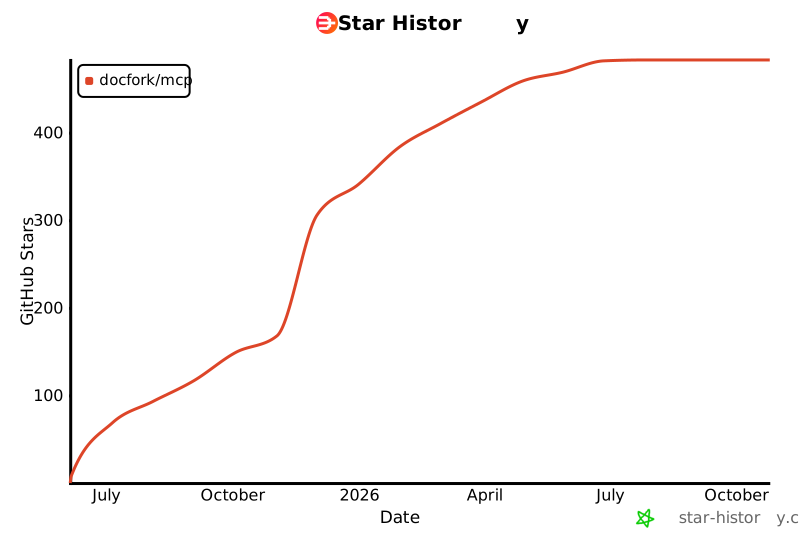
## Star History
[](https://www.star-history.com/#docfork/mcp&Date)
## ⚠️ Disclaimer
Docfork is an open, community-driven catalogue. While we review submissions, we cannot guarantee accuracy for every project listed. If you spot an issue, [raise a GitHub issue](https://github.com/docfork/mcp/issues/new?labels=library&title=LIBRARY:%20) or [contact support](mailto:support@docfork.com).
## License
MIT
