GitHub Enterprise MCP 서버
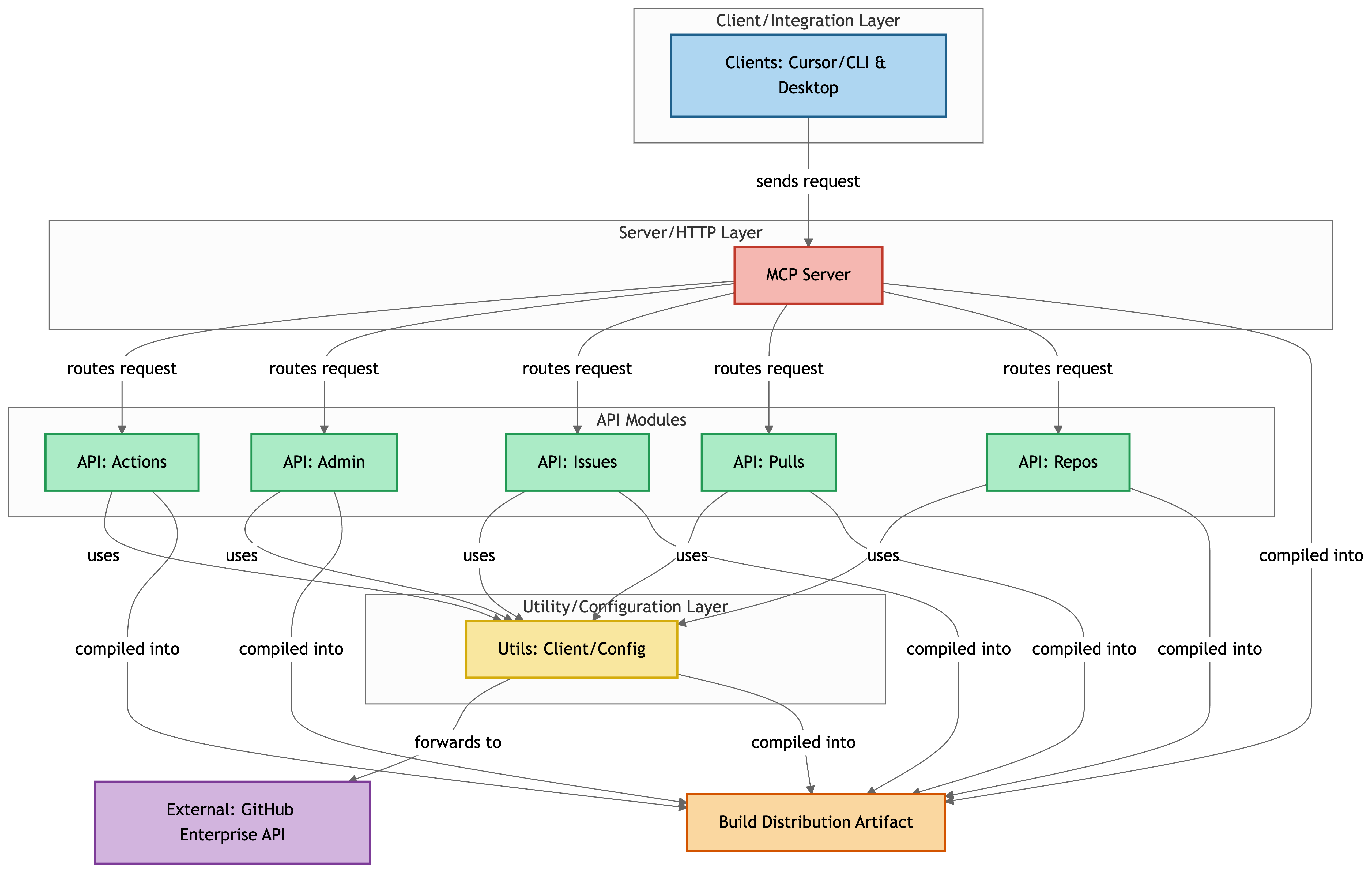
GitHub Enterprise API와 통합하기 위한 MCP(Model Context Protocol) 서버입니다. 이 서버는 Cursor에서 GitHub Enterprise의 저장소 정보, 이슈, PR 등에 쉽게 액세스할 수 있는 MCP 인터페이스를 제공합니다.
호환성
이 프로젝트는 주로 GitHub Enterprise Server 환경을 위해 설계되었지만 다음 환경에서도 작동합니다.
GitHub.com
GitHub 엔터프라이즈 클라우드
참고 : 일부 기업 전용 기능(라이선스 정보 및 기업 통계 등)은 GitHub.com 또는 GitHub Enterprise Cloud에서 작동하지 않습니다.
Related MCP server: GitHub MCP Server Plus
주요 특징
GitHub Enterprise 인스턴스에서 저장소 목록 검색
자세한 저장소 정보를 얻으세요
저장소 브랜치 나열
파일 및 디렉토리 내용 보기
이슈 관리 및 풀 리퀘스트
저장소 관리(생성, 업데이트, 삭제)
GitHub Actions 워크플로 관리
사용자 관리(사용자 목록, 생성, 업데이트, 삭제, 일시 중지/일시 중지 해제)
기업 통계에 액세스
향상된 오류 처리 및 사용자 친화적인 응답 형식
시작하기
필수 조건
Docker 설치 및 설정
옵션 1: Docker로 실행
Docker 이미지를 빌드합니다.
지엑스피1
환경 변수를 사용하여 Docker 컨테이너를 실행합니다.
docker run -p 3000:3000 \
-e GITHUB_TOKEN="your_github_token" \
-e GITHUB_ENTERPRISE_URL="https://github.your-company.com/api/v3" \
-e DEBUG=true \
github-enterprise-mcp
참고 : Dockerfile은 기본적으로 --transport http 사용하여 실행되도록 구성되어 있습니다. 이 옵션을 변경해야 하는 경우 다음 명령을 재정의할 수 있습니다.
docker run -p 3000:3000 \
-e GITHUB_TOKEN="your_github_token" \
-e GITHUB_ENTERPRISE_URL="https://github.your-company.com/api/v3" \
-e DEBUG=true \
github-enterprise-mcp node dist/index.js --transport http --debug
옵션 2: Docker Compose 사용
프로젝트 루트에 필수 환경 변수가 포함된 .env 파일을 만듭니다.
GITHUB_ENTERPRISE_URL=https://github.your-company.com/api/v3
GITHUB_TOKEN=your_github_token
DEBUG=true
Docker Compose로 컨테이너를 시작합니다.
로그를 확인하세요:
컨테이너를 멈추세요:
설치 및 설정
로컬 개발(동시 모드 사용)
이 방법은 자동 재컴파일 및 서버 재시작이 포함된 활성 개발에 권장됩니다.
저장소를 복제하고 필요한 패키지를 설치합니다.
git clone https://github.com/ddukbg/github-enterprise-mcp.git
cd github-enterprise-mcp
npm install
개발 서버를 실행합니다.
export GITHUB_TOKEN="your_github_token"
export GITHUB_ENTERPRISE_URL="https://github.your-company.com/api/v3"
npm run dev
이렇게 하면:
파일이 변경되면 TypeScript 코드를 자동으로 컴파일합니다.
컴파일된 파일이 업데이트되면 서버를 다시 시작합니다.
URL 기반 연결을 위해 HTTP 모드로 서버를 실행합니다.
아래 설명된 대로 URL 모드를 사용하여 커서에 연결합니다.
프로덕션을 위한 설치 및 설정
옵션 1: URL 모드 사용(로컬 개발에 권장)
이 방법은 가장 안정적이며 로컬 개발이나 테스트에 권장됩니다.
저장소를 복제하고 필요한 패키지를 설치합니다.
git clone https://github.com/ddukbg/github-enterprise-mcp.git
cd github-enterprise-mcp
npm install
프로젝트를 빌드하세요:
npm run build
chmod +x dist/index.js
서버를 실행합니다:
export GITHUB_TOKEN="your_github_token"
export GITHUB_ENTERPRISE_URL="https://github.your-company.com/api/v3"
node dist/index.js --transport http --debug
URL 모드를 사용하여 커서에 연결합니다.
{
"mcpServers": {
"github-enterprise": {
"url": "http://localhost:3000/sse"
}
}
}
옵션 2: 글로벌 명령으로 설치(npm 링크)
이 방법은 지역 개발에 유용합니다.
# After cloning the repository
git clone https://github.com/ddukbg/github-enterprise-mcp.git
cd github-enterprise-mcp
# Install required packages
npm install
# Build
npm run build
chmod +x dist/index.js
# Link globally
npm link
# Run as a global command
export GITHUB_TOKEN="your_github_token"
export GITHUB_ENTERPRISE_URL="https://github.your-company.com/api/v3"
github-enterprise-mcp --transport=http --debug
옵션 3: npx 사용(패키지가 게시될 때)
패키지가 공개 npm 레지스트리에 게시된 경우:
npx @ddukbg/github-enterprise-mcp --token=your_github_token --github-enterprise-url=https://github.your-company.com/api/v3
AI 도구와의 통합
클로드 데스크탑
claude_desktop_config.json 에 다음을 추가하세요.
{
"mcpServers": {
"github-enterprise": {
"command": "npx",
"args": ["-y", "@ddukbg/github-enterprise-mcp", "--token=YOUR_GITHUB_TOKEN", "--github-enterprise-url=YOUR_GITHUB_ENTERPRISE_URL"]
}
}
}
YOUR_GITHUB_TOKEN 과 YOUR_GITHUB_ENTERPRISE_URL 실제 값으로 바꾸세요.
커서
권장: URL 모드(가장 안정적)
Cursor에서 가장 안정적인 작업을 위해서는 URL 모드를 사용하는 것이 좋습니다.
별도의 터미널 창에서 서버를 시작합니다.
cd /path/to/github-enterprise-mcp
GITHUB_ENTERPRISE_URL="https://github.your-company.com/api/v3" GITHUB_TOKEN="your_github_token" node dist/index.js --transport http
커서의 MCP 설정을 구성하세요.
{
"mcpServers": {
"github-enterprise": {
"url": "http://localhost:3000/sse"
}
}
}
변경 사항을 적용하려면 커서를 다시 시작하세요.
대안: 명령 모드
또는 URL 모드가 더 안정적이기는 하지만 명령 모드를 사용하도록 커서를 구성할 수 있습니다.
커서를 열고 설정 으로 이동하세요
AI > MCP 서버 로 이동
MCP 서버 추가를 클릭하세요
다음 세부 정보를 입력하세요.
또는 .cursor/mcp.json 파일을 수동으로 편집하여 다음을 포함할 수 있습니다.
{
"mcpServers": {
"github-enterprise": {
"command": "npx",
"args": [
"@ddukbg/github-enterprise-mcp"
],
"env": {
"GITHUB_ENTERPRISE_URL": "https://github.your-company.com/api/v3",
"GITHUB_TOKEN": "your_github_token"
}
}
}
}
언어 구성
이 MCP 서버는 영어와 한국어를 모두 지원합니다. 다음을 사용하여 언어를 설정할 수 있습니다.
환경 변수
# Set language to Korean
export LANGUAGE=ko
# Or in .env file
LANGUAGE=ko
명령줄 인수
# Set language to Korean
node dist/index.js --language ko
지정하지 않으면 기본 언어는 영어입니다.
HTTP 모드의 추가 옵션
--debug : 디버그 로깅을 활성화합니다.
--github-enterprise-url <URL> : GitHub Enterprise API URL을 설정합니다.
--token <TOKEN> : GitHub 개인 액세스 토큰 설정
--language <LANG> : 언어 설정(en 또는 ko, 기본값: en)
사용 가능한 MCP 도구
이 MCP 서버는 다음과 같은 도구를 제공합니다.
도구 이름 | 설명 | 매개변수 | 필수 PAT 권한 |
list-repositories
| 사용자 또는 조직의 저장소 목록 검색 | owner : 사용자 이름/조직 이름 isOrg : 조직인지 여부 type : 저장소 유형 sort : 정렬 기준 page : 페이지 번호 perPage : 페이지당 항목 수
| repo
|
get-repository
| 자세한 저장소 정보를 얻으세요 | owner : 저장소 소유자 repo : 저장소 이름
| repo
|
list-branches
| 저장소의 브랜치 나열 | owner : 저장소 소유자 repo : 저장소 이름 protected_only : 보호된 브랜치만 표시할지 여부 page : 페이지 번호 perPage : 페이지당 항목 수
| repo
|
get-content
| 파일 또는 디렉토리 내용 검색 | owner : 저장소 소유자 repo : 저장소 이름 path : 파일/디렉토리 경로 ref : 브랜치/커밋(선택 사항)
| repo
|
list-pull-requests
| 저장소에 풀 리퀘스트 나열 | owner : 저장소 소유자 repo : 저장소 이름 state : PR 상태 필터 sort : 정렬 기준 direction : 정렬 방향 page : 페이지 번호 per_page : 페이지당 항목 수
| repo
|
get-pull-request
| 풀 리퀘스트 세부 정보 받기 | owner : 저장소 소유자 repo : 저장소 이름 pull_number : 풀 요청 번호
| repo
|
create-pull-request
| 새로운 풀 리퀘스트를 만듭니다 | owner : 저장소 소유자 repo : 저장소 이름 title : PR 제목 head : 헤드 브랜치 base : 베이스 브랜치 body : PR 설명 draft : 초안으로 생성 PR
| repo
|
merge-pull-request
| 풀 리퀘스트 병합 | owner : 저장소 소유자 repo : 저장소 이름 pull_number : 풀 요청 번호 merge_method : 병합 방법 commit_title : 커밋 제목 commit_message : 커밋 메시지
| repo
|
list-issues
| 저장소의 문제 나열 | owner : 저장소 소유자 repo : 저장소 이름 state : 문제 상태 filter sort : 정렬 기준 direction : 정렬 방향 page : 페이지 번호 per_page : 페이지당 항목 수
| repo
|
get-issue
| 문제 세부 정보 받기 | owner : 저장소 소유자 repo : 저장소 이름 issue_number : 이슈 번호
| repo
|
list-issue-comments
| 이슈 또는 풀 리퀘스트에 대한 댓글을 나열하세요 | owner : 저장소 소유자 repo : 저장소 이름 issue_number : 이슈/PR 번호 page : 페이지 번호 per_page : 페이지당 항목 수
| repo
|
create-issue
| 새로운 이슈를 생성하세요 | owner : 저장소 소유자 repo : 저장소 이름 title : 이슈 제목 body : 이슈 본문 콘텐츠 labels : 레이블 이름 배열 assignees : 사용자 로그인 배열 milestone : 마일스톤 ID
| repo
|
create-repository
| 새로운 저장소를 만듭니다 | name : 저장소 이름 description : 저장소 설명 private : 비공개 여부 auto_init : README로 초기화 gitignore_template : .gitignore 추가 license_template : 라이선스 추가 org : 조직 이름
| repo
|
update-repository
| 저장소 설정 업데이트 | owner : 저장소 소유자 repo : 저장소 이름 description : 새 설명 private : 개인 정보 보호 변경 default_branch : 기본 브랜치 변경 has_issues : 이슈 활성화/비활성화 has_projects : 프로젝트 활성화/비활성화 has_wiki : 위키 활성화/비활성화 archived : 보관/보관 취소
| repo
|
delete-repository
| 저장소 삭제 | owner : 저장소 소유자 repo : 저장소 이름 confirm : 확인(반드시 사실이어야 함)
| delete_repo
|
list-workflows
| GitHub Actions 워크플로 목록 | owner : 저장소 소유자 repo : 저장소 이름 page : 페이지 번호 perPage : 페이지당 항목 수
| actions:read
|
list-workflow-runs
| 워크플로 실행 목록 | owner : 저장소 소유자 repo : 저장소 이름 workflow_id : 워크플로 ID/파일 이름 branch : 지점별 필터링 status : 상태별 필터링 page : 페이지 번호 perPage : 페이지당 항목 수
| actions:read
|
trigger-workflow
| 워크플로 트리거 | owner : 저장소 소유자 repo : 저장소 이름 workflow_id : 워크플로 ID/파일 이름 ref : Git 참조 inputs : 워크플로 입력
| actions:write
|
get-license-info
| GitHub Enterprise 라이선스 정보 가져오기 | - | site_admin(관리자) 계정이 필요합니다. |
get-enterprise-stats
| GitHub Enterprise 시스템 통계 가져오기 | - | site_admin(관리자) 계정이 필요합니다. |
참고 : 엔터프라이즈 전용 도구( get-license-info 및 get-enterprise-stats )의 경우 사이트 관리자 권한이 있는 사용자가 필요합니다. 세분화된 토큰은 이러한 엔터프라이즈 수준 권한을 지원하지 않을 수 있으므로 클래식 개인 액세스 토큰을 사용하는 것이 좋습니다.
커서의 도구 사용
MCP 서버를 설정하고 Cursor가 연결되도록 구성하면 Cursor의 AI 채팅에서 GitHub Enterprise 도구를 직접 사용할 수 있습니다. 몇 가지 예를 들면 다음과 같습니다.
저장소 나열
mcp_github_enterprise_list_repositories(owner="octocat")
저장소 정보 가져오기
mcp_github_enterprise_get_repository(owner="octocat", repo="hello-world")
풀 리퀘스트 목록
mcp_github_enterprise_list_pull_requests(owner="octocat", repo="hello-world", state="open")
문제 관리
# List issues
mcp_github_enterprise_list_issues(owner="octocat", repo="hello-world", state="all")
# Get issue details
mcp_github_enterprise_get_issue(owner="octocat", repo="hello-world", issue_number=1)
# Get issue/PR comments
mcp_github_enterprise_list_issue_comments(owner="octocat", repo="hello-world", issue_number=1)
# Create a new issue
mcp_github_enterprise_create_issue(
owner="octocat",
repo="hello-world",
title="Found a bug",
body="Here is a description of the bug",
labels=["bug", "important"]
)
저장소 콘텐츠 작업
mcp_github_enterprise_get_content(owner="octocat", repo="hello-world", path="README.md")
저장소 관리
# Create a new repository
mcp_github_enterprise_create_repository(
name="new-project",
description="This is a new project",
private=true,
auto_init=true
)
# Update repository settings
mcp_github_enterprise_update_repository(
owner="octocat",
repo="hello-world",
description="Updated description",
has_issues=true
)
사용자 관리(Enterprise 전용)
이러한 기능은 GitHub Enterprise Server 환경을 위해 특별히 설계되었으며 관리자 권한이 필요합니다.
# List all users in the GitHub Enterprise instance
mcp_github_enterprise_list_users(filter="active", per_page=100)
# Get a specific user's details
mcp_github_enterprise_get_user(username="octocat")
# Create a new user (Enterprise only)
mcp_github_enterprise_create_user(
login="newuser",
email="newuser@example.com",
name="New User",
company="ACME Inc."
)
# Update a user's information (Enterprise only)
mcp_github_enterprise_update_user(
username="octocat",
email="updated-email@example.com",
location="San Francisco"
)
# Suspend a user (Enterprise only)
mcp_github_enterprise_suspend_user(
username="octocat",
reason="Violation of terms of service"
)
# Unsuspend a user (Enterprise only)
mcp_github_enterprise_unsuspend_user(username="octocat")
# List organizations a user belongs to
mcp_github_enterprise_list_user_orgs(username="octocat")
API 개선
기여하다
기여를 환영합니다! 풀 리퀘스트를 제출해 주세요.
특허
아이에스씨
