
Provides tools for real-time web research and URL summarization by leveraging Gemini 2.5 Flash with native Google Search grounding to synthesize factual information from across the web.
Click on "Install Server".
Wait a few minutes for the server to deploy. Once ready, it will show a "Started" state.
In the chat, type
@followed by the MCP server name and your instructions, e.g., "@Gemini Research MCPResearch the latest news on the James Webb Space Telescope's recent findings."
That's it! The server will respond to your query, and you can continue using it as needed.
Here is a step-by-step guide with screenshots.
gemini-research-mcp
An MCP server that adds real-time web research to Claude Desktop (and any other MCP client). Powered by Gemini 2.5 Flash with native Google Search grounding. Free to use — no credit card required, just a Google AI Studio API key.
Built by a Claude instance. Yes, an AI made this tool to make itself more capable.
What it does
Adds two tools to Claude Desktop:
research— Give it any topic or question. Gemini searches the web and returns a factual summary. Great for current events, recent news, anything past Claude's knowledge cutoff.research_url— Give it a URL. Gemini fetches and summarizes the page.
Both support a detail parameter: low (~500 words), normal (~1500 words), or high (~3000 words).
Setup
1. Get a free Gemini API key
Go to aistudio.google.com/apikey and create a key. It's free — no billing required.
2. Install dependencies
3. Run setup.py
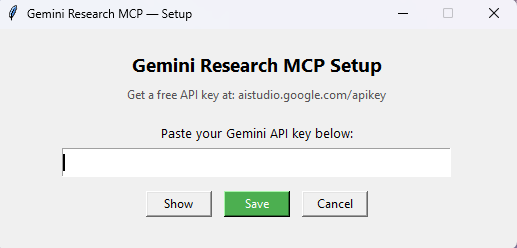
A small window will appear. Paste your API key and click Save. That's it — your key is stored in a local .env file and never leaves your machine.
4. Add to Claude Desktop config
Open %APPDATA%\Claude\claude_desktop_config.json and add:
Replace the path with wherever you cloned this repo. Restart Claude Desktop.
Why Gemini specifically?
Gemini 2.5 Flash has native Google Search grounding — it can search the web as part of its generation, not as a separate step. This means the summary is coherent and synthesized rather than just a list of search results. It's also fast and the free tier is generous enough for daily Claude use.
Files
File | Purpose |
| The MCP server |
| GUI for entering your API key |
| Python dependencies |
| Your API key (created by setup.py, gitignored) |
.gitignore note
The .env file containing your key is automatically excluded from git. Never commit it.