### Description
This PR introduces a **modern, React-based Task Viewer** - a professional web interface for viewing and managing Shrimp Task Manager data across multiple profiles. The Task Viewer replaces the basic HTML interface with a sophisticated, production-ready dashboard featuring advanced UI/UX patterns and comprehensive task management capabilities.
**🎯 Motivation**: Users needed a more intuitive and powerful way to visualize their task data, especially when working with multiple profiles. The previous interface lacked modern features like real-time search, sortable tables, and efficient profile switching.
**✨ Key Enhancements**:
- **Modern Tab Interface**: Browser-style draggable tabs for seamless profile switching
- **Advanced Search & Filtering**: Real-time task filtering with TanStack React Table
- **Intelligent Auto-Refresh**: Configurable intervals (5s to 5m) with visual indicators
- **Professional UI/UX**: Dark theme optimized for development environments
- **Responsive Design**: Mobile-first approach with breakpoint optimization
- **Comprehensive Documentation**: Complete setup guide with screenshot
**🔧 Technical Implementation**:
- Complete rewrite using **React 19** + **Vite** for optimal development experience
- **TanStack React Table** for advanced table features (sorting, pagination, filtering)
- **HTML5 Drag & Drop API** for intuitive tab reordering
- **Node.js HTTP server** with RESTful API endpoints
- **Hot Module Replacement** for instant development updates
### Type of change
- [x] New feature (non-breaking change which adds functionality)
- [x] This change requires a documentation update
### How Has This Been Tested?
- [x] `npm run build` - Production build succeeds without errors
- [x] Manual testing with the following configuration:
**Test Configuration**:
- **Environment**: WSL2 Ubuntu on Windows
- **Node.js version**: v18+
- **Browser**: Chrome, Firefox, Safari
- **Server**: Node.js HTTP server on port 9998
- **Build Tool**: Vite for development and production builds
**Testing Scenarios**:
- ✅ Profile management (add, remove, switch between tabs)
- ✅ Drag & drop tab reordering functionality
- ✅ Real-time search across all task fields
- ✅ Auto-refresh with configurable intervals
- ✅ Responsive design on multiple screen sizes
- ✅ Task statistics display and updates
- ✅ Hot reload during development
- ✅ Production build and deployment
### Checklist:
- [x] I have performed a self-review of my own code
- [x] I have commented my code, particularly in hard-to-understand areas
- [x] I have made corresponding changes to the documentation (`README.md`, `CHANGELOG.md`)
- [x] My changes generate no new warnings
- [x] I have added comprehensive documentation that proves my feature works
- [x] New interface works seamlessly with existing backend
- [x] I have checked to ensure my PR is focused on a single feature/fix
- [x] I have updated the version number in `package.json`
### 📸 Visual Preview
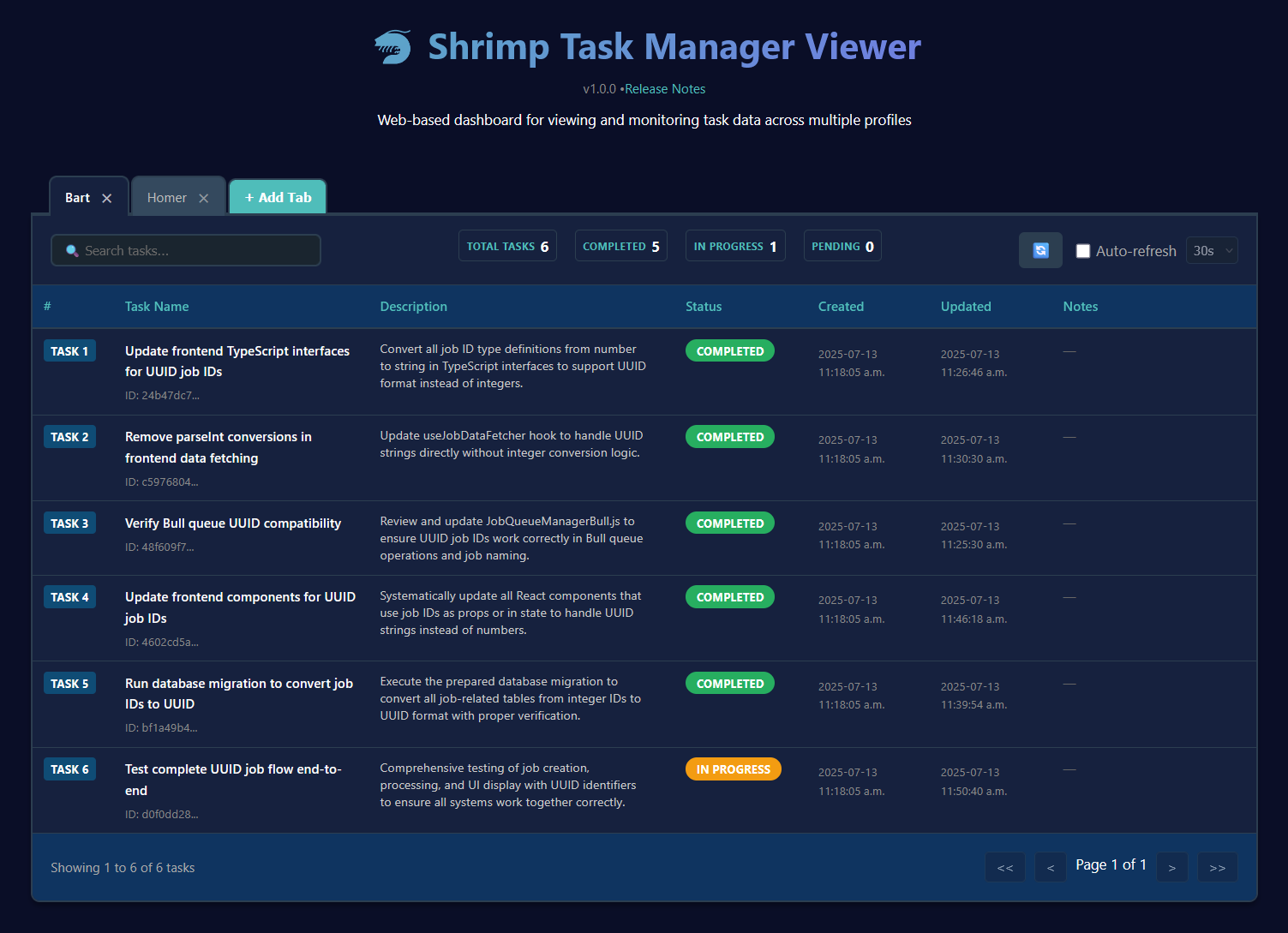
*Modern tabbed interface showing task management with real-time search, configurable auto-refresh, and professional table display*
### 📁 File Structure
```
tools/task-viewer/
├── src/
│ ├── App.jsx # Main React application
│ ├── components/
│ │ └── TaskTable.jsx # TanStack table component
│ └── index.css # Complete styling system
├── dist/ # Built React application
├── server.js # Node.js backend server
├── vite.config.js # Vite configuration
├── package.json # Dependencies and scripts
├── README.md # Comprehensive documentation
├── TESTING.md # Manual testing procedures
└── screenshot.png # Interface demonstration
```
### 🚀 Usage
```bash
# Navigate to task viewer
cd tools/task-viewer
# Install dependencies
npm install
# Build and start
npm run build && npm start
# Access at http://127.0.0.1:9998
```
### 📖 Documentation
- **Main README**: Updated with Task Viewer section and links
- **Tool README**: Complete documentation at `tools/task-viewer/README.md`
- **Testing Guide**: Manual testing procedures at `tools/task-viewer/TESTING.md`
- **Screenshot**: Professional interface preview included
- **Features**: Comprehensive feature list with technical details
This enhancement significantly improves the user experience for task management while maintaining full compatibility with the existing Shrimp Task Manager ecosystem.


