# Nova - Search/Global-Search
*Source: https://nova.laravel.com/docs/v5/search/global-search*
---
- [Community](https://discord.com/invite/laravel)
- [Blog](https://blog.laravel.com)
##### Get Started
- [Installation](/docs/v5/installation)
- [Release Notes](/docs/v5/releases)
- [Upgrade Guide](/docs/v5/upgrade)
##### Resources
- [The Basics](/docs/v5/resources/the-basics)
- [Fields](/docs/v5/resources/fields)
- [Dependent Fields](/docs/v5/resources/dependent-fields)
- [Date Fields](/docs/v5/resources/date-fields)
- [File Fields](/docs/v5/resources/file-fields)
- [Repeater Fields](/docs/v5/resources/repeater-fields)
- [Field Panels](/docs/v5/resources/panels)
- [Relationships](/docs/v5/resources/relationships)
- [Validation](/docs/v5/resources/validation)
- [Authorization](/docs/v5/resources/authorization)
##### Search
- [The Basics](/docs/v5/search/the-basics)
- [Global Search](/docs/v5/search/global-search)
- [Scout Integration](/docs/v5/search/scout-integration)
##### Filters
- [Defining Filters](/docs/v5/filters/defining-filters)
- [Registering Filters](/docs/v5/filters/registering-filters)
##### Lenses
- [Defining Lenses](/docs/v5/lenses/defining-lenses)
- [Registering Lenses](/docs/v5/lenses/registering-lenses)
##### Actions
- [Defining Actions](/docs/v5/actions/defining-actions)
- [Registering Actions](/docs/v5/actions/registering-actions)
##### Metrics
- [Defining Metrics](/docs/v5/metrics/defining-metrics)
- [Registering Metrics](/docs/v5/metrics/registering-metrics)
##### Digging Deeper
- [Dashboards](/docs/v5/customization/dashboards)
- [Menus](/docs/v5/customization/menus)
- [Notifications](/docs/v5/customization/notifications)
- [Authentication](/docs/v5/customization/authentication)
- [Impersonation](/docs/v5/customization/impersonation)
- [Tools](/docs/v5/customization/tools)
- [Resource Tools](/docs/v5/customization/resource-tools)
- [Cards](/docs/v5/customization/cards)
- [Fields](/docs/v5/customization/fields)
- [Filters](/docs/v5/customization/filters)
- [CSS / JavaScript](/docs/v5/customization/frontend)
- [Assets](/docs/v5/customization/assets)
- [Localization](/docs/v5/customization/localization)
- [Stubs](/docs/v5/customization/stubs)
On this page
- [Title / Subtitle Attributes](#title-%2F-subtitle-attributes)
- [Subtitles](#subtitles)
- [Customization](#customization)
- [Limiting Global Search Results](#limiting-global-search-results)
- [Global Search Debounce](#global-search-debounce)
- [Custom Avatars / Covers](#custom-avatars-%2F-covers)
- [Disabling Global Search for a Resource](#disabling-global-search-for-a-resource)
- [Disabling Global Search Globally](#disabling-global-search-globally)
Search
# Global Search
Learn how to use Nova’s global search feature to search across all your resources.
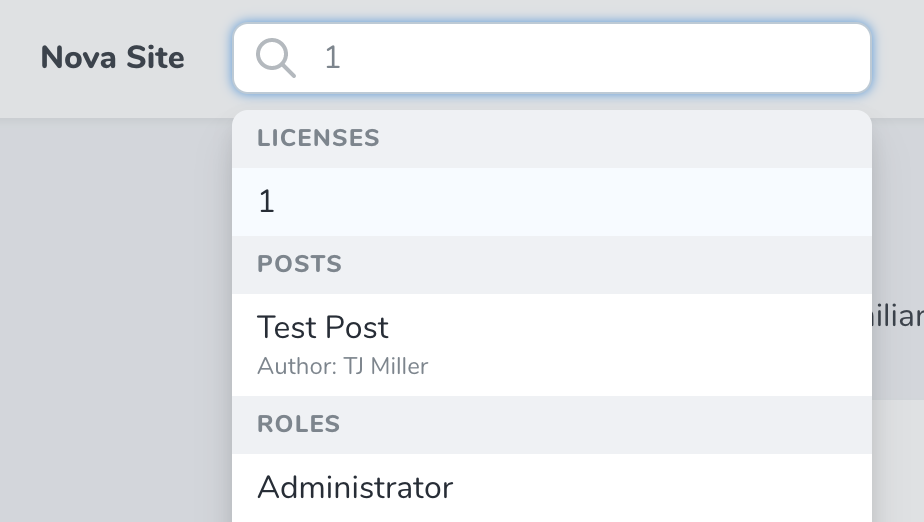
Nova not only allows you to search within specific resources and relationships, you may also globally search across all your resources using the global search input located within the top-navigation bar of the Nova administration panel:
You can focus the global search input by pressing `/` (forward slash) on your keyboard. Pressing `ESC` (the escape key) will also close the global search input.
## [](#title-/-subtitle-attributes) Title / Subtitle Attributes
When a resource is shown within the search results, the results will display the “title” of the resource. For example, a `User` resource may specify the `name` attribute as its title. Then, when the resource is shown within the global search results, that attribute will be displayed.
To customize the “title” attribute of a resource, you may define a `title` property or `title` method on the resource class:
Property
Method
Copy
Ask AI
```
namespace App\Nova;
class Team extends Resource
{
/**
* The single value that should be used to represent the resource when being displayed.
*
* @var string
*/
public static $title = 'name';
}
```
You may also display resource’s “avatar” next to the title in the search result by adding an [Avatar](./../resources/fields#avatar-field) field to the resource.
### [](#subtitles) Subtitles
You may also display a smaller “subtitle” attribute within the global search results. The subtitle will be placed directly under the title attribute. In this screenshot, you can see that the `Post` resource’s author is displayed as a subtitle, allowing quick identification of who wrote a given post:

To define a resource’s subtitle, you should override the `subtitle` method of the resource:
app/Nova/Post.php
Copy
Ask AI
```
/**
* Get the search result subtitle for the resource.
*
* @return string
*/
public function subtitle()
{
return "Author: {$this->user->name}";
}
```
If your subtitle accesses information on a related resource, you should consider adding the related resource to your resource’s [eager load array](./../resources/the-basics#eager-loadings).
## [](#customization) Customization
### [](#limiting-global-search-results) Limiting Global Search Results
You can limit the number of results that are returned via global search for a given resource by overriding the `globalSearchResults` property on the resource:
app/Nova/Post.php
Copy
Ask AI
```
/**
* The maximum number of results to include when searching globally.
*
* @var int
*/
public static $globalSearchResults = 5;
```
### [](#global-search-debounce) Global Search Debounce
You can configure the debounce timing of the global search field using the `Nova::globalSearchDebounce` method. Normally, this method should be called from within your application’s `NovaServiceProvider`:
app/Providers/NovaServiceProvider.php
Copy
Ask AI
```
/**
* Boot any application services.
*/
public function boot(): void
{
parent::boot();
Nova::globalSearchDebounce(1); // 1 second
}
```
### [](#custom-avatars-/-covers) Custom Avatars / Covers
If you are building a [custom field](./../customization/fields) that you would like to serve as the “avatar image” / cover art for global search results, your field should implement the `Laravel\Nova\Contracts\Cover` interface. This interface requires you to define a `resolveThumbnailUrl` method, which should return the URL of your desired “cover art”:
app/Nova/Team.php
Copy
Ask AI
```
namespace App\Nova;
class Team extends Resource
{
/**
* Resolve the thumbnail URL for the field.
*
* @return string|null
*/
public function resolveThumbnailUrl()
{
return 'https://www.example.com/avatar/'.md5(strtolower($this->value)).'?s=300';
}
}
```
## [](#disabling-global-search-for-a-resource) Disabling Global Search for a Resource
By default, all Nova resources are globally searchable; however, you may exclude a given resource from the global search by overriding the `globallySearchable` property on the resource:
app/Nova/Team.php
Copy
Ask AI
```
/**
* Indicates if the resource should be globally searchable.
*
* @var bool
*/
public static $globallySearchable = false;
```
## [](#disabling-global-search-globally) Disabling Global Search Globally
If you wish to completely disable global search inside of Nova, you can call the `withoutGlobalSearch` method from your `App/Providers/NovaServiceProvider`:
app/Providers/NovaServiceProvider.php
Copy
Ask AI
```
/**
* Boot any application services.
*/
public function boot(): void
{
parent::boot();
Nova::withoutGlobalSearch();
}
```
Was this page helpful?
YesNo
[The Basics](/docs/v5/search/the-basics)[Scout Integration](/docs/v5/search/scout-integration)
⌘I
