# Forge - Resources/Databases
*Source: https://forge.laravel.com/docs/resources/databases*
---
- [Community](https://discord.gg/laravel)
- [Blog](https://blog.laravel.com)
- [Status](https://status.on-forge.com)
##### Get Started
- [Introduction](/docs/introduction)
- [Laravel Forge CLI](/docs/cli)
- [Laravel Forge SDK](/docs/sdk)
##### Basics
- [Organizations](/docs/organizations)
- [Teams](/docs/teams)
- [Server Providers](/docs/server-providers)
- [Source Control](/docs/source-control)
- [SSH Keys](/docs/ssh)
- [Recipes](/docs/recipes)
- [API](/docs/api)
##### Servers
- [Managing Servers](/docs/servers/the-basics)
- [Server Types](/docs/servers/types)
- [Laravel VPS](/docs/servers/laravel-vps)
- [PHP](/docs/servers/php)
- [Load Balancing](/docs/servers/load-balancing)
- [Nginx Templates](/docs/servers/nginx-templates)
- [Security](/docs/servers/security)
- [Monitoring](/docs/servers/monitoring)
- [Real-Time Metrics](/docs/servers/real-time-metrics)
##### Sites
- [Managing Sites](/docs/sites/the-basics)
- [Domains](/docs/sites/domains)
- [Deployments](/docs/sites/deployments)
- [Environment Variables](/docs/sites/environment-variables)
- [Commands](/docs/sites/commands)
- [Queues](/docs/sites/queues)
- [Network](/docs/sites/network)
- [Isolation](/docs/sites/user-isolation)
- [Laravel](/docs/sites/laravel)
- [Logs](/docs/sites/logs)
##### Resources
- [Databases](/docs/resources/databases)
- [Database Backups](/docs/resources/database-backups)
- [Caches](/docs/resources/caches)
- [Background Processes](/docs/resources/background-processes)
- [Scheduler](/docs/resources/scheduler)
- [Network](/docs/resources/network)
- [Packages](/docs/resources/packages)
##### Integrations
- [Envoyer](/docs/integrations/envoyer)
- [Sentry](/docs/integrations/sentry)
- [Aikido](/docs/integrations/aikido)
##### Other
- [Support](/docs/support)
- [Changelog](/docs/changelog)
- [Abuse](/docs/abuse)
On this page
- [Introduction](#introduction)
- [Creating servers with databases](#creating-servers-with-databases)
- [Installing databases later](#installing-databases-later)
- [Managing database passwords](#managing-database-passwords)
- [Connecting to databases via database clients](#connecting-to-databases-via-database-clients)
- [Using database connection URLs](#using-database-connection-urls)
- [Connecting to external databases](#connecting-to-external-databases)
- [Managing databases](#managing-databases)
- [Creating databases](#creating-databases)
- [Syncing databases](#syncing-databases)
- [Creating database users](#creating-database-users)
- [Database upgrades](#database-upgrades)
Resources
# Databases
Copy page
Learn how to manage databases on your Laravel Forge server.
Copy page
## [](#introduction) Introduction
When provisioning a new Laravel Forge server that requires a database, you can choose between installing an [app server](/docs/servers/types#app-servers) or a dedicated [database server](/docs/servers/types#database-servers). The Forge dashboard provides comprehensive tools for managing databases, users, and permissions across your infrastructure.
## [](#creating-servers-with-databases) Creating servers with databases
During server creation, you can select from several supported database servers:
- MySQL (8.0)
- MariaDB (10.11, 11.4)
- PostgreSQL (13, 14, 15, 16, 17, 18)
Laravel Forge automatically handles the installation process, creating a default `forge` database and user with a securely generated password. Both the database and root passwords are displayed upon server creation for your reference.
Laravel VPS servers are limited to the latest MySQL and PostgreSQL versions only.
### [](#installing-databases-later) Installing databases later
If you need to add database functionality to an existing server, you can install one through the server’s “Databases” management tab. Once installed, you’ll have full database management capabilities through the Laravel Forge interface.
If you created a “Web Server”, database installation is not supported. Web servers include only the essential software needed for PHP applications. For combined web and database functionality, provision an “App Server” instead.
## [](#managing-database-passwords) Managing database passwords
You can reset both `root` and `forge` database user passwords using the password reset feature in Laravel Forge’s “Databases” management tab.
Never change `root` or `forge` database passwords manually or outside the Laravel Forge dashboard. This will break Forge’s ability to connect to and manage your database.
## [](#connecting-to-databases-via-database-clients) Connecting to databases via database clients
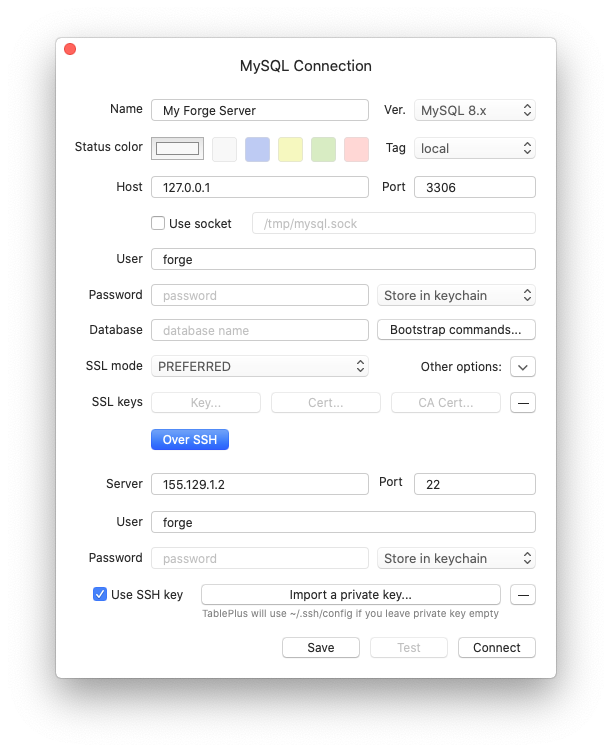
Database connections require SSH key authentication by default and don’t support password-only access. When using GUI database clients to connect to your Laravel Forge database, you’ll need SSH authentication with your **private SSH key**.
For example, when configuring [TablePlus](https://tableplus.com):
### [](#using-database-connection-urls) Using database connection URLs
Some clients like TablePlus support connection URLs for simplified setup. Laravel Forge automatically generates these URLs for you, though you’ll need to enter your password manually since it’s not included in the URL for security purposes.
Forge also provides a convenient button to launch your preferred database client directly.
## [](#connecting-to-external-databases) Connecting to external databases
You can connect your application to a database hosted on another Laravel Forge server using [Laravel Forge’s server network feature](/docs/resources/network#server-network).
When both servers [meet the network requirements](/docs/resources/network#server-network), follow these steps:
1. **Configure server network access:**
- Navigate to your application server’s “Network” settings
- Enable the connection to your database server under the “Server Network” section
2. **Update application configuration:**
- Access your site’s environment page
- Set the database host to the external server’s private IP address
- Update database credentials to match the external database
## [](#managing-databases) Managing databases
Laravel Forge provides advanced database management capabilities for MySQL, MariaDB, and PostgreSQL servers.
### [](#creating-databases) Creating databases
Create new databases through the server’s “Storage” > “Database” tab. You only need to provide the database name—the `forge` user automatically receives access permissions.
### [](#syncing-databases) Syncing databases
While we recommend managing databases through Laravel Forge for consistency, you can sync externally created databases using the “Sync Databases” button.
Note that system-reserved database names are excluded from syncing:
- `mysql`, `information_schema`, `performance_schema`, `sys`
- `postgres`, `template0`, `template1`
### [](#creating-database-users) Creating database users
The database panel allows you to create additional users by specifying the username, password, and accessible databases. You can also designate users as read-only, restricting them to select operations while preventing insert, update, or delete actions.
## [](#database-upgrades) Database upgrades
Laravel Forge doesn’t provide automatic database server upgrades. If you need to upgrade your database software, you’ll need to handle this process manually.
Was this page helpful?
YesNo
[Logs](/docs/sites/logs)[Database Backups](/docs/resources/database-backups)
⌘I
[x](https://x.com/laravelphp)[github](https://github.com/laravel)[discord](https://discord.com/invite/laravel)[linkedin](https://linkedin.com/company/laravel)
