# Nova - Resources/Relationships
*Source: https://nova.laravel.com/docs/v5/resources/relationships*
---
[Laravel Nova home page](https://nova.laravel.com)
v5
Search...
⌘KAsk AI
- [email protected]
- [Platform Status](https://status.laravel.com/)
- [Dashboard](https://nova.laravel.com)
- [Dashboard](https://nova.laravel.com)
Search...
Navigation
Resources
Relationships
[Documentation](/docs/v5/installation)[Knowledge Base](/docs/kb/support)
- [Blog](https://blog.laravel.com)
##### Get Started
- [Installation](/docs/v5/installation)
- [Release Notes](/docs/v5/releases)
- [Upgrade Guide](/docs/v5/upgrade)
##### Resources
- [The Basics](/docs/v5/resources/the-basics)
- [Fields](/docs/v5/resources/fields)
- [Dependent Fields](/docs/v5/resources/dependent-fields)
- [Date Fields](/docs/v5/resources/date-fields)
- [File Fields](/docs/v5/resources/file-fields)
- [Repeater Fields](/docs/v5/resources/repeater-fields)
- [Field Panels](/docs/v5/resources/panels)
- [Relationships](/docs/v5/resources/relationships)
- [Validation](/docs/v5/resources/validation)
- [Authorization](/docs/v5/resources/authorization)
##### Search
- [The Basics](/docs/v5/search/the-basics)
- [Global Search](/docs/v5/search/global-search)
- [Scout Integration](/docs/v5/search/scout-integration)
##### Filters
- [Defining Filters](/docs/v5/filters/defining-filters)
- [Registering Filters](/docs/v5/filters/registering-filters)
##### Lenses
- [Defining Lenses](/docs/v5/lenses/defining-lenses)
- [Registering Lenses](/docs/v5/lenses/registering-lenses)
##### Actions
- [Defining Actions](/docs/v5/actions/defining-actions)
- [Registering Actions](/docs/v5/actions/registering-actions)
##### Metrics
- [Defining Metrics](/docs/v5/metrics/defining-metrics)
- [Registering Metrics](/docs/v5/metrics/registering-metrics)
##### Digging Deeper
- [Dashboards](/docs/v5/customization/dashboards)
- [Menus](/docs/v5/customization/menus)
- [Notifications](/docs/v5/customization/notifications)
- [Authentication](/docs/v5/customization/authentication)
- [Impersonation](/docs/v5/customization/impersonation)
- [Tools](/docs/v5/customization/tools)
- [Resource Tools](/docs/v5/customization/resource-tools)
- [Cards](/docs/v5/customization/cards)
- [Fields](/docs/v5/customization/fields)
- [Filters](/docs/v5/customization/filters)
- [CSS / JavaScript](/docs/v5/customization/frontend)
- [Assets](/docs/v5/customization/assets)
- [Localization](/docs/v5/customization/localization)
- [Stubs](/docs/v5/customization/stubs)
On this page
- [HasOne](#hasone)
- [HasOneOfMany](#hasoneofmany)
- [HasMany](#hasmany)
- [HasOneThrough](#hasonethrough)
- [HasManyThrough](#hasmanythrough)
- [BelongsTo](#belongsto)
- [Peeking at BelongsTo Relationships](#peeking-at-belongsto-relationships)
- [Preventing Peeking at BelongsTo Relationships](#preventing-peeking-at-belongsto-relationships)
- [Nullable Relationships](#nullable-relationships)
- [Title Attributes](#title-attributes)
- [Disable Ordering by Title](#disable-ordering-by-title)
- [Filter Trashed Items](#filter-trashed-items)
- [BelongsToMany](#belongstomany)
- [Pivot Fields](#pivot-fields)
- [Pivot Computed Fields](#pivot-computed-fields)
- [Pivot Actions](#pivot-actions)
- [Title Attributes](#title-attributes-2)
- [Disabling Ordering by Title](#disabling-ordering-by-title)
- [Allowing Duplicate Relations](#allowing-duplicate-relations)
- [MorphOne](#morphone)
- [MorphOneOfMany](#morphoneofmany)
- [MorphMany](#morphmany)
- [MorphTo](#morphto)
- [Nullable MorphTo Relationships](#nullable-morphto-relationships)
- [Peeking at MorphTo Relationships](#peeking-at-morphto-relationships)
- [Preventing Peeking at MorphTo Relationships](#preventing-peeking-at-morphto-relationships)
- [Setting Default Values on MorphTo Relationships](#setting-default-values-on-morphto-relationships)
- [MorphToMany](#morphtomany)
- [Pivot Fields](#pivot-fields-2)
- [Title Attributes](#title-attributes-3)
- [Collapsable Relations](#collapsable-relations)
- [Searchable Relations](#searchable-relations)
- [Relatable Query Filtering](#relatable-query-filtering)
- [Limiting Relation Results](#limiting-relation-results)
- [Creating Inline Relations](#creating-inline-relations)
- [Inline Creation Modal Size](#inline-creation-modal-size)
Resources
# Relationships
Nova ships with a variety of fields out of the box, including fields for text inputs, booleans, dates, file uploads, Markdown, and more.
In addition to the variety of fields we’ve already discussed, Nova has full support for all of Laravel’s relationships. Once you add relationship fields to your Nova resources, you’ll start to experience the full power of the Nova dashboard, as the resource detail page will allow you to quickly view and search a resource’s related models:
## [](#hasone) HasOne
The `HasOne` field corresponds to a `hasOne` Eloquent relationship. For example, let’s assume a `User` model `hasOne` `Address` model. We may add the relationship to our `User` Nova resource like so:
Copy
Ask AI
```
use Laravel\Nova\Fields\HasOne;
// ...
HasOne::make('Address'),
```
Like other types of fields, relationship fields will automatically “camel case” the displayable name of the field to determine the underlying relationship method / attribute. However, you may explicitly specify the name of the relationship method by passing it as the second argument to the field’s `make` method:
Copy
Ask AI
```
use Laravel\Nova\Fields\HasOne;
// ...
HasOne::make('Dirección', 'address'),
```
### [](#hasoneofmany) HasOneOfMany
The `HasOne` relationship field can be transformed into an “has one of many” Eloquent relationship using the `ofMany` method. For example, let’s assume a `User` model `hasMany` `Post` models. We may add the “has one of many” relationship to our `User` Nova resource like so:
Copy
Ask AI
```
use App\Nova\Post;
use Laravel\Nova\Fields\HasOne;
// ...
HasOne::ofMany('Latest Post', 'latestPost', Post::class),
```
## [](#hasmany) HasMany
The `HasMany` field corresponds to a `hasMany` Eloquent relationship. For example, let’s assume a `User` model `hasMany` `Post` models. We may add the relationship to our `User` Nova resource like so:
Copy
Ask AI
```
use Laravel\Nova\Fields\HasMany;
// ...
HasMany::make('Posts'),
```
Once the field has been added to your resource, it will be displayed on the resource’s detail page.
When defining `HasMany` relationships, make sure to use the plural form of the relationship so Nova can infer the correct singular resource name:
Copy
Ask AI
```
use Laravel\Nova\Fields\HasMany;
// ...
HasMany::make('Posts'),
```
## [](#hasonethrough) HasOneThrough
The `HasOneThrough` field corresponds to a `hasOneThrough` Eloquent relationship. For example, let’s assume a `Mechanic` model has one `Car`, and each `Car` may have one `Owner`. While the `Mechanic` and the `Owner` have no direct connection, the `Mechanic` can access the `Owner` through the `Car` itself. You can display this relationship by adding it to your Nova resource:
Copy
Ask AI
```
use Laravel\Nova\Fields\HasOneThrough;
// ...
HasOneThrough::make('Owner'),
```
## [](#hasmanythrough) HasManyThrough
The `HasManyThrough` field corresponds to a `hasManyThrough` Eloquent relationship. For example, a `Country` model might have many `Post` models through an intermediate `User` model. In this example, you could easily gather all blog posts for a given country. To display this relationship within Nova, you may add it to your Nova resource:
Copy
Ask AI
```
use Laravel\Nova\Fields\HasManyThrough;
// ...
HasManyThrough::make('Posts'),
```
## [](#belongsto) BelongsTo
The `BelongsTo` field corresponds to a `belongsTo` Eloquent relationship. For example, let’s assume a `Post` model `belongsTo` a `User` model. We may add the relationship to our `Post` Nova resource like so:
Copy
Ask AI
```
use Laravel\Nova\Fields\BelongsTo;
// ...
BelongsTo::make('User'),
```
You may customize the resource class used by the relation field by providing the second and third arguments of the `make` method, which define the name of the relationship and the underlying Nova resource class:
Copy
Ask AI
```
use App\Nova\User;
use Laravel\Nova\Fields\BelongsTo;
// ...
BelongsTo::make('Author', 'author', User::class),
```
### [](#peeking-at-belongsto-relationships) Peeking at BelongsTo Relationships
When hovering over a `BelongsTo` link when viewing the index or detail views, Nova will show a small card allowing you to “take a peek” at the linked relation:
### [](#preventing-peeking-at-belongsto-relationships) Preventing Peeking at `BelongsTo` Relationships
Relationship peeking is enabled by default; however, you can prevent the user from peeking at the relation using the `noPeeking` helper on your `BelongsTo` field:
Copy
Ask AI
```
use Laravel\Nova\Fields\BelongsTo;
// ...
BelongsTo::make('Author')
->noPeeking(),
```
You may also use the `peekable` method to determine whether the user should be allowed to peek at the relation:
Copy
Ask AI
```
use Laravel\Nova\Fields\BelongsTo;
use Laravel\Nova\Http\Requests\NovaRequest;
// ...
BelongsTo::make('Author')
->peekable(function (NovaRequest $request) {
return $request->isResourceDetailRequest();
}),
```
#### [](#nullable-relationships) Nullable Relationships
If you would like your `BelongsTo` relationship to be `nullable`, you may simply chain the `nullable` method onto the field’s definition:
Copy
Ask AI
```
use Laravel\Nova\Fields\BelongsTo;
// ...
BelongsTo::make('User')
->nullable(),
```
#### [](#title-attributes) Title Attributes
When a `BelongsTo` field is shown on a resource creation / update page, a drop-down selection menu or search menu will display the “title” of the resource. For example, a `User` resource may use the `name` attribute as its title. Then, when the resource is shown in a `BelongsTo` selection menu, that attribute will be displayed:
To customize the “title” attribute of a resource, you may define a `title` property or `title` method on the resource class:
Property
Method
Copy
Ask AI
```
/**
* The single value that should be used to represent the resource when being displayed.
*
* @var string
*/
public static $title = 'name';
```
#### [](#disable-ordering-by-title) Disable Ordering by Title
By default, associatable resources will be sorted by their title when listed in a select dropdown. Using the `dontReorderAssociatables` method, you can disable this behavior so that the resources as sorted based on the ordering specified by the [relatable query](./authorization#relatable-filtering):
Copy
Ask AI
```
use Laravel\Nova\Fields\BelongsTo;
// ...
BelongsTo::make('User')
->dontReorderAssociatables(),
```
#### [](#filter-trashed-items) Filter Trashed Items
By default, the `BelongsTo` field will allow users to select soft-deleted models; however, this can be disabled using the `withoutTrashed` method:
Copy
Ask AI
```
use Laravel\Nova\Fields\BelongsTo;
// ...
BelongsTo::make('User')
->withoutTrashed(),
```
## [](#belongstomany) BelongsToMany
The `BelongsToMany` field corresponds to a `belongsToMany` Eloquent relationship. For example, let’s assume a `User` model `belongsToMany` `Role` models:
app/Models/User.php
Copy
Ask AI
```
use App\Models\Role;
use Illuminate\Database\Eloquent\Relations\BelongsToMany;
// ...
public function roles(): BelongsToMany
{
return $this->belongsToMany(Role::class);
}
```
We may add the relationship to our `User` Nova resource like so:
app/Nova/User.php
Copy
Ask AI
```
use Laravel\Nova\Fields\BelongsToMany;
// ...
/**
* Get the fields displayed by the resource.
*
* @return array<int, \Laravel\Nova\Fields\Field>
*/
public function fields(NovaRequest $request): array
{
return [
BelongsToMany::make('Roles'),
];
}
```
You may customize the resource class used by the relationship field by providing the second and third arguments to the `make` method:
Copy
Ask AI
```
use App\Nova\Author;
use Laravel\Nova\Fields\BelongsToMany;
// ...
BelongsToMany::make('Pseudonyms', 'pseudonyms', Author::class),
```
Once the field has been added to your resource, it will be displayed on the resource’s detail page.
#### [](#pivot-fields) Pivot Fields
If your `belongsToMany` relationship interacts with additional “pivot” fields that are stored on the intermediate table of the many-to-many relationship, you may also attach those to your `BelongsToMany` Nova relationship. Once these fields are attached to the relationship field, and the relationship has been defined on both of the related models / resources, they will be displayed on the related resource index.
For example, let’s assume our `User` model `belongsToMany` `Role` models. On our `role_user` intermediate table, let’s imagine we have a `notes` field that contains some simple text notes about the relationship. We can attach this pivot field to the `BelongsToMany` field using the `fields` method:
app/Nova/User.php
Copy
Ask AI
```
use Laravel\Nova\Fields\BelongsToMany;
use Laravel\Nova\Fields\Text;
// ...
BelongsToMany::make('Roles')
->fields(function ($request, $relatedModel) {
return [
Text::make('Notes'),
];
}),
```
Of course, it is likely we would also define this field on the inverse of the relationship. So, if we define the `BelongsToMany` field on the `User` resource, we would define its inverse on the `Role` resource:
app/Nova/Role.php
Copy
Ask AI
```
use Laravel\Nova\Fields\BelongsToMany;
use Laravel\Nova\Fields\Text;
// ...
BelongsToMany::make('Users')
->fields(function ($request, $relatedModel) {
return [
Text::make('Notes'),
];
}),
```
Don’t forget to define the pivot fields inside your Model’s relationship definition using the
`withPivot` method:
<https://laravel.com/docs/eloquent-relationships
}
```
#### [](#pivot-computed-fields) Pivot Computed Fields
Laravel Nova also allows you to define computed fields within the field list of a `belongsToMany` relationship field:
Copy
Ask AI
```
use Laravel\Nova\Fields\BelongsToMany;
use Laravel\Nova\Fields\Boolean;
use Laravel\Nova\Fields\Text;
// ...
BelongsToMany::make('Users')
->fields(function ($request, $relatedModel) {
return [
Text::make('Notes'),
Boolean::make('Has Notes', function ($pivot) {
return ! empty($pivot->notes);
}),
];
}),
```
#### [](#pivot-actions) Pivot Actions
Typically, [Nova actions](./../actions/defining-actions) operate on a resource. However, you may also attach actions to `belongsToMany` fields so that they can operate on pivot / intermediate table records. To accomplish this, you may chain the `actions` method onto your field’s definition:
Copy
Ask AI
```
use App\Nova\Actions\MarkAsActive;
use Laravel\Nova\Fields\BelongsToMany;
// ...
BelongsToMany::make('Roles')
->actions(fn () => [
new MarkAsActive,
]),
```
Once the action has been attached to the field, you will be able to select the action and execute it from the relationship index on the parent resource’s detail page.
To learn more about Nova actions, check out the complete [action documentation](./../actions/defining-actions).
#### [](#title-attributes-2) Title Attributes
When a `BelongsToMany` field is shown on a resource creation / update page, a drop-down selection menu or search menu will display the “title” of the resource. For example, a `Role` resource may use the `name` attribute as its title. Then, when the resource is shown in a `BelongsToMany` selection menu, that attribute will be displayed:

To customize the “title” attribute of a resource, you may define a `title` property or `title` method on the resource class:
Property
Method
Copy
Ask AI
```
/**
* The single value that should be used to represent the resource when being displayed.
* @var string
*/
public static $title = 'name';
```
#### [](#disabling-ordering-by-title) Disabling Ordering by Title
By default, associatable resources will be sorted by their title when listed in a select dropdown. Using the `dontReorderAttachables` method, you can disable this behavior so that the resources as sorted based on the ordering specified by the [relatable query](./authorization#relatable-filtering):
Copy
Ask AI
```
use Laravel\Nova\Fields\BelongsToMany;
// ...
BelongsToMany::make('Roles')
->dontReorderAttachables(),
```
#### [](#allowing-duplicate-relations) Allowing Duplicate Relations
By default, Laravel Nova ensures that “belongs to many” relationships are unique. However, if necessary, you may instruct Nova to allow duplicate relationship entries.
To get started, you should ensure that your pivot record’s `id` column is available by using the `withPivot` method when defining the relationship on your Eloquent model. In this example, let’s imagine that a `User` may purchase a `Book` one or more times:
app/Models/User.php
Copy
Ask AI
```
use Illuminate\Database\Eloquent\Relations\BelongsToMany;
// ...
public function books(): BelongsToMany
{
return $this->belongsToMany(Book::class)
->using(BookPurchase::class)
->withPivot('id', 'notes')
->withTimestamps();
}
```
Next, we can define the Nova relationship that allows duplicate relations using the `allowDuplicateRelations` method:
Copy
Ask AI
```
use Laravel\Nova\Fields\BelongsToMany;
// ...
/**
* Get the fields displayed by the resource.
* @return array<int, \Laravel\Nova\Fields\Field>
*/
public function fields(NovaRequest $request): array
{
return [
BelongsToMany::make('Books')
->fields(fn () => [
Text::make('Notes'),
])->allowDuplicateRelations(),
];
}
```
## [](#morphone) MorphOne
The `MorphOne` field corresponds to a `morphOne` Eloquent relationship. For example, let’s assume a `Post` has a one-to-one polymorphic relationship with the `Image` model. We may add the relationship to our `Post` Nova resource like so:
Copy
Ask AI
```
use Laravel\Nova\Fields\MorphOne;
// ...
MorphOne::make('Image'),
```
### [](#morphoneofmany) MorphOneOfMany
The `MorphOne` relationship field can be transformed into a “morph one of many” Eloquent relationship using the `ofMany` method. For example, let’s assume a `Post` has a one-to-many polymorphic relationship with the `Comment` model. We may add the relationship to our `Post` Nova resource like so:
Copy
Ask AI
```
use App\Nova\Comment;
use Laravel\Nova\Fields\MorphOne;
// ...
MorphOne::ofMany('Latest Comment', 'latestComment', Comment::class),
```
## [](#morphmany) MorphMany
The `MorphMany` field corresponds to a `morphMany` Eloquent relationship. For example, let’s assume a `Post` has a one-to-many polymorphic relationship with the `Comment` model. We may add the relationship to our `Post` Nova resource like so:
Copy
Ask AI
```
use Laravel\Nova\Fields\MorphMany;
// ...
MorphMany::make('Comments'),
```
## [](#morphto) MorphTo
The `MorphTo` field corresponds to a `morphTo` Eloquent relationship. For example, let’s assume a `Comment` model has a polymorphic relationship with both the `Post` and `Video` models. We may add the relationship to our `Comment` Nova resource like so:
Copy
Ask AI
```
use App\Nova\Post;
use App\Nova\Video;
use Laravel\Nova\Fields\MorphTo;
// ...
MorphTo::make('Commentable')
->types([
Post::class,
Video::class,
]),
```
As you can see in the example above, the `types` method is used to instruct the `MorphTo` field what types of resources it may be associated with. Nova will use this information to populate the `MorphTo` field’s type selection menu on the creation and update pages:
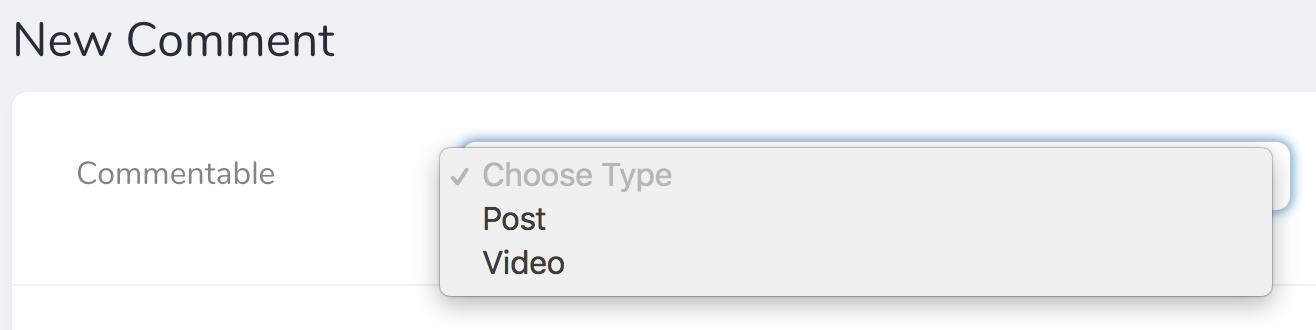
When a `MorphTo` field is shown on a resource creation / update page, the [title attributes](#title-attributes) of the available resources will automatically be displayed.
### [](#nullable-morphto-relationships) Nullable `MorphTo` Relationships
If you would like your `MorphTo` relationship to be `nullable`, chain the `nullable` method onto the field’s definition:
Copy
Ask AI
```
use App\Nova\Post;
use App\Nova\Video;
use Laravel\Nova\Fields\MorphTo;
// ...
MorphTo::make('Commentable')
->types([
Post::class,
Video::class,
])->nullable(),
```
### [](#peeking-at-morphto-relationships) Peeking at `MorphTo` Relationships
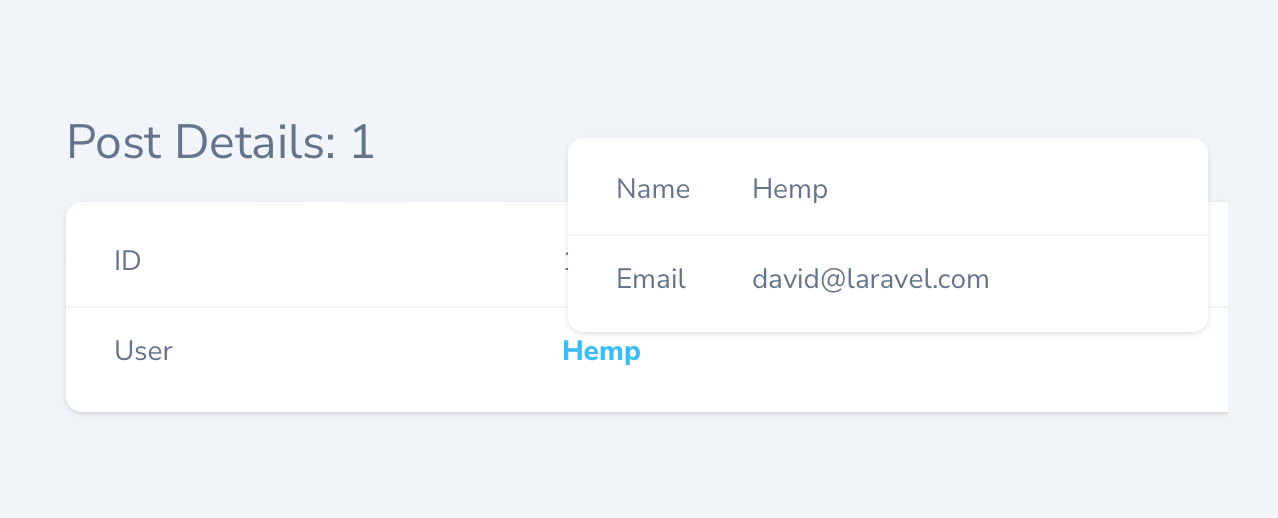
When hovering over a `MorphTo` link when viewing the index or detail views, Nova will show a small card allowing you to “take a peek” at the linked relation:
### [](#preventing-peeking-at-morphto-relationships) Preventing Peeking at `MorphTo` Relationships
Relationship peeking is enabled by default; however, you can prevent the user from peeking at the relation using the `noPeeking` helper on your `MorphTo` field:
Copy
Ask AI
```
use Laravel\Nova\Fields\MorphTo;
// ...
MorphTo::make('Author')
->noPeeking(),
```
You may also use the `peekable` method to determine whether the user should be allowed to peek at the relation:
Copy
Ask AI
```
use Laravel\Nova\Fields\MorphTo;
use Laravel\Nova\Http\Requests\NovaRequest;
// ...
MorphTo::make('Author')
->peekable(function (NovaRequest $request) {
return $request->isResourceDetailRequest();
}),
```
### [](#setting-default-values-on-morphto-relationships) Setting Default Values on `MorphTo` Relationships
When setting the default value for a `MorphTo` field, in addition to setting the field’s initial value using the `default` method, you also need to specify the class name of the resource to be used. You may accomplish this via the `defaultResource` method:
Copy
Ask AI
```
use App\Nova\Post;
use Laravel\Nova\Fields\MorphTo;
// ...
MorphTo::make('Commentable')
->default(1)
->defaultResource(Post::class),
```
## [](#morphtomany) MorphToMany
The `MorphToMany` field corresponds to a `morphToMany` Eloquent relationship. For example, let’s assume a `Post` has a many-to-many polymorphic relationship with the `Tag` model. We may add the relationship to our `Post` Nova resource like so:
Copy
Ask AI
```
use Laravel\Nova\Fields\MorphToMany;
// ...
MorphToMany::make('Tags'),
```
#### [](#pivot-fields-2) Pivot Fields
If your `morphToMany` relationship interacts with additional “pivot” fields that are stored on the intermediate table of the many-to-many relationship, you may also attach those to your `MorphToMany` Nova relationship. Once these fields are attached to the relationship field, they will be displayed on the related resource index.
For example, on our `taggables` intermediate table, let’s imagine we have a `notes` field that contains some simple text notes about the relationship. We can attach this pivot field to the `MorphToMany` field using the `fields` method:
app/Nova/Post.php
Copy
Ask AI
```
use Laravel\Nova\Fields\MorphToMany;
use Laravel\Nova\Fields\Text;
use Laravel\Nova\Http\Requests\NovaRequest;
// ...
/**
* Get the fields displayed by the resource.
* @return array<int, \Laravel\Nova\Fields\Field>
*/
public function fields(NovaRequest $request): array
{
return [
MorphToMany::make('Tags')
->fields(fn ($request, $relatedModel) => [
Text::make('Notes'),
]),
];
}
```
Of course, it is likely we would also define this field on the inverse of the relationship. So, if we define the `MorphToMany` field on the `Post` resource, we would define it’s inverse on the `Tag` resource:
app/Nova/Tag.php
Copy
Ask AI
```
use Laravel\Nova\Fields\MorphToMany;
use Laravel\Nova\Fields\Text;
use Laravel\Nova\Http\Requests\NovaRequest;
// ...
/**
* Get the fields displayed by the resource.
* @return array<int, \Laravel\Nova\Fields\Field>
*/
public function fields(NovaRequest $request): array
{
return [
MorphToMany::make('Posts')
->fields(fn ($request, $relatedModel) => [
Text::make('Notes'),
]),
];
}
```
Don’t forget to define the pivot fields inside your Model’s relationship definition using the
`withPivot` method:
<https://laravel.com/docs/eloquent-relationships
}
```
#### [](#title-attributes-3) Title Attributes
When a `MorphToMany` field is shown on a resource creation / update page, a drop-down selection menu or search menu will display the “title” of the resource. For example, a `Tag` resource may use the `name` attribute as its title. Then, when the resource is shown in a `MorphToMany` selection menu, that attribute will be displayed:
To customize the “title” attribute of a resource, you may define a `title` property or `title` method on the resource class:
Property
Method
Copy
Ask AI
```
/**
* The single value that should be used to represent the resource when being displayed.
*
* @var string
*/
public static $title = 'name';
```
## [](#collapsable-relations) Collapsable Relations
By default, the `BelongsToMany`, `HasMany`, and `MorphToMany` relationship fields are shown on the resource detail page. However, this can quickly become cumbersome if a resource has many performance-intensive relationships which cause the page to be slow.
For this reason, Nova allows you to mark as relationship as `collapsable`. When a relationship is collapsable, users may collapse some of the relations for a given resource and Nova will remember their preferences on subsequent page loads. Collapsed relationships are not retrieved from the database until the relationship is expanded in Nova’s user interface:
Copy
Ask AI
```
use Laravel\Nova\Fields\MorphToMany;
// ...
MorphToMany::make('Tags')
->collapsable(),
```
You may also indicate a relationship should always be collapsed by default via the `collapsedByDefault` method:
Copy
Ask AI
```
use Laravel\Nova\Fields\MorphToMany;
// ...
MorphToMany::make('Tags')
->collapsedByDefault(),
```
## [](#searchable-relations) Searchable Relations
By default, when the `BelongsTo`, `MorphTo`, `BelongsToMany` and `MorphToMany` relationship fields are shown on a resource creation / update page, a simple drop-down selection menu will be displayed. However, this can quickly become cumbersome if a resource model has many records. For example, imagine a drop-down selection menu populated with over 10,000 users!
Instead of displaying a drop-down selection menu, you may mark your relationships as `searchable`. When a relationship is marked as `searchable`, a beautiful search input control will be displayed instead:
To mark a relationship as `searchable`, chain the `searchable` method onto the field’s definition. If you would like to conditionally determine if a field should be searchable, you may pass a closure to the `searchable` method:
Copy
Ask AI
```
use Laravel\Nova\Fields\BelongsTo;
// ...
BelongsTo::make('User')
->searchable(),
BelongsTo::make('User')
->searchable(function ($request) {
return true;
}),
```
You may also instruct the relation field to display the [resource’s subtitle](./../search/global-search) by invoking the `withSubtitles` method when defining the field:
Copy
Ask AI
```
use Laravel\Nova\Fields\BelongsTo;
// ...
BelongsTo::make('User')
->searchable()
->withSubtitles(),
```
#### [](#relatable-query-filtering) Relatable Query Filtering
If you would like to customize the relatable query, you may do so by invoking the `relatableQueryUsing` method:
Copy
Ask AI
```
use Illuminate\Database\Eloquent\Builder;
use Laravel\Nova\Fields\BelongsTo;
use Laravel\Nova\Http\Requests\NovaRequest;
// ...
BelongsTo::make('User')
->relatableQueryUsing(function (NovaRequest $request, Builder $query) {
$query->whereIn('teams', ['editor', 'writer']);
}),
```
The `relatableQueryUsing` method may also prove useful when you need to adjust the query based on the value of another field:
Copy
Ask AI
```
use Illuminate\Database\Eloquent\Builder;
use Laravel\Nova\Fields\BelongsTo;
use Laravel\Nova\Fields\FormData;
use Laravel\Nova\Http\Requests\NovaRequest;
// ...
BelongsTo::make('User')
->dependsOn('topic', function (BelongsTo $field, NovaRequest $request, FormData $formData) {
if ($formData->topic === 'laravel-nova') {
$field->relatableQueryUsing(function (NovaRequest $request, Builder $query) {
$query->whereIn('email', ['[email protected]', '[email protected]']);
});
}
}),
```
#### [](#limiting-relation-results) Limiting Relation Results
You can limit the number of results that are returned when searching the field by defining a `relatableSearchResults` property on the class of the resource that you are searching for:
app/Nova/~Resource.php
Copy
Ask AI
```
/**
* The number of results to display when searching for relatable resources without Scout.
*
* @var int|null
*/
public static $relatableSearchResults = 200;
```
## [](#creating-inline-relations) Creating Inline Relations
For convenience, When `BelongsTo` or `MorphTo` relationship fields are shown on a resource create or update page, you may create the related resource inline via a modal window without leaving the creation / update page:
To enable this functionality, invoke the `showCreateRelationButton` method when defining the relationship field:
Copy
Ask AI
```
use Laravel\Nova\Fields\BelongsTo;
// ...
BelongsTo::make('User')
->showCreateRelationButton(),
```
You may also pass a closure to the `showCreateRelationButton` method to conditionally determine if inline resource creation should be enabled:
Copy
Ask AI
```
use Laravel\Nova\Fields\BelongsTo;
// ...
BelongsTo::make('User')
->showCreateRelationButton(function ($request) {
//
}),
```
You may also create related many-to-many relationships from the “attach” and “update attached” pages. To enable this feature, invoke the `showCreateRelationButton` when defining a `BelongsToMany` or `MorphToMany` relationship:
Copy
Ask AI
```
use Laravel\Nova\Fields\BelongsToMany;
// ...
BelongsToMany::make('Roles')
->showCreateRelationButton(),
```
To hide the inline creation button, invoke the `hideCreateRelationButton` method when defining the relationship field:
Copy
Ask AI
```
use Laravel\Nova\Fields\BelongsTo;
// ...
BelongsTo::make('User')
->hideCreateRelationButton(),
```
The inline relation creation process will respect any [authorization policies](./authorization) you have defined.
### [](#inline-creation-modal-size) Inline Creation Modal Size
You may adjust the size of the modal using the `modalSize` method:
Copy
Ask AI
```
use Laravel\Nova\Fields\BelongsTo;
// ...
// Can be "sm", "md", "lg", "xl", "2xl", "3xl", "4xl", "5xl", "6xl", "7xl".
BelongsTo::make('User')
->showCreateRelationButton()
->modalSize('7xl'),
```
Inline relation creation only supports creating relations **one level deep**. This means you cannot trigger an additional inline creation modal inside an existing inline creation modal. Instead, you must select a resource that already exists.
Was this page helpful?
YesNo
[Field Panels](/docs/v5/resources/panels)[Validation](/docs/v5/resources/validation)
⌘I
[Laravel Nova home page](https://nova.laravel.com)
Platform
[Dashboard](https://nova.laravel.com/)[Status](https://status.laravel.com/)
Legal and Compliance
[Term of Service](https://nova.laravel.com/terms)[Privacy Policy](https://nova.laravel.com/privacy)
Assistant
Responses are generated using AI and may contain mistakes.
