# Nova - Installation
*Source: https://nova.laravel.com/docs/v5/installation*
---
- [Community](https://discord.com/invite/laravel)
- [Blog](https://blog.laravel.com)
##### Get Started
- [Installation](/docs/v5/installation)
- [Release Notes](/docs/v5/releases)
- [Upgrade Guide](/docs/v5/upgrade)
##### Resources
- [The Basics](/docs/v5/resources/the-basics)
- [Fields](/docs/v5/resources/fields)
- [Dependent Fields](/docs/v5/resources/dependent-fields)
- [Date Fields](/docs/v5/resources/date-fields)
- [File Fields](/docs/v5/resources/file-fields)
- [Repeater Fields](/docs/v5/resources/repeater-fields)
- [Field Panels](/docs/v5/resources/panels)
- [Relationships](/docs/v5/resources/relationships)
- [Validation](/docs/v5/resources/validation)
- [Authorization](/docs/v5/resources/authorization)
##### Search
- [The Basics](/docs/v5/search/the-basics)
- [Global Search](/docs/v5/search/global-search)
- [Scout Integration](/docs/v5/search/scout-integration)
##### Filters
- [Defining Filters](/docs/v5/filters/defining-filters)
- [Registering Filters](/docs/v5/filters/registering-filters)
##### Lenses
- [Defining Lenses](/docs/v5/lenses/defining-lenses)
- [Registering Lenses](/docs/v5/lenses/registering-lenses)
##### Actions
- [Defining Actions](/docs/v5/actions/defining-actions)
- [Registering Actions](/docs/v5/actions/registering-actions)
##### Metrics
- [Defining Metrics](/docs/v5/metrics/defining-metrics)
- [Registering Metrics](/docs/v5/metrics/registering-metrics)
##### Digging Deeper
- [Dashboards](/docs/v5/customization/dashboards)
- [Menus](/docs/v5/customization/menus)
- [Notifications](/docs/v5/customization/notifications)
- [Authentication](/docs/v5/customization/authentication)
- [Impersonation](/docs/v5/customization/impersonation)
- [Tools](/docs/v5/customization/tools)
- [Resource Tools](/docs/v5/customization/resource-tools)
- [Cards](/docs/v5/customization/cards)
- [Fields](/docs/v5/customization/fields)
- [Filters](/docs/v5/customization/filters)
- [CSS / JavaScript](/docs/v5/customization/frontend)
- [Assets](/docs/v5/customization/assets)
- [Localization](/docs/v5/customization/localization)
- [Stubs](/docs/v5/customization/stubs)
On this page
- [Requirements](#requirements)
- [Browser Support](#browser-support)
- [Installing Nova via Composer](#installing-nova-via-composer)
- [Registering a Nova License Key and Production URL](#registering-a-nova-license-key-and-production-url)
- [Verifying Your Nova License Key Configuration](#verifying-your-nova-license-key-configuration)
- [Authenticating Nova in CI Environments](#authenticating-nova-in-ci-environments)
- [Using Nova on Development and Staging Domains](#using-nova-on-development-and-staging-domains)
- [Authorizing Access to Nova](#authorizing-access-to-nova)
- [Customization](#customization)
- [Branding](#branding)
- [Brand Logo](#brand-logo)
- [Brand Color](#brand-color)
- [Customizing Nova’s Footer](#customizing-nova%E2%80%99s-footer)
- [Customizing Nova’s Authentication Guard](#customizing-nova%E2%80%99s-authentication-guard)
- [Customizing Nova’s Storage Disk Driver](#customizing-nova%E2%80%99s-storage-disk-driver)
- [Customizing Nova’s Initial Path](#customizing-nova%E2%80%99s-initial-path)
- [Enabling Breadcrumbs](#enabling-breadcrumbs)
- [Enabling RTL Support](#enabling-rtl-support)
- [Disabling Nova’s Theme Switcher](#disabling-nova%E2%80%99s-theme-switcher)
- [Error Reporting](#error-reporting)
- [Updating Nova](#updating-nova)
- [Updating Nova’s Assets](#updating-nova%E2%80%99s-assets)
- [Keeping Nova’s Assets Updated](#keeping-nova%E2%80%99s-assets-updated)
- [Code Distribution](#code-distribution)
- [Legal and Compliance](#legal-and-compliance)
Get Started
# Installation
Learn how to install Laravel Nova into your Laravel application.
[## Purchase Nova
Purchase a license for Laravel Nova](https://nova.laravel.com)[## Learn More
Watch the free Nova series on Laracasts](https://laracasts.com/series/laravel-nova-mastery-2023-edition)
## [](#requirements) Requirements
Laravel Nova has a few minimum requirements you should be aware of before installing:
- Composer 2
- Laravel Framework 10.x, 11.x, or 12.x
- Inertia.js 2.x
- Laravel Mix 6.x
- Node.js (Version 18.x+)
- NPM 9.x
## [](#browser-support) Browser Support
Nova supports modern versions of the following browsers:
- Apple Safari
- Google Chrome
- Microsoft Edge
- Mozilla Firefox
## [](#installing-nova-via-composer) Installing Nova via Composer
You may install Nova as a Composer package via our private Satis repository. To get started, add the Nova repository to your application’s `composer.json` file:
composer.json
Copy
Ask AI
```
"repositories": [
{
"type": "composer",
"url": "https://nova.laravel.com"
}
],
```
Or, you may use the following CLI command to add the Composer repository to your `composer.json` file:
Copy
Ask AI
```
composer config repositories.nova '{"type": "composer", "url": "https://nova.laravel.com"}' --file composer.json
```
Next, you may add `laravel/nova` to your list of required packages in your `composer.json` file:
composer.json
Copy
Ask AI
```
"require": {
"php": "^8.2",
"laravel/framework": "^12.0",
"laravel/nova": "^5.0"
},
```
After your `composer.json` file has been updated, run the `composer update` command in your console terminal:
Copy
Ask AI
```
composer update --prefer-dist
```
When running `composer update`, you will be prompted to provide a username and password. You should use your Nova website email for the username and a [license key](https://nova.laravel.com/licenses) should be used as the password. These credentials will authenticate your Composer session as having permission to download the Nova source code.
To avoid manually typing these credentials, you may create a [Composer auth.json file](https://getcomposer.org/doc/articles/http-basic-authentication) while using your [license key](https://nova.laravel.com/licenses) in place of your password:
Copy
Ask AI
```
composer config http-basic.nova.laravel.com [email protected] your-license-key
```
Finally, run the `nova:install` and `migrate` Artisan commands. The `nova:install` command will install Nova’s service provider and public assets within your application:
Copy
Ask AI
```
php artisan nova:install
php artisan migrate
```
The default `App\Nova\User` Nova resource references the `App\Models\User` model. If you place your models in a different directory or namespace, you should adjust this value within the resource:
app/Nova/User.php
Copy
Ask AI
```
namespace App\Nova;
class User extends Resource
{
/**
* The model the resource corresponds to.
*
* @var class-string<\App\Models\User>
*/
public static $model = \App\Models\User::class;
}
```
If your application’s `users` table is empty or you want to create a new user, you can run the `nova:user` Artisan command:
Copy
Ask AI
```
php artisan nova:user
```
That’s it! Next, you may navigate to your application’s `/nova` path in your browser and you should be greeted with the Nova dashboard which includes links to various parts of this documentation.
## [](#registering-a-nova-license-key-and-production-url) Registering a Nova License Key and Production URL
Nova requires a license key and a production URL to be used in production environments. Nova will check your license key and the current host against the values from the license details found in your Nova account.
You can generate license keys and register the production URL for your project inside the license’s page on your Nova account at <https://nova.laravel.com/licenses>:
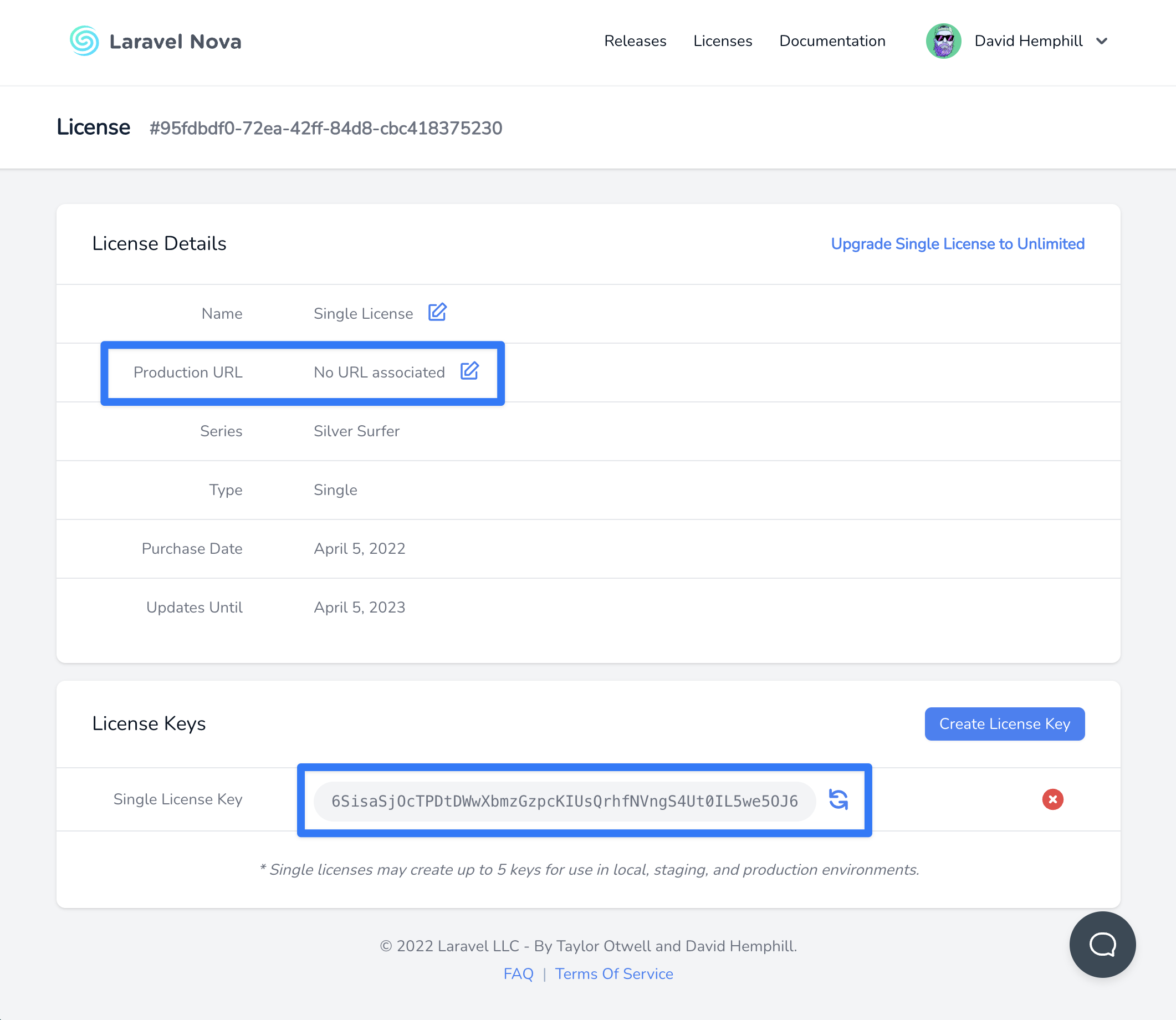
You can register a wildcard subdomain for your production URL for use in multi-tenant scenarios (e.g. `*.laravel.com`).
You can register your license key by setting the `NOVA_LICENSE_KEY` variable to `.env` file or `license_key` option in your `config/nova.php` configuration file:
.env
config/nova.php
Copy
Ask AI
```
NOVA_LICENSE_KEY=
```
### [](#verifying-your-nova-license-key-configuration) Verifying Your Nova License Key Configuration
To verify everything has been configured correctly, you should run the `nova:check-license` command:
Copy
Ask AI
```
php artisan nova:check-license
```
## [](#authenticating-nova-in-ci-environments) Authenticating Nova in CI Environments
It’s not recommended to store your Composer `auth.json` file inside your project’s source control repository. However, there may be times you wish to download Nova inside a CI environment like [GitHub Actions](https://github.com/features/actions). For instance, you may wish to run tests for any custom tools you create.
To authenticate Nova in these situations, you can use Composer’s `config` command to set the configuration option inside your CI system’s pipeline, injecting environment variables containing your Nova username and license key:
GitHub Actions
Copy
Ask AI
```
composer config http-basic.nova.laravel.com "${secrets.NOVA_USERNAME}" "${secrets.NOVA_LICENSE_KEY}"
```
## [](#using-nova-on-development-and-staging-domains) Using Nova on Development and Staging Domains
Since Nova can be used in local and staging development environments, Nova will not check your license key when used on `localhost` or local TLDs like those specified in [IETF RFC 2606](https://datatracker.ietf.org/doc/html/rfc2606#page-2):
- `.test`
- `.example`
- `.invalid`
- `.localhost`
- `.local`
Nova will also not check the current license key when the subdomain is one of these commonly-used staging subdomains:
- `staging.`
- `stage.`
- `test.`
- `testing.`
- `dev.`
- `development.`
## [](#authorizing-access-to-nova) Authorizing Access to Nova
Within your `app/Providers/NovaServiceProvider.php` file, there is a `gate` method. This authorization gate controls access to Nova in **non-local** environments. By d
*[Content truncated for length]*
