# Nova - Actions/Defining-Actions
*Source: https://nova.laravel.com/docs/v5/actions/defining-actions*
---
- [Community](https://discord.com/invite/laravel)
- [Blog](https://blog.laravel.com)
##### Get Started
- [Installation](/docs/v5/installation)
- [Release Notes](/docs/v5/releases)
- [Upgrade Guide](/docs/v5/upgrade)
##### Resources
- [The Basics](/docs/v5/resources/the-basics)
- [Fields](/docs/v5/resources/fields)
- [Dependent Fields](/docs/v5/resources/dependent-fields)
- [Date Fields](/docs/v5/resources/date-fields)
- [File Fields](/docs/v5/resources/file-fields)
- [Repeater Fields](/docs/v5/resources/repeater-fields)
- [Field Panels](/docs/v5/resources/panels)
- [Relationships](/docs/v5/resources/relationships)
- [Validation](/docs/v5/resources/validation)
- [Authorization](/docs/v5/resources/authorization)
##### Search
- [The Basics](/docs/v5/search/the-basics)
- [Global Search](/docs/v5/search/global-search)
- [Scout Integration](/docs/v5/search/scout-integration)
##### Filters
- [Defining Filters](/docs/v5/filters/defining-filters)
- [Registering Filters](/docs/v5/filters/registering-filters)
##### Lenses
- [Defining Lenses](/docs/v5/lenses/defining-lenses)
- [Registering Lenses](/docs/v5/lenses/registering-lenses)
##### Actions
- [Defining Actions](/docs/v5/actions/defining-actions)
- [Registering Actions](/docs/v5/actions/registering-actions)
##### Metrics
- [Defining Metrics](/docs/v5/metrics/defining-metrics)
- [Registering Metrics](/docs/v5/metrics/registering-metrics)
##### Digging Deeper
- [Dashboards](/docs/v5/customization/dashboards)
- [Menus](/docs/v5/customization/menus)
- [Notifications](/docs/v5/customization/notifications)
- [Authentication](/docs/v5/customization/authentication)
- [Impersonation](/docs/v5/customization/impersonation)
- [Tools](/docs/v5/customization/tools)
- [Resource Tools](/docs/v5/customization/resource-tools)
- [Cards](/docs/v5/customization/cards)
- [Fields](/docs/v5/customization/fields)
- [Filters](/docs/v5/customization/filters)
- [CSS / JavaScript](/docs/v5/customization/frontend)
- [Assets](/docs/v5/customization/assets)
- [Localization](/docs/v5/customization/localization)
- [Stubs](/docs/v5/customization/stubs)
On this page
- [Overview](#overview)
- [Action Titles](#action-titles)
- [Destructive Actions](#destructive-actions)
- [Action Callbacks](#action-callbacks)
- [Action Fields](#action-fields)
- [Action Fields Default Values](#action-fields-default-values)
- [Action Responses](#action-responses)
- [Redirect Responses](#redirect-responses)
- [Download Responses](#download-responses)
- [Emitting Client Side Events](#emitting-client-side-events)
- [Custom Modal Responses](#custom-modal-responses)
- [Queued Actions](#queued-actions)
- [Customizing the Connection and Queue](#customizing-the-connection-and-queue)
- [Job Batching](#job-batching)
- [Action Log](#action-log)
- [Disabling the Action Log](#disabling-the-action-log)
- [Queued Action Statuses](#queued-action-statuses)
- [Action Modal Customization](#action-modal-customization)
Actions
# Defining Actions
Defining actions in Nova
Nova actions allow you to perform custom tasks on one or more Eloquent models. For example, you might write an action that sends an email to a user containing account data they have requested. Or, you might write an action to transfer a group of records to another user.
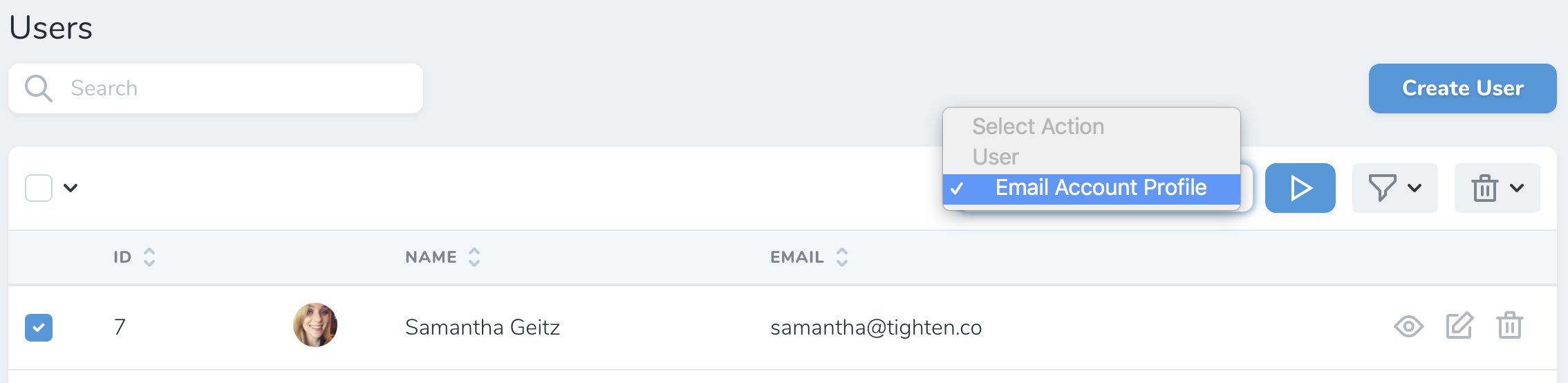
Once an action has been attached to a resource definition, you may initiate it from the resource’s index or detail pages:
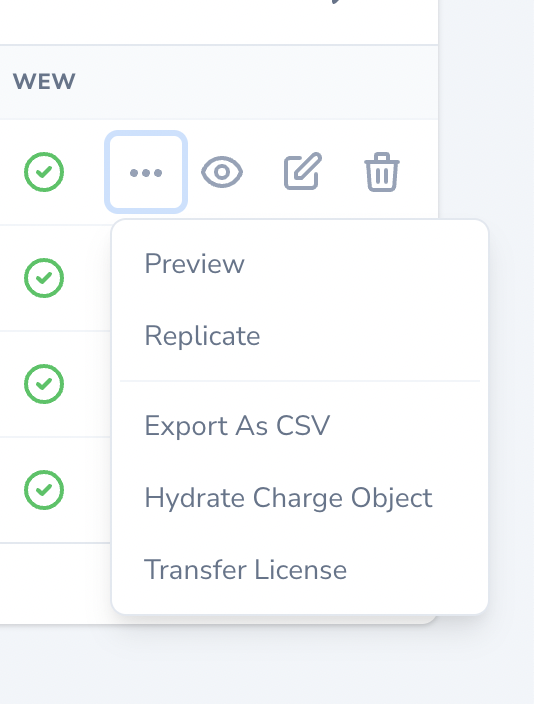
If an action is enabled for display on the resource’s table row, you may also initiate the action from the resource’s action dropdown menu via the resource index page. These actions are referred to as “Inline Actions”:
## [](#overview) Overview
Nova actions may be generated using the `nova:action` Artisan command. By default, all actions are placed in the `app/Nova/Actions` directory:
Copy
Ask AI
```
php artisan nova:action EmailAccountProfile
```
You may generate a [destructive action](#destructive-actions) by passing the `--destructive` option:
Copy
Ask AI
```
php artisan nova:action DeleteUserData --destructive
```
To learn how to define Nova actions, let’s look at an example. In this example, we’ll define an action that sends an email message to a user or group of users:
app/Nova/Actions/EmailAccountProfile.php
Copy
Ask AI
```
namespace App\Nova\Actions;
use App\Models\AccountData;
use Illuminate\Bus\Queueable;
use Illuminate\Contracts\Queue\ShouldQueue;
use Illuminate\Queue\InteractsWithQueue;
use Illuminate\Support\Collection;
use Laravel\Nova\Actions\Action;
use Laravel\Nova\Http\Requests\NovaRequest;
use Laravel\Nova\Fields\ActionFields;
class EmailAccountProfile extends Action
{
use InteractsWithQueue;
use Queueable;
/**
* Perform the action on the given models.
*
* @return mixed
*/
public function handle(ActionFields $fields, Collection $models)
{
foreach ($models as $model) {
(new AccountData($model))->send();
}
}
/**
* Get the fields available on the action.
*
* @return array<int, \Laravel\Nova\Fields\Field>
*/
public function fields(NovaRequest $request): array
{
return [];
}
}
```
The most important method of an action is the `handle` method. The `handle` method receives the values for any fields attached to the action, as well as a collection of selected models. The `handle` method **always** receives a `Collection` of models, even if the action is only being performed against a single model.
Within the `handle` method, you may perform whatever tasks are necessary to complete the action. You are free to update database records, send emails, call other services, etc. The sky is the limit!
#### [](#action-titles) Action Titles
Typically, Nova utilizes the action’s class name to determine the displayable name of the action that should be shown in the action selection menu. If you would like to change the displayable name of the action, you may define a `name` property on the action class:
app/Nova/Actions/EmailAccountProfile.php
Copy
Ask AI
```
/**
* The displayable name of the action.
*
* @var \Stringable|string
*/
public $name = 'Send Account Profile via E-mail';
```
### [](#destructive-actions) Destructive Actions
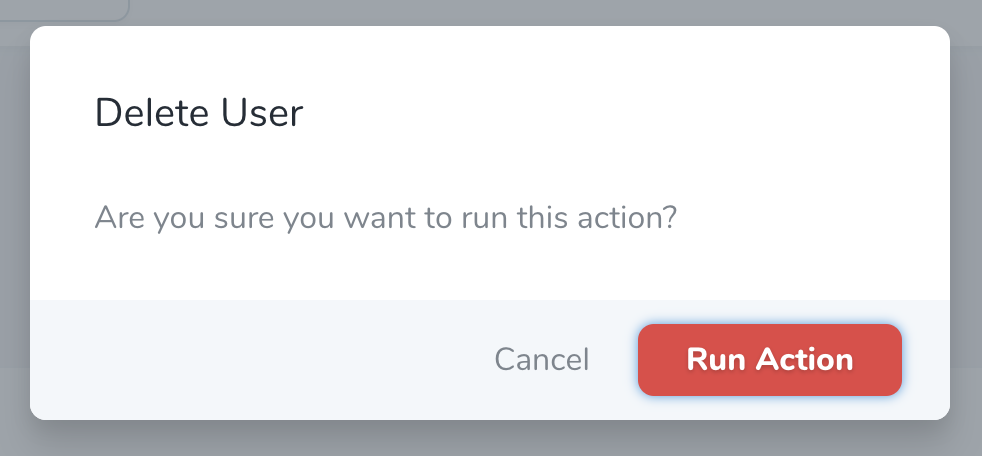
You may designate an action as destructive or dangerous by defining an action class that extends `Laravel\Nova\Actions\DestructiveAction`. This will change the color of the action’s confirm button to red:
When a destructive action is added to a resource that has an associated authorization policy, the policy’s `delete` method must return `true` in order for the action to run.
### [](#action-callbacks) Action Callbacks
The `Action::then` method should not be utilized if your action is queued. To achieve similar functionality when using queued actions, you should leverage Nova’s [action batching callbacks](#job-batching).
When running an action against multiple resources, you may wish to execute some code after the action has completed executing against all of the resources. For example, you may wish to generate a report detailing all of the changes for the selected resources. To accomplish this, you may invoke the `then` method when [registering your action](./registering-actions).
The `then` methods accepts a closure which will be invoked when the action has finished executing against all of the selected resources. The closure will receive a flattened Laravel [collection](https://laravel.com/docs/collections) containing the values that were returned by the action.
For example, note that the following action’s `handle` method returns the `$models` it receives:
app/Nova/Actions/EmailAccountProfile.php
Copy
Ask AI
```
use App\Models\AccountData;
use Illuminate\Support\Collection;
use Laravel\Nova\Fields\ActionFields;
// ...
/**
* Perform the action on the given models.
*/
public function handle(ActionFields $fields, Collection $models): Collection
{
foreach ($models as $model) {
(new AccountData($model))->send();
}
return $models;
}
```
When registering this action on a resource, we may use the `then` callback to access the returned models and interact with them after the action has finished executing:
app/Nova/~Resource.php
Copy
Ask AI
```
use App\Nova\Actions\EmailAccountProfile;
use Laravel\Nova\Http\Requests\NovaRequest;
// ...
/**
* Get the actions available for the resource.
*
* @return array<int, \Laravel\Nova\Actions\Action>
*/
public function actions(NovaRequest $request): array
{
return [
(new Actions\EmailAccountProfile)->then(function ($models) {
$models->each(function ($model) {
//
});
}),
];
}
```
## [](#action-fields) Action Fields
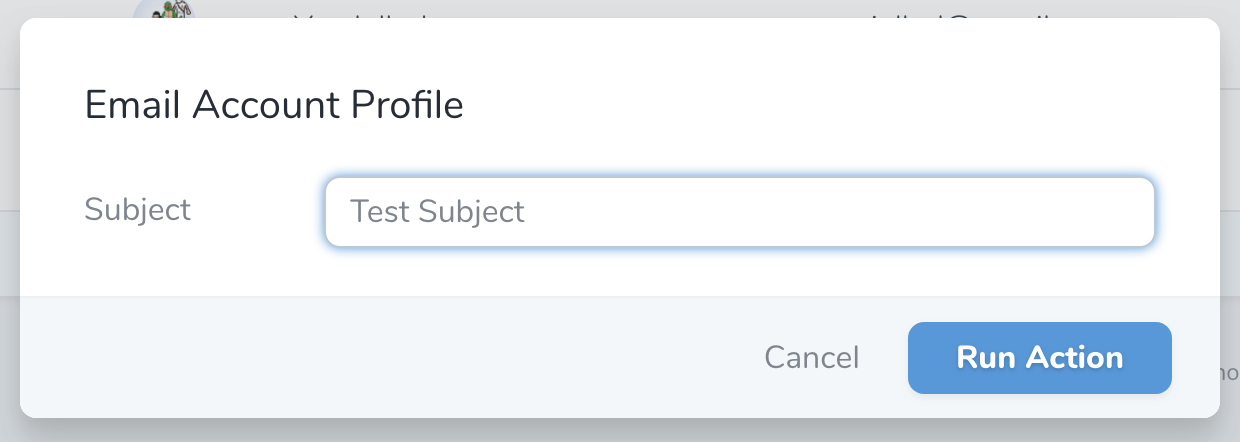
Sometimes you may wish to gather additional information from the user before dispatching an action. For this reason, Nova allows you to attach most of Nova’s supported [fields](./../resources/fields) directly to an action. When the action is initiated, Nova will prompt the user to provide input for the fields:
To add a field to an action, add the field to the array of fields returned by the action’s `fields` method:
app/Nova/Actions/EmailAccountProfile.php
Copy
Ask AI
```
use Laravel\Nova\Fields\Text;
use Laravel\Nova\Http\Requests\NovaRequest;
// ...
/**
* Get the f
*[Content truncated for length]*
