
Laravel 12 Docs MCP Server
by brianirish
- laravel-docs-mcp
- docs
- external
- forge
- resources
caches.md•4.87 kB
# Forge - Resources/Caches
*Source: https://forge.laravel.com/docs/resources/caches*
---
- [Community](https://discord.gg/laravel)
- [Blog](https://blog.laravel.com)
- [Status](https://status.on-forge.com)
##### Get Started
- [Introduction](/docs/introduction)
- [Laravel Forge CLI](/docs/cli)
- [Laravel Forge SDK](/docs/sdk)
##### Basics
- [Organizations](/docs/organizations)
- [Teams](/docs/teams)
- [Server Providers](/docs/server-providers)
- [Source Control](/docs/source-control)
- [SSH Keys](/docs/ssh)
- [Recipes](/docs/recipes)
- [API](/docs/api)
##### Servers
- [Managing Servers](/docs/servers/the-basics)
- [Server Types](/docs/servers/types)
- [Laravel VPS](/docs/servers/laravel-vps)
- [PHP](/docs/servers/php)
- [Load Balancing](/docs/servers/load-balancing)
- [Nginx Templates](/docs/servers/nginx-templates)
- [Security](/docs/servers/security)
- [Monitoring](/docs/servers/monitoring)
- [Real-Time Metrics](/docs/servers/real-time-metrics)
##### Sites
- [Managing Sites](/docs/sites/the-basics)
- [Domains](/docs/sites/domains)
- [Deployments](/docs/sites/deployments)
- [Environment Variables](/docs/sites/environment-variables)
- [Commands](/docs/sites/commands)
- [Queues](/docs/sites/queues)
- [Network](/docs/sites/network)
- [Isolation](/docs/sites/user-isolation)
- [Laravel](/docs/sites/laravel)
- [Logs](/docs/sites/logs)
##### Resources
- [Databases](/docs/resources/databases)
- [Database Backups](/docs/resources/database-backups)
- [Caches](/docs/resources/caches)
- [Background Processes](/docs/resources/background-processes)
- [Scheduler](/docs/resources/scheduler)
- [Network](/docs/resources/network)
- [Packages](/docs/resources/packages)
##### Integrations
- [Envoyer](/docs/integrations/envoyer)
- [Sentry](/docs/integrations/sentry)
- [Aikido](/docs/integrations/aikido)
##### Other
- [Support](/docs/support)
- [Changelog](/docs/changelog)
- [Abuse](/docs/abuse)
On this page
- [Introduction](#introduction)
- [Connecting to Redis and Memcached](#connecting-to-redis-and-memcached)
- [Managing cache services](#managing-cache-services)
- [Configuring Redis password](#configuring-redis-password)
- [Network connectivity](#network-connectivity)
- [External connections](#external-connections)
Resources
# Caches
Copy page
Learn how to connect to Redis™ and Memcached on your Laravel Forge server.
Copy page
## [](#introduction) Introduction
Laravel Forge automatically installs both [Memcached](https://www.memcached.org/) and [Redis™](https://redis.io/) when provisioning [App Servers](/docs/servers/types#app-servers) or [Cache Servers](/docs/servers/types#cache-servers). Both services are secured by default, remaining inaccessible from external networks and only available for local server connections.
## [](#connecting-to-redis-and-memcached) Connecting to Redis and Memcached
Both caching services are accessible via localhost using their standard ports:
Copy
Ask AI
```
MEMCACHED_HOST=127.0.0.1
MEMCACHED_PORT=11211
REDIS_HOST=127.0.0.1
REDIS_PASSWORD=null
REDIS_PORT=6379
```
## [](#managing-cache-services) Managing cache services
Both Redis and Memcached run as system services and can be managed through standard service commands if needed. Laravel Forge handles the initial configuration and setup automatically, ensuring optimal performance for your applications.
### [](#configuring-redis-password) Configuring Redis password
To configure the Redis password, navigate to the server’s settings page. Then, click “Recipes” in the sidebar. Click the “Set password” button under the Redis section. After entering and confirming your desired password, click the “Add password” button to apply the changes.
## [](#network-connectivity) Network connectivity
When connecting your applications to Redis or Memcached from another server within your infrastructure, you can utilize [Laravel Forge’s server network feature](/docs/resources/network#server-network) to establish secure internal connections between servers.
### [](#external-connections) External connections
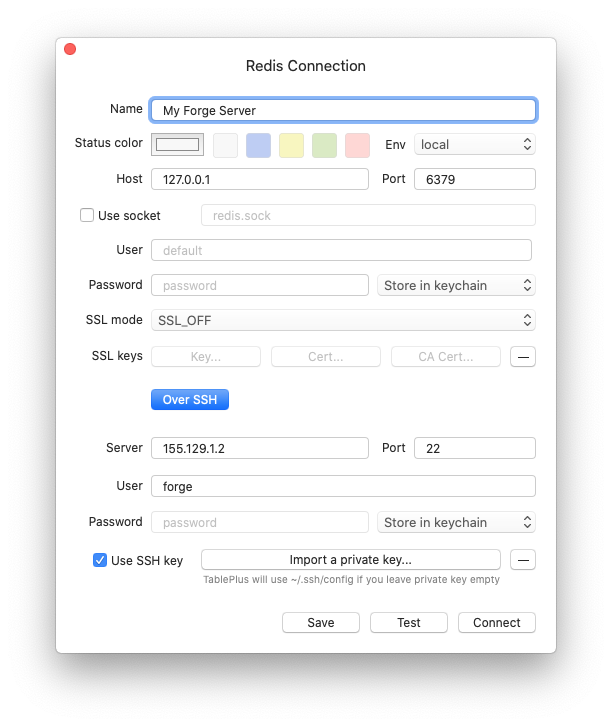
Laravel Forge servers require SSH key authentication and don’t support password-based access. When connecting to Redis through external clients, ensure you use your **private SSH key** for authentication.
For example, when connecting via [TablePlus](https://tableplus.com/):
Was this page helpful?
YesNo
[Database Backups](/docs/resources/database-backups)[Background Processes](/docs/resources/background-processes)
⌘I
[x](https://x.com/laravelphp)[github](https://github.com/laravel)[discord](https://discord.com/invite/laravel)[linkedin](https://linkedin.com/company/laravel)
Latest Blog Posts
- MCP Moves to the Linux Foundation: Neutral Stewardship for Agentic InfrastructureBy Om-Shree-0709 on .mcpanthropicLinux Foundation
MCP directory API
We provide all the information about MCP servers via our MCP API.
curl -X GET 'https://glama.ai/api/mcp/v1/servers/brianirish/laravel-docs-mcp'
If you have feedback or need assistance with the MCP directory API, please join our Discord server