
The Bitcoin SV MCP Server provides a comprehensive suite of tools for interacting with the Bitcoin SV blockchain:
Wallet Operations: Send/receive BSV, manage keys and addresses, create/verify signatures, encrypt/decrypt data, and handle ordinals inscriptions
Blockchain Exploration: Retrieve BSV price, decode transactions, explore chain data (blocks, transactions, addresses) via WhatsOnChain API
NFT & Token Management: Work with Ordinals (NFTs) and BSV-20/21 tokens, get inscription details, search NFTs, access marketplace listings, track sales, and manage MNEE tokens
Data Utilities: Convert between formats (utf8, hex, base64, binary)
Educational Resources: Access information about Bitcoin SV, Ordinals, BSV SDK, and BRC specifications
Customization Options: Run in limited modes (without private key), disable specific tools/prompts, disable transaction broadcasting for testing, and sign ordinal inscriptions with identity keys
Integration: Connect with MCP-compatible clients like Cursor and Claude for Desktop
Provides wallet functionality, BSV blockchain interaction, ordinals/NFT management, and utility tools for Bitcoin SV. Capabilities include retrieving addresses, sending transactions, purchasing NFTs, getting price information, working with ordinals, and managing BSV20 tokens.
Uses Bun as the JavaScript runtime for the MCP server, enabling fast execution of the Bitcoin SV tools and capabilities.
Click on "Install Server".
Wait a few minutes for the server to deploy. Once ready, it will show a "Started" state.
In the chat, type
@followed by the MCP server name and your instructions, e.g., "@Bitcoin SV MCP Servercheck my BSV wallet balance"
That's it! The server will respond to your query, and you can continue using it as needed.
Here is a step-by-step guide with screenshots.
Bitcoin SV MCP Server
⚠️ NOTICE: Experimental Work in Progress
This project is in an early experimental stage. Features may change, and the API is not yet stable. Contributions, feedback, and bug reports are welcome! Feel free to open issues or submit pull requests.
A collection of Bitcoin SV (BSV) tools for the Model Context Protocol (MCP) framework. This library provides wallet, ordinals, and utility functions for BSV blockchain interaction.
Installation Options
Option 1: Hosted Version (FREE - No BSV Required!)
The easiest way to get started! Use our hosted version with OAuth 2.1 authentication:
Configure: Add the MCP server configuration to your IDE
Authenticate: Sign in with your Bitcoin wallet via sigma-auth
Use: Start using BSV features immediately - no BSV needed!
To get your access token, authenticate at https://auth.sigmaidentity.com
Benefits:
✅ No Bitcoin required - we pay for everything
✅ Secure OAuth 2.1 authentication with Bitcoin signatures
✅ Instant setup - no installation needed
✅ Always up-to-date
✅ Global availability via Cloudflare
Option 2: Self-Hosted Installation
Prerequisites
**Use Bun (Optional but recommended)
This project is built using Bun, a fast JavaScript runtime and package manager. While Bun is recommended for best performance, the server can also run with Node.js and npm as Bun is designed to be backward compatible with node.
Installing Bun
macOS (using Homebrew):
macOS/Linux/WSL (using installer script):
Windows: Windows users should use WSL (Windows Subsystem for Linux) or Docker to run Bun.
Node.js and npm will also work but may not offer the same performance benefits.
Related MCP server: MCP Blockchain Query Server
Connecting to MCP Clients
This server implements the Model Context Protocol (MCP), allowing AI assistants to utilize Bitcoin SV functionalities. You can connect this server to various MCP-compatible clients.
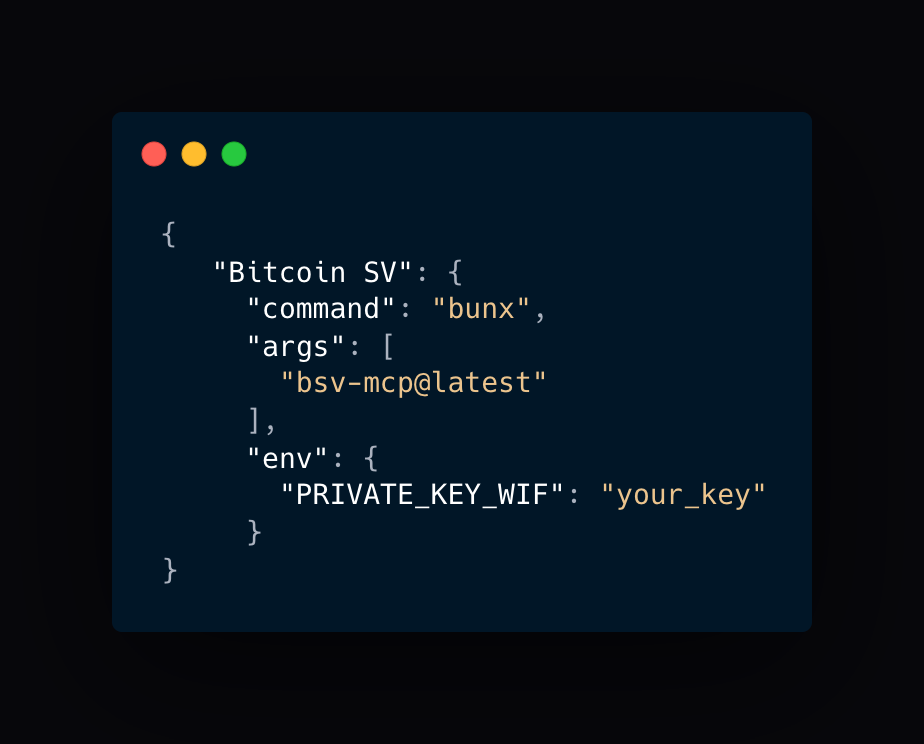
Note: The
PRIVATE_KEY_WIFenvironment variable is now optional. Without it, the server runs in limited mode with educational resources and non-wallet tools available. Wallet and MNEE token operations require a valid private key. You can also set theIDENTITY_KEY_WIFenvironment variable to enable sigma-protocol signing of ordinals inscriptions for authentication, curation, and web-of-trust.
Claude Code
To use the BSV MCP server with Claude Code:
To add with environment variables:
For encrypted key storage (recommended):
Note: The server automatically runs in stdio mode when used with Claude Code CLI.
Cursor
Quick Install: Click the button above to automatically add the BSV MCP server to Cursor! This will install the server with the basic configuration using bunx bsv-mcp@latest.
Manual Setup: To manually configure the BSV MCP server with Cursor:
Install Cursor if you haven't already
Open Cursor and navigate to Settings → Extensions → Model Context Protocol
Click "Add a new global MCP server"
Enter the following configuration in JSON format:
Replace
<your_private_key_wif>with your actual private key WIF (keep this secure!) If you dont have one you can leave this off for now but you wont be able to use tools that require a wallet.<your_identity_key_wif>is also optional. It will sign 1Sat Ordinals with Sigma protocol using the provided identity key.Click "Save"
The BSV tools will now be available to Cursor's AI assistant under the "Bitcoin SV" namespace.
Alternative for npm users
If you prefer to use npm instead of Bun:
Claude for Desktop
To connect this server to Claude for Desktop:
Open Claude for Desktop and go to Claude > Settings > Developer
Click "Edit Config".
Open the Claude configuration json file in your favorite text editor. If you prefer to do it from the cli:
Add the BSV MCP server to your configuration:
{ "mcpServers": { "Bitcoin SV": { "command": "bun", "args": [ "run", "bsv-mcp@latest" ], "env": { "PRIVATE_KEY_WIF": "<your_private_key_wif>", "IDENTITY_KEY_WIF": "<your_identity_key_wif>" } } } }Replace
<your_private_key_wif>with your actual private key WIFSave the file and restart Claude for Desktop
The BSV tools will appear when you click the tools icon (hammer) in Claude for Desktop
Alternative for npm users (Claude)
If you prefer to use npm instead of Bun, replace the "command" field with "npx".
VS Code (CLI Method)
If you prefer using the command line, you can add the BSV MCP server to VS Code (which uses the same underlying settings as Cursor) directly:
Using Bun (Recommended):
Using Node.js/npm:
Replace
<your_private_key_wif>with your actual private key WIF (optional, required for wallet tools).Replace
<your_identity_key_wif>with your identity key WIF (optional, enables Sigma protocol signing).Ensure the
codecommand is in your system's PATH (it usually is if VS Code was installed normally).
This command adds the server configuration to your VS Code settings.json file under the mcp.servers key.
Available Tools
The toolkit is organized into several categories:
Wallet Tools
Wallet tools provide core BSV wallet functionality:
Tool Name | Description | Example Output |
| Retrieves a public key for a specified protocol and key ID |
|
| Creates a cryptographic signature for the provided data |
|
| Verifies a cryptographic signature against the provided data |
|
| Combined tool for encrypting and decrypting data using the wallet's cryptographic keys. Examples: 1. Encrypt text: 2. Decrypt data: | Encrypt: Decrypt: |
| Returns a BSV address for the current wallet or a derived path |
|
| Sends BSV to a specified address (supports BSV or USD amounts) |
|
| Purchases NFTs or BSV-20/BSV-21 tokens from marketplace listings |
|
| Creates and inscribes ordinals on the BSV blockchain |
|
BSV Tools
Tools for interacting with the BSV blockchain and network:
Tool Name | Description | Example Output |
| Gets the current BSV price from an exchange API |
|
| Decodes a BSV transaction and returns detailed information |
|
| Comprehensive blockchain explorer tool accessing WhatsOnChain API endpoints |
|
BSocial Tools
Tools for social interactions on the BSV blockchain (requires wallet):
Tool Name | Description | Example Output |
| Creates a social post on the BSV blockchain using B:// and MAP protocols |
|
| Reads social posts from the BSV blockchain with filtering options |
|
Ordinals Tools
Tools for working with ordinals (NFTs) on BSV:
Tool Name | Description | Example Output |
| Retrieves detailed information about a specific inscription |
|
| Searches for inscriptions based on various criteria |
|
| Retrieves market listings for NFTs, BSV-20, and BSV-21 tokens with unified interface |
|
| Gets information about BSV-20 and BSV-21 token market sales |
|
| Retrieves details about a specific BSV20 token by ID |
|
Utility Tools
General-purpose utility functions:
Tool Name | Description | Example Output |
| Converts data between different encodings (utf8, hex, base64, binary). |
Args:
data(string, required): The data string to be converted.from(string, required): Source encoding format (utf8, hex, base64, or binary).to(string, required): Target encoding format (utf8, hex, base64, or binary).
Returns: The converted data as a string.
BAP (Bitcoin Attestation Protocol) Tools
Tools for interacting with BAP identities.
bap_getId
Retrieves a Bitcoin Attestation Protocol (BAP) identity profile using an idKey.
Args:
idKey(string, optional): The Identity Key (Paymail or public key string) to fetch the profile for. If not provided, the tool attempts to use the server's configured identity key (derived fromIDENTITY_KEY_WIFor the key file~/.bsv-mcp/keys.json).
Returns: A JSON string containing the BAP identity data if found, or a message indicating that no identity was found for the given key. Returns an error if the API request fails or the key cannot be derived.
bap_getCurrentAddress
Retrieves the current BAP identity's Bitcoin SV address. This address is derived from the server's configured identity key.
Args: None.
Returns: A JSON object containing the
addressstring.
bap_generate
Generates a new BAP HD master key (xprv) and saves it to ~/.bsv-mcp/keys.json. This key can be used as a root for deriving multiple BAP identities.
Args: None.
Returns: A JSON object with the generated
xprvstring and a status message, or an error message if generation/saving fails.
MNEE Tools
Tools for working with MNEE tokens:
Tool Name | Description | Example Output |
| Retrieves the current MNEE token balance for the wallet |
|
| Send MNEE tokens to a specified address. Supports both MNEE and USD amounts |
|
| Parse an MNEE transaction to get detailed information about its operations and amounts. All amounts are in atomic units with 5 decimal precision (e.g. 1000 atomic units = 0.01 MNEE) |
|
Using the Tools with MCP
Once connected, you can use natural language to interact with Bitcoin SV through your AI assistant. Here are some example prompts:
Wallet Operations
"Get my Bitcoin SV address"
"Send 0.01 BSV to 1ExampleBsvAddressXXXXXXXXXXXXXXXXX"
"Send $5 USD worth of BSV to 1ExampleBsvAddressXXXXXXXXXXXXXXXXX"
"Send 0.01 MNEE to 1ExampleBsvAddressXXXXXXXXXXXXXXXXX"
"Check my MNEE balance"
"Parse this MNEE transaction: txid"
"Encrypt this message using my wallet's keys"
"Decrypt this data that was previously encrypted for me"
"Purchase this NFT listing: txid_vout"
"Purchase this BSV-20 token listing: txid_vout"
Ordinals (NFTs)
"Show me information about the NFT with outpoint 6a89047af2cfac96da17d51ae8eb62c5f1d982be2bc4ba0d0cd2084b7ffed325_0"
"Search for Pixel Zoide NFTs"
"Show me the current marketplace listings for BSV NFTs"
"Show me BSV-20 token listings for ticker PEPE"
"Get recent BSV-20 token sales"
Collection Minting
The BSV MCP server provides a two-step process for minting ordinal collections from folders of images:
Gather Collection Info (Pre-flight check)
"Analyze the folder /path/to/my/nft-images for collection minting"
"Check if I can mint a collection from ./my-art-folder"
This step will:
Validate all images in the folder
Check your wallet balance
Estimate total costs
Suggest collection metadata
Report any issues before minting
Mint Collection (Create the collection)
"Mint a collection called 'My Art Collection' from /path/to/images with description 'Amazing digital art'"
"Create an NFT collection from ./my-art-folder with traits: background=[red,blue,green], style=[vintage,modern]"
"Mint collection with rarity labels: common=60%, rare=30%, legendary=10%"
Blockchain Operations
"What is the current BSV price?"
"Decode this BSV transaction: (transaction hex or ID)"
"Get the latest Bitcoin SV chain information"
"Show me block details for height 800000"
"Explore transaction history for address 1ExampleBsvAddressXXXX"
"Check unspent outputs (UTXOs) for my wallet address"
"Get details for transaction with hash a1b2c3d4e5f6..."
Data Conversion
"Convert 'Hello World' from UTF-8 to hex format"
Social Posts
"Create a post saying 'Hello BSV World!' on the blockchain"
"Post a markdown message: # My First On-Chain Post\n\nThis is bold and italic text"
"Read the latest social posts from the blockchain"
"Read posts by BAP identity 1SomeIdentityKey..."
"Get the post with transaction ID a1b2c3d4e5f6..."
"Show me replies to post txid a1b2c3d4e5f6..."
MCP Prompts and Resources
The BSV MCP server exposes specialized prompts and resources that provide detailed information and context about Bitcoin SV technologies. These can be accessed by AI models to enhance their understanding and capabilities.
Available Prompts
The server provides the following educational prompts that can be accessed directly via the MCP protocol:
Ordinals Prompt
Identifier:
bitcoin_sv_ordinalsDescription: Comprehensive information about Bitcoin SV ordinals, including what they are, how they work, and how to use them.
Usage: Ask the assistant about "Bitcoin SV ordinals" or "1Sat Ordinals" to access this information.
BSV SDK Prompts
A collection of prompts providing detailed information about the Bitcoin SV SDK:
Overview
Identifier:
bitcoin_sv_sdk_overviewDescription: General overview of the Bitcoin SV SDK, including its purpose and main components.
Usage: "Tell me about the BSV SDK" or "What is the Bitcoin SV SDK?"
Wallet Operations
Identifier:
bitcoin_sv_sdk_walletDescription: Information about wallet operations in the BSV SDK.
Usage: "How do wallet operations work in the BSV SDK?"
Transaction Building
Identifier:
bitcoin_sv_sdk_transactionDescription: Details about transaction creation and manipulation.
Usage: "Explain BSV SDK transaction building" or "How do I create transactions with BSV SDK?"
Authentication
Identifier:
bitcoin_sv_sdk_authDescription: Authentication and identity protocols in BSV SDK.
Usage: "How does authentication work with BSV SDK?"
Cryptography
Identifier:
bitcoin_sv_sdk_cryptographyDescription: Signing, encryption, and verification functionality.
Usage: "Explain BSV SDK cryptography features"
Scripting
Identifier:
bitcoin_sv_sdk_scriptDescription: Bitcoin scripting and contract capabilities.
Usage: "How do I work with Bitcoin scripts using the BSV SDK?"
Primitives
Identifier:
bitcoin_sv_sdk_primitivesDescription: Core data types and structures in the BSV SDK.
Usage: "What primitives are available in the BSV SDK?"
Available Resources
The server also provides access to Bitcoin Request for Comments (BRC) specifications and documentation:
Changelog Resource
Identifier:
bsv-mcp-changelogDescription: Version history and changelog for the BSV MCP server.
Usage: "Show me the BSV MCP changelog" or "What's new in the latest version?"
BRC Resources
BRCs Overview
Identifier:
brcs_readmeDescription: Overview of all Bitcoin SV protocol specifications in the BRCs repository.
Usage: "Show me the Bitcoin SV BRCs overview"
BRCs Summary
Identifier:
brcs_summaryDescription: Table of contents for all Bitcoin SV BRCs.
Usage: "Give me a summary of Bitcoin SV BRCs"
Specific BRC Specifications
Identifier:
brc_specDescription: Access specific BRC specifications by category and number.
Usage: "Show me BRC 8 on Transaction Envelopes" or "What does BRC 1 specify?"
BRC Categories
The BRC specifications are organized into the following categories:
Wallet
Transactions
Scripts
Tokens
Overlays
Payments
Peer-to-Peer
Key Derivation
Outpoints
Opinions
State Machines
Apps
Using Prompts and Resources
AI models can use these prompts and resources to provide more accurate and detailed responses about Bitcoin SV technologies. As a user, you can:
Ask about a specific topic: "Tell me about Bitcoin SV ordinals" or "Explain BSV SDK transaction building"
Request specific BRC details: "What does BRC 8 specify?" or "Show me the BRC on Transaction Creation"
Get general overviews: "What is the BSV SDK?" or "Show me a summary of all BRCs"
These prompts and resources enhance the AI's knowledge base, enabling more technical and accurate responses even for complex Bitcoin SV topics.
How MCP Works
When you interact with an MCP-enabled AI assistant:
The AI analyzes your request and decides which tools to use
With your approval, it calls the appropriate BSV MCP tool
The server executes the requested operation on the Bitcoin SV blockchain
The results are returned to the AI assistant
The assistant presents the information in a natural, conversational way
Key Management & Security
Encrypted Key Storage (Recommended)
BSV MCP now supports encrypted key storage using bitcoin-backup for enhanced security:
Set a passphrase (minimum 8 characters):
export BSV_MCP_PASSPHRASE="your-secure-passphrase"Automatic migration: Keys will be automatically encrypted when a passphrase is provided
Manual migration: Use the migration script:
BSV_MCP_PASSPHRASE="your-passphrase" bun run scripts/migrate-keys.tsFile locations:
Encrypted keys:
~/.bsv-mcp/keys.bepLegacy keys:
~/.bsv-mcp/keys.json(deprecated)Automatic backup:
~/.bsv-mcp/keys.bep.backup
Security Best Practices
Use encrypted storage: Always set
BSV_MCP_PASSPHRASEfor production useStrong passphrases: Use 12+ characters with mixed case, numbers, and symbols
Backup your keys: Keep secure backups of both keys and passphrase
File permissions: Key files are automatically created with restricted permissions (0600)
Environment Variables for Key Management
Variable | Description | Default |
| Passphrase for encrypted key storage | None |
| Automatically migrate legacy keys |
|
| Keep unencrypted keys after migration |
|
Customization Options
The BSV MCP server can be customized using environment variables to enable or disable specific components:
Component Configuration
Environment Variable | Default | Description |
|
| Set to |
|
| Set to |
|
| Set to |
Tool-Specific Configuration
Environment Variable | Default | Description |
|
| Set to |
|
| Set to |
|
| Set to |
|
| Set to |
|
| Set to |
|
| Optional WIF for identity key; if set, ordinals inscriptions will be signed with sigma-protocol for authentication, curation, and web-of-trust. |
|
| Set to |
Droplet API Configuration
The BSV MCP server supports running in Droplet API mode, which allows operation without local private keys by using a remote faucet service:
Environment Variable | Default | Description |
|
| Set to |
|
| Base URL for the Droplet faucet API service |
|
| Name of the faucet to use (required when |
|
| MCP transport mode (stdio/http) - automatically set to stdio for Claude Code compatibility |
Droplet API Mode
When USE_DROPLET_API=true is set, the server operates in remote mode:
No Local Keys Required: The server doesn't need
PRIVATE_KEY_WIFor local key filesRemote Wallet Operations: Transactions are funded and broadcast through the Droplet API
BSM Authentication: Uses Bitcoin Signed Message (BSM) authentication for secure API communication
Automatic Funding: The faucet automatically provides UTXOs for transactions
Seamless Integration: All existing wallet tools work transparently with the remote service
Example Droplet Configuration
This mode is particularly useful for:
Development and Testing: No need to manage local private keys
Educational Environments: Safe experimentation without real funds
Shared Environments: Multiple users can use the same faucet service
Simplified Deployment: Reduced security concerns for demonstration purposes
Examples
Run with only educational resources and prompts, no tools:
Run with only BSV tools, no wallet or other functionality:
Use all tools except wallet operations:
Create transactions without broadcasting them (dry-run mode):
Troubleshooting
If you're having issues with the BSV MCP server:
Connection Issues
Make sure Bun or Node.js is installed on your system
Verify your WIF private key is correctly set in the environment
Check that your client supports MCP and is properly configured
Look for error messages in the client's console output
Keeping Bun Up to Date
It's important to keep Bun updated to the latest version to ensure compatibility:
To verify your current Bun version:
Logging and Debugging
For Claude for Desktop, check the logs at:
For Cursor, check the Cursor MCP logs in Settings → Extensions → Model Context Protocol.
Recent Updates
Transaction Broadcast Control: Added
DISABLE_BROADCASTINGenvironment variable to prevent transactions from being broadcast to the networkBlockchain Explorer: Added
bsv_exploretool for WhatsOnChain API access with mainnet/testnet supportUnified Tools: Merged
wallet_encrypt/wallet_decryptinto singlewallet_encryptiontoolEnhanced Marketplace: Support for NFTs, BSV-20/21 tokens in listings, sales and purchases
Performance: Added price caching and optimized API endpoint structure
Improved Validation: Better error handling for private keys and parameters
Bitcoin SV Blockchain Explorer
The bsv_explore tool provides comprehensive access to the Bitcoin SV blockchain through the WhatsOnChain API. This powerful explorer tool allows you to query various aspects of the blockchain, including chain data, blocks, transactions, and address information.
Available Endpoints
The tool supports the following endpoint categories and specific endpoints:
Chain Data
Endpoint | Description | Required Parameters | Example Response |
| Network statistics, difficulty, and chain work | None |
|
| Current chain tips including heights and states | None |
|
| Current BSV circulating supply | None |
|
| Connected peer statistics | None |
|
Block Data
Endpoint | Description | Required Parameters | Example Response |
| Complete block data via hash |
|
|
| Complete block data via height |
|
|
| Stats on tag count for a specific block |
|
|
| Retrieves the last 10 block headers | None |
|
| Retrieves pages of transaction IDs for large blocks |
|
|
Stats Data
Endpoint | Description | Required Parameters | Example Response |
| Block statistics for a specific height |
|
|
| Block mining statistics for a time period | optional: |
|
| Summary of mining statistics | optional: |
|
Transaction Data
Endpoint | Description | Required Parameters | Example Response |
| Detailed transaction data |
|
|
| Raw transaction hex data |
|
|
| Transaction receipt |
|
|
| Retrieve multiple transactions in one request |
|
|
Address Data
Endpoint | Description | Required Parameters | Example Response |
| Transaction history for address |
|
|
| Unspent outputs for address |
|
|
Network
Endpoint | Description | Required Parameters | Example Response |
| API health check | None |
|
Usage Examples
The bsv_explore tool can be used with natural language prompts like:
Under the hood, the tool accepts parameters to specify which data to retrieve:
endpoint: The specific WhatsOnChain endpoint to query (e.g.,chain_info,tx_by_hash)network: The BSV network to use (mainortest)Additional parameters as required by the specific endpoint:
blockHash: For block_by_hash and block_pages endpointsblockHeight: For block_by_height, tag_count_by_height, and block_stats_by_height endpointspageNumber: For block_pages endpoint (pagination)days: For block_miner_stats and miner_summary_stats endpoints (defaults to 7)txHash: For transaction-related endpoints (tx_by_hash, tx_raw, tx_receipt)txids: For bulk_tx_details endpoint (array of transaction IDs)address: For address-related endpointslimit: Optional pagination limit for address_history
Network Options
The tool supports both mainnet and testnet:
main: Bitcoin SV mainnet (default)test: Bitcoin SV testnet
Development
Project Setup
If you want to contribute to the project or run it locally:
Clone the repository:
git clone https://github.com/b-open-io/bsv-mcp.git cd bsv-mcpInstall dependencies:
bun install # or with npm npm install
Running the Server
Running Tests
Troubleshooting
Make sure you're on the latest version of bun
Make sure the commands can be run directly from your cli
Make sure you're on node v22+
License
This project is licensed under the MIT License - see the LICENSE file for details.