
The RTFD MCP Server bridges LLMs and real-time documentation, enabling AI agents to access up-to-date information from multiple sources to prevent hallucinations and generate accurate code.
Multi-Source Documentation Retrieval: Fetch documentation and metadata from PyPI (Python), npm (JavaScript/TypeScript), crates.io (Rust), GoDocs (Go), Zig docs, DockerHub, GitHub Container Registry (GHCR), GitHub repositories, and Google Cloud Platform services. Unified search queries across all sources simultaneously.
GitHub Repository Exploration: Search repositories and code, browse directory contents and file trees (recursive/non-recursive), read source files, fetch READMEs, and get commit diffs.
Smart Content Processing: Automatically extracts relevant sections (Installation, Usage, API Reference, Examples), converts formats (reStructuredText/HTML to Markdown), and prioritizes key content to reduce noise.
Cache Management: View cache statistics and entries with configurable TTL for improved performance.
Security & Privacy: Runs entirely locally with no data collection, configurable restrictions (PyPI verification, content fetching toggles), and flexible GitHub authentication options.
Token-Aware Responses: Optional token counting and configurable chunking to prevent context overflow.
Pluggable Architecture: Easily extensible with new documentation providers.
Provides tools for fetching Docker image documentation and metadata from DockerHub, including image descriptions, stats (stars, pulls), and Dockerfile retrieval for official and community images.
Enables comprehensive GitHub interaction including repository search, code search, browsing repository file trees, reading source files, viewing commit diffs, and managing GitHub Container Registry (GHCR) packages.
Provides access to Google Cloud Platform service documentation through hybrid search combining local service mapping with cloud.google.com, supporting 20+ services including Cloud Storage, Compute Engine, BigQuery, Cloud Functions, and GKE.
Fetches npm package documentation and metadata for JavaScript/TypeScript libraries, including README content, installation instructions, and package information.
Retrieves Python package documentation and metadata from PyPI, with smart section extraction for installation guides, quickstart instructions, and API references, plus optional verification filtering.
Provides search and metadata retrieval for Rust crates from crates.io, including crate information, version details, and documentation access.
Enables searching Zig language documentation to access language features and standard library information.
Click on "Install Server".
Wait a few minutes for the server to deploy. Once ready, it will show a "Started" state.
In the chat, type
@followed by the MCP server name and your instructions, e.g., "@RTFD (Read The F*****g Docs)fetch the latest pandas API reference to check for deprecated methods"
That's it! The server will respond to your query, and you can continue using it as needed.
Here is a step-by-step guide with screenshots.
 RTFD (Read The F*****g Docs) MCP Server


The RTFD (Read The F*****g Docs) MCP Server acts as a bridge between Large Language Models (LLMs) and real-time documentation. It allows coding agents to query package repositories like PyPI, npm, crates.io, GoDocs, DockerHub, GitHub, and Google Cloud Platform (GCP) to retrieve the most up-to-date documentation and context.
This server solves a common problem where LLMs hallucinate APIs or provide outdated code examples because their training data is months or years old. By giving agents access to the actual documentation, RTFD ensures that generated code is accurate and follows current best practices.
⚠️ Security Warning
Security Warning: This MCP server grants agents access to unverified code and content from external sources (GitHub, PyPI, etc.). This introduces significant risks, including indirect prompt injection and the potential for malicious code execution, particularly when operating in autonomous or "YOLO" modes. Use at your own risk. The maintainers assume no responsibility for any damage or security compromises resulting from the use of this tool.
You can mitigate these risks by configuring specific environment variables to restrict functionality. For example, setting
RTFD_FETCH=falsedisables all content fetching tools (allowing only metadata lookups), andVERIFIED_BY_PYPI=truerestricts Python package documentation to only PyPI-verified sources. See the Configuration section for more details.
Why use RTFD?
Accuracy: Agents can access the latest documentation for libraries, ensuring they use the correct version-specific APIs and avoid deprecated methods.
Context Awareness: Instead of just getting a raw text dump, the server extracts key sections like installation instructions, quickstart guides, and API references, giving the agent exactly what it needs.
Privacy: Unlike cloud-based documentation services, RTFD runs entirely on your local machine. Your queries are sent DIRECTLY to the source (no servers in the middle, no API keys needed, etc) and the documentation you access never leave your system, ensuring complete privacy and no data collection.
Supported Sources: PyPI (Python), npm (JavaScript/TypeScript), crates.io (Rust), GoDocs (Go), Zig docs, DockerHub, GitHub Container Registry (GHCR), GitHub repositories, and Google Cloud Platform (GCP).
Use Cases
RTFD helps in scenarios like:
Refactoring old code: Fetch current
pandasdocs to find deprecated methods and their replacements. Instead of guessing what changed, the LLM reads the actual upgrade guide.Unfamiliar libraries: Integrating a Rust crate you've never seen? Look up the exact version, feature flags, and examples directly from the docs instead of guessing the API from general patterns.
Libraries after training cutoff: Using a library released after the LLM's training data ends? Fetch the actual README and code examples from GitHub so the LLM can write correct usage instead of hallucinating APIs.
Docker optimization: When optimizing a Dockerfile, inspect the official
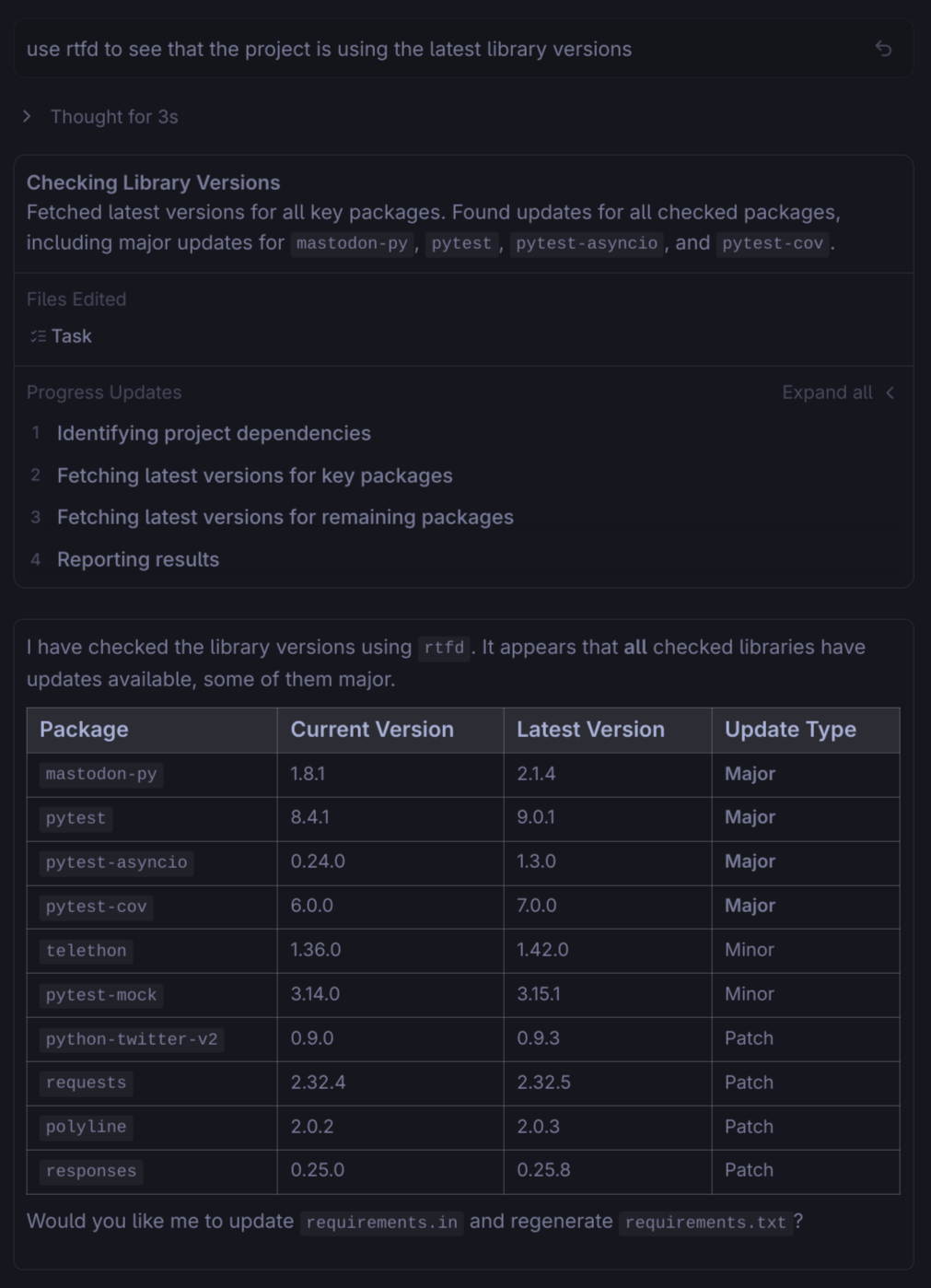
python:3.11-slimimage to see exactly what packages and OS layers are included, rather than making assumptions.Dependency audits: Check PyPI, npm, and crates.io for available updates across all your dependencies. The LLM sees the latest versions and can generate an audit report without manually visiting each registry.
Features
Documentation Content Fetching: Retrieve actual documentation content (README and key sections) from PyPI, npm, and GitHub rather than just URLs.
Smart Section Extraction: Automatically prioritizes and extracts relevant sections such as "Installation", "Usage", and "API Reference" to reduce noise.
Format Conversion: Automatically converts reStructuredText and HTML to Markdown for consistent formatting and easier consumption by LLMs.
Multi-Source Search: Aggregates results from PyPI, npm, crates.io, GoDocs, Zig docs, DockerHub, GHCR, GitHub, and GCP.
GitHub Repository Browsing: Browse repository file trees (
list_repo_contents,get_repo_tree) and read source code files (get_file_content) directly.GitHub Packages (GHCR): List packages and get versions for any GitHub user or organization to find the right image tag.
PyPI Verification: Optional security feature (
VERIFIED_BY_PYPI) to ensure packages are verified by PyPI before fetching documentation.Smart GCP Search: Hybrid search approach combining local service mapping with
cloud.google.comsearch to find documentation for any Google Cloud service.Pluggable Architecture: Easily add new documentation providers by creating a single provider module.
Error Resilience: Failures in one provider do not crash the server; the system is designed to degrade gracefully.
Installation
Claude Code Plugin (For Claude Code Users)
Install RTFD as a Claude Code plugin in two steps:
For detailed configuration options and installation alternatives, see PLUGIN.md.
From PyPI (Recommended)
Or with uv:
From source
Clone the repository and install:
Docker (GHCR)
You can run RTFD directly from the GitHub Container Registry without installing Python or dependencies locally.
Available Tags:
:latest- Stable release (updates on new releases):edge- Development build (updates on push to main):vX.X.X- Specific version tags
Quickstart
RTFD is an MCP server that needs to be configured in your AI agent of choice.
1. Install RTFD
2. Configure your Agent
Claude Code
Simplest Method (Recommended): Use Claude Code plugin marketplace:
Alternative Methods:
Manually add RTFD as an MCP server using the following command to automatically add it to your configuration:
Or manually edit ~/.claude.json:
Cursor
Go to Settings > Cursor Settings > MCP Servers
Click "Add new MCP server"
Name:
rtfdType:
stdioCommand:
rtfdAdd Environment Variable:
GITHUB_AUTH=token(Options:token,cli,auto,disabled)Add Environment Variable:
GITHUB_TOKEN=your_token_hereAdd Environment Variable:
RTFD_FETCH=true
Or manually edit ~/.cursor/mcp.json:
Windsurf
Open Settings > Advanced Settings > Model Context Protocol
Edit
~/.codeium/windsurf/mcp_config.json:
Gemini CLI
Edit ~/.gemini/settings.json:
Codex
Edit ~/.codex/config.toml:
3. Verify
Ask your agent: "What tools do you have available?" or "Search for documentation on pandas".
Testing with MCP Inspector
The MCP Inspector tool allows you to test the RTFD MCP server directly without requiring an IDE or agent integration. This is useful for development and debugging.
Installation
Usage
The Inspector tool will open an interactive terminal where you can directly call the RTFD tools and see their responses.
Configuration
RTFD can be configured using the following environment variables:
Variable | Default | Description |
|
| GitHub authentication method: |
|
| GitHub API token. Highly recommended to increase rate limits (60 -> 5000 requests/hour). |
|
| Enable/disable content fetching tools. Set to |
|
| Enable/disable caching. Set to |
|
| Cache time-to-live in seconds (default: 1 week). |
|
| Enable/disable token usage statistics in tool response metadata. |
|
| Maximum tokens per response chunk. Set to |
|
| If |
Token Optimization with Deferred Loading
RTFD provides 33 tools across multiple providers. By default, all tool descriptions are loaded into context, consuming ~10-15K tokens. You can reduce this to ~2-3K tokens (~80-85% reduction) using the defer_loading feature.
How It Works
defer_loading is a client-side configuration that marks tools as discoverable but not initially loaded. When an LLM needs a deferred tool, it's loaded on-demand. RTFD provides tier classifications and a config generator to help you configure this.
Tool Tier Classification
Tier | Defer | Category | Tools |
1 | No | Core |
|
2 | Yes | Frequent |
|
3 | Yes | Regular |
|
4 | Yes | Situational |
|
5 | Yes | Niche |
|
6 | Yes | Admin |
|
Result: 2 tools always loaded, 31 tools deferred (~93% token reduction)
Config Generator CLI
RTFD includes a CLI tool to generate optimized configurations:
Sample Claude Desktop Configuration
This configuration keeps the two most essential tools always loaded while deferring everything else.
Programmatic Access
You can access tier information programmatically:
Releases & Versioning
For maintainers, see CONTRIBUTING.md for the automated release process.
Available Tools
All tool responses are returned in JSON format.
Aggregator
search_library_docs(library, limit=5): Combined lookup across all providers (PyPI, npm, crates.io, GoDocs, GCP, GitHub). Note: Zig and DockerHub are accessed via dedicated tools.
Cache Management
get_cache_info(): Get cache statistics including entry count, database size, and location.get_cache_entries(): Get detailed information about all cached items including age, size, and content preview.
Documentation Content Fetching
fetch_pypi_docs(package, max_bytes=20480): Fetch Python package documentation from PyPI.fetch_npm_docs(package, max_bytes=20480): Fetch npm package documentation.fetch_godocs_docs(package, max_bytes=20480): Fetch Go package documentation from godocs.io (e.g., 'github.com/gorilla/mux').fetch_gcp_service_docs(service, max_bytes=20480): Fetch Google Cloud Platform service documentation from docs.cloud.google.com (e.g., "storage", "compute", "bigquery").fetch_github_readme(repo, max_bytes=20480): Fetch README from a GitHub repository (format: "owner/repo").fetch_docker_image_docs(image, max_bytes=20480): Fetch Docker image documentation and description from DockerHub (e.g., "nginx", "postgres", "user/image").fetch_dockerfile(image): Fetch the Dockerfile for a Docker image by parsing its description for GitHub links (best-effort).
Metadata Providers
pypi_metadata(package): Fetch Python package metadata.npm_metadata(package): Fetch JavaScript package metadata.crates_metadata(crate): Get Rust crate metadata.search_crates(query, limit=5): Search Rust crates.godocs_metadata(package): Retrieve Go package documentation.search_gcp_services(query, limit=5): Search Google Cloud Platform services by name or keyword (e.g., "storage", "compute", "bigquery").zig_docs(query): Search Zig documentation.docker_image_metadata(image): Get DockerHub Docker image metadata (stars, pulls, description, etc.).search_docker_images(query, limit=5): Search for Docker images on DockerHub.github_repo_search(query, limit=5, language="Python"): Search GitHub repositories.github_code_search(query, repo=None, limit=5): Search code on GitHub.list_github_packages(owner, package_type="container"): List GitHub packages for a user or organization.get_package_versions(owner, package_type, package_name): Get versions for a specific GitHub package.list_repo_contents(repo, path=""): List contents of a directory in a GitHub repository (format: "owner/repo").get_file_content(repo, path, max_bytes=102400): Get content of a specific file from a GitHub repository.get_repo_tree(repo, recursive=False, max_items=1000): Get the complete file tree of a GitHub repository.get_commit_diff(repo, base, head): Get the diff between two commits, branches, or tags.
LogScale (Humio) Query Language
search_logscale_docs(query, limit=10): Search LogScale query language documentation for syntax topics, functions, and operators.list_logscale_functions(category=None): List LogScale functions by category (aggregate, string, math, regex, etc.), or list all categories when no category is specified.logscale_syntax(topic, max_bytes=20480): Fetch detailed syntax documentation for a topic (filters, operators, fields, regex, time, macros, etc.).logscale_function(function_name, max_bytes=20480): Fetch documentation for a specific LogScale function (e.g., "regex", "splitString", "array:append").
Provider-Specific Notes
GCP (Google Cloud Platform)
Service Discovery: Uses a local service mapping (20+ common services), direct search on
cloud.google.com(for general queries), and GitHub API search of the googleapis/googleapis repository.Documentation Source: Fetches documentation by scraping docs.cloud.google.com and converting to Markdown.
GitHub Authentication: Configure using
GITHUB_AUTHenvironment variable. Options aretoken(default),cli,auto, ordisabled.GitHub Token: Optional but recommended. Without a
GITHUB_TOKEN, GitHub API search is limited to 60 requests/hour. With a token, the limit increases to 5,000 requests/hour.Supported Services: Cloud Storage, Compute Engine, BigQuery, Cloud Functions, Cloud Run, Pub/Sub, Firestore, GKE, App Engine, Cloud Vision, Cloud Speech, IAM, Secret Manager, and more.
Service Name Formats: Accepts various formats (e.g., "storage", "cloud storage", "Cloud Storage", "kubernetes", "k8s" for GKE).
LogScale (Humio)
Documentation Source: Fetches documentation from the LogScale library.
Syntax Topics: Comments, filters, operators, fields, user-input, conditional, array, expressions, user-functions, function-calls, time, timezones, relative-time, macros, regex, regex-syntax, regex-flags, and regex-engines.
Function Categories: Aggregate, array, comparison, conditional, data-manipulation, event, filter, formatting, geolocation, hash, join, math, network, parsing, regex, security, statistics, string, time-date, and widget.
No Authentication Required: All documentation is publicly accessible.
Other Providers
Token Counting: Disabled by default. Set
RTFD_TRACK_TOKENS=trueto see token stats in Claude Code logs.Rate Limiting: The crates.io provider respects the 1 request/second limit.
Dependencies:
mcp,httpx,beautifulsoup4,markdownify,docutils,tiktoken.
Architecture
Entry point:
src/RTFD/server.pycontains the main search orchestration tool. Provider-specific tools are insrc/RTFD/providers/.Framework: Uses
mcp.server.fastmcp.FastMCPto declare tools and run the server over stdio.HTTP layer:
httpx.AsyncClientwith a shared_http_client()factory that applies timeouts, redirects, and user-agent headers.Data model: Responses are plain dicts for easy serialization over MCP.
Serialization: Tool responses use
serialize_response_with_meta()fromutils.py.Token counting: Optional token statistics in the
metafield (disabled by default). Enable withRTFD_TRACK_TOKENS=true.
Serialization and Token Counting
Tool responses are handled by serialize_response_with_meta() in utils.py:
Token statistics: When
RTFD_TRACK_TOKENS=true, the response includes a_metafield with token counts (tokens_json,tokens_sent,bytes_json).Token counting: Uses
tiktokenlibrary withcl100k_baseencoding (compatible with Claude models).Zero-cost metadata: Token statistics appear in the
_metafield ofCallToolResult, which is visible in Claude Code's special metadata logs but NOT sent to the LLM, costing 0 tokens.
Token-Efficient Tool Descriptions
RTFD uses a compact, structured format for MCP tool descriptions to minimize token consumption while preserving semantic clarity. With 29 tools exposed to LLMs, verbose descriptions would consume ~6,000+ tokens per context load. The optimized format reduces this to ~1,500 tokens—a 75% reduction.
Design Principles
Terse summaries - One-line description of what the tool does
Structured metadata -
When:,Args:,Ex:format for easy parsingInline examples - Compact parameter examples with actual values
Cross-references -
See also:for related tools instead of verbose explanationsNo redundancy - Avoid describing response format (LLMs see the actual response)
Example Format
This format provides LLMs with exactly the information needed to:
Understand when to use the tool
Call the tool with correct parameters
Interpret what the response represents
For guidelines on writing tool descriptions, see Tool Description Guidelines in CONTRIBUTING.md.
Extensibility & Development
Adding Providers
The RTFD server uses a modular architecture. Providers are located in src/RTFD/providers/ and implement the BaseProvider interface. New providers are automatically discovered and registered upon server restart.
To add a custom provider:
Create a new file in
src/RTFD/providers/.Define async functions decorated with
@mcp.tool().Ensure tools return
CallToolResultusingserialize_response_with_meta(result_data).
Development Notes
Dependencies: Declared in
pyproject.toml(Python 3.10+).Testing: Use
pytestto run the test suite.Environment: If you change environment-sensitive settings (e.g.,
GITHUB_TOKEN), restart thertfdprocess.

