
Provides access to AppSignal's monitoring data, metrics, and tools, enabling AI agents to interact with performance monitoring information from AppSignal.
Click on "Install Server".
Wait a few minutes for the server to deploy. Once ready, it will show a "Started" state.
In the chat, type
@followed by the MCP server name and your instructions, e.g., "@AppSignal MCP Servershow me error rates for my production app in the last hour"
That's it! The server will respond to your query, and you can continue using it as needed.
Here is a step-by-step guide with screenshots.
AppSignal MCP Server
This is the official AppSignal server. Everything necessary to debug using AppSignal's monitoring data, metrics, and tools is now accessible from your favorite AI editor.
This feature is in Beta. Documentation can also be found here
Join our to help shape this MCP implementation. Feature requests are welcome!
Prerequisites
Docker
An and an .
Related MCP server: Official Substack MCP Server
Installation
Pull the Docker image:
docker pull appsignal/mcp:latestConfiguration
Claude
Configure Claude to use the AppSignal MCP server by editing the ~/Library/Application Support/Claude/claude_desktop_config.json file:
{
  "mcpServers": {
    "appsignal": {
      "command": "docker",
      "args": ["run", "-i", "--rm", "-e", "APPSIGNAL_API_KEY", "appsignal/mcp"],
      "env": {
        "APPSIGNAL_API_KEY": "your_api_key_here"
      }
    }
  }
}
You can find this by navigating to your Profile -> Settings -> Developer and then clicking Edit Config
Claude Code
To enable AppSignal MCP in Claude Code, run the following command:
claude mcp add appsignal -e APPSIGNAL_API_KEY=your_api_key_here -- docker run -i --rm -e APPSIGNAL_API_KEY appsignal/mcpCursor and Windsurf
To enable AppSignal MCP in Cursor or Windsurf, edit your configuration file.
For Cursor use ~/.cursor/mcp.json
For Windsurf use ~/.codeium/windsurf/mcp_config.json
Add the following configuration:
{
  "mcpServers": {
    "appsignal": {
      "command": "docker",
      "args": ["run", "-i", "--rm", "-e", "APPSIGNAL_API_KEY", "appsignal/mcp"],
      "env": {
        "APPSIGNAL_API_KEY": "your-mcp-token"
      }
    }
  }
}
Zed
Open your Zed settings file and add the context_servers section:
{
  "context_servers": {
    "appsignal": {
      "source": "custom",
      "command": "docker",
      "args": ["run", "-i", "--rm", "-e", "APPSIGNAL_API_KEY", "appsignal/mcp"],
      "env": {
        "APPSIGNAL_API_KEY": "your-mcp-token"
      }
    }
}
VSCode
If you are running GitHub Copilot, and are signed in under a company account, make sure to set "MCP servers in Copilot" to "Enabled" under your organization settings > Copilot > Policies.
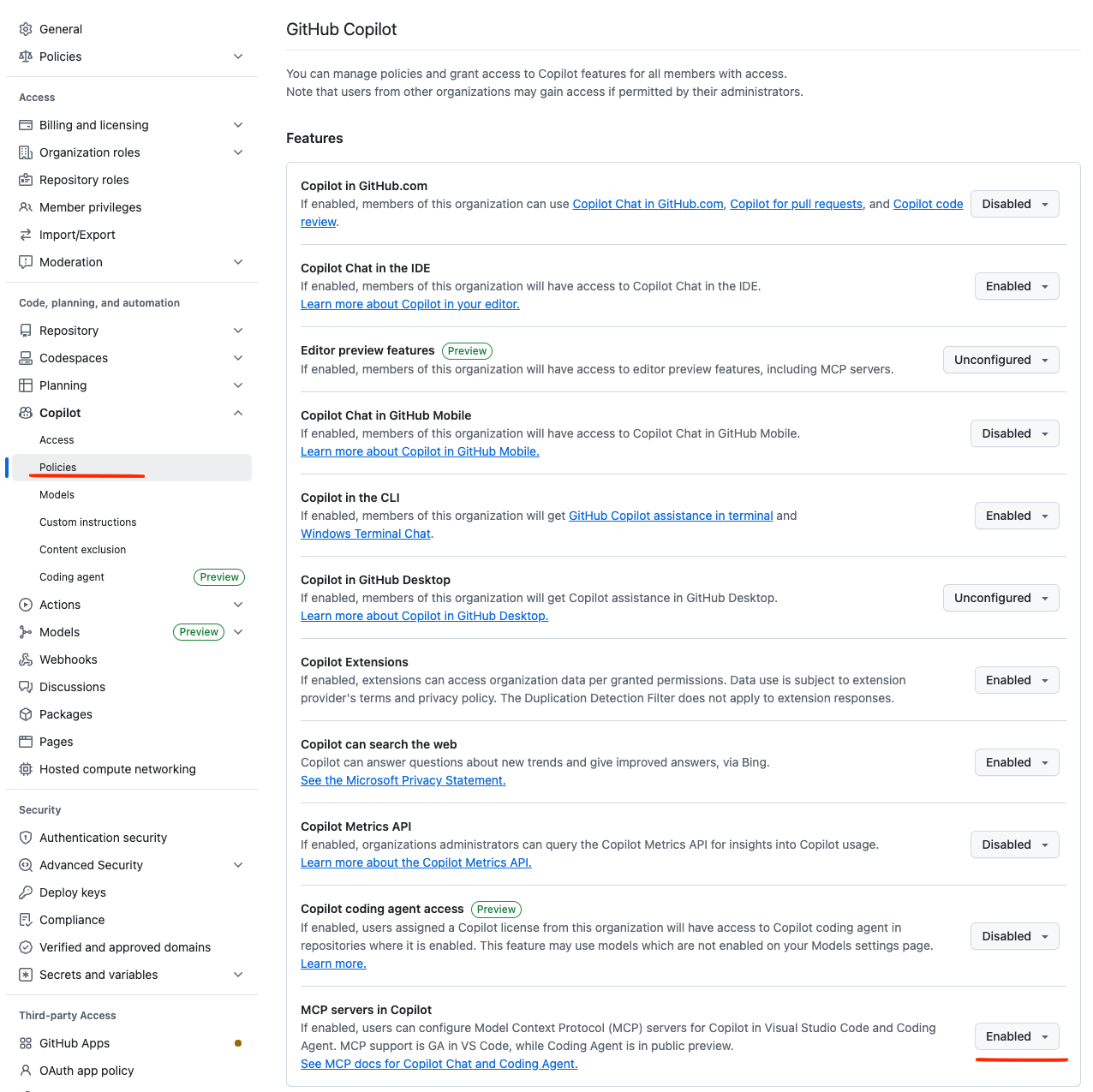
Then add this config to your .vscode/mcp.json settings:
{
  "inputs": [
    {
      "type": "promptString",
      "id": "appsignal_mcp_token",
      "description": "AppSignal MCP Token",
      "password": true
    }
  ],
  "servers": {
    "appsignal": {
      "command":  "docker"
      "args": [
        "run",
        "-i",
        "--rm",
        "-e",
        "APPSIGNAL_API_KEY",
        "appsignal/mcp"
      ],
      "env": {
        "APPSIGNAL_API_KEY": "${input:appsignal_mcp_token}"
      }
    }
  }
}
Development
To work on the MCP server:
Start the TypeScript compiler in watch mode:
npm run watchRun tests:
npm testUse the MCP inspector for debugging:
npm run inspector
Change management
Every change that will results in a new version to be released, requires a changeset. Changesets are small Markdown file that describe the change for the end-user. The changeset's frontmatter describes the type of change (new feature, bug fix, etc.) and the version bump (major, minor, or patch).
Use Mono's changeset CLI to generate a new changeset file. Commit the changeset file and include it in your Pull Requests.
mono changeset addPublishing
Install Mono, the tool used for release management.
git pull # Ensure you have the latest version

mono publish # Publish a new version
Contributing
Thinking of contributing to our project? Awesome! 🚀
Please follow our in our documentation and follow our .
Also, we would be very happy to send you Stroopwafles. Have look at everyone we send a package to so far on our .
Support
Join our to chat with other developers and the AppSignal team
to speak directly with the engineers working on AppSignal. They will help you get set up, tweak your code and make sure you get the most out of using AppSignal.
License
This project is licensed under the MIT License - see the LICENSE file for details.
About AppSignal
provides real-time performance monitoring for your web applications. Track errors, monitor performance, measure client-side metrics, and receive alerts when things go wrong.