
References the MCP SDK available through PyPI, which is used to implement the server's functionality.
Click on "Install Server".
Wait a few minutes for the server to deploy. Once ready, it will show a "Started" state.
In the chat, type
@followed by the MCP server name and your instructions, e.g., "@MCP Server Sampleadd 5 and 7"
That's it! The server will respond to your query, and you can continue using it as needed.
Here is a step-by-step guide with screenshots.
MCP Server Sample
This repository contains an implementation of a Model Context Protocol (MCP) server for educational purposes. This code demonstrates how to build a functional MCP server that can integrate with various LLM clients.
MCP Server Example
This repository contains an implementation of a Model Context Protocol (MCP) server for educational purposes. This code demonstrates how to build a functional MCP server that can integrate with various LLM clients.
References:
What is MCP?
MCP (Model Context Protocol) is an open protocol that standardizes how applications provide context to LLMs. Think of MCP like a USB-C port for AI applications - it provides a standardized way to connect AI models to different data sources and tools.
Key Benefits
A growing list of pre-built integrations that your LLM can directly plug into
Flexibility to switch between LLM providers and vendors
Best practices for securing your data within your infrastructure
Related MCP server: MCP Server Example
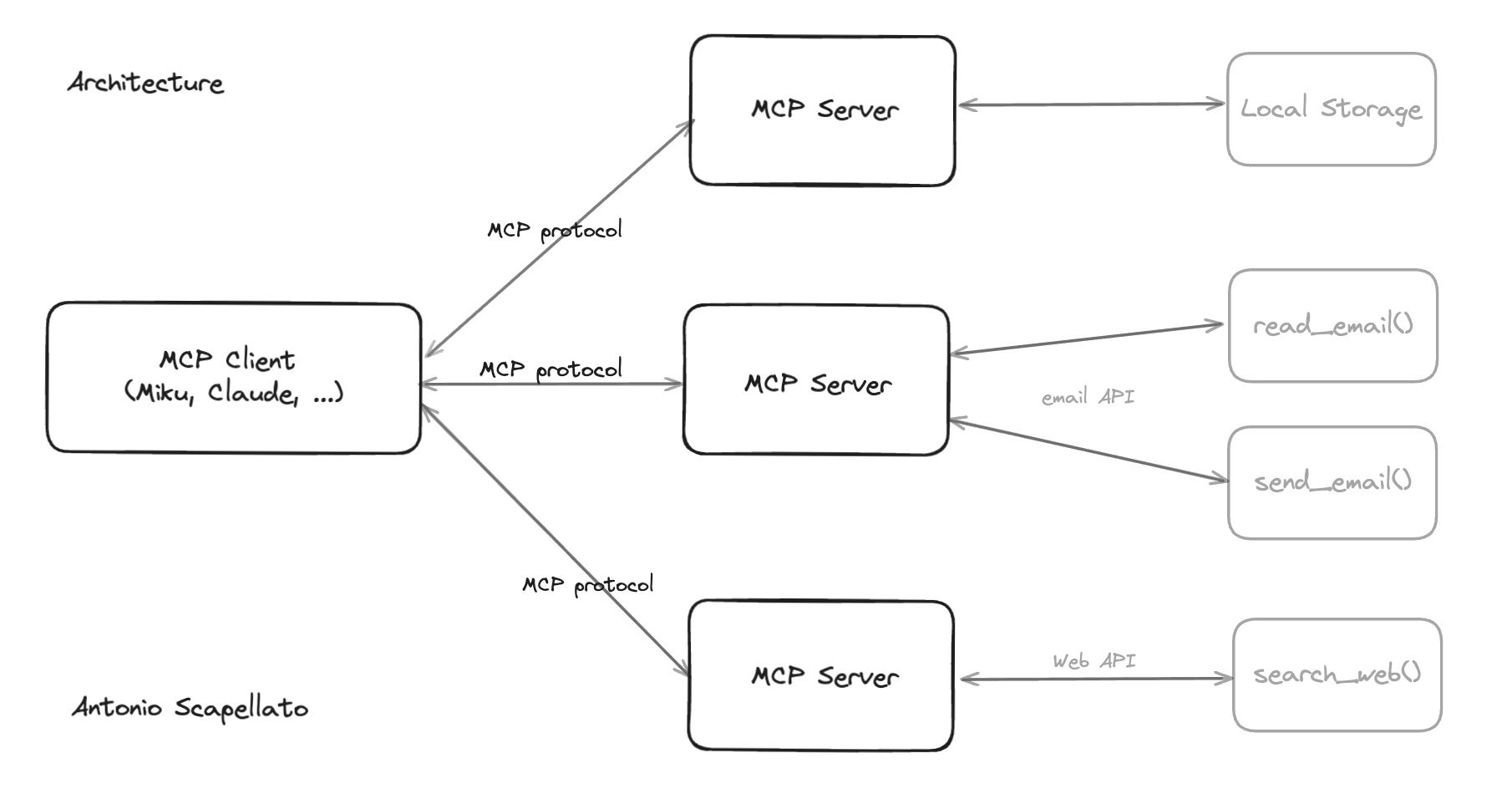
Architecture Overview
MCP follows a client-server architecture where a host application can connect to multiple servers:
MCP Hosts: Programs like Claude Desktop, IDEs, or AI tools that want to access data through MCP
MCP Clients: Protocol clients that maintain 1:1 connections with servers
MCP Servers: Lightweight programs that expose specific capabilities through the standardized Model Context Protocol
Data Sources: Both local (files, databases) and remote services (APIs) that MCP servers can access
Core MCP Concepts
MCP servers can provide three main types of capabilities:
Resources: File-like data that can be read by clients (like API responses or file contents)
Tools: Functions that can be called by the LLM (with user approval)
Prompts: Pre-written templates that help users accomplish specific tasks
System Requirements
Python 3.10 or higher
MCP SDK 1.2.0 or higher
uvpackage manager
Installation
Adding MCP to your python project We recommend using uv to manage your Python projects.
If you haven't created a uv-managed project yet, create one:
Then add MCP to your project dependencies:
Alternatively, for projects using pip for dependencies:
Running the standalone MCP development tools To run the mcp command with uv:
Quickstart
Let's create a simple MCP server that exposes a calculator tool and some data:
You can install this server in Claude Desktop and interact with it right away by running:
Alternatively, you can test it with the MCP Inspector:
Made with ❤️ by Antonio Scapellato
Resources:
License
This project is licensed under the MIT License. See the LICENSE file for details.