<p align="center">
<img src="https://raw.githubusercontent.com/aitytech/agentkits-memory/main/assets/logo.svg" alt="AgentKits Logo" width="80" height="80">
</p>
<h1 align="center">AgentKits Memory</h1>
<p align="center">
<em>by <strong>AityTech</strong></em>
</p>
<p align="center">
<a href="https://www.npmjs.com/package/@aitytech/agentkits-memory"><img src="https://img.shields.io/npm/v/@aitytech/agentkits-memory.svg" alt="npm"></a>
<img src="https://img.shields.io/badge/license-MIT-blue.svg" alt="License">
<img src="https://img.shields.io/badge/Claude_Code-Compatible-blueviolet" alt="Claude Code">
<img src="https://img.shields.io/badge/Cursor-Compatible-blue" alt="Cursor">
<img src="https://img.shields.io/badge/Windsurf-Compatible-cyan" alt="Windsurf">
<img src="https://img.shields.io/badge/Cline-Compatible-orange" alt="Cline">
<img src="https://img.shields.io/badge/OpenCode-Compatible-green" alt="OpenCode">
<br>
<img src="https://img.shields.io/badge/tests-970_passed-brightgreen" alt="Tests">
<img src="https://img.shields.io/badge/coverage-91%25-brightgreen" alt="Coverage">
</p>
<p align="center">
<strong>Persistent Memory System for AI Coding Assistants</strong>
</p>
<p align="center">
Your AI assistant forgets everything between sessions. AgentKits Memory fixes that.<br>
Decisions, patterns, errors, and context — all persisted locally via MCP.
</p>
<p align="center">
<a href="https://www.agentkits.net/memory">Website</a> •
<a href="https://www.agentkits.net/memory/docs">Docs</a> •
<a href="#quick-start">Quick Start</a> •
<a href="#how-it-works">How It Works</a> •
<a href="#multi-platform-support">Platforms</a> •
<a href="#cli-commands">CLI</a> •
<a href="#web-viewer">Web Viewer</a>
</p>
<p align="center">
<strong>English</strong> · <a href="./i18n/README.zh.md">简体中文</a> · <a href="./i18n/README.ja.md">日本語</a> · <a href="./i18n/README.ko.md">한국어</a> · <a href="./i18n/README.es.md">Español</a> · <a href="./i18n/README.de.md">Deutsch</a> · <a href="./i18n/README.fr.md">Français</a> · <a href="./i18n/README.pt-br.md">Português</a> · <a href="./i18n/README.vi.md">Tiếng Việt</a> · <a href="./i18n/README.ru.md">Русский</a> · <a href="./i18n/README.ar.md">العربية</a>
</p>
---
## Features
| Feature | Benefit |
|---------|---------|
| **100% Local** | All data stays on your machine. No cloud, no API keys, no accounts |
| **Blazing Fast** | Native SQLite (better-sqlite3) = instant queries, zero latency |
| **Zero Config** | Works out of the box. No database setup required |
| **Multi-Platform** | Claude Code, Cursor, Windsurf, Cline, OpenCode — one setup command |
| **MCP Server** | 9 tools: save, search, timeline, details, recall, list, update, delete, status |
| **Auto-Capture** | Hooks capture session context, tool usage, summaries automatically |
| **AI Enrichment** | Background workers enrich observations with AI-generated summaries |
| **Vector Search** | sqlite-vec semantic similarity with multilingual embeddings (100+ languages) |
| **Web Viewer** | Browser UI to view, search, add, edit, delete memories |
| **3-Layer Search** | Progressive disclosure saves ~87% tokens vs fetching everything |
| **Lifecycle Mgmt** | Auto-compress, archive, and clean up old sessions |
| **Export/Import** | Backup and restore memories as JSON |
---
## How It Works
```
Session 1: "Use JWT for auth" Session 2: "Add login endpoint"
┌──────────────────────────┐ ┌──────────────────────────┐
│ You code with AI... │ │ AI already knows: │
│ AI makes decisions │ │ ✓ JWT auth decision │
│ AI encounters errors │ ───► │ ✓ Error solutions │
│ AI learns patterns │ saved │ ✓ Code patterns │
│ │ │ ✓ Session context │
└──────────────────────────┘ └──────────────────────────┘
│ ▲
▼ │
.claude/memory/memory.db ──────────────────┘
(SQLite, 100% local)
```
1. **Setup once** — `npx @aitytech/agentkits-memory` configures your platform
2. **Auto-capture** — Hooks record decisions, tool usage, and summaries as you work
3. **Context injection** — Next session starts with relevant history from past sessions
4. **Background processing** — Workers enrich observations with AI, generate embeddings, compress old data
5. **Search anytime** — AI uses MCP tools (`memory_search` → `memory_details`) to find past context
All data stays in `.claude/memory/memory.db` on your machine. No cloud. No API keys required.
---
## Design Decisions That Matter
Most memory tools scatter data across markdown files, require Python runtimes, or send your code to external APIs. AgentKits Memory makes fundamentally different choices:
| Design Choice | Why It Matters |
|---------------|----------------|
| **Single SQLite database** | One file (`memory.db`) holds everything — memories, sessions, observations, embeddings. No scattered files to sync, no merge conflicts, no orphaned data. Backup = copy one file |
| **Native Node.js, zero Python** | Runs wherever Node runs. No conda, no pip, no virtualenv. Same language as your MCP server — one `npx` command, done |
| **Token-efficient 3-layer search** | Search index first (~50 tokens/result), then timeline context, then full details. Only fetch what you need. Other tools dump entire memory files into context, burning tokens on irrelevant content |
| **Auto-capture via hooks** | Decisions, patterns, and errors are recorded as they happen — not after you remember to save them. Session context injection happens automatically on next session start |
| **Local embeddings, no API calls** | Vector search uses a local ONNX model (multilingual-e5-small). Semantic search works offline, costs nothing, and supports 100+ languages |
| **Background workers** | AI enrichment, embedding generation, and compression run asynchronously. Your coding flow is never blocked |
| **Multi-platform from day one** | One `--platform=all` flag configures Claude Code, Cursor, Windsurf, Cline, and OpenCode simultaneously. Same memory database, different editors |
| **Structured observation data** | Tool usage is captured with type classification (read/write/execute/search), file tracking, intent detection, and AI-generated narratives — not raw text dumps |
| **No process leaks** | Background workers self-terminate after 5 minutes, use PID-based lock files with stale-lock cleanup, and handle SIGTERM/SIGINT gracefully. No zombie processes, no orphaned workers |
| **No memory leaks** | Hooks run as short-lived processes (not long-running daemons). Database connections close on shutdown. Embedding subprocess has bounded respawn (max 2), pending request timeouts, and graceful cleanup of all timers and queues |
---
## Web Viewer
View and manage your memories through a modern web interface.
```bash
npx @aitytech/agentkits-memory web
```
Then open **http://localhost:1905** in your browser.
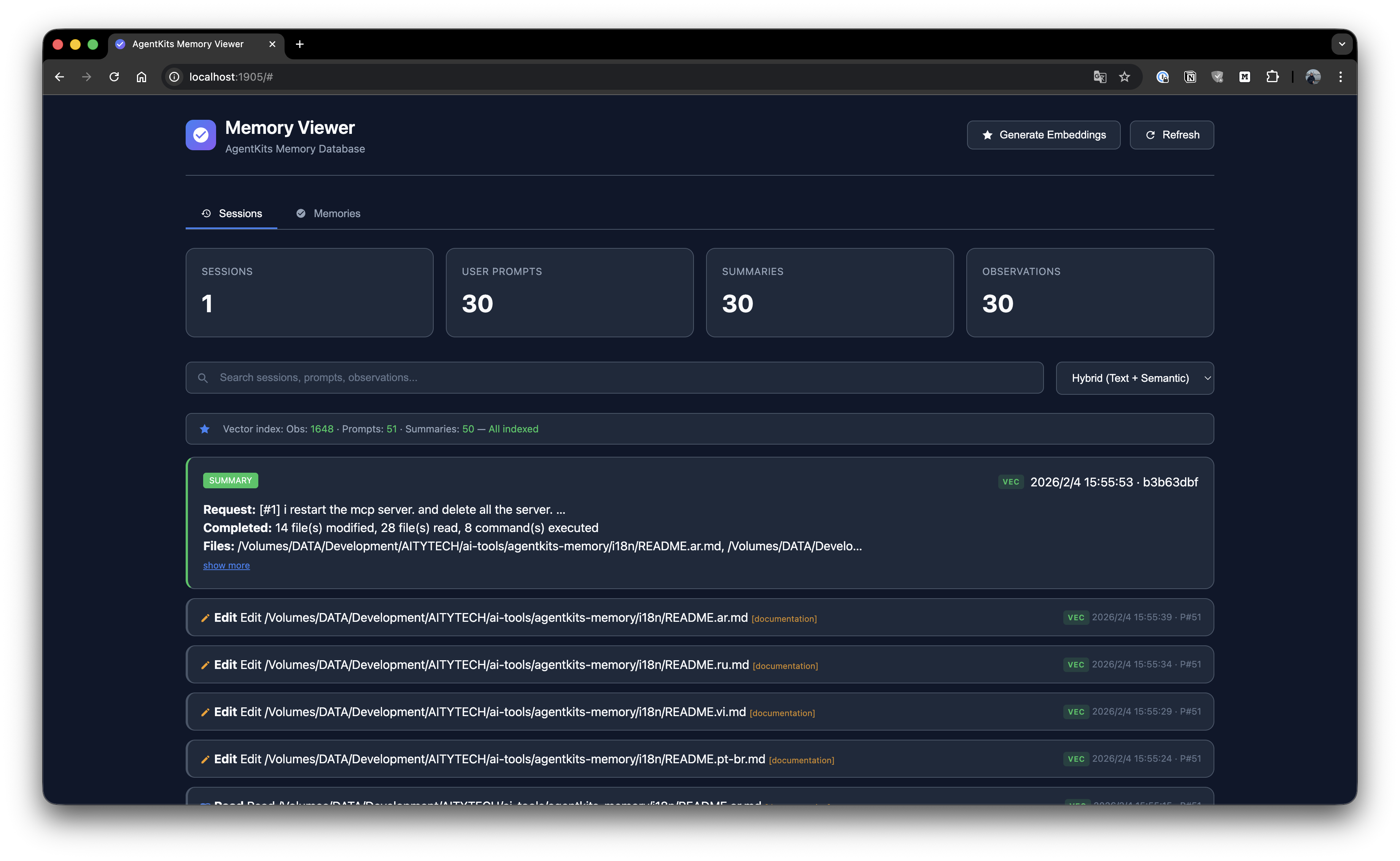
### Session List
Browse all sessions with timeline view and activity details.
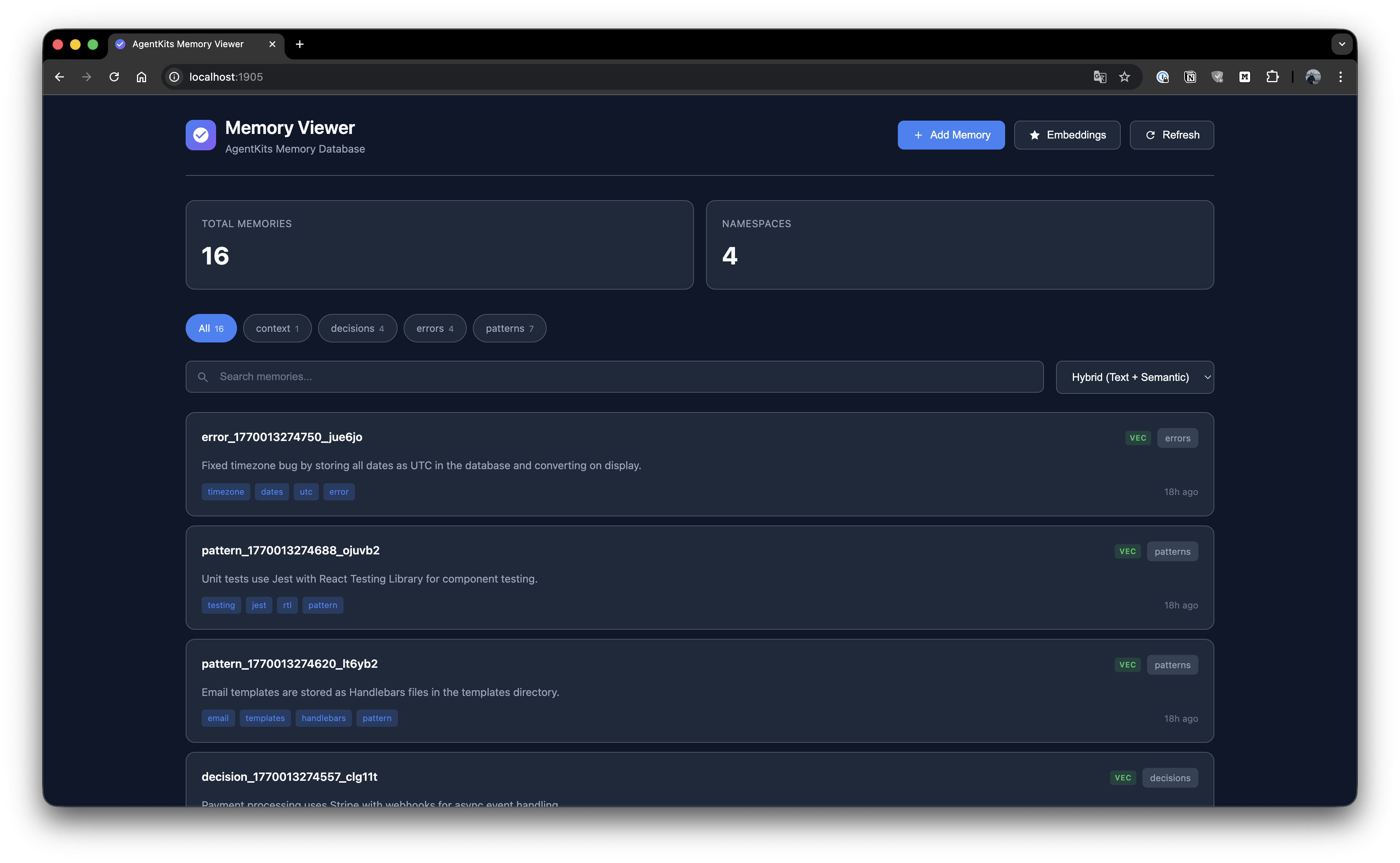
### Memory List
Browse all stored memories with search and namespace filtering.
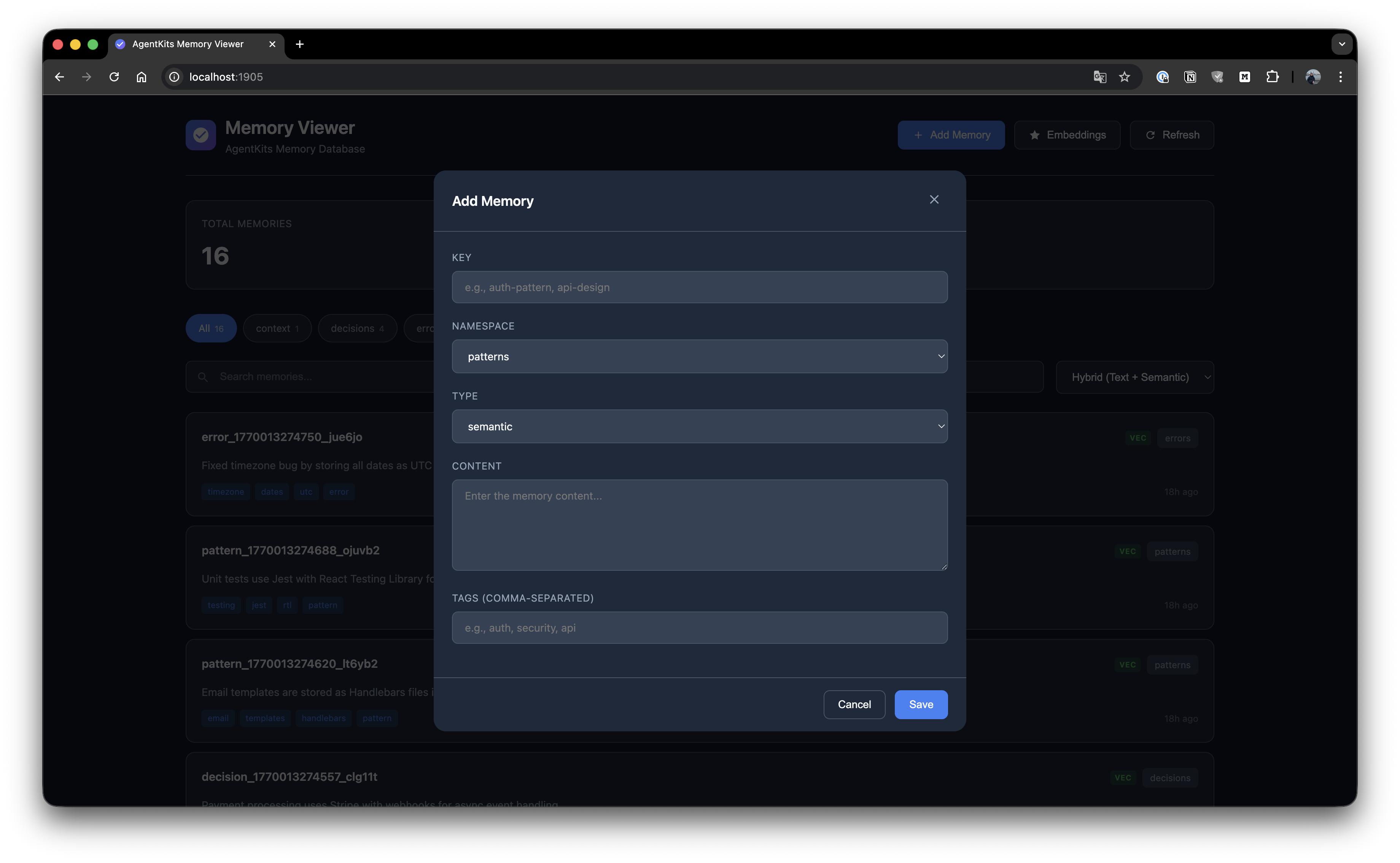
### Add Memory
Create new memories with key, namespace, type, content, and tags.
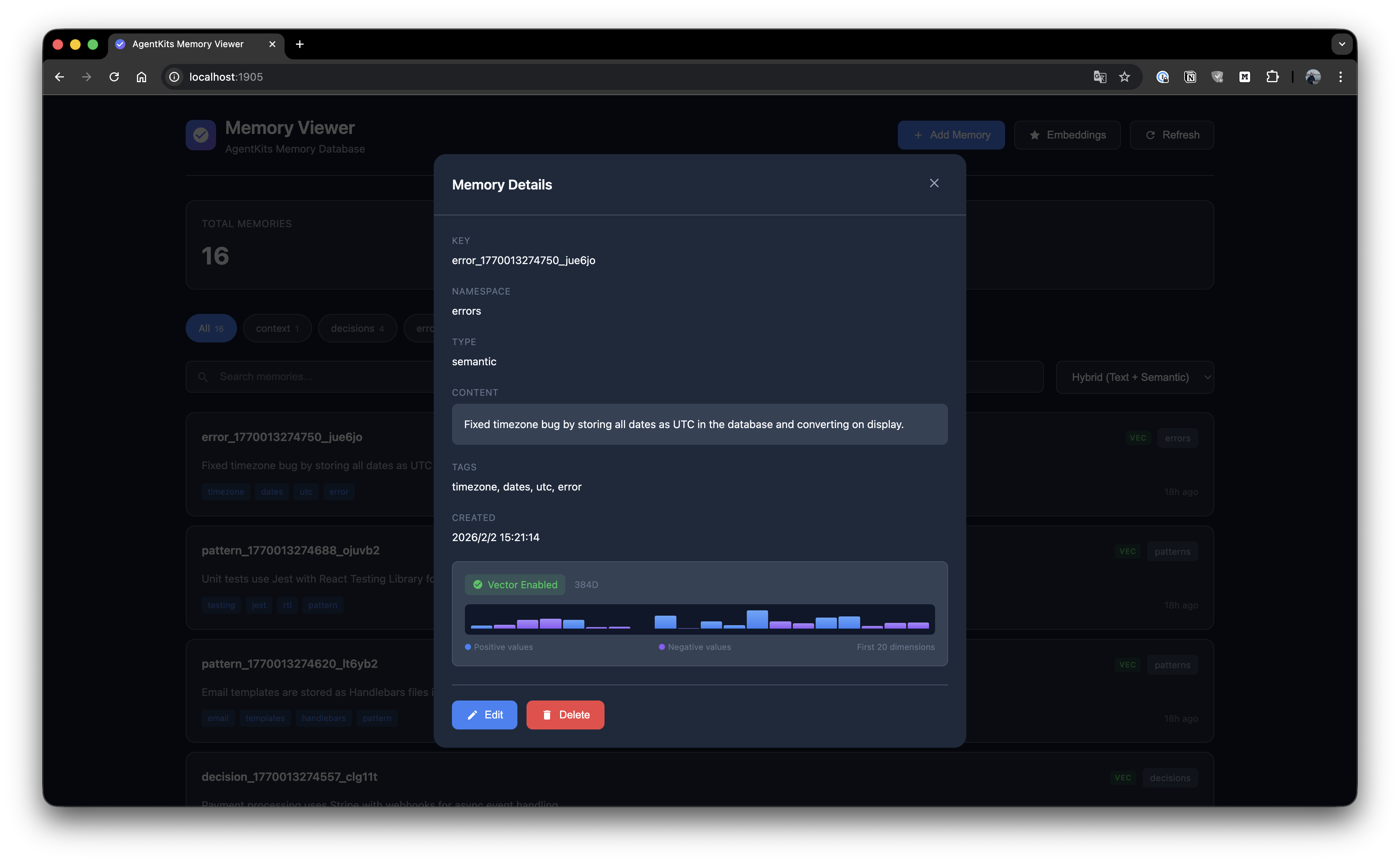
### Memory Details
View full memory details with edit and delete options.
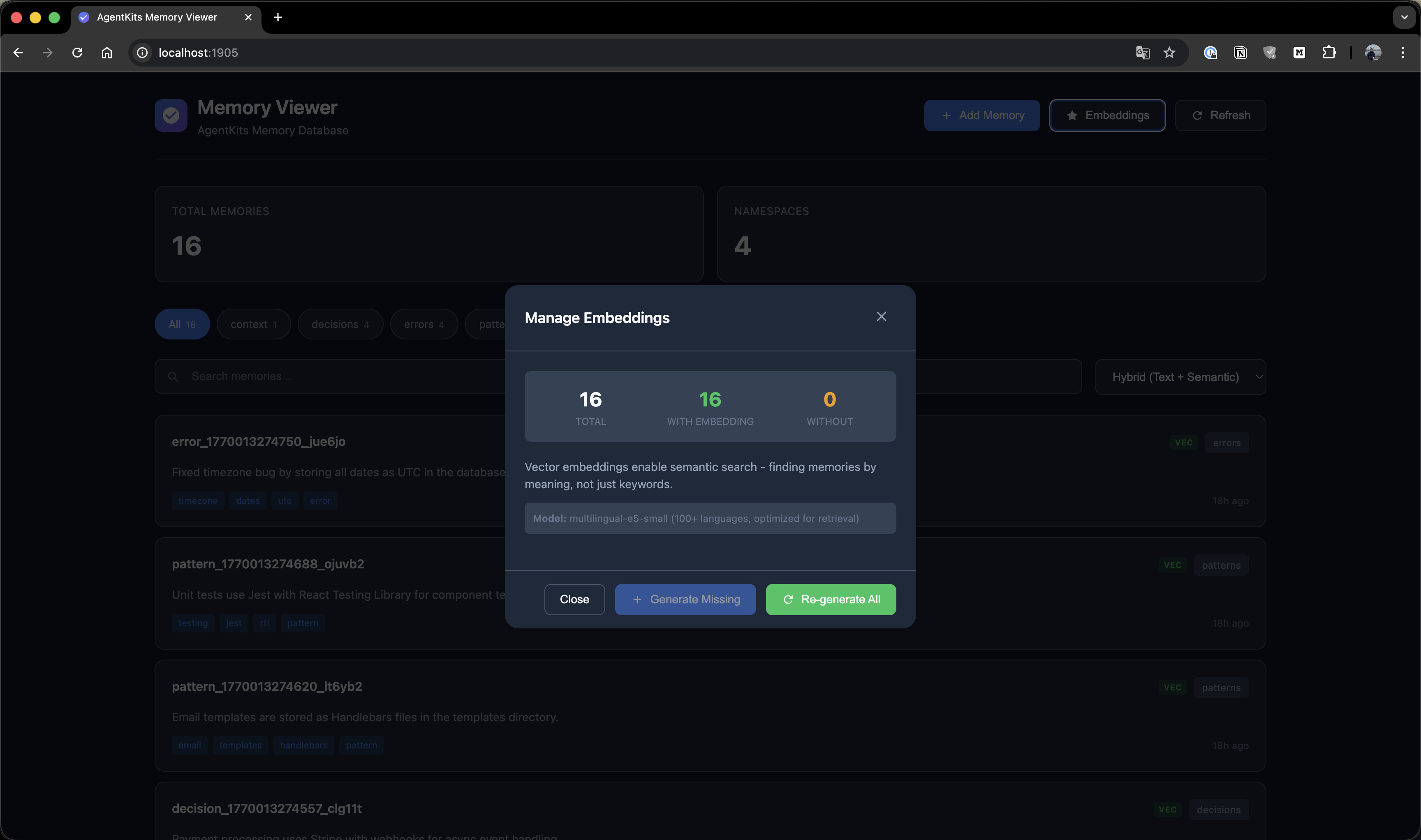
### Manage Embeddings
Generate and manage vector embeddings for semantic search.
---
## Quick Start
### Option 1: Claude Code Plugin Marketplace (Recommended for Claude Code)
Install as a plugin with one command — no manual configuration needed:
```bash
/plugin marketplace add aitytech/agentkits-memory
/plugin install agentkits-memory@agentkits-memory
```
This installs hooks, MCP server, and memory workflow skill automatically. Restart Claude Code after installation.
### Option 2: Automated Setup (All Platforms)
```bash
npx @aitytech/agentkits-memory
```
This auto-detects your platform and configures everything: MCP server, hooks (Claude Code/OpenCode), rules files (Cursor/Windsurf/Cline), and downloads the embedding model.
**Target a specific platform:**
```bash
npx @aitytech/agentkits-memory --platform=cursor
npx @aitytech/agentkits-memory --platform=windsurf,cline
npx @aitytech/agentkits-memory --platform=all
```
### Option 3: Manual MCP Configuration
If you prefer manual setup, add to your MCP config:
```json
{
"mcpServers": {
"memory": {
"command": "npx",
"args": ["-y", "@aitytech/agentkits-memory", "server"]
}
}
}
```
Config file locations:
- **Claude Code**: `.claude/settings.json` (embedded in `mcpServers` key)
- **Cursor**: `.cursor/mcp.json`
- **Windsurf**: `.windsurf/mcp.json`
- **Cline / OpenCode**: `.mcp.json` (project root)
### 3. MCP Tools
Once configured, your AI assistant can use these tools:
| Tool | Description |
|------|-------------|
| `memory_status` | Check memory system status (call first!) |
| `memory_save` | Save decisions, patterns, errors, or context |
| `memory_search` | **[Step 1]** Search index — lightweight IDs + titles (~50 tokens/result) |
| `memory_timeline` | **[Step 2]** Get temporal context around a memory |
| `memory_details` | **[Step 3]** Get full content for specific IDs |
| `memory_recall` | Quick topic overview — grouped summary |
| `memory_list` | List recent memories |
| `memory_update` | Update existing memory content or tags |
| `memory_delete` | Remove outdated memories |
---
## Progressive Disclosure (Token-Efficient Search)
AgentKits Memory uses a **3-layer search pattern** that saves ~70% tokens compared to fetching full content upfront.
### How It Works
```
┌─────────────────────────────────────────────────────────────┐
│ Step 1: memory_search │
│ Returns: IDs, titles, tags, scores (~50 tokens/item) │
│ → Review index, pick relevant memories │
└─────────────────────────────────────────────────────────────┘
↓
┌─────────────────────────────────────────────────────────────┐
│ Step 2: memory_timeline (optional) │
│ Returns: Context ±30 minutes around memory │
│ → Understand what happened before/after │
└─────────────────────────────────────────────────────────────┘
↓
┌─────────────────────────────────────────────────────────────┐
│ Step 3: memory_details │
│ Returns: Full content for selected IDs only │
│ → Fetch only what you actually need │
└─────────────────────────────────────────────────────────────┘
```
### Example Workflow
```typescript
// Step 1: Search - get lightweight index
memory_search({ query: "authentication" })
// → Returns: [{ id: "abc", title: "JWT pattern...", score: 85% }]
// Step 2: (Optional) See temporal context
memory_timeline({ anchor: "abc" })
// → Returns: What happened before/after this memory
// Step 3: Get full content only for what you need
memory_details({ ids: ["abc"] })
// → Returns: Full content for selected memory
```
### Token Savings
| Approach | Tokens Used |
|----------|-------------|
| **Old:** Fetch all content | ~500 tokens × 10 results = 5000 tokens |
| **New:** Progressive disclosure | 50 × 10 + 500 × 2 = 1500 tokens |
| **Savings** | **70% reduction** |
---
## CLI Commands
```bash
# One-command setup (auto-detects platform)
npx @aitytech/agentkits-memory
npx @aitytech/agentkits-memory setup --platform=cursor # specific platform
npx @aitytech/agentkits-memory setup --platform=all # all platforms
npx @aitytech/agentkits-memory setup --force # re-install/update
# Start MCP server
npx @aitytech/agentkits-memory server
# Web viewer (port 1905)
npx @aitytech/agentkits-memory web
# Terminal viewer
npx @aitytech/agentkits-memory viewer
npx @aitytech/agentkits-memory viewer --stats
npx @aitytech/agentkits-memory viewer --json
# Save from CLI
npx @aitytech/agentkits-memory save "Use JWT with refresh tokens" --category pattern --tags auth,security
# Settings
npx @aitytech/agentkits-memory hook settings .
npx @aitytech/agentkits-memory hook settings . --reset
npx @aitytech/agentkits-memory hook settings . aiProvider.provider=openai aiProvider.apiKey=sk-...
# Export / Import
npx @aitytech/agentkits-memory hook export . my-project ./backup.json
npx @aitytech/agentkits-memory hook import . ./backup.json
# Lifecycle management
npx @aitytech/agentkits-memory hook lifecycle . --compress-days=7 --archive-days=30
npx @aitytech/agentkits-memory hook lifecycle-stats .
```
---
## Programmatic Usage
```typescript
import { ProjectMemoryService } from '@aitytech/agentkits-memory';
const memory = new ProjectMemoryService({
baseDir: '.claude/memory',
dbFilename: 'memory.db',
});
await memory.initialize();
// Store a memory
await memory.storeEntry({
key: 'auth-pattern',
content: 'Use JWT with refresh tokens for authentication',
namespace: 'patterns',
tags: ['auth', 'security'],
});
// Query memories
const results = await memory.query({
type: 'hybrid',
namespace: 'patterns',
content: 'authentication',
limit: 10,
});
// Get by key
const entry = await memory.getByKey('patterns', 'auth-pattern');
```
---
## Auto-Capture Hooks
Hooks automatically capture your AI coding sessions (Claude Code and OpenCode only):
| Hook | Trigger | Action |
|------|---------|--------|
| `context` | Session Start | Injects previous session context + memory status |
| `session-init` | User Prompt | Initializes/resumes session, records prompts |
| `observation` | After Tool Use | Captures tool usage with intent detection |
| `summarize` | Session End | Generates structured session summary |
| `user-message` | Session Start | Displays memory status to user (stderr) |
Setup hooks:
```bash
npx @aitytech/agentkits-memory
```
**What gets captured automatically:**
- File reads/writes with paths
- Code changes as structured diffs (before → after)
- Developer intent (bugfix, feature, refactor, investigation, etc.)
- Session summaries with decisions, errors, and next steps
- Multi-prompt tracking within sessions
---
## Multi-Platform Support
| Platform | MCP | Hooks | Rules File | Setup |
|----------|-----|-------|------------|-------|
| **Claude Code** | `.claude/settings.json` | ✅ Full | CLAUDE.md (skill) | `--platform=claude-code` |
| **Cursor** | `.cursor/mcp.json` | — | `.cursorrules` | `--platform=cursor` |
| **Windsurf** | `.windsurf/mcp.json` | — | `.windsurfrules` | `--platform=windsurf` |
| **Cline** | `.mcp.json` | — | `.clinerules` | `--platform=cline` |
| **OpenCode** | `.mcp.json` | ✅ Full | — | `--platform=opencode` |
- **MCP Server** works with all platforms (memory tools via MCP protocol)
- **Hooks** provide auto-capture on Claude Code and OpenCode
- **Rules files** teach Cursor/Windsurf/Cline the memory workflow
- **Memory data** always stored in `.claude/memory/` (single source of truth)
---
## Background Workers
After each session, background workers process queued tasks:
| Worker | Task | Description |
|--------|------|-------------|
| `embed-session` | Embeddings | Generate vector embeddings for semantic search |
| `enrich-session` | AI Enrichment | Enrich observations with AI-generated summaries, facts, concepts |
| `compress-session` | Compression | Compress old observations (10:1–25:1) and generate session digests (20:1–100:1) |
Workers run automatically after session end. Each worker:
- Processes up to 200 items per run
- Uses lock files to prevent concurrent execution
- Auto-terminates after 5 minutes (prevents zombies)
- Retries failed tasks up to 3 times
---
## AI Provider Configuration
AI enrichment uses pluggable providers. Default is `claude-cli` (no API key needed).
| Provider | Type | Default Model | Notes |
|----------|------|---------------|-------|
| **Claude CLI** | `claude-cli` | `haiku` | Uses `claude --print`, no API key needed |
| **OpenAI** | `openai` | `gpt-4o-mini` | Any OpenAI model |
| **Google Gemini** | `gemini` | `gemini-2.0-flash` | Google AI Studio key |
| **OpenRouter** | `openai` | any | Set `baseUrl` to `https://openrouter.ai/api/v1` |
| **GLM (Zhipu)** | `openai` | any | Set `baseUrl` to `https://open.bigmodel.cn/api/paas/v4` |
| **Ollama** | `openai` | any | Set `baseUrl` to `http://localhost:11434/v1` |
### Option 1: Environment Variables
```bash
# OpenAI
export AGENTKITS_AI_PROVIDER=openai
export AGENTKITS_AI_API_KEY=sk-...
# Google Gemini
export AGENTKITS_AI_PROVIDER=gemini
export AGENTKITS_AI_API_KEY=AIza...
# OpenRouter (uses OpenAI-compatible format)
export AGENTKITS_AI_PROVIDER=openai
export AGENTKITS_AI_API_KEY=sk-or-...
export AGENTKITS_AI_BASE_URL=https://openrouter.ai/api/v1
export AGENTKITS_AI_MODEL=anthropic/claude-3.5-haiku
# Local Ollama (no API key needed)
export AGENTKITS_AI_PROVIDER=openai
export AGENTKITS_AI_BASE_URL=http://localhost:11434/v1
export AGENTKITS_AI_MODEL=llama3.2
# Disable AI enrichment entirely
export AGENTKITS_AI_ENRICHMENT=false
```
### Option 2: Persistent Settings
```bash
# Saved to .claude/memory/settings.json — persists across sessions
npx @aitytech/agentkits-memory hook settings . aiProvider.provider=openai aiProvider.apiKey=sk-...
npx @aitytech/agentkits-memory hook settings . aiProvider.provider=gemini aiProvider.apiKey=AIza...
npx @aitytech/agentkits-memory hook settings . aiProvider.baseUrl=https://openrouter.ai/api/v1
# View current settings
npx @aitytech/agentkits-memory hook settings .
# Reset to defaults
npx @aitytech/agentkits-memory hook settings . --reset
```
> **Priority:** Environment variables override settings.json. Settings.json overrides defaults.
---
## Lifecycle Management
Manage memory growth over time:
```bash
# Compress observations older than 7 days, archive sessions older than 30 days
npx @aitytech/agentkits-memory hook lifecycle . --compress-days=7 --archive-days=30
# Also auto-delete archived sessions older than 90 days
npx @aitytech/agentkits-memory hook lifecycle . --compress-days=7 --archive-days=30 --delete --delete-days=90
# View lifecycle statistics
npx @aitytech/agentkits-memory hook lifecycle-stats .
```
| Stage | What Happens |
|-------|-------------|
| **Compress** | AI-compresses observations, generates session digests |
| **Archive** | Marks old sessions as archived (excluded from context) |
| **Delete** | Removes archived sessions (opt-in, requires `--delete`) |
---
## Export / Import
Backup and restore your project memories:
```bash
# Export all sessions for a project
npx @aitytech/agentkits-memory hook export . my-project ./backup.json
# Import from backup (deduplicates automatically)
npx @aitytech/agentkits-memory hook import . ./backup.json
```
Export format includes sessions, observations, prompts, and summaries.
---
## Memory Categories
| Category | Use Case |
|----------|----------|
| `decision` | Architecture decisions, tech stack picks, trade-offs |
| `pattern` | Coding conventions, project patterns, recurring approaches |
| `error` | Bug fixes, error solutions, debugging insights |
| `context` | Project background, team conventions, environment setup |
| `observation` | Auto-captured session observations |
---
## Storage
Memories are stored in `.claude/memory/` within your project directory.
```
.claude/memory/
├── memory.db # SQLite database (all data)
├── memory.db-wal # Write-ahead log (temp)
├── settings.json # Persistent settings (AI provider, context config)
└── embeddings-cache/ # Cached vector embeddings
```
---
## CJK Language Support
AgentKits Memory has **automatic CJK support** for Chinese, Japanese, and Korean text search.
### Zero Configuration
When `better-sqlite3` is installed (default), CJK search works automatically:
```typescript
import { ProjectMemoryService } from '@aitytech/agentkits-memory';
const memory = new ProjectMemoryService('.claude/memory');
await memory.initialize();
// Store CJK content
await memory.storeEntry({
key: 'auth-pattern',
content: '認証機能の実装パターン - JWT with refresh tokens',
namespace: 'patterns',
});
// Search in Japanese, Chinese, or Korean - it just works!
const results = await memory.query({
type: 'hybrid',
content: '認証機能',
});
```
### How It Works
- **Native SQLite**: Uses `better-sqlite3` for maximum performance
- **Trigram tokenizer**: FTS5 with trigram creates 3-character sequences for CJK matching
- **Smart fallback**: Short CJK queries (< 3 chars) automatically use LIKE search
- **BM25 ranking**: Relevance scoring for search results
### Advanced: Japanese Word Segmentation
For advanced Japanese with proper word segmentation, optionally use lindera:
```typescript
import { createJapaneseOptimizedBackend } from '@aitytech/agentkits-memory';
const backend = createJapaneseOptimizedBackend({
databasePath: '.claude/memory/memory.db',
linderaPath: './path/to/liblindera_sqlite.dylib',
});
```
Requires [lindera-sqlite](https://github.com/lindera/lindera-sqlite) build.
---
## API Reference
### ProjectMemoryService
```typescript
interface ProjectMemoryConfig {
baseDir: string; // Default: '.claude/memory'
dbFilename: string; // Default: 'memory.db'
enableVectorIndex: boolean; // Default: false
dimensions: number; // Default: 384
embeddingGenerator?: EmbeddingGenerator;
cacheEnabled: boolean; // Default: true
cacheSize: number; // Default: 1000
cacheTtl: number; // Default: 300000 (5 min)
}
```
### Methods
| Method | Description |
|--------|-------------|
| `initialize()` | Initialize the memory service |
| `shutdown()` | Shutdown and persist changes |
| `storeEntry(input)` | Store a memory entry |
| `get(id)` | Get entry by ID |
| `getByKey(namespace, key)` | Get entry by namespace and key |
| `update(id, update)` | Update an entry |
| `delete(id)` | Delete an entry |
| `query(query)` | Query entries with filters |
| `semanticSearch(content, k)` | Semantic similarity search |
| `count(namespace?)` | Count entries |
| `listNamespaces()` | List all namespaces |
| `getStats()` | Get statistics |
---
## Code Quality
AgentKits Memory is thoroughly tested with **970 unit tests** across 21 test suites.
| Metric | Coverage |
|--------|----------|
| **Statements** | 90.29% |
| **Branches** | 80.85% |
| **Functions** | 90.54% |
| **Lines** | 91.74% |
### Test Categories
| Category | Tests | What's Covered |
|----------|-------|----------------|
| Core Memory Service | 56 | CRUD, search, pagination, categories, tags, import/export |
| SQLite Backend | 65 | Schema, migrations, FTS5, transactions, error handling |
| sqlite-vec Vector Index | 47 | Insert, search, delete, persistence, edge cases |
| Hybrid Search | 44 | FTS + vector fusion, scoring, ranking, filters |
| Token Economics | 27 | 3-layer search budgets, truncation, optimization |
| Embedding System | 63 | Cache, subprocess, local models, CJK support |
| Hook System | 502 | Context, session-init, observation, summarize, AI enrichment, service lifecycle, queue workers, adapters, types |
| MCP Server | 48 | All 9 MCP tools, validation, error responses |
| CLI | 34 | Platform detection, rules generation |
| Integration | 84 | End-to-end flows, embedding integration, multi-session |
```bash
# Run tests
npm test
# Run with coverage
npm run test:coverage
```
---
## Requirements
- **Node.js LTS**: 18.x, 20.x, or 22.x (recommended)
- MCP-compatible AI coding assistant
### Node.js Version Notes
This package uses `better-sqlite3` which requires native binaries. **Prebuilt binaries are available for LTS versions only**.
| Node Version | Status | Notes |
|--------------|--------|-------|
| 18.x LTS | ✅ Works | Prebuilt binaries |
| 20.x LTS | ✅ Works | Prebuilt binaries |
| 22.x LTS | ✅ Works | Prebuilt binaries |
| 19.x, 21.x, 23.x | ⚠️ Requires build tools | No prebuilt binaries |
### Using Non-LTS Versions (Windows)
If you must use a non-LTS version (19, 21, 23), install build tools first:
**Option 1: Visual Studio Build Tools**
```powershell
# Download and install from:
# https://visualstudio.microsoft.com/visual-cpp-build-tools/
# Select "Desktop development with C++" workload
```
**Option 2: windows-build-tools (npm)**
```powershell
npm install --global windows-build-tools
```
**Option 3: Chocolatey**
```powershell
choco install visualstudio2022-workload-vctools
```
See [node-gyp Windows guide](https://github.com/nodejs/node-gyp#on-windows) for more details.
---
## AgentKits Ecosystem
**AgentKits Memory** is part of the AgentKits ecosystem by AityTech - tools that make AI coding assistants smarter.
| Product | Description | Link |
|---------|-------------|------|
| **AgentKits Engineer** | 28 specialized agents, 100+ skills, enterprise patterns | [GitHub](https://github.com/aitytech/agentkits-engineer) |
| **AgentKits Marketing** | AI-powered marketing content generation | [GitHub](https://github.com/aitytech/agentkits-marketing) |
| **AgentKits Memory** | Persistent memory for AI assistants (this package) | [npm](https://www.npmjs.com/package/@aitytech/agentkits-memory) |
<p align="center">
<a href="https://agentkits.net">
<img src="https://img.shields.io/badge/Visit-agentkits.net-blue?style=for-the-badge" alt="agentkits.net">
</a>
</p>
---
## Star History
<a href="https://star-history.com/#aitytech/agentkits-memory&Date">
<picture>
<source media="(prefers-color-scheme: dark)" srcset="https://api.star-history.com/svg?repos=aitytech/agentkits-memory&type=Date&theme=dark" />
<source media="(prefers-color-scheme: light)" srcset="https://api.star-history.com/svg?repos=aitytech/agentkits-memory&type=Date" />
<img alt="Star History Chart" src="https://api.star-history.com/svg?repos=aitytech/agentkits-memory&type=Date" />
</picture>
</a>
---
## License
MIT
---
<p align="center">
<strong>Give your AI assistant memory that persists.</strong>
</p>
<p align="center">
<em>AgentKits Memory by AityTech</em>
</p>
<p align="center">
Star this repo if it helps your AI remember.
</p>
