
Click on "Install Server".
Wait a few minutes for the server to deploy. Once ready, it will show a "Started" state.
In the chat, type
@followed by the MCP server name and your instructions, e.g., "@IBM AS400 ISeries MCP Serverlog me into the production AS400 system"
That's it! The server will respond to your query, and you can continue using it as needed.
Here is a step-by-step guide with screenshots.
IBM AS/400 ISeries MCP Server
This project implements a customizable MCP server to execute RTE protocol.
Example

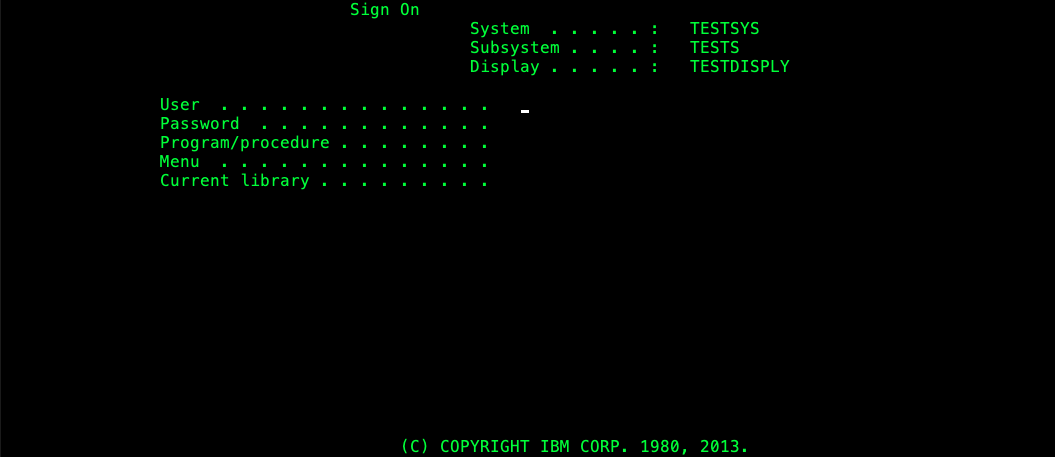
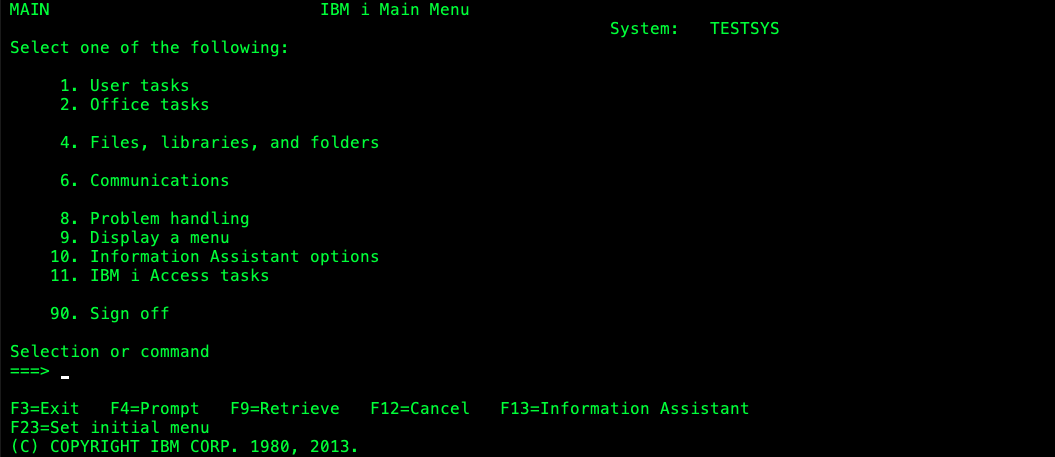
Related MCP server: RFC MCP Server
Development
Requirements
Java 21+*
Run
Compile project
./mvnw clean packageRun server on SSE mode
java -jar target/rte-mcp-server-0.0.1-SNAPSHOT.jarRun server on STDIO mode
java -jar -Dspring.ai.mcp.server.stdio=true rte-mcp-server-0.0.1-SNAPSHOT.jar
RteUtils
The intention of this project is to be easily extensible. You can add your own MCP tools by
using RteUtils class.
Also is needed to define the RTE connection parameters and the RTE flow in a yaml format.
RteUtils has the following methods implemented:
static RteProtocolClient connect(RteConfig config): Connects to the RTE server using the provided yaml.static String executeSteps(RteProtocolClient client, List<RteStep> steps): Executes the provided steps on the RTE server and returns the screen result as a string using the provided yaml.
The method exposed as MCP tool should be annotated as @Tool and the class should be annotated as @Services like in the
followig example:
The yaml defines the connection parameters and the steps to execute in the RTE server. This * yaml* file should have the following structure
Any number the steps can be defined in the yaml file.
server: The server address to connect to the RTE server.
port: The port to connect to the RTE server.
protocol: The supported protocols are TN5250, TN3270 and VT420
terminalType: The following table shows the supported terminal types for each protocol:
| Protocol | Terminal Type | |----------|-----------------------| | TN5250 | IBM-3477-FC: 27x132 | | | IBM-3179-2: 24x80 | | TN3270 | IBM-3278-M2: 24x80 | | | IBM-3278-M2-E: 24x80 | | | IBM-3278-M3: 32x80 | | | IBM-3278-M3-E: 32x80 | | | IBM-3278-M4: 43x80 | | | IBM-3278-M4-E: 43x80 | | | IBM-3278-M5: 27x132 | | | IBM-3278-M5-E: 27x132 | | VT420 | VT420-7: 24x80 |
sslType: The supported ssl types are None TLS and SSLv3.
steps: A list of actions representing the steps to execute in the RTE server.
actions: All the actions to execute in the current screen, any number of pairs label/input could be added.
label: The label of the field to fill in the RTE screen.
input: The value to fill in the field.
attentionKey: The key to press after filling the fields, it can be ENTER, F1, F2, F3, F4, F5, F6, F7, F8, F9, F10, F11, F12, F13, F14, F15, F16, F17, F18, F19, F20, F21, F22, F23, F24, ATTN, CLEAR, SYSRQ, RESET, ROLL_UP, ROLL_DN, PA1, PA2 or PA3.
Testing
An example of integration test is provided in the RteServiceLoginToolTest class, this test uses
the MCPClient validate the list of tools and execute it.
note: to test the behaving of to tool is recommended to generate a dump of the RTE flow to be executed and mock it using
More information on how to test and debug the server could be found here