# MCP Gateway
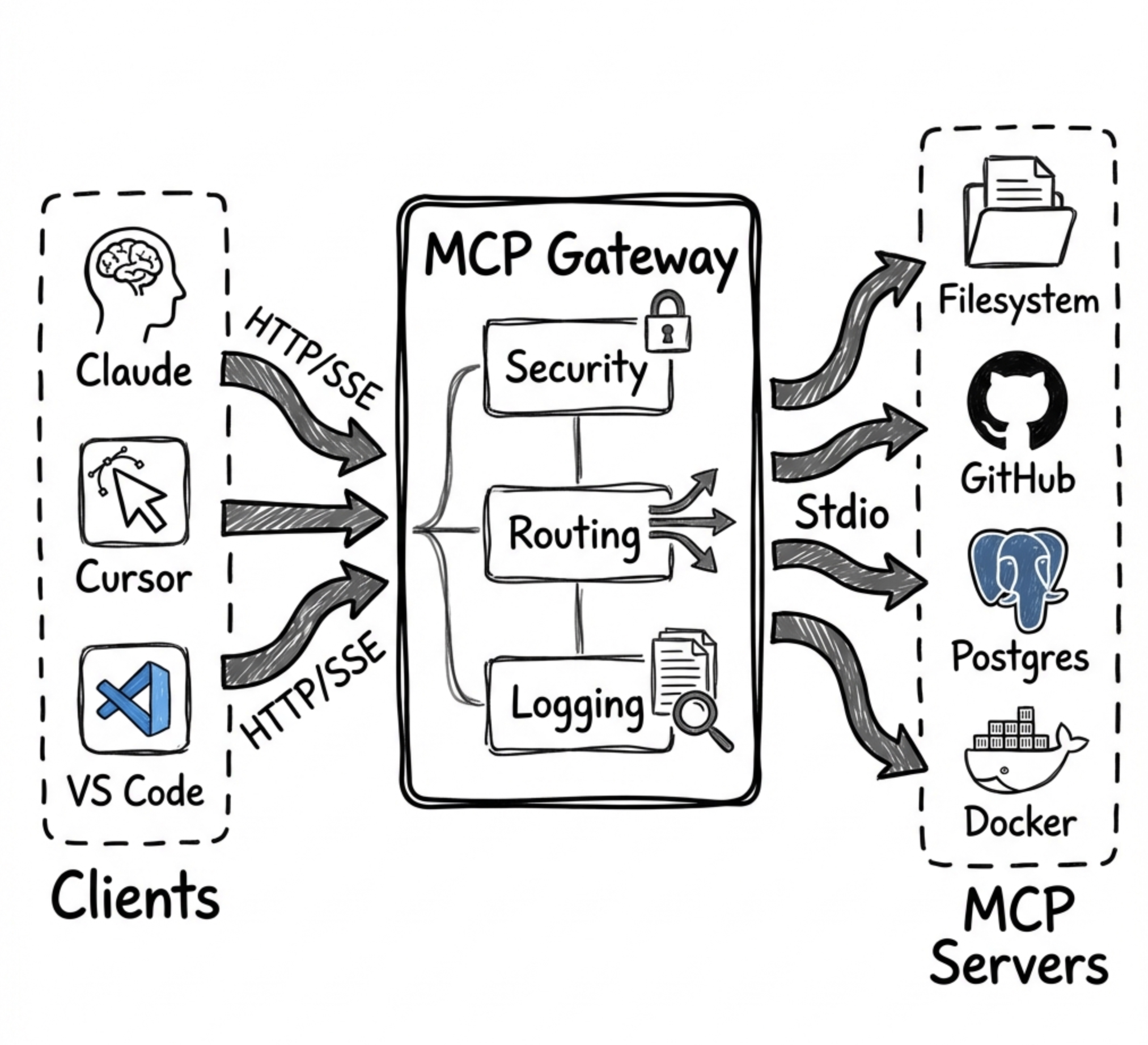
A universal Model Context Protocol (MCP) Gateway that aggregates multiple MCP servers and provides **result optimization** that native tool search doesn't offer. Works with all major MCP clients:
- ✅ **Claude Desktop / Claude Code**
- ✅ **Cursor**
- ✅ **OpenAI Codex**
- ✅ **VS Code Copilot**

## How MCP Gateway Complements Anthropic's Tool Search
> **January 2025**: Anthropic released [Tool Search Tool](https://platform.claude.com/docs/en/agents-and-tools/tool-use/tool-search-tool) - a native server-side feature for discovering tools from large catalogs using `defer_loading` and regex/BM25 search.
**MCP Gateway and Anthropic's Tool Search solve different problems:**
| Problem | Anthropic Tool Search | MCP Gateway |
|---------|----------------------|-------------|
| **Tool Discovery** (finding the right tool from 100s) | ✅ Native `defer_loading` + search | ✅ Progressive disclosure |
| **Result Filtering** (trimming large results) | ❌ Not available | ✅ `maxRows`, `fields`, `format` |
| **Auto-Summarization** (extracting insights) | ❌ Not available | ✅ 60-90% token savings |
| **Delta Responses** (only send changes) | ❌ Not available | ✅ 90%+ savings for polling |
| **Aggregations** (count, sum, groupBy) | ❌ Not available | ✅ Server-side analytics |
| **Code Batching** (multiple ops in one call) | ❌ Not available | ✅ 60-80% fewer round-trips |
| **Skills** (reusable code patterns) | ❌ Not available | ✅ 95%+ token savings |
**Bottom line:** Anthropic's Tool Search helps you *find* the right tool. MCP Gateway helps you *use* tools efficiently by managing large results, batching operations, and providing reusable patterns.
You can use both together - let Anthropic handle tool discovery while routing tool *calls* through MCP Gateway for result optimization.
---
## Why MCP Gateway?
**Problem:** AI agents face three critical challenges when working with MCP servers:
1. **Tool Overload** - Loading 300+ tool definitions consumes 77,000+ context tokens before any work begins
2. **Result Bloat** - Large query results (10K rows) can consume 50,000+ tokens per call
3. **Repetitive Operations** - Same workflows require re-explaining to the model every time
> **Note:** Anthropic's [Tool Search Tool](https://platform.claude.com/docs/en/agents-and-tools/tool-use/tool-search-tool) now addresses #1 natively for direct API users. MCP Gateway remains essential for #2 and #3, and provides tool discovery for MCP clients that don't have native tool search.
**Solution:** MCP Gateway aggregates all your MCP servers and provides **15 layers of token optimization**:
| Layer | What It Does | Token Savings | Unique to Gateway? |
|-------|--------------|---------------|:------------------:|
| Progressive Disclosure | Load tool schemas on-demand | 85% | Shared* |
| **Smart Filtering** | Auto-limit result sizes | 60-80% | ✅ |
| **Aggregations** | Server-side analytics | 90%+ | ✅ |
| **Code Batching** | Multiple ops in one call | 60-80% | ✅ |
| **Skills** | Zero-shot task execution | **95%+** | ✅ |
| Caching | Skip repeated queries | 100% | ✅ |
| PII Tokenization | Redact sensitive data | Security | ✅ |
| Response Optimization | Strip null/empty values | 20-40% | ✅ |
| Session Context | Avoid resending data in context | Very High | ✅ |
| Schema Deduplication | Reference identical schemas by hash | Up to 90% | ✅ |
| Micro-Schema Mode | Ultra-compact type abbreviations | 60-70% | ✅ |
| **Delta Responses** | Send only changes for repeated queries | 90%+ | ✅ |
| **Context Tracking** | Monitor context usage, prevent overflow | **Safety** | ✅ |
| **Auto-Summarization** | Extract insights from large results | **60-90%** | ✅ |
| **Query Planning** | Detect optimization opportunities | **30-50%** | ✅ |
*\*Anthropic's Tool Search provides native tool discovery; MCP Gateway provides it for MCP clients without native support.*
**Result:** A typical session drops from ~500,000 tokens to ~25,000 tokens (95% reduction).
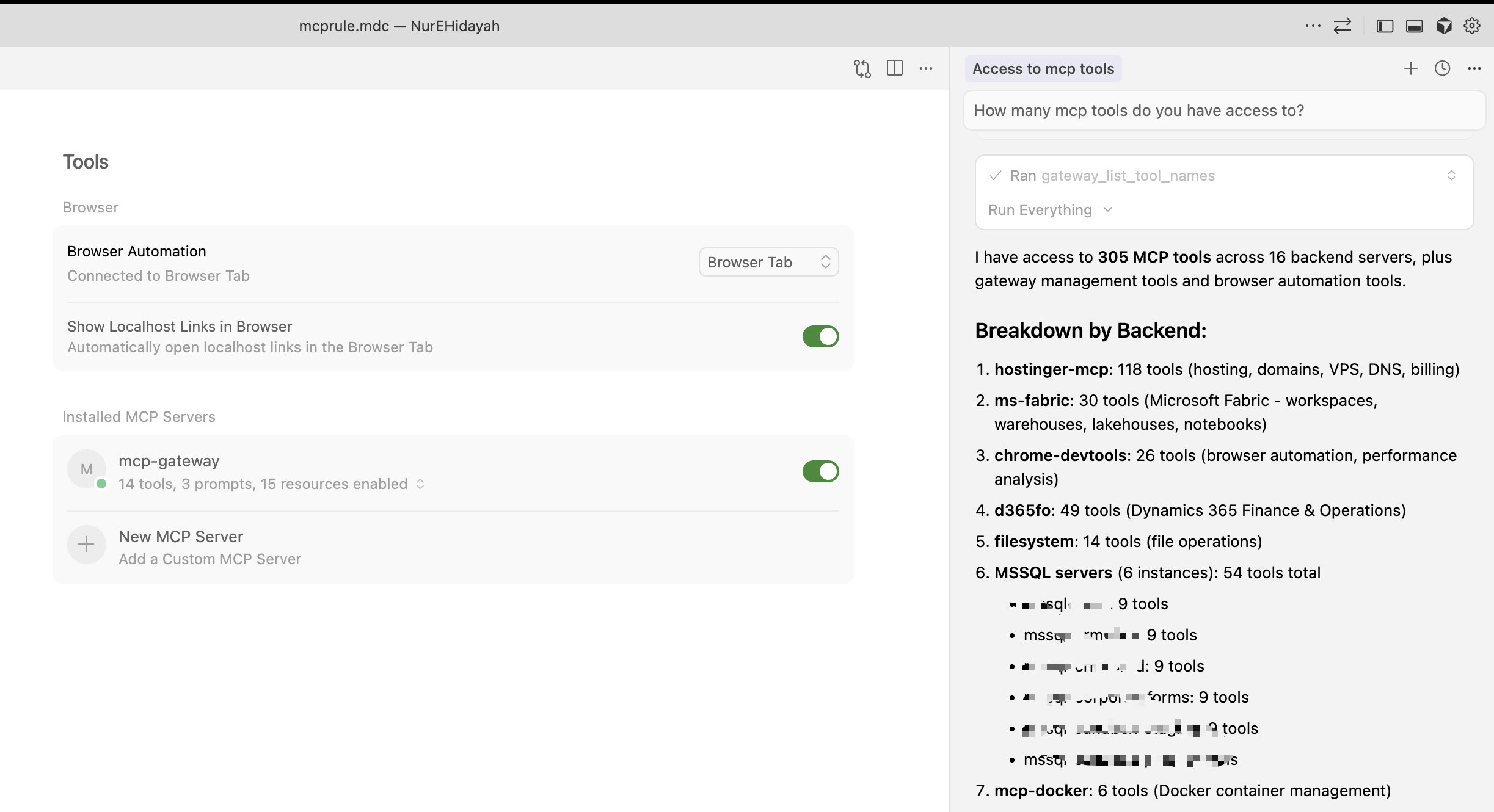
### 305 Tools Through 19 Gateway Tools

*Cursor connected to MCP Gateway - 19 tools provide access to 305 backend tools across 16 servers*
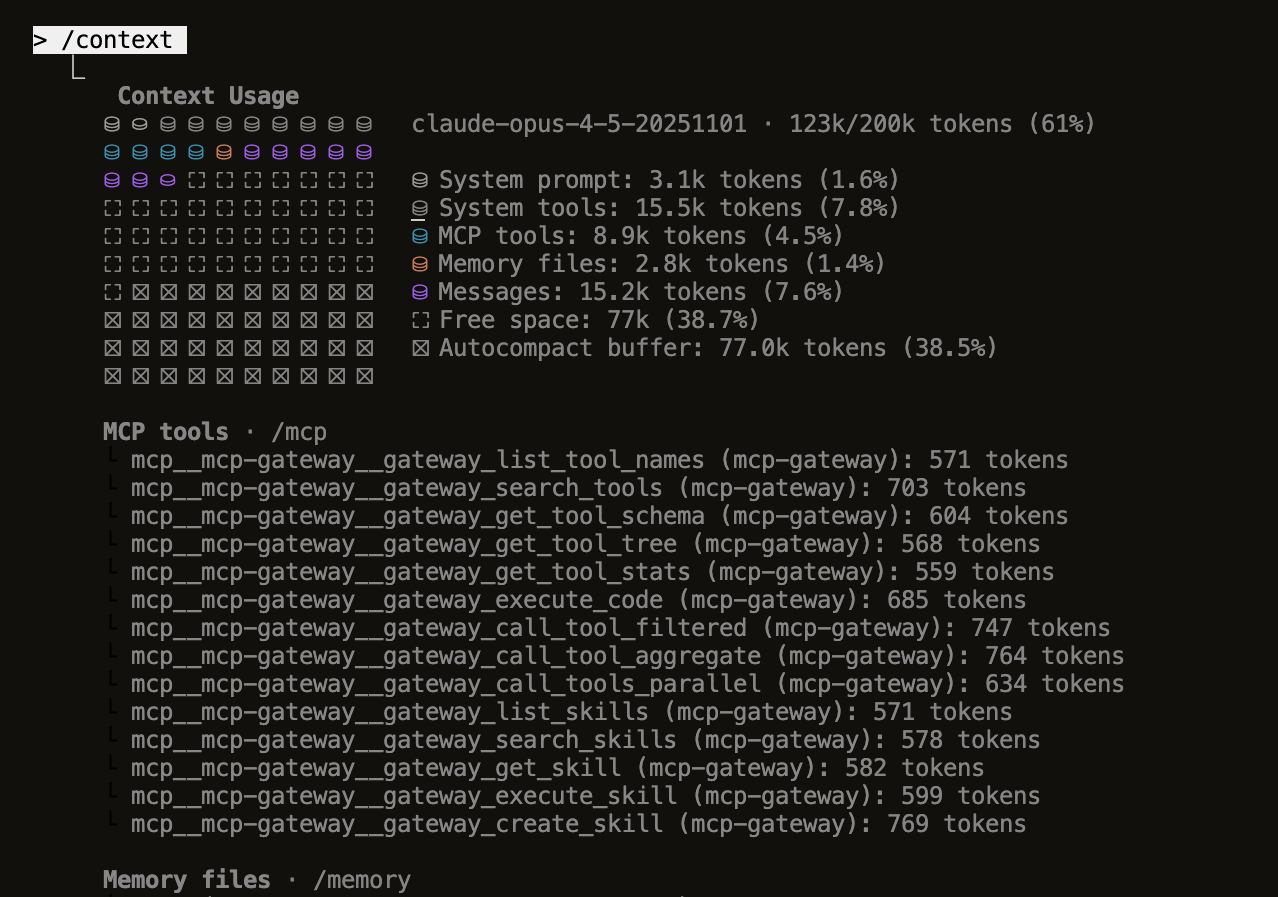
### Minimal Context Usage

*Claude Code `/context` view - Only 8.9k tokens (4.5%) for all MCP tools instead of 200k+ for raw definitions*
## What's New (v1.0.0)
- **Gateway MCP Tools** - All code execution features now exposed as MCP tools (`gateway_*`) that any client can discover and use directly
- **Hot-Reload Server Management** - Add, edit, and delete MCP servers from the dashboard without restarting
- **UI State Persistence** - Disabled tools and backends are remembered across server restarts
- **Enhanced Dashboard** - Reconnect failed backends, view real-time status, improved error handling
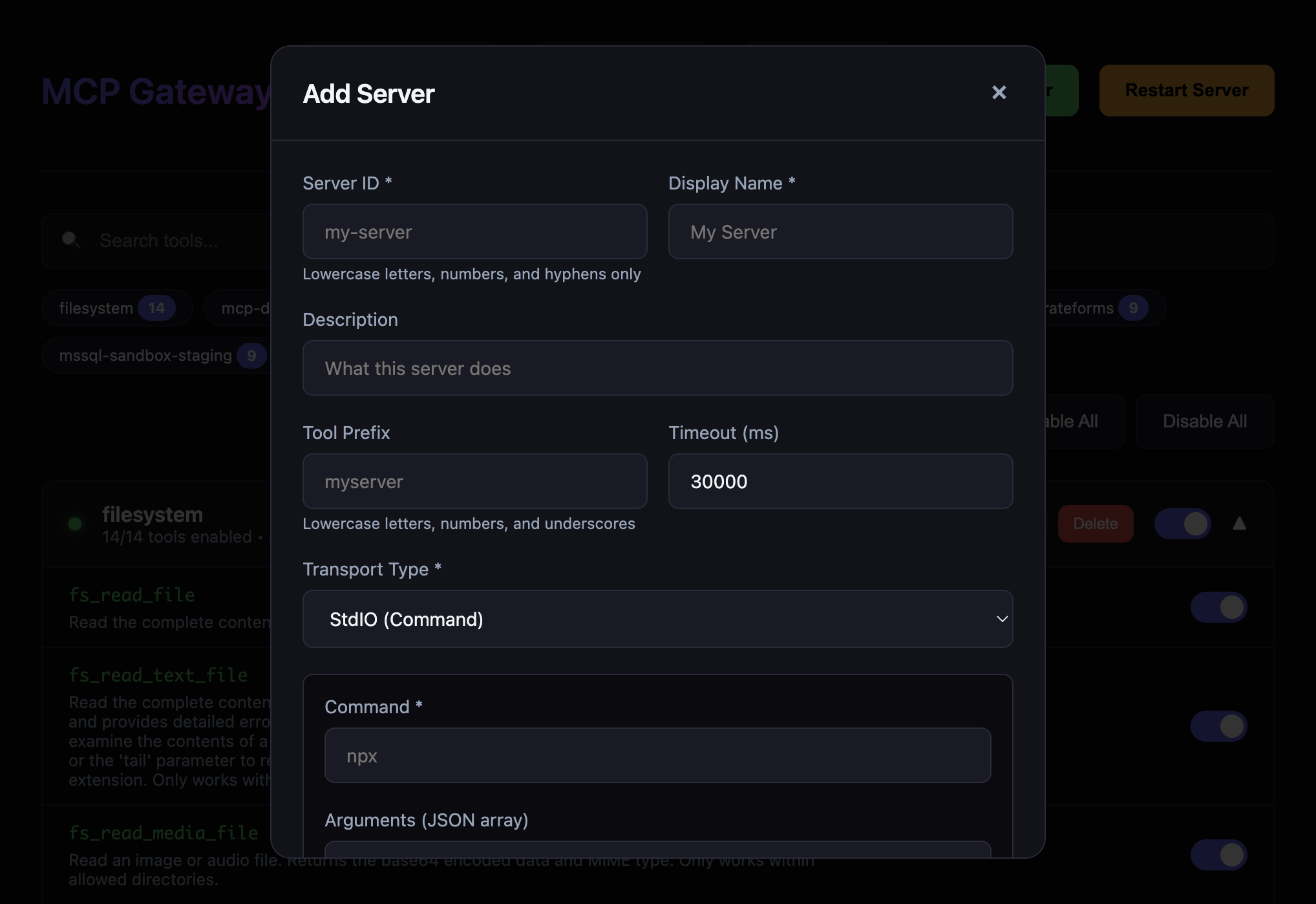
- **Connection Testing** - Test server connections before adding them to your configuration
- **Export/Import Config** - Backup and share your server configurations easily
- **Parallel Tool Execution** - Execute multiple tool calls simultaneously for better performance
- **Result Filtering & Aggregation** - Reduce context bloat with `maxRows`, `fields`, `format`, and aggregation options
## Features
### Core Gateway Features
- 🔀 **Multi-Server Aggregation** - Route multiple MCP servers through one gateway
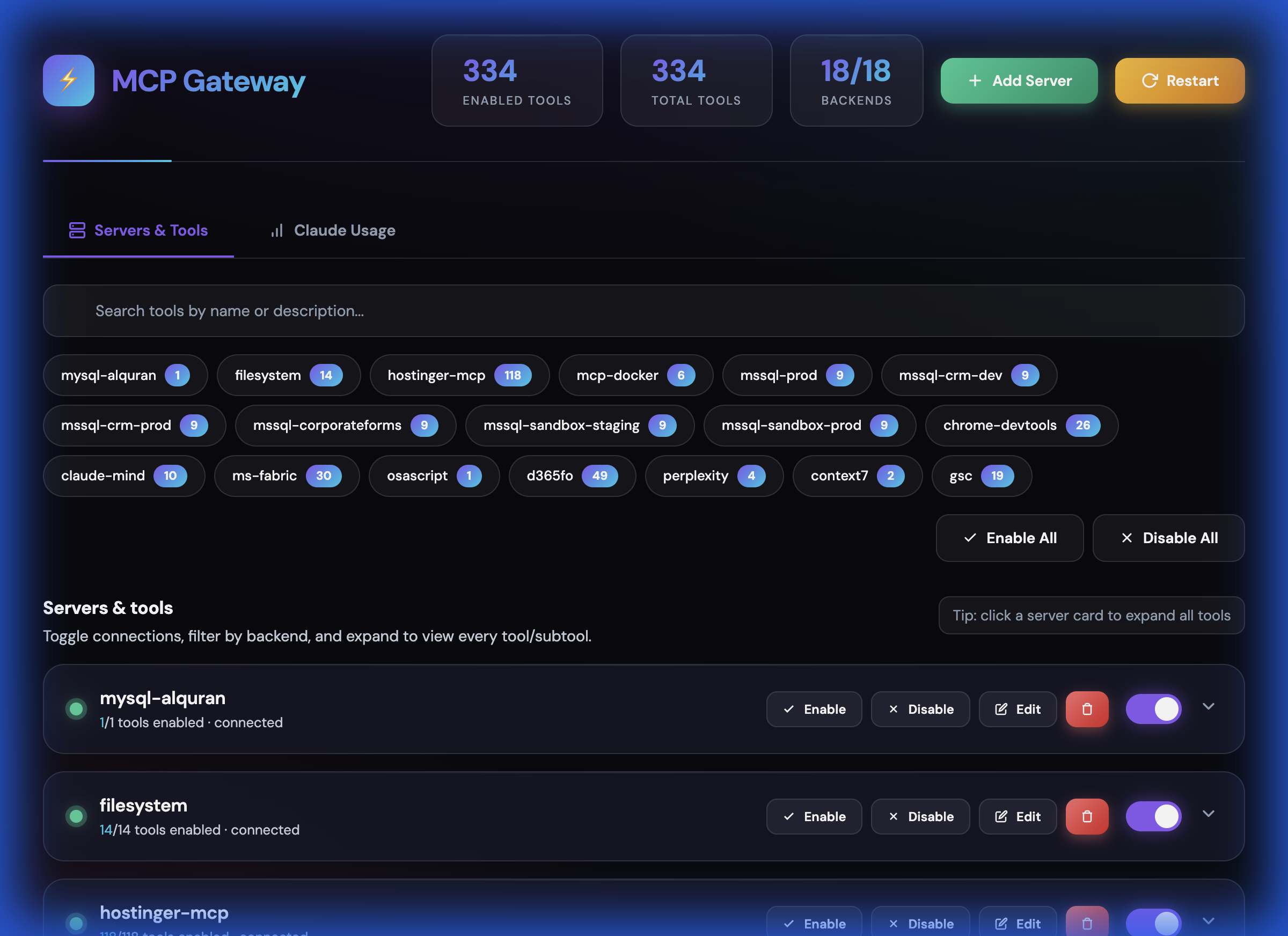
- 🎛️ **Web Dashboard** - Real-time UI to manage tools, backends, and server lifecycle
- ➕ **Hot-Reload Server Management** - Add, edit, delete MCP servers from dashboard without restart
- 🌐 **HTTP Streamable Transport** - Primary transport, works with all clients
- 📡 **SSE Transport** - Backward compatibility for older clients
- 🔐 **Authentication** - API Key and OAuth/JWT support
- ⚡ **Rate Limiting** - Protect your backend servers
- 🐳 **Docker Ready** - Easy deployment with Docker/Compose
- 📊 **Health Checks** - Monitor backend status with detailed diagnostics
- 🔄 **Auto-Restart** - Server restarts automatically on crash or via dashboard
- 💾 **UI State Persistence** - Remembers disabled tools/backends across restarts
### Code Execution Mode (Token-Efficient AI)
Inspired by [Anthropic's Code Execution with MCP](https://www.anthropic.com/engineering/code-execution-with-mcp) - achieve up to **98.7% token reduction**:
- 🔍 **Progressive Tool Disclosure** - Search and lazy-load tools to reduce token usage (85% reduction)
- 💻 **Sandboxed Code Execution** - Execute TypeScript/JavaScript in secure Node.js VM
- 📉 **Context-Efficient Results** - Filter, aggregate, and transform tool results (60-80% reduction)
- 🔒 **Privacy-Preserving Operations** - PII tokenization for sensitive data
- 📁 **Skills System** - Save and reuse code patterns for zero-shot execution (eliminates prompt tokens)
- 🗄️ **State Persistence** - Workspace for agent state across sessions
- 🛠️ **Gateway MCP Tools** - All code execution features exposed as MCP tools for any client
- 🧹 **Response Optimization** - Automatically strip null/empty values from responses (20-40% reduction)
- 🧠 **Session Context** - Track sent data to avoid resending in multi-turn conversations
- 🔗 **Schema Deduplication** - Reference identical schemas by hash (up to 90% reduction)
- 📐 **Micro-Schema Mode** - Ultra-compact schemas with abbreviated types (60-70% reduction)
- 🔄 **Delta Responses** - Send only changes for repeated queries (90%+ reduction)
- 📊 **Context Tracking** - Monitor context window usage and get warnings before overflow
- 📝 **Auto-Summarization** - Extract key insights from large results (60-90% reduction)
- 🔍 **Query Planning** - Analyze code to detect optimization opportunities (30-50% improvement)
### Monitoring & Observability
- 📈 **Prometheus Metrics** - Tool call latency, error rates, cache performance
- 📊 **JSON Metrics API** - Programmatic access to gateway statistics
- 💾 **Result Caching** - LRU cache with TTL for tool results
- 📝 **Audit Logging** - Track sensitive operations
## Screenshots
### Dashboard Overview

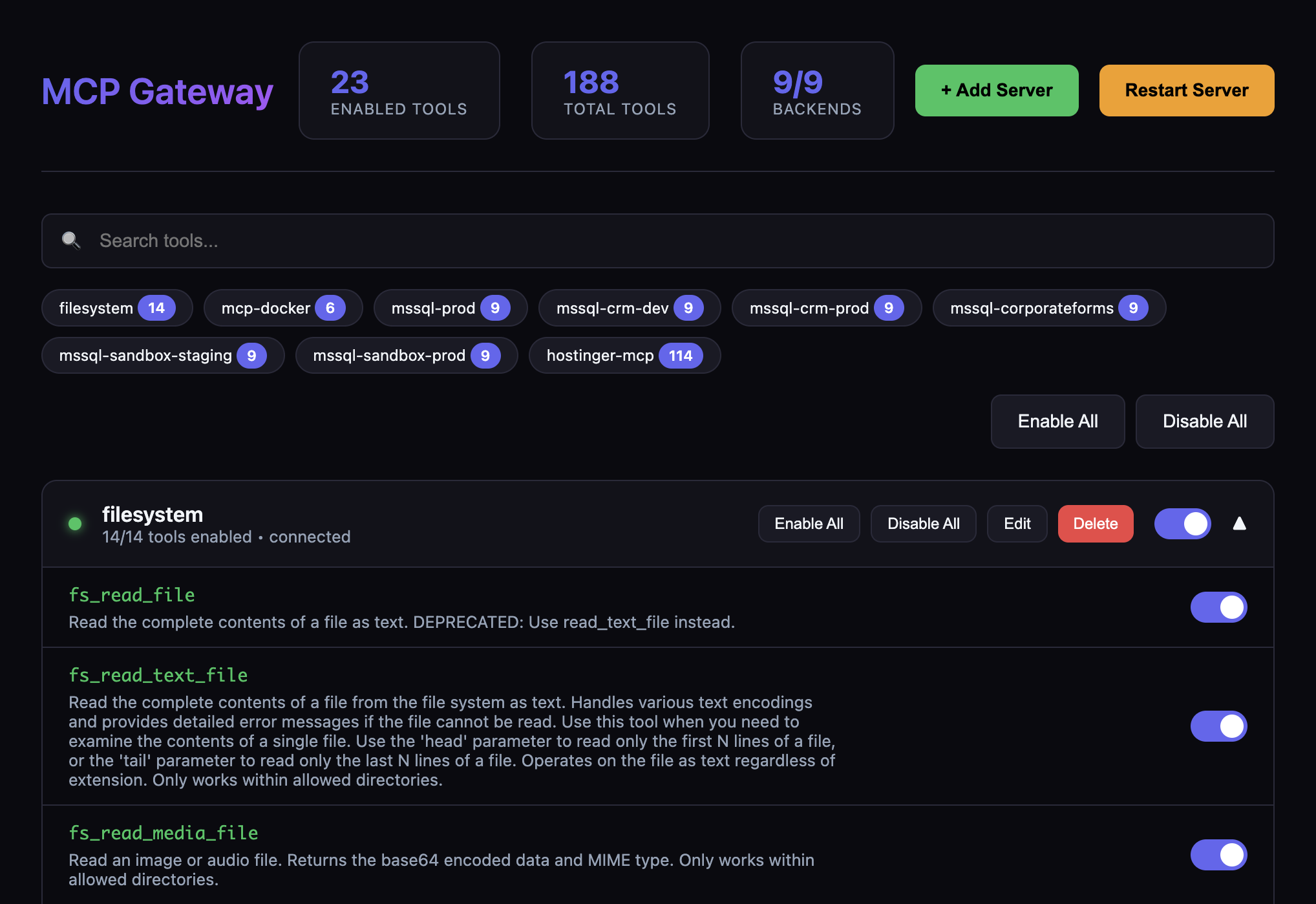
### Tools Management

### Add Server Dialog

## Quick Start
### 1. Install Dependencies
```bash
npm install
```
### 2. Configure Backend Servers
Copy the example config and edit it:
```bash
cp config/servers.example.json config/servers.json
```
Edit `config/servers.json` to add your MCP servers:
```json
{
"servers": [
{
"id": "filesystem",
"name": "Filesystem",
"enabled": true,
"transport": {
"type": "stdio",
"command": "npx",
"args": ["-y", "@modelcontextprotocol/server-filesystem", "/path/to/dir"]
},
"toolPrefix": "fs"
}
]
}
```
### 3. Start the Gateway
```bash
# Development
npm run dev
# Production
npm run build
npm start
```
The gateway will start on `http://localhost:3010` by default.
#### Security modes
For local experimentation you can run without auth:
- `AUTH_MODE=none`
However, **sensitive endpoints** (`/dashboard`, `/dashboard/api/*`, `/api/code/*`, `/metrics/json`) are blocked by default when `AUTH_MODE=none`. To allow unauthenticated access (not recommended except for isolated local use), explicitly opt in:
- `ALLOW_INSECURE=1`
For secure usage, prefer:
- `AUTH_MODE=api-key` with `API_KEYS=key1,key2`
- or `AUTH_MODE=oauth` with the appropriate `OAUTH_*` settings shown below.
## Endpoints
### Core Endpoints
| Endpoint | Transport | Use Case |
|----------|-----------|----------|
| `/mcp` | HTTP Streamable | Primary endpoint - works with all clients |
| `/sse` | Server-Sent Events | Backward compatibility |
| `/health` | JSON | Health checks and status |
| `/dashboard` | Web UI | Manage tools, backends, and restart server |
| `/metrics` | Prometheus | Prometheus-format metrics |
| `/metrics/json` | JSON | JSON-format metrics |
### Code Execution API
| Endpoint | Method | Description |
|----------|--------|-------------|
| `/api/code/tools/search` | GET | Search tools with filters |
| `/api/code/tools/tree` | GET | Get filesystem-like tool tree |
| `/api/code/tools/names` | GET | Get all tool names (minimal tokens) |
| `/api/code/tools/:name/schema` | GET | Lazy-load specific tool schema |
| `/api/code/tools/stats` | GET | Tool statistics by backend |
| `/api/code/sdk` | GET | Auto-generated TypeScript SDK |
| `/api/code/execute` | POST | Execute code in sandbox |
| `/api/code/tools/:name/call` | POST | Call tool with result filtering |
| `/api/code/tools/:name/call/aggregate` | POST | Call tool with aggregation |
| `/api/code/tools/parallel` | POST | Execute multiple tools in parallel |
| `/api/code/skills` | GET/POST | List or create skills |
| `/api/code/skills/search` | GET | Search skills |
| `/api/code/skills/:name` | GET/DELETE | Get or delete skill |
| `/api/code/skills/:name/execute` | POST | Execute a skill |
| `/api/code/workspace/session` | GET/POST | Get or update session state |
| `/api/code/cache/stats` | GET | Cache statistics |
| `/api/code/cache/clear` | POST | Clear cache |
### Dashboard API
| Endpoint | Method | Description |
|----------|--------|-------------|
| `/dashboard/api/tools` | GET | Get all tools with enabled status |
| `/dashboard/api/backends` | GET | Get all backends with status |
| `/dashboard/api/tools/:name/toggle` | POST | Toggle tool enabled/disabled |
| `/dashboard/api/backends/:id/toggle` | POST | Toggle backend enabled/disabled |
| `/dashboard/api/backends/:id/reconnect` | POST | Reconnect a failed backend |
| `/dashboard/api/backends` | POST | Add new backend server |
| `/dashboard/api/backends/:id` | PUT | Update backend configuration |
| `/dashboard/api/backends/:id` | DELETE | Remove backend server |
| `/dashboard/api/config/export` | GET | Export server configuration |
| `/dashboard/api/config/import` | POST | Import server configuration |
| `/dashboard/api/restart` | POST | Restart the gateway server |
## Dashboard
Access the web dashboard at `http://localhost:3010/dashboard` to:
- View all connected backends and their real-time status
- **Add new MCP servers** with connection testing (STDIO, HTTP, SSE transports)
- **Edit existing servers** (modify command, args, environment variables)
- **Delete servers** with graceful disconnect
- Enable/disable individual tools or entire backends
- Search and filter tools across all backends
- **Export/import configuration** for backup and sharing
- **Reconnect failed backends** with one click
- Restart the entire gateway server
- View tool counts and backend health at a glance
The dashboard persists UI state (disabled tools/backends) across server restarts.
## Client Configuration
### Claude Desktop / Claude Code
1. Open Claude Desktop → **Settings** → **Connectors**
2. Click **Add remote MCP server**
3. Enter your gateway URL:
```
http://your-gateway-host:3010/mcp
```
4. Complete authentication if required
> **Note:** Claude requires adding remote servers through the UI, not config files.
#### Claude Desktop via STDIO Proxy
If Claude Desktop doesn't support HTTP/SSE transports directly, you can use the included STDIO proxy script:
```json
{
"mcpServers": {
"mcp-gateway": {
"command": "node",
"args": ["/path/to/mcp-gateway/scripts/claude-stdio-proxy.mjs"],
"env": {
"MCP_GATEWAY_URL": "http://localhost:3010/mcp"
}
}
}
}
```
The proxy (`scripts/claude-stdio-proxy.mjs`) reads JSON-RPC messages from stdin, forwards them to the gateway HTTP endpoint, and writes responses to stdout. It automatically manages session IDs.
### Cursor
1. Open Cursor → **Settings** → **Features** → **MCP**
2. Click **Add New MCP Server**
3. Choose **Type**: `HTTP` or `SSE`
4. Enter your gateway URL:
For HTTP (recommended):
```
http://your-gateway-host:3010/mcp
```
For SSE:
```
http://your-gateway-host:3010/sse
```
Or add to your Cursor settings JSON:
```json
{
"mcpServers": {
"my-gateway": {
"type": "http",
"url": "http://your-gateway-host:3010/mcp"
}
}
}
```
### OpenAI Codex
#### Option 1: CLI
```bash
codex mcp add my-gateway --transport http --url https://your-gateway-host:3010/mcp
```
#### Option 2: Config File
Add to `~/.codex/config.toml`:
```toml
[mcp_servers.my_gateway]
type = "http"
url = "https://your-gateway-host:3010/mcp"
# With API key authentication
# headers = { Authorization = "Bearer your-api-key-here" }
```
> **Important:** Codex requires **HTTPS** for remote servers and only supports HTTP Streamable (not SSE).
### VS Code Copilot
1. Open Command Palette (`Cmd/Ctrl + Shift + P`)
2. Run **MCP: Add MCP Server**
3. Choose **Remote (URL)**
4. Enter your gateway URL:
```
http://your-gateway-host:3010/mcp
```
5. Approve the trust prompt
Or add to your VS Code `settings.json`:
```json
{
"mcp.servers": {
"my-gateway": {
"type": "http",
"url": "http://your-gateway-host:3010/mcp"
}
}
}
```
## Backend Server Configuration
The gateway can connect to MCP servers using different transports:
### STDIO (Local Process)
```json
{
"id": "filesystem",
"name": "Filesystem Server",
"enabled": true,
"transport": {
"type": "stdio",
"command": "npx",
"args": ["-y", "@modelcontextprotocol/server-filesystem", "/path/to/dir"],
"env": {
"SOME_VAR": "${ENV_VAR_NAME}"
}
},
"toolPrefix": "fs",
"timeout": 30000
}
```
### HTTP (Remote Server)
```json
{
"id": "remote-server",
"name": "Remote MCP Server",
"enabled": true,
"transport": {
"type": "http",
"url": "https://remote-mcp-server.com/mcp",
"headers": {
"Authorization": "Bearer ${REMOTE_API_KEY}"
}
},
"toolPrefix": "remote",
"timeout": 60000
}
```
### Tool Prefixing
Use `toolPrefix` to namespace tools from different servers:
- Server with `toolPrefix: "fs"` exposes `read_file` as `fs_read_file`
- Prevents naming collisions between servers
- Makes it clear which server handles each tool
## Authentication
### API Key Authentication
Set environment variables:
```bash
AUTH_MODE=api-key
API_KEYS=key1,key2,key3
```
Clients send the key in the Authorization header:
```
Authorization: Bearer your-api-key
```
### OAuth Authentication
```bash
AUTH_MODE=oauth
OAUTH_ISSUER=https://your-oauth-provider.com
OAUTH_AUDIENCE=mcp-gateway
OAUTH_JWKS_URI=https://your-oauth-provider.com/.well-known/jwks.json
```
## Docker Deployment
### Build and Run
```bash
# Build the image
docker build -t mcp-gateway .
# Run with environment variables
docker run -d \
-p 3010:3010 \
-v $(pwd)/config/servers.json:/app/config/servers.json:ro \
-e AUTH_MODE=api-key \
-e API_KEYS=your-secret-key \
mcp-gateway
```
### Docker Compose
```bash
# Start
docker-compose up -d
# View logs
docker-compose logs -f
# Stop
docker-compose down
```
## Environment Variables
### Core Configuration
| Variable | Default | Description |
|----------|---------|-------------|
| `PORT` | `3010` | Server port |
| `HOST` | `0.0.0.0` | Server host |
| `LOG_LEVEL` | `info` | Log level (debug, info, warn, error) |
| `GATEWAY_NAME` | `mcp-gateway` | Gateway name in MCP responses |
| `GATEWAY_LITE_MODE` | `1` | Lite mode - reduces exposed gateway tools for lower token usage (recommended) |
| `AUTH_MODE` | `none` | Authentication mode (none, api-key, oauth) |
| `API_KEYS` | - | Comma-separated API keys |
| `OAUTH_ISSUER` | - | OAuth token issuer |
| `OAUTH_AUDIENCE` | - | OAuth audience |
| `OAUTH_JWKS_URI` | - | OAuth JWKS endpoint |
| `CORS_ORIGINS` | `http://localhost:3010,http://127.0.0.1:3010` | Allowed CORS origins (`*` to allow all) |
| `HEALTH_REQUIRE_BACKENDS` | `0` | If `1`, `/health` returns `503` when all configured backends are down |
| `ALLOW_INSECURE` | `0` | If `1`, allow unauthenticated access to dashboard, code APIs, and JSON metrics when `AUTH_MODE=none` |
| `RATE_LIMIT_WINDOW_MS` | `60000` | Rate limit window (ms) |
| `RATE_LIMIT_MAX_REQUESTS` | `100` | Max requests per window |
### Optional Features
MCP Gateway includes optional features that are **disabled by default** for minimal, public-friendly deployments. Enable them by setting the corresponding environment variable to `1`.
| Variable | Default | Description |
|----------|---------|-------------|
| `ENABLE_SKILLS` | `0` | Enable Skills system - reusable code patterns and skill execution |
| `ENABLE_CIPHER` | `0` | Enable Cipher Memory - cross-IDE persistent memory with Qdrant vector store |
| `ENABLE_ANTIGRAVITY` | `0` | Enable Antigravity Usage - IDE quota tracking for Antigravity IDE |
| `ENABLE_CLAUDE_USAGE` | `0` | Enable Claude Usage - API token consumption tracking |
When a feature is disabled:
- The corresponding dashboard tab is hidden
- API endpoints return `404 Feature disabled` with instructions to enable
- No errors occur from missing dependencies (Qdrant, Cipher service, etc.)
**For personal/development use**, enable the features you need in your `.env`:
```bash
# Enable all optional features
ENABLE_SKILLS=1
ENABLE_CIPHER=1
ENABLE_ANTIGRAVITY=1
ENABLE_CLAUDE_USAGE=1
# Disable lite mode to see all gateway tools
GATEWAY_LITE_MODE=0
```
### Feature-Specific Configuration
These variables are only needed when the corresponding feature is enabled:
| Variable | Feature | Default | Description |
|----------|---------|---------|-------------|
| `CIPHER_API_URL` | Cipher | `http://localhost:8082` | Cipher Memory service URL |
| `QDRANT_URL` | Cipher | - | Qdrant vector store URL |
| `QDRANT_API_KEY` | Cipher | - | Qdrant API key |
| `QDRANT_COLLECTION` | Cipher | `cipher_knowledge` | Qdrant collection name |
| `QDRANT_TIMEOUT_MS` | Cipher | `8000` | Qdrant request timeout |
## Optional Features Guide
This section provides detailed instructions for enabling and using each optional feature.
---
### Skills System (`ENABLE_SKILLS=1`)
The Skills system allows you to save and reuse code patterns for zero-shot execution. Skills are the **most powerful token-saving feature** in MCP Gateway, reducing token usage by 95%+ for recurring tasks.
#### What Skills Do
- **Save successful code patterns** as reusable templates
- **Execute complex workflows** with a single tool call (~20 tokens)
- **Eliminate prompt engineering** for recurring tasks
- **Hot-reload** when skill files change on disk
#### Enabling Skills
```bash
# In your .env file
ENABLE_SKILLS=1
```
#### Storage Locations
Skills are stored in two directories:
- `workspace/skills/` - User-created skills (editable)
- `external-skills/` - Shared/imported skills (read-only by default)
Each skill is a directory containing:
```
my-skill/
├── skill.json # Metadata (name, description, inputs, tags)
├── index.ts # Executable TypeScript code
└── SKILL.md # Auto-generated documentation
```
#### Creating Skills via MCP Tools
```javascript
// Create a new skill
await gateway_create_skill({
name: "daily-report",
description: "Generate daily sales summary by region",
code: `
const sales = await mssql.executeQuery({
query: \`SELECT region, SUM(amount) as total
FROM orders WHERE date = '\${date}' GROUP BY region\`
});
console.log(JSON.stringify(sales));
`,
inputs: [
{ name: "date", type: "string", required: true, description: "Date in YYYY-MM-DD format" }
],
tags: ["reporting", "sales", "daily"]
});
```
#### Executing Skills
```javascript
// Execute with ~20 tokens instead of 500+ for raw code
await gateway_execute_skill({
name: "daily-report",
inputs: { date: "2024-01-15" }
});
```
#### Skills MCP Tools
| Tool | Description |
|------|-------------|
| `gateway_list_skills` | List all available skills with metadata |
| `gateway_search_skills` | Search skills by name, description, or tags |
| `gateway_get_skill` | Get full skill details including code |
| `gateway_execute_skill` | Execute a skill with input parameters |
| `gateway_create_skill` | Create a new reusable skill |
#### Skills REST API
| Endpoint | Method | Description |
|----------|--------|-------------|
| `/api/code/skills` | GET | List all skills |
| `/api/code/skills` | POST | Create a new skill |
| `/api/code/skills/search?q=query` | GET | Search skills |
| `/api/code/skills/:name` | GET | Get skill details |
| `/api/code/skills/:name` | DELETE | Delete a skill |
| `/api/code/skills/:name/execute` | POST | Execute a skill |
| `/api/code/skills/templates` | GET | Get skill templates |
| `/api/code/skills/sync` | POST | Sync external skills to workspace |
#### Dashboard
When enabled, a **Skills** tab appears in the dashboard (`/dashboard`) showing:
- All available skills with search/filter
- Skill details and code preview
- Execute skills directly from UI
- Create new skills from templates
---
### Cipher Memory (`ENABLE_CIPHER=1`)
Cipher Memory provides **persistent AI memory across all IDEs**. Decisions, learnings, patterns, and insights are stored in a vector database and recalled automatically in future sessions.
#### What Cipher Does
- **Cross-IDE memory** - Memories persist across Claude, Cursor, Windsurf, VS Code, Codex
- **Project-scoped context** - Filter memories by project path
- **Semantic search** - Find relevant memories using natural language
- **Auto-consolidation** - Session summaries stored automatically
#### Prerequisites
Cipher requires two external services:
1. **Cipher Memory Service** - The memory API (default: `http://localhost:8082`)
2. **Qdrant Vector Store** - For semantic memory storage
#### Enabling Cipher
```bash
# In your .env file
ENABLE_CIPHER=1
# Cipher service URL (if not running on default port)
CIPHER_API_URL=http://localhost:8082
# Qdrant configuration (required for memory stats)
QDRANT_URL=https://your-qdrant-instance.cloud
QDRANT_API_KEY=your-qdrant-api-key
QDRANT_COLLECTION=cipher_knowledge
QDRANT_TIMEOUT_MS=8000
```
#### Using Cipher via MCP
The Cipher service exposes the `cipher_ask_cipher` tool via MCP:
```javascript
// Store a decision
cipher_ask_cipher({
message: "STORE DECISION: Using PostgreSQL for the user service. Reasoning: Better JSON support.",
projectPath: "/path/to/your/project"
});
// Recall context
cipher_ask_cipher({
message: "Recall context for this project. What do you remember?",
projectPath: "/path/to/your/project"
});
// Search memories
cipher_ask_cipher({
message: "Search memory for: database decisions",
projectPath: "/path/to/your/project"
});
```
#### Memory Types
| Prefix | Use Case | Example |
|--------|----------|---------|
| `STORE DECISION:` | Architectural choices | "STORE DECISION: Using Redis for caching" |
| `STORE LEARNING:` | Bug fixes, discoveries | "STORE LEARNING: Fixed race condition in auth" |
| `STORE MILESTONE:` | Completed features | "STORE MILESTONE: Completed user auth system" |
| `STORE PATTERN:` | Code patterns | "STORE PATTERN: Repository pattern for data access" |
| `STORE BLOCKER:` | Ongoing issues | "STORE BLOCKER: CI failing on ARM builds" |
#### Dashboard API
| Endpoint | Method | Description |
|----------|--------|-------------|
| `/dashboard/api/cipher/sessions` | GET | List memory sessions |
| `/dashboard/api/cipher/sessions/:id/history` | GET | Get session history |
| `/dashboard/api/cipher/ask` | POST | Send message to Cipher |
| `/dashboard/api/cipher/search?q=query` | GET | Search memories |
| `/dashboard/api/cipher/qdrant-stats` | GET | Get vector store statistics |
| `/dashboard/api/cipher/memory/:id` | GET | Get specific memory by ID |
#### Dashboard
When enabled, a **Memory** tab appears showing:
- Total memories stored in Qdrant
- Recent memories with timestamps
- Memory categories breakdown (decisions, learnings, etc.)
- Search interface for finding memories
- Session history viewer
---
### Claude Usage Tracking (`ENABLE_CLAUDE_USAGE=1`)
Track your Claude API token consumption and costs across all Claude Code sessions.
#### What It Does
- **Aggregate usage data** from Claude Code JSONL logs
- **Track costs** by model (Opus, Sonnet, Haiku)
- **Monitor cache efficiency** (creation vs read tokens)
- **View daily/weekly/monthly trends**
- **Live session monitoring**
#### Prerequisites
This feature uses the `ccusage` CLI tool to parse Claude Code conversation logs from `~/.claude/projects/`.
```bash
# The tool is auto-installed via npx when needed
npx ccusage@latest --json
```
#### Enabling Claude Usage
```bash
# In your .env file
ENABLE_CLAUDE_USAGE=1
```
No additional configuration required - the service automatically finds Claude Code logs.
#### Dashboard API
| Endpoint | Method | Description |
|----------|--------|-------------|
| `/dashboard/api/claude-usage` | GET | Get usage summary (cached 5 min) |
| `/dashboard/api/claude-usage/range?since=YYYY-MM-DD&until=YYYY-MM-DD` | GET | Get usage for date range |
| `/dashboard/api/claude-usage/current` | GET | Get live session usage |
| `/dashboard/api/claude-usage/refresh` | POST | Force refresh cached data |
#### Response Format
```json
{
"totalCost": 45.67,
"totalInputTokens": 15000000,
"totalOutputTokens": 2500000,
"totalCacheCreationTokens": 500000,
"totalCacheReadTokens": 12000000,
"cacheHitRatio": 96.0,
"daysActive": 30,
"avgCostPerDay": 1.52,
"modelDistribution": [
{ "model": "Claude Sonnet", "cost": 40.00, "percentage": 87.5 },
{ "model": "Claude Opus", "cost": 5.67, "percentage": 12.5 }
],
"topDays": [...],
"daily": [...]
}
```
#### Dashboard
When enabled, a **Usage** tab appears showing:
- Total cost and token breakdown
- Cost by model pie chart
- Cache hit ratio (higher = more efficient)
- Daily usage trend graph
- Top usage days
- Live current session monitoring
---
### Antigravity Usage Tracking (`ENABLE_ANTIGRAVITY=1`)
Track quota and usage for Antigravity IDE (formerly Windsurf/Codeium) accounts.
#### What It Does
- **Real-time quota monitoring** for all model tiers
- **Multi-account support** (Antigravity + Techgravity accounts)
- **Conversation statistics** from local data
- **Brain/task tracking** for agentic workflows
- **Auto-detection** of running Language Server processes
#### How It Works
The service:
1. Detects running `language_server_macos` processes
2. Extracts CSRF tokens and ports from process arguments
3. Queries the local gRPC-Web endpoint for quota data
4. Falls back to file-based stats if API unavailable
#### Prerequisites
- Antigravity IDE installed and running
- Account directories exist in `~/.gemini/antigravity/` or `~/.gemini/techgravity/`
#### Enabling Antigravity Usage
```bash
# In your .env file
ENABLE_ANTIGRAVITY=1
```
No additional configuration required.
#### Dashboard API
| Endpoint | Method | Description |
|----------|--------|-------------|
| `/dashboard/api/antigravity/available` | GET | Check if Antigravity accounts exist |
| `/dashboard/api/antigravity/summary` | GET | Get full usage summary |
| `/dashboard/api/antigravity/refresh` | POST | Force refresh cached data |
#### Response Format
```json
{
"status": {
"isRunning": true,
"processId": 12345,
"port": 64446,
"accounts": [
{
"accountId": "antigravity",
"accountName": "Antigravity",
"accountEmail": "user@example.com",
"planName": "Pro",
"monthlyPromptCredits": 500,
"availablePromptCredits": 450,
"models": [
{
"modelId": "gemini-3-pro-high",
"label": "Gemini 3 Pro (High)",
"remainingPercentage": 85,
"isExhausted": false,
"timeUntilReset": "4h 30m"
},
{
"modelId": "claude-sonnet-4.5",
"label": "Claude Sonnet 4.5",
"remainingPercentage": 60,
"isExhausted": false
}
]
}
]
},
"conversationStats": {
"primary": {
"totalConversations": 150,
"totalSizeBytes": 25000000,
"formattedSize": "23.8 MB",
"recentConversations": 25
}
},
"brainStats": {
"primary": {
"totalTasks": 12,
"totalSizeBytes": 5000000
}
}
}
```
#### Dashboard
When enabled, an **Antigravity** tab appears showing:
- Running status indicator (green = active)
- Per-account quota bars for each model
- Remaining percentage with color coding (green/yellow/red)
- Time until quota reset
- Conversation and task statistics
- Multi-account support (Antigravity + Techgravity)
---
### Enabling All Features
For personal/development use, enable everything:
```bash
# .env file
# Core settings
PORT=3010
LOG_LEVEL=info
# Enable all optional features
ENABLE_SKILLS=1
ENABLE_CIPHER=1
ENABLE_ANTIGRAVITY=1
ENABLE_CLAUDE_USAGE=1
# Show all gateway tools (not just lite mode subset)
GATEWAY_LITE_MODE=0
# Cipher/Qdrant settings (if using Cipher)
CIPHER_API_URL=http://localhost:8082
QDRANT_URL=https://your-qdrant.cloud
QDRANT_API_KEY=your-api-key
QDRANT_COLLECTION=cipher_knowledge
```
Then restart the gateway:
```bash
npm run build && npm start
```
All four tabs will now appear in the dashboard at `http://localhost:3010/dashboard`.
---
## Health Check
```bash
curl http://localhost:3010/health
```
Response:
```json
{
"status": "ok",
"gateway": "mcp-gateway",
"backends": {
"connected": 2,
"total": 3,
"details": {
"filesystem": {
"status": "connected",
"toolCount": 5,
"resourceCount": 0,
"promptCount": 0
}
}
},
"tools": 10,
"resources": 0,
"prompts": 0
}
```
## Architecture
```
┌─────────────────────────────────────────────────────────────────┐
│ MCP Clients │
│ (Claude Desktop, Cursor, Codex, VS Code) │
└─────────────────────────────────────────────────────────────────┘
│
HTTP Streamable / SSE
│
▼
┌─────────────────────────────────────────────────────────────────┐
│ MCP Gateway │
│ ┌─────────────┐ ┌──────────────┐ ┌────────────────────────┐ │
│ │ Auth │ │ Rate Limit │ │ Protocol Handler │ │
│ │ Middleware │──│ Middleware │──│ (Aggregates Tools) │ │
│ └─────────────┘ └──────────────┘ └────────────────────────┘ │
│ │ │
│ ┌────────────────────┼────────────────┐ │
│ │ │ │ │
│ ▼ ▼ ▼ │
│ ┌──────────────────┐ ┌──────────────────┐ ┌──────┐ │
│ │ STDIO Backend │ │ HTTP Backend │ │ ... │ │
│ │ (Local Process) │ │ (Remote Server) │ │ │ │
│ └──────────────────┘ └──────────────────┘ └──────┘ │
└─────────────────────────────────────────────────────────────────┘
│ │
▼ ▼
┌──────────────────┐ ┌──────────────────┐
│ Local MCP │ │ Remote MCP │
│ Server │ │ Server │
└──────────────────┘ └──────────────────┘
```
## Code Execution Mode
The Code Execution Mode allows AI agents to write and execute code instead of making individual tool calls, achieving up to **98.7% token reduction** for complex workflows.
### Why Skills? (Efficiency & Token Usage)
Skills are the most powerful token-saving feature in MCP Gateway. Here's why:
#### The Token Problem
Without skills, every complex operation requires:
1. **Input tokens**: Describe the task in natural language (~200-500 tokens)
2. **Reasoning tokens**: Model thinks about how to implement it (~100-300 tokens)
3. **Output tokens**: Model generates code to execute (~200-1000 tokens)
4. **Result tokens**: Large query results enter context (~500-10,000+ tokens)
**Total: 1,000-12,000+ tokens per operation**
#### The Skills Solution
With skills, the same operation requires:
1. **Input tokens**: `gateway_execute_skill({ name: "daily-report" })` (~20 tokens)
2. **Result tokens**: Pre-filtered, summarized output (~50-200 tokens)
**Total: 70-220 tokens per operation → 95%+ reduction**
#### Key Benefits
| Benefit | Description | Token Savings |
|---------|-------------|---------------|
| **Zero-Shot Execution** | No prompt explaining *how* to do the task | 500-2000 tokens/call |
| **Deterministic Results** | Pre-tested code, no LLM hallucinations | Eliminates retries |
| **Batched Operations** | Multiple tool calls in single skill | 60-80% fewer round-trips |
| **Pre-filtered Output** | Results processed before returning | 80-95% on large datasets |
| **Cached Execution** | Repeated skill calls hit cache | 100% on cache hits |
#### Real-World Example
**Without Skills** (Traditional approach):
```
User: "Get me the daily sales report grouped by region"
Model: [Thinks about SQL, table schema, grouping logic...]
Model: [Generates code block with query, filtering, aggregation...]
Tool: [Returns 10,000 rows of raw data]
Model: [Processes and summarizes...]
Total: ~8,000 tokens, 4 round-trips, 15 seconds
```
**With Skills** (Skill-based approach):
```
User: "Get me the daily sales report grouped by region"
Model: gateway_execute_skill({ name: "daily-sales-report", inputs: { date: "today" } })
Tool: [Returns pre-aggregated summary: 5 regions, totals, trends]
Total: ~150 tokens, 1 round-trip, 2 seconds
```
### Gateway MCP Tools
All code execution features are exposed as MCP tools that any client can use directly. When connected to the gateway, clients automatically get these **19 tools** instead of 300+ raw tool definitions:
#### Tool Discovery (Progressive Disclosure)
| Tool | Purpose | Token Impact |
|------|---------|--------------|
| `gateway_list_tool_names` | Get all tool names with pagination | ~50 bytes/tool |
| `gateway_search_tools` | Search by name, description, category, backend | Filters before loading |
| `gateway_get_tool_schema` | Lazy-load specific tool schema | Load only when needed |
| `gateway_get_tool_schemas` | Batch load multiple schemas | 40% smaller with `compact: true` |
| `gateway_get_tool_categories` | Get semantic categories (database, filesystem, etc.) | Navigate 300+ tools easily |
| `gateway_get_tool_tree` | Get tools organized by backend | Visual hierarchy |
| `gateway_get_tool_stats` | Get statistics about tools | Counts by backend |
#### Execution & Filtering
| Tool | Purpose | Token Impact |
|------|---------|--------------|
| `gateway_execute_code` | Execute TypeScript/JavaScript in sandbox | Batch multiple ops |
| `gateway_call_tool_filtered` | Call any tool with result filtering | 60-80% smaller results |
| `gateway_call_tool_aggregate` | Call tool with aggregation | 90%+ smaller for analytics |
| `gateway_call_tools_parallel` | Execute multiple tools in parallel | Fewer round-trips |
#### Skills (Highest Token Savings)
| Tool | Purpose | Token Impact |
|------|---------|--------------|
| `gateway_list_skills` | List saved code patterns | Discover available skills |
| `gateway_search_skills` | Search skills by name/tags | Find the right skill fast |
| `gateway_get_skill` | Get skill details and code | Inspect before executing |
| `gateway_execute_skill` | Execute a saved skill | **~20 tokens per call** |
| `gateway_create_skill` | Save a new reusable skill | One-time investment |
#### Optimization & Monitoring
| Tool | Purpose | Token Impact |
|------|---------|--------------|
| `gateway_get_optimization_stats` | View token savings statistics | Monitor efficiency |
| `gateway_call_tool_delta` | Call tool with delta response - only changes | **90%+ for repeated queries** |
| `gateway_get_context_status` | Monitor context window usage and get warnings | Prevent overflow |
| `gateway_call_tool_summarized` | Call tool with auto-summarization of results | **60-90% for large data** |
| `gateway_analyze_code` | Analyze code for optimization opportunities | Improve efficiency |
### Progressive Tool Disclosure
Instead of loading all tool definitions upfront (which can consume excessive tokens with 300+ tools), use progressive disclosure:
```bash
# Get just tool names (minimal tokens)
curl http://localhost:3010/api/code/tools/names
# Search for specific tools
curl "http://localhost:3010/api/code/tools/search?query=database&backend=mssql"
# Get filesystem-like tree view
curl http://localhost:3010/api/code/tools/tree
# Lazy-load specific tool schema when needed
curl http://localhost:3010/api/code/tools/mssql_execute_query/schema
```
Detail levels for search:
- `name_only` - Just tool names
- `name_description` - Names with descriptions
- `full_schema` - Complete JSON schema
### Sandboxed Code Execution
Execute TypeScript/JavaScript code in a secure Node.js VM sandbox:
```bash
curl -X POST http://localhost:3010/api/code/execute \
-H "Content-Type: application/json" \
-d '{
"code": "const data = await mssql.executeQuery({ query: \"SELECT * FROM users\" });\nconst active = data.filter(u => u.active);\nconsole.log(`Found ${active.length} active users`);",
"timeout": 30000
}'
```
The sandbox:
- Auto-generates TypeScript SDK from your MCP tools
- Supports async/await, loops, and conditionals
- Returns only `console.log` output (not raw data)
- Has configurable timeout protection
### Context-Efficient Results
Reduce context bloat from large tool results:
```bash
# Call tool with filtering
curl -X POST http://localhost:3010/api/code/tools/mssql_get_table_data/call \
-H "Content-Type: application/json" \
-d '{
"args": { "tableName": "users" },
"options": {
"maxRows": 10,
"fields": ["id", "name", "email"],
"format": "summary"
}
}'
# Call with aggregation
curl -X POST http://localhost:3010/api/code/tools/mssql_get_table_data/call/aggregate \
-H "Content-Type: application/json" \
-d '{
"args": { "tableName": "orders" },
"aggregation": {
"operation": "groupBy",
"field": "status",
"countField": "count"
}
}'
```
Available aggregations: `count`, `sum`, `avg`, `min`, `max`, `groupBy`, `distinct`
### Privacy-Preserving Operations
Automatically tokenize PII so sensitive data never enters model context:
```bash
curl -X POST http://localhost:3010/api/code/execute \
-H "Content-Type: application/json" \
-d '{
"code": "const users = await mssql.executeQuery({ query: \"SELECT * FROM users\" });\nconsole.log(users);",
"privacy": {
"tokenize": true,
"patterns": ["email", "phone", "ssn", "credit_card"]
}
}'
```
Output shows tokenized values:
```
[{ name: "John", email: "[EMAIL_1]", phone: "[PHONE_1]" }]
```
Tokens are automatically untokenized when data flows to another tool.
### Skills System
Save successful code patterns as reusable skills:
```bash
# Create a skill
curl -X POST http://localhost:3010/api/code/skills \
-H "Content-Type: application/json" \
-d '{
"name": "export-active-users",
"description": "Export active users to CSV",
"code": "const users = await mssql.executeQuery({ query: \"SELECT * FROM users WHERE active = 1\" });\nreturn users;",
"parameters": {
"type": "object",
"properties": {
"limit": { "type": "number", "default": 100 }
}
}
}'
# List all skills
curl http://localhost:3010/api/code/skills
# Execute a skill
curl -X POST http://localhost:3010/api/code/skills/export-active-users/execute \
-H "Content-Type: application/json" \
-d '{ "limit": 50 }'
```
Skills are stored in the `skills/` directory and can be discovered via filesystem exploration.
### Session State & Workspace
Persist state across agent sessions:
```bash
# Save session state
curl -X POST http://localhost:3010/api/code/workspace/session \
-H "Content-Type: application/json" \
-d '{
"lastQuery": "SELECT * FROM users",
"results": { "count": 150 }
}'
# Retrieve session state
curl http://localhost:3010/api/code/workspace/session
```
State is stored in the `workspace/` directory.
## Monitoring & Metrics
### Prometheus Metrics
```bash
curl http://localhost:3010/metrics
```
Returns metrics including:
- `mcp_tool_calls_total` - Total tool calls by backend and tool
- `mcp_tool_call_duration_seconds` - Tool call latency histogram
- `mcp_tool_errors_total` - Error count by backend
- `mcp_cache_hits_total` / `mcp_cache_misses_total` - Cache performance
- `mcp_active_connections` - Active client connections
### JSON Metrics
```bash
curl http://localhost:3010/metrics/json
```
### Caching
Tool results are cached using an LRU cache with TTL:
```bash
# View cache statistics
curl http://localhost:3010/api/code/cache/stats
# Clear cache
curl -X POST http://localhost:3010/api/code/cache/clear
```
## Token Efficiency Architecture
MCP Gateway implements a multi-layered approach to minimize token usage at every stage of AI agent interactions.
### Layer 1: Progressive Tool Disclosure (85% Reduction)
Traditional MCP clients load all tool schemas upfront. With 300+ tools, this can consume 77,000+ tokens before any work begins.
```
Traditional: Load 305 tools → 77,000 tokens in context
Gateway: Load 14 gateway tools → 8,900 tokens in context (89% less)
```
**How it works:**
```javascript
// Step 1: Get just tool names (50 bytes each)
const names = await gateway_list_tool_names();
// Returns: ["db_query", "db_insert", "fs_read", ...]
// Step 2: Search with minimal detail
const tools = await gateway_search_tools({
query: "database",
detailLevel: "name_only" // or "name_description"
});
// Step 3: Load full schema ONLY when calling
const schema = await gateway_get_tool_schema({
toolName: "db_query",
compact: true // 40% smaller schemas
});
```
### Layer 2: Smart Result Filtering (60-80% Reduction)
Large tool results can consume thousands of tokens. Smart filtering is **enabled by default**.
```javascript
// Default behavior - auto-applies smart filtering
await gateway_call_tool_filtered({
toolName: "database_query",
args: { query: "SELECT * FROM users" }
});
// Returns: { rowCount: 10000, sample: [...first 20 rows...], truncated: true }
// Explicit filtering for more control
await gateway_call_tool_filtered({
toolName: "database_query",
args: { query: "SELECT * FROM users" },
filter: {
maxRows: 10, // Limit rows
maxTokens: 500, // Budget-aware truncation
fields: ["id", "name"], // Select columns
format: "summary" // Count + sample
}
});
```
### Layer 3: Server-Side Aggregations
Instead of fetching raw data and processing client-side, compute aggregations in the gateway:
```javascript
// Without aggregation: Fetch 10,000 orders → 50,000 tokens
// With aggregation: Get summary → 200 tokens
await gateway_call_tool_aggregate({
toolName: "orders_table",
args: { tableName: "orders" },
aggregation: {
operation: "groupBy",
groupByField: "status"
}
});
// Returns: { "completed": 5420, "pending": 3210, "cancelled": 1370 }
```
**Available operations:** `count`, `sum`, `avg`, `min`, `max`, `groupBy`, `distinct`
### Layer 4: Code Execution Batching
Execute multiple operations in a single round-trip. Results are processed server-side; only `console.log` output returns.
```javascript
// Without batching: 5 tool calls = 5 round-trips + 5 result payloads
// With batching: 1 code execution = 1 round-trip + 1 summarized output
await gateway_execute_code({
code: `
const users = await db.query("SELECT * FROM users WHERE active = 1");
const orders = await db.query("SELECT * FROM orders WHERE user_id IN (...)");
const summary = users.map(u => ({
name: u.name,
orderCount: orders.filter(o => o.user_id === u.id).length
}));
console.log(JSON.stringify(summary.slice(0, 10)));
`
});
```
### Layer 5: Skills (95%+ Reduction)
Skills eliminate prompt engineering entirely for recurring tasks:
```javascript
// Create once
await gateway_create_skill({
name: "user-activity-report",
description: "Get user activity summary for a date range",
code: `
const users = await db.query(\`SELECT * FROM users WHERE last_active BETWEEN '\${startDate}' AND '\${endDate}'\`);
const grouped = users.reduce((acc, u) => {
acc[u.department] = (acc[u.department] || 0) + 1;
return acc;
}, {});
console.log(JSON.stringify({ total: users.length, byDepartment: grouped }));
`,
inputs: [
{ name: "startDate", type: "string", required: true },
{ name: "endDate", type: "string", required: true }
]
});
// Execute forever (~20 tokens per call)
await gateway_execute_skill({
name: "user-activity-report",
inputs: { startDate: "2024-01-01", endDate: "2024-01-31" }
});
```
### Layer 6: Result Caching
Identical queries hit the LRU cache instead of re-executing:
```javascript
// First call: Executes tool, caches result
await gateway_call_tool_filtered({ toolName: "db_query", args: { query: "SELECT COUNT(*) FROM users" } });
// Second call: Returns cached result instantly (0 tool execution tokens)
await gateway_call_tool_filtered({ toolName: "db_query", args: { query: "SELECT COUNT(*) FROM users" } });
```
### Layer 7: PII Tokenization
Sensitive data never enters model context while still flowing between tools:
```javascript
// Raw data: { email: "john@example.com", ssn: "123-45-6789" }
// Model sees: { email: "[EMAIL_1]", ssn: "[SSN_1]" }
// Next tool receives: Original values (auto-detokenized)
```
### Layer 8: Response Optimization (20-40% Reduction)
Automatically strip default/empty values from all responses:
```javascript
// Before optimization (raw response):
{ name: "John", email: null, phone: "", orders: [], metadata: {} }
// After optimization (stripped):
{ name: "John" }
// Saves 20-40% tokens on typical API responses
```
Strips: `null`, `undefined`, empty strings `""`, empty arrays `[]`, empty objects `{}`
### Layer 9: Session Context Cache (Very High Reduction)
Tracks what schemas and data have been sent in the conversation to avoid resending:
```javascript
// First call: Full schema sent (~500 tokens)
await gateway_get_tool_schema({ toolName: "db_query" });
// Second call in same session: Reference returned (~20 tokens)
await gateway_get_tool_schema({ toolName: "db_query" });
// Returns: "[See schema 'db_query' sent earlier in conversation]"
// View savings
await gateway_get_optimization_stats();
// Returns: { session: { duplicatesAvoided: 15, tokensSaved: 4500 }, ... }
```
### Layer 10: Schema Deduplication (Up to 90% Reduction)
Many tools share identical schemas. Reference by hash instead of duplicating:
```javascript
// 10 database tools with same query schema:
// Without dedup: 10 × 200 tokens = 2000 tokens
// With dedup: 200 tokens (schema) + 10 × 5 tokens (refs) = 250 tokens
// Savings: 87.5%
// The gateway automatically identifies duplicate schemas
await gateway_get_optimization_stats();
// Returns: { schemaDeduplication: { uniqueSchemas: 45, totalSchemas: 305, duplicateSchemas: 260 } }
```
### Layer 11: Micro-Schema Mode (60-70% Reduction)
Ultra-compact schema representation using abbreviated types:
```javascript
// Full schema (~200 tokens):
{ type: "object", properties: { query: { type: "string", description: "SQL query" }, limit: { type: "number" } }, required: ["query"] }
// Micro schema (~60 tokens):
{ p: { query: { t: "s", r: 1 }, limit: { t: "n" } } }
// Use micro mode for maximum savings
await gateway_search_tools({ query: "database", detailLevel: "micro_schema" });
await gateway_get_tool_schema({ toolName: "db_query", mode: "micro" });
// Type abbreviations: s=string, n=number, i=integer, b=boolean, a=array, o=object
// r=1 means required, e=enum values, d=default value
```
### Layer 12: Delta Responses (90%+ Reduction)
For repeated queries or polling, send only changes since last call:
```javascript
// First call - returns full data
await gateway_call_tool_delta({
toolName: "database_query",
args: { query: "SELECT * FROM active_users" },
idField: "id" // Optional: use ID for smarter diffing
});
// Returns: { isDelta: false, data: [...1000 users...], stateHash: "abc123" }
// Second call - returns only changes
await gateway_call_tool_delta({
toolName: "database_query",
args: { query: "SELECT * FROM active_users" },
idField: "id"
});
// Returns: { isDelta: true, data: { type: "diff", added: [2 new], updated: {"5": {...}}, removed: ["3"] }, stats: { savedPercent: 95 } }
// Perfect for:
// - Dashboard refreshes
// - Monitoring queries
// - Real-time data feeds
// - Polling scenarios
```
### Layer 13: Context Window Tracking (Safety)
Monitor context usage to prevent overflow and get optimization recommendations:
```javascript
// Check current context status
await gateway_get_context_status();
// Returns: {
// tokensUsed: 45000,
// contextLimit: 128000,
// percentUsed: 35,
// warning: null, // 'low', 'medium', 'high', 'critical'
// recommendation: null,
// breakdown: { schemas: 8000, results: 32000, code: 5000 },
// recentCalls: [{ tool: "db_query", tokens: 1200, timestamp: ... }]
// }
// When context is high (>70%), you'll get warnings:
// warning: "medium"
// recommendation: "Consider using compact or micro schema modes. Use result filtering."
// When critical (>95%):
// warning: "critical"
// recommendation: "CRITICAL: Context nearly full. Complete current task or start new session."
```
### Layer 14: Auto-Summarization (60-90% Reduction)
Automatically extract insights from large results:
```javascript
// Instead of returning 10,000 rows...
await gateway_call_tool_summarized({
toolName: "database_query",
args: { query: "SELECT * FROM orders" },
maxTokens: 300,
focusFields: ["status", "amount"]
});
// Returns summarized insights:
// {
// wasSummarized: true,
// data: {
// count: 10000,
// fields: ["id", "status", "amount", "created_at"],
// sample: [/* first 5 rows */],
// stats: { amount: { min: 10, max: 5000, avg: 250 } },
// distribution: { status: { completed: 7500, pending: 2000, cancelled: 500 } },
// insights: [
// "Total records: 10000",
// "status distribution: completed: 7500, pending: 2000, cancelled: 500",
// "amount: min=10, max=5000, avg=250"
// ]
// },
// summary: { originalTokens: 45000, summaryTokens: 280, savedPercent: 99 }
// }
```
### Layer 15: Query Planning (30-50% Improvement)
Analyze code before execution to detect optimization opportunities:
```javascript
await gateway_analyze_code({
code: `
const users = await db.query("SELECT * FROM users");
const orders = await db.query("SELECT * FROM orders");
const products = await db.query("SELECT * FROM products");
for (const user of users) {
await db.query(\`SELECT * FROM logs WHERE user_id = \${user.id}\`);
}
`
});
// Returns optimization plan:
// {
// toolCalls: [/* detected calls */],
// suggestions: [
// {
// type: "parallel",
// severity: "info",
// message: "Sequential awaits on lines 2, 3, 4 could run in parallel with Promise.all()",
// suggestedCode: "const [users, orders, products] = await Promise.all([...])",
// estimatedSavings: "66% time reduction"
// },
// {
// type: "batch",
// severity: "warning",
// message: "Potential N+1 query pattern detected (await inside loop)",
// estimatedSavings: "80-95% reduction for large datasets"
// },
// {
// type: "filter",
// severity: "warning",
// message: "SELECT * returns all columns. Consider selecting only needed fields.",
// estimatedSavings: "30-70% token reduction"
// }
// ],
// warnings: ["High number of tool calls (4). Consider using code batching."],
// summary: "Found 4 tool calls. Optimization opportunities: 1 parallel, 1 batch, 1 filter."
// }
```
### Combined Token Savings
| Layer | Feature | Typical Savings |
|-------|---------|-----------------|
| 1 | Progressive Disclosure | 85% on tool schemas |
| 2 | Smart Filtering | 60-80% on results |
| 3 | Aggregations | 90%+ on analytics |
| 4 | Code Batching | 60-80% fewer round-trips |
| 5 | Skills | 95%+ on recurring tasks |
| 6 | Caching | 100% on repeated queries |
| 7 | PII Tokenization | Prevents data leakage |
| 8 | Response Optimization | 20-40% on all responses |
| 9 | Session Context | Very high on multi-turn |
| 10 | Schema Deduplication | Up to 90% on similar tools |
| 11 | Micro-Schema Mode | 60-70% on schema definitions |
| 12 | Delta Responses | 90%+ on repeated/polling queries |
| 13 | Context Tracking | Prevents context overflow |
| 14 | Auto-Summarization | 60-90% on large datasets |
| 15 | Query Planning | 30-50% through optimization |
**Real-world impact:** A typical 10-minute agent session with 50 tool calls drops from ~500,000 tokens to ~25,000 tokens.
## Tips for AI Agents
When using MCP Gateway with AI agents (Claude, GPT, etc.), follow these best practices for efficient token usage:
### 1. Start with Tool Discovery
```javascript
// First, get just tool names (minimal tokens)
const names = await gateway_list_tool_names();
// Search for specific functionality
const dbTools = await gateway_search_tools({ query: "database", detailLevel: "name_description" });
// Only load full schema when you need to call a tool
const schema = await gateway_get_tool_schema({ toolName: "mssql_execute_query" });
```
### 2. Use Code Execution for Complex Workflows
```javascript
// Instead of multiple tool calls, batch operations in code
await gateway_execute_code({
code: `
const users = await mssql.executeQuery({ query: "SELECT * FROM users WHERE active = 1" });
const summary = users.reduce((acc, u) => {
acc[u.department] = (acc[u.department] || 0) + 1;
return acc;
}, {});
console.log(JSON.stringify(summary));
`
});
```
### 3. Filter Large Results
```javascript
// Reduce context bloat from large datasets
await gateway_call_tool_filtered({
toolName: "mssql_get_table_data",
args: { tableName: "orders" },
filter: { maxRows: 10, fields: ["id", "status", "total"], format: "summary" }
});
// Smart filtering is ON by default (maxRows: 20, format: "summary")
// Just call without filter - tokens are minimized automatically
await gateway_call_tool_filtered({
toolName: "mssql_get_table_data",
args: { tableName: "orders" }
});
// Opt-out for raw results when you need full data
await gateway_call_tool_filtered({
toolName: "mssql_get_table_data",
args: { tableName: "orders" },
smart: false
});
```
### 4. Use Aggregations
```javascript
// Get summaries instead of raw data
await gateway_call_tool_aggregate({
toolName: "mssql_get_table_data",
args: { tableName: "orders" },
aggregation: { operation: "groupBy", groupByField: "status" }
});
```
### 5. Save Reusable Patterns as Skills
```javascript
// Create a skill for common operations
await gateway_create_skill({
name: "daily-sales-report",
description: "Generate daily sales summary",
code: "const sales = await mssql.executeQuery({...}); console.log(sales);",
tags: ["reporting", "sales"]
});
// Execute later with different inputs
await gateway_execute_skill({ name: "daily-sales-report", inputs: { date: "2024-01-15" } });
```
## Invoking Cipher from Any IDE
Cipher exposes the `cipher_ask_cipher` tool via MCP. To ensure memories persist across IDEs and sessions, **always include the `projectPath` parameter**.
### Tool Schema
```typescript
cipher_ask_cipher({
message: string, // Required: What to store or ask
projectPath: string // Recommended: Full project path for cross-IDE filtering
})
```
### Quick Reference
| Action | Message Format |
|--------|----------------|
| **Recall context** | `"Recall context for this project. What do you remember?"` |
| **Store decision** | `"STORE DECISION: [description]. Reasoning: [why]"` |
| **Store bug fix** | `"STORE LEARNING: Fixed [bug]. Root cause: [cause]. Solution: [fix]"` |
| **Store milestone** | `"STORE MILESTONE: Completed [feature]. Key files: [files]"` |
| **Store pattern** | `"STORE PATTERN: [pattern_name]. Usage: [when_to_use]"` |
| **Store blocker** | `"STORE BLOCKER: [description]. Attempted: [what_tried]"` |
| **Search memory** | `"Search memory for: [topic]. What patterns or learnings are relevant?"` |
| **Session end** | `"Consolidate session. Accomplishments: [list]. Open: [items]"` |
### IDE Configuration Examples
Add these instructions to your IDE's rules file so the AI automatically uses Cipher.
<details>
<summary><strong>Claude Code</strong> (~/.claude/CLAUDE.md)</summary>
Claude Code can use a SessionStart hook for automatic recall. For manual configuration:
```markdown
# Cipher Memory Protocol
At session start, recall context:
cipher_ask_cipher({
message: "Recall context for this project. What do you remember?",
projectPath: "/path/to/your/project"
})
Auto-store important events (decisions, bug fixes, milestones, patterns, blockers)
using cipher_ask_cipher with the STORE prefix and always include projectPath.
```
</details>
<details>
<summary><strong>Cursor</strong> (~/.cursorrules)</summary>
```markdown
# Cipher Memory Protocol - MANDATORY
## Session Start
At the start of EVERY conversation, call:
cipher_ask_cipher({
message: "Recall context for this project. What do you remember?",
projectPath: "/path/to/your/project"
})
## Auto-Store Events
| Event | Call |
|-------|------|
| Decision | cipher_ask_cipher({ message: "STORE DECISION: ...", projectPath: "..." }) |
| Bug fix | cipher_ask_cipher({ message: "STORE LEARNING: ...", projectPath: "..." }) |
| Feature | cipher_ask_cipher({ message: "STORE MILESTONE: ...", projectPath: "..." }) |
| Pattern | cipher_ask_cipher({ message: "STORE PATTERN: ...", projectPath: "..." }) |
## projectPath Rules
1. ALWAYS use FULL path: /path/to/your/project
2. NEVER use placeholders like {cwd} - use the actual path
3. Determine path from workspace folder or open files
```
</details>
<details>
<summary><strong>Windsurf</strong> (~/.windsurfrules)</summary>
```markdown
# Cipher Memory Protocol - MANDATORY
## Session Start
At the start of EVERY conversation, call:
cipher_ask_cipher({
message: "Recall context for this project. What do you remember?",
projectPath: "/path/to/your/project"
})
## Auto-Store Events
Store decisions, bug fixes, milestones, and patterns automatically using
cipher_ask_cipher with STORE prefix. Always include full projectPath.
## projectPath Rules
1. ALWAYS use FULL path - /path/to/your/project
2. NEVER use placeholders - determine actual path from context
```
</details>
<details>
<summary><strong>VS Code / GitHub Copilot</strong> (~/.github/copilot-instructions.md)</summary>
```markdown
# Cipher Memory Protocol - MANDATORY
## Session Start
At the start of EVERY conversation, call:
cipher_ask_cipher({
message: "Recall context for this project. What do you remember?",
projectPath: "/path/to/your/project"
})
## Auto-Store Events
When you encounter decisions, bug fixes, completed features, or discovered patterns,
store them in Cipher using cipher_ask_cipher with the appropriate STORE prefix.
## projectPath is MANDATORY
- Use FULL path like /path/to/your/project
- Never use placeholders or just the project name
```
</details>
<details>
<summary><strong>Codex CLI</strong> (~/.codex/AGENTS.md)</summary>
```markdown
# Cipher Memory Protocol - MANDATORY
## Session Start
At the start of EVERY conversation, call:
cipher_ask_cipher message="Recall context for this project. What do you remember?" projectPath="/path/to/your/project"
## Auto-Store Events
| Event | Example Call |
|-------|--------------|
| Decision | cipher_ask_cipher message="STORE DECISION: [desc]" projectPath="/path/to/your/project" |
| Bug fix | cipher_ask_cipher message="STORE LEARNING: Fixed [bug]" projectPath="/path/to/your/project" |
| Feature | cipher_ask_cipher message="STORE MILESTONE: Completed [feature]" projectPath="/path/to/your/project" |
## projectPath Rules
1. ALWAYS use FULL path - /path/to/your/project
2. NEVER use placeholders - look at open files to determine actual path
```
</details>
<details>
<summary><strong>Google Gemini / Antigravity</strong> (~/.gemini/GEMINI.md)</summary>
```markdown
---
alwaysApply: true
---
# Cipher Memory Protocol - MANDATORY
## CRITICAL: Determine Project Path FIRST
Before ANY cipher call, determine the FULL project path from:
1. Workspace folder open in the IDE
2. File paths in the conversation
## Session Start
cipher_ask_cipher({
message: "Recall context for this project. What do you remember?",
projectPath: "/path/to/your/project"
})
## Auto-Store Events
Store decisions, learnings, milestones, and patterns using STORE prefix.
Always include projectPath with the FULL path.
## projectPath Rules
1. ALWAYS use FULL path - /path/to/your/project
2. NEVER use {cwd} or {project} placeholders - they don't resolve!
3. Determine path from context - workspace name, file paths, or ask user
```
</details>
### Why projectPath Matters
The `projectPath` parameter is **critical** for:
1. **Cross-IDE Filtering**: Memories are scoped to projects, so switching from Cursor to Claude Code maintains context.
2. **Avoiding Pollution**: Without projectPath, memories from different projects mix together.
3. **Team Sync**: Workspace memory features rely on consistent project paths.
**Common Mistake**: Using `{cwd}` or just the project name. These don't resolve correctly. Always use the full absolute path like `/path/to/your/project`.
## macOS Auto-Start (LaunchAgent)
To run the gateway automatically on login:
1. Copy and customize the example plist file:
```bash
# Copy the example file
cp com.mcp-gateway.plist.example ~/Library/LaunchAgents/com.mcp-gateway.plist
# Edit the file to update paths for your installation
nano ~/Library/LaunchAgents/com.mcp-gateway.plist
```
Update these paths in the plist file:
- `/path/to/mcp-gateway` → Your actual installation path
- `/usr/local/bin/node` → Your Node.js path (run `which node` to find it)
2. Load the LaunchAgent:
```bash
# Create logs directory
mkdir -p /path/to/mcp-gateway/logs
# Load (start) the service
launchctl load ~/Library/LaunchAgents/com.mcp-gateway.plist
# Unload (stop) the service
launchctl unload ~/Library/LaunchAgents/com.mcp-gateway.plist
# Restart the service
launchctl kickstart -k gui/$(id -u)/com.mcp-gateway
```
## Windows Setup
### Running the Gateway
```powershell
# Install dependencies
npm install
# Development mode
npm run dev
# Production
npm run build
npm start
```
### Windows Auto-Start (Task Scheduler)
To run the gateway automatically on Windows startup:
1. Open **Task Scheduler** (`taskschd.msc`)
2. Click **Create Task** (not Basic Task)
3. Configure:
- **General tab**: Name it `MCP Gateway`, check "Run whether user is logged on or not"
- **Triggers tab**: Add trigger → "At startup"
- **Actions tab**: Add action:
- Program: `node` (or full path like `C:\Program Files\nodejs\node.exe`)
- Arguments: `dist/index.js`
- Start in: `C:\path\to\mcp-gateway`
- **Settings tab**: Check "Allow task to be run on demand"
Alternatively, use the `start.example.sh` pattern adapted for PowerShell:
```powershell
# start-gateway.ps1
$env:NODE_ENV = "production"
$env:PORT = "3010"
Set-Location "C:\path\to\mcp-gateway"
while ($true) {
Write-Host "Starting MCP Gateway..."
node dist/index.js
Write-Host "Gateway stopped. Restarting in 5 seconds..."
Start-Sleep -Seconds 5
}
```
### Windows Service (NSSM)
For a proper Windows service, use [NSSM](https://nssm.cc/):
```powershell
# Install NSSM, then:
nssm install MCPGateway "C:\Program Files\nodejs\node.exe" "C:\path\to\mcp-gateway\dist\index.js"
nssm set MCPGateway AppDirectory "C:\path\to\mcp-gateway"
nssm set MCPGateway AppEnvironmentExtra "NODE_ENV=production" "PORT=3010"
nssm start MCPGateway
```
## Development
```bash
# Install dependencies
npm install
# Run in development mode (with hot reload)
npm run dev
# Type check
npm run typecheck
# Lint
npm run lint
# Build for production
npm run build
```
## License
MIT