
Integrates with the Valhalla routing engine and OpenStreetMap to provide route calculation for various transport modes, generate travel time isochrones, and serve vector map tiles.
Click on "Install Server".
Wait a few minutes for the server to deploy. Once ready, it will show a "Started" state.
In the chat, type
@followed by the MCP server name and your instructions, e.g., "@Valhalla MCP ServerShow a 15-minute walking isochrone from the Eiffel Tower"
That's it! The server will respond to your query, and you can continue using it as needed.
Here is a step-by-step guide with screenshots.
Valhalla MCP Server
A Model Context Protocol (MCP) server that provides seamless integration between Claude Desktop and the Valhalla Open-Street-Map routing engine. Access professional routing and isochrone capabilities directly from your AI conversations without complex APIs.



Example Usage
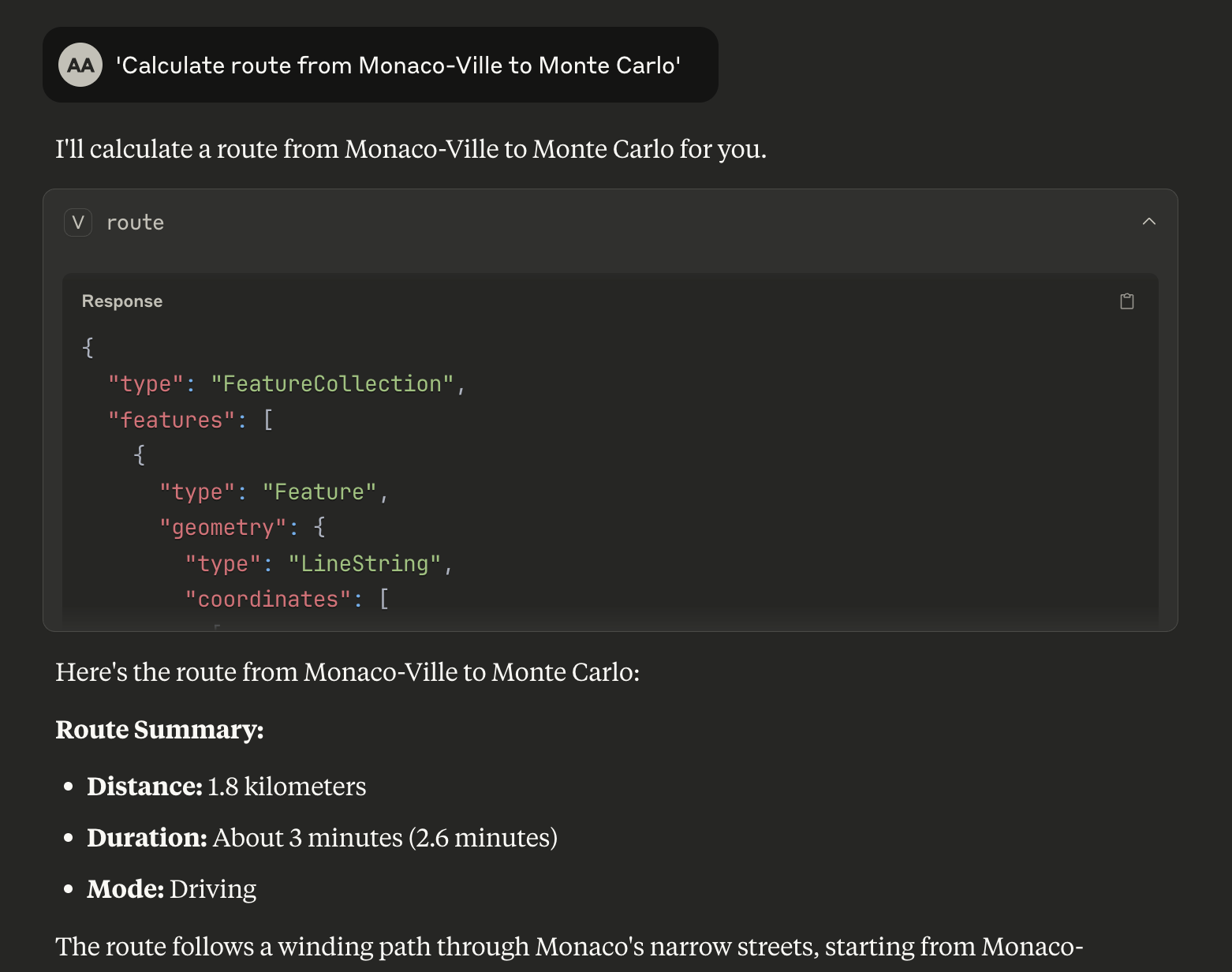
Claude Desktop showing a route calculation between two points with detailed GeoJSON response from Valhalla MCP Server
Features
Currently Supported Valhalla Services
MCP Tool/Resource | Valhalla Service | Description |
|
| Single origin → destination routing with alternatives |
|
| Travel time polygons showing reachable areas |
|
| Server status and version information |
|
| Vector tiles for client-side rendering |
Valhalla Services - Coming Soon
Service | Description | Use Cases |
Matrix | Distance/time matrices for multiple origins/destinations | Delivery optimization, logistics planning |
Map-matching | Match GPS coordinates to road network | GPS trace cleaning, route correction |
Elevation | Elevation profiles along routes or at points | Hiking routes, difficulty analysis |
Expansion | Graph traversal visualization | Network analysis, reachability studies |
Locate | Detailed metadata about nodes and edges | Address geocoding, road attributes |
Centroid | Optimal convergence point from multiple locations | Meeting point optimization |
Optimized Route | Multi-stop delivery routing with constraints | Logistics, delivery services |
Transportation Modes
auto- Car routingbicycle- Bicycle routingpedestrian- Walking routestaxi- Taxi routingbus- Public transit routing
Quick Start
Prerequisites
Node.js 18+
Claude Desktop
NPM or Yarn package manager
Option 1: Local Valhalla Server
For production use or custom datasets:
# Prerequisites: Docker and Docker Compose
./start-mcp.sh
This script will:
Build the MCP server
Start local Valhalla with Monaco OSM data
Wait for services to be ready
Run integration tests
Provide Claude Desktop configuration
Option 2: Use Your Pre-existing Valhalla Server
If you already have a Valhalla server running elsewhere:
# Clone and setup
git clone <repository-url>
cd valhalla-mcp
npm install
npm run build

# Configure environment variables
cp env.example .env
# Edit .env file and set VALHALLA_BASE_URL=http://your-valhalla-server:8002
Claude Desktop Integration
Open Claude Desktop settings
Add to your MCP configuration:
For Demo API (recommended for testing):
{
  "mcpServers": {
    "valhalla-mcp": {
      "command": "node",
      "args": ["dist/index.js"],
      "cwd": "/YOUR/PATH/TO/valhalla-mcp",
      "env": {
        "VALHALLA_BASE_URL": "https://valhalla1.openstreetmap.de"
      }
    }
  }
}
For Local Valhalla Server:
{
  "mcpServers": {
    "valhalla-mcp": {
      "command": "node",
      "args": ["dist/index.js"],
      "cwd": "/YOUR/PATH/TO/valhalla-mcp",
      "env": {
        "VALHALLA_BASE_URL": "http://localhost:8002"
      }
    }
  }
}
Update the
cwdpath to your actual project locationRestart Claude Desktop
Test Your Installation
Try these commands in Claude Desktop to verify everything works:
Basic routing:
"Calculate route from Monaco-Ville to Monte Carlo"
"Get driving directions from 43.7384,7.4246 to 43.7396,7.4263"
"Calculate bicycle route from 43.7350,7.4200 to 43.7450,7.4300"
Travel time analysis:
"Show 10-minute drive isochrone from Monaco center"
"Generate 15-minute bicycle travel polygon from 43.7311,7.4197"
You should receive detailed GeoJSON responses with route geometries and travel statistics!
Development Mode
For development with auto-reload:
npm run devConfiguration
Environment Variables
The server uses environment variables for configuration. Create a .env file from the template:
cp env.example .envAvailable environment variables:
VALHALLA_BASE_URL- Base URL for Valhalla service (default: http://localhost:8002)DEBUG- Enable debug logging (default: false)LOG_LEVEL- Log level: error, warn, info, debug (default: info)MCP_SERVER_NAME- MCP server name (default: valhalla-mcp-server)MCP_SERVER_VERSION- MCP server version (default: 0.1.0)
Common Valhalla endpoints:
http://localhost:8002- Local Docker instance (recommended)https://valhalla1.openstreetmap.de- Public demo API (✅ tested and working)https://your-server.com:8002- Custom deployment
Note: The main demo URL
https://valhalla.openstreetmap.deserves a web interface. Usehttps://valhalla1.openstreetmap.defor API access.
Docker Deployment
The complete stack can be deployed using Docker Compose:
# Build and start all services
docker-compose up -d

# View logs
docker-compose logs -f valhalla-mcp

# Stop services
docker-compose down
Usage Examples
Route Calculation
Request a route between two points:
{
  "tool": "route",
  "arguments": {
    "origin": { "lat": 52.5200, "lon": 13.4050 },
    "destination": { "lat": 52.5170, "lon": 13.3888 },
    "mode": "bicycle",
    "alternatives": 2,
    "units": "kilometers"
  }
}
Response includes GeoJSON LineString with route geometry and summary statistics:
{
  "type": "FeatureCollection",
  "features": [{
    "type": "Feature",
    "geometry": {
      "type": "LineString",
      "coordinates": [[13.4050, 52.5200], [13.3888, 52.5170]]
    },
    "properties": {
      "distance_km": 2.1,
      "duration_seconds": 420,
      "duration_minutes": 7,
      "mode": "bicycle"
    }
  }]
}
Isochrone Generation
Generate a 15-minute travel time polygon:
{
  "tool": "isochrone",
  "arguments": {
    "origin": { "lat": 52.5200, "lon": 13.4050 },
    "minutes": 15,
    "mode": "pedestrian"
  }
}
Health Check
Access server health information:
{
  "resource": "health://status"
}
Integration with MCP Clients
Claude Desktop
Add to your Claude Desktop configuration:
{
  "mcpServers": {
    "valhalla": {
      "command": "node",
      "args": ["/path/to/valhalla-mcp/dist/index.js"],
      "env": {
        "VALHALLA_BASE_URL": "https://valhalla1.openstreetmap.de"
      }
    }
  }
}
Note: Environment variables in Claude Desktop config override
.envfile values.
Other MCP Clients
The server implements the standard MCP protocol and works with any compliant client. Use stdio transport for local integration.
Architecture
┌─────────────────┐     MCP Protocol     ┌─────────────────┐
│   MCP Client    │ ◄─────────────────► │ Valhalla MCP    │
│ (Claude, etc.)  │    (stdio/HTTP)      │     Server      │
└─────────────────┘                      └─────────┬───────┘
                                                   │ HTTP REST
                                         ┌─────────▼───────┐
                                         │   Valhalla      │
                                         │  Routing Engine │
                                         └─────────────────┘
Development
Installation
# Install dependencies
npm install

# Build the project
npm run build
Key dependencies:
@modelcontextprotocol/sdk- Official MCP SDKaxios- HTTP client for Valhalla API callszod- Runtime type validationgeojson- GeoJSON type definitionsdotenv- Environment variable management
Testing
# Run tests
npm test

# Run tests in watch mode
npm run test:watch

# Run linting
npm run lint

# Fix linting issues
npm run lint:fix
Type Checking
The project uses strict TypeScript configuration:
# Type check
npx tsc --noEmit
Performance
Route calculation: < 200ms (local Valhalla instance)
Isochrone generation: < 300ms
Tile serving: < 30ms
Health check: < 5ms
Performance depends on Valhalla configuration and available OSM data.
Contributing
Fork the repository
Create a feature branch
Make your changes
Add tests
Submit a pull request
License
MIT License - see LICENSE file for details.
Acknowledgments
For issues and questions:
Open an issue on GitHub
Check the MCP documentation
Review Valhalla documentation