<div align="center"><a name="readme-top"></a>

<h1>CloudBase MCP</h1>
**🪐 Go from AI prompt to live app in one click**<br/>
The bridge that connects your AI IDE (Cursor, Copilot, etc.) directly to Tencent CloudBase
**Languages:** [中文](README-ZH.md) | **English** · [Documentation][docs] · [Changelog][changelog] · [Report Issues][github-issues-link]
<!-- SHIELD GROUP -->
[![][npm-version-shield]][npm-link]
[![][npm-downloads-shield]][npm-link]
[![][github-stars-shield]][github-stars-link]
[![][github-forks-shield]][github-forks-link]
[![][github-issues-shield]][github-issues-link]
![][github-license-shield]
[![][github-contributors-shield]][github-contributors-link]
[![][cnb-shield]][cnb-link]
[![][deepwiki-shield]][deepwiki-link]
**Found a game-changer for AI coding: one-click deploy from prompt to production**
[![][share-x-shield]][share-x-link]
[![][share-telegram-shield]][share-telegram-link]
[![][share-weibo-shield]][share-weibo-link]
<sup>The shortest path from AI prompt to live application</sup>
[![][github-trending-shield]](https://github.com/TencentCloudBase/CloudBase-AI-ToolKit)
[<img width="791" height="592" alt="Clipboard_Screenshot_1763724670" src="https://github.com/user-attachments/assets/f769beb7-5710-4397-8854-af2b7e452f70" />](https://docs.cloudbase.net/ai/cloudbase-ai-toolkit/tutorials)
</div>
## Why You Need CloudBase MCP
AI programming tools (like Cursor, Copilot) solve the **code generation** challenge.
However, there's still a gap between "generating code" and "application going live" (deployment, database configuration, CDN, domain setup).
**CloudBase MCP** (formerly CloudBase AI ToolKit) bridges this gap.
You no longer need:
- ❌ Complex DevOps configuration and YAML files
- ❌ Manual setup of cloud functions and databases
- ❌ Switching back and forth between IDE and cloud console
You only need to use natural language in your AI IDE to complete the entire journey from "idea" to "live".
<details>
<summary><kbd>Table of Contents</kbd></summary>
- [Quick Start](#quick-start)
- [Core Features](#core-features)
- [Installation & Configuration](#installation--configuration)
- [Use Cases](#use-cases)
- [MCP Tools](#mcp-tools)
- [More Resources](#more-resources)
</details>
## Quick Start
### One-Line Configuration, Start Using Immediately
In AI IDEs that support MCP (Cursor, WindSurf, CodeBuddy, etc.), just add one line of configuration:
```json
{
"mcpServers": {
"cloudbase": {
"command": "npx",
"args": ["@cloudbase/cloudbase-mcp@latest"]
}
}
}
```
> [!TIP]
> **Recommended: CloudBase AI CLI**
>
> One-click installation, automatic configuration, supports multiple AI programming tools:
>
> ```bash
> npm install @cloudbase/cli@latest -g
> ```
>
> After installation, run `tcb ai` to start using
>
> [View complete documentation](https://docs.cloudbase.net/cli-v1/ai/introduce) | [Detailed case tutorial](https://docs.cloudbase.net/practices/ai-cli-mini-program)
### First Time Use
1. **Login to CloudBase**
```
Login to CloudBase
```
AI will automatically open the login interface and guide environment selection
2. **Start Developing**
```
Build a two-player online Gomoku game website, support online battle, and deploy it
```
AI will automatically generate code, deploy to the cloud, and return the access link
### Supported AI IDEs
| Tool | Supported Platform | Guide |
|------|----------|----------|
| [CloudBase AI CLI](https://docs.cloudbase.net/cli-v1/ai/introduce) | CLI | [Guide](https://docs.cloudbase.net/cli-v1/ai/introduce) |
| [Cursor](https://docs.cloudbase.net/ai/cloudbase-ai-toolkit/ide-setup/cursor) | Standalone IDE| [Guide](https://docs.cloudbase.net/ai/cloudbase-ai-toolkit/ide-setup/cursor) |
| [WindSurf](https://docs.cloudbase.net/ai/cloudbase-ai-toolkit/ide-setup/windsurf) | Standalone IDE, VSCode, JetBrains Plugin | [Guide](https://docs.cloudbase.net/ai/cloudbase-ai-toolkit/ide-setup/windsurf) |
| [CodeBuddy](https://docs.cloudbase.net/ai/cloudbase-ai-toolkit/ide-setup/codebuddy) | Standalone IDE (CloudBase built-in), VS Code, JetBrains, WeChat DevTools| [Guide](https://docs.cloudbase.net/ai/cloudbase-ai-toolkit/ide-setup/codebuddy) |
| [CLINE](https://docs.cloudbase.net/ai/cloudbase-ai-toolkit/ide-setup/cline) | VS Code Plugin | [Guide](https://docs.cloudbase.net/ai/cloudbase-ai-toolkit/ide-setup/cline) |
| [GitHub Copilot](https://docs.cloudbase.net/ai/cloudbase-ai-toolkit/ide-setup/github-copilot) | VS Code Plugin | [Guide](https://docs.cloudbase.net/ai/cloudbase-ai-toolkit/ide-setup/github-copilot) |
| [Trae](https://docs.cloudbase.net/ai/cloudbase-ai-toolkit/ide-setup/trae) | Standalone IDE | [Guide](https://docs.cloudbase.net/ai/cloudbase-ai-toolkit/ide-setup/trae) |
| [Tongyi Lingma](https://docs.cloudbase.net/ai/cloudbase-ai-toolkit/ide-setup/tongyi-lingma) | Standalone IDE, VS Code, JetBrains Plugin | [Guide](https://docs.cloudbase.net/ai/cloudbase-ai-toolkit/ide-setup/tongyi-lingma) |
| [RooCode](https://docs.cloudbase.net/ai/cloudbase-ai-toolkit/ide-setup/roocode) | VS Code Plugin | [Guide](https://docs.cloudbase.net/ai/cloudbase-ai-toolkit/ide-setup/roocode) |
| [Baidu Comate](https://docs.cloudbase.net/ai/cloudbase-ai-toolkit/ide-setup/baidu-comate) | VS Code, JetBrains Plugin| [Guide](https://docs.cloudbase.net/ai/cloudbase-ai-toolkit/ide-setup/baidu-comate) |
| [Augment Code](https://docs.cloudbase.net/ai/cloudbase-ai-toolkit/ide-setup/augment-code) | VS Code, JetBrains Plugin | [Guide](https://docs.cloudbase.net/ai/cloudbase-ai-toolkit/ide-setup/augment-code) |
| [Claude Code](https://docs.cloudbase.net/ai/cloudbase-ai-toolkit/ide-setup/claude-code) | CLI | [Guide](https://docs.cloudbase.net/ai/cloudbase-ai-toolkit/ide-setup/claude-code) |
| [Gemini CLI](https://docs.cloudbase.net/ai/cloudbase-ai-toolkit/ide-setup/gemini-cli) | CLI | [Guide](https://docs.cloudbase.net/ai/cloudbase-ai-toolkit/ide-setup/gemini-cli) |
| [OpenAI Codex CLI](https://docs.cloudbase.net/ai/cloudbase-ai-toolkit/ide-setup/openai-codex-cli) | CLI | [Guide](https://docs.cloudbase.net/ai/cloudbase-ai-toolkit/ide-setup/openai-codex-cli) |
| [OpenCode](https://docs.cloudbase.net/ai/cloudbase-ai-toolkit/ide-setup/opencode) | CLI | [Guide](https://docs.cloudbase.net/ai/cloudbase-ai-toolkit/ide-setup/opencode) |
| [Qwen Code](https://docs.cloudbase.net/ai/cloudbase-ai-toolkit/ide-setup/qwen-code) | CLI | [Guide](https://docs.cloudbase.net/ai/cloudbase-ai-toolkit/ide-setup/qwen-code) |
## How to Achieve "One-Click Deploy" for AI Programming?
### 1. AI-Native
We're not just "glue code". Our built-in rule library is designed specifically for AI programming, enabling AI to directly generate "deployable" CloudBase best-practice code.
```markdown
Prompt: Generate a user login feature
- AI automatically generates code following CloudBase standards
- Auto-configure database, cloud functions, security rules
- One-click deploy to cloud
```
<img width="1032" height="776" alt="f1" src="https://github.com/user-attachments/assets/62e6dd9d-9c53-4668-841d-0ac1985a75e0" />
### 2. One-Click Deploy
AI-automated MCP deployment flow, AI handles **all** cloud resource configuration from cloud functions, databases to static websites.
```markdown
Prompt: Deploy current project to CloudBase
- Auto-detect project type (Web/Mini-program/Backend)
- Intelligent deployment parameter configuration
- Real-time deployment progress display
- Auto-return access link
```
<img width="1032" height="776" alt="f2" src="https://github.com/user-attachments/assets/20e0493a-fa50-4c03-b4ac-3dc584eb4ccb" />
### 3. Smart Debugging
Deployment error? Don't worry. AI automatically reads logs, analyzes issues, and generates fixes, truly achieving a **develop-deploy-debug** closed loop.
```markdown
Prompt: There's an error: xxxx
- AI automatically views cloud function logs
- Analyze error causes
- Generate fix code
- Auto redeploy
```
<img width="1032" height="776" alt="f5" src="https://github.com/user-attachments/assets/5a61714a-ddcf-448a-8740-983bbad9d2b9" />
### 4. Full-Stack Ready
Whether it's Web apps, mini-programs, or backend services, AI handles it all for you. You just focus on business logic.
| Application Type | Tech Stack | Deployment Method |
|---------|--------|---------|
| **Web Apps** | React/Vue/Next.js | Static Hosting + CDN |
| **WeChat Mini-Programs** | Native/UniApp | Mini-program Publishing |
| **Backend Services** | Node.js/Python | Cloud Functions/Cloud Run |
<img width="1032" height="776" alt="f3" src="https://github.com/user-attachments/assets/1c50fed3-3223-4cd6-8534-885dc798c08e" />
### 5. Knowledge Search
Built-in intelligent vector search for CloudBase, WeChat Mini-Program and other professional knowledge bases, making AI understand CloudBase better.
```markdown
Prompt: How to use cloud database to achieve real-time data synchronization?
- Intelligent search CloudBase knowledge base
- Return relevant documentation and best practices
- Provide code examples
```
<img width="1032" height="776" alt="f6" src="https://github.com/user-attachments/assets/9ccb6b39-1f76-46b8-8b10-b076bfdcc37f" />
### 6. Flexible Workflow
Support /spec and /no_spec commands, intelligently choose based on task complexity.
```markdown
/spec - Complete workflow (Requirements → Design → Tasks → Implementation)
/no_spec - Fast iteration (Direct implementation)
```
<img width="1032" height="776" alt="f7" src="https://github.com/user-attachments/assets/30a0632c-92e9-4f6d-8da9-10aef044d516" />
## Installation & Configuration
### Prerequisites
- Node.js v18.15.0 or above
- Enabled [Tencent CloudBase Environment](https://tcb.cloud.tencent.com/dev)
- Installed AI IDE that supports MCP ([View supported IDEs](#supported-ai-ides))
### Configuration Methods
#### Method 1: CloudBase AI CLI (Recommended)
```bash
# Install
npm install @cloudbase/cli@latest -g
# Use
tcb ai
```
#### Method 2: Manual MCP Configuration
Add MCP configuration according to your AI IDE:
<details>
<summary><b>Cursor</b></summary>
Add to `.cursor/mcp.json`:
```json
{
"mcpServers": {
"cloudbase": {
"command": "npx",
"args": ["@cloudbase/cloudbase-mcp@latest"]
}
}
}
```
</details>
<details>
<summary><b>WindSurf</b></summary>
Add to `.windsurf/settings.json`:
```json
{
"mcpServers": {
"cloudbase": {
"command": "npx",
"args": ["@cloudbase/cloudbase-mcp@latest"]
}
}
}
```
</details>
<details>
<summary><b>CodeBuddy</b></summary>
CodeBuddy has CloudBase MCP built-in, no configuration needed.
</details>
<details>
<summary><b>Other IDEs</b></summary>
View [Complete configuration guide](https://docs.cloudbase.net/ai/cloudbase-ai-toolkit/ide-setup/) for other IDE configuration methods.
</details>
## Use Cases
### Case 1: Two-Player Online Gomoku
**Development Process:**
1. Input requirement: "Build a two-player online Gomoku website, support online battle"
2. AI generates: Web app + cloud database + real-time data push
3. Auto-deploy and get access link
**Demo:** [Gomoku Game](https://cloud1-5g39elugeec5ba0f-1300855855.tcloudbaseapp.com/gobang/#/)
<details>
<summary>View development screenshots</summary>
| Development Process | Final Result |
|---------|---------|
| ![][image-case1-dev] | ![][image-case1-result] |
</details>
### Case 2: AI Pet Mini-Program
**Development Process:**
1. Input: "Develop a pet-raising mini-program with AI-enhanced interaction"
2. AI generates: Mini-program + cloud database + AI cloud function
3. Import to WeChat DevTools to publish
<details>
<summary>View development screenshots and mini-program preview</summary>
![][image-case2]
</details>
### Case 3: Smart Issue Diagnosis
When an app has issues, AI automatically views logs, analyzes errors, and generates fix code.
<details>
<summary>View smart diagnosis process</summary>
![][image-case3]
</details>
## MCP Tools
**39 tools** covering environment management, database, cloud functions, static hosting, mini-program publishing, and other core features.
| Category | Tools | Core Features |
|------|------|----------|
| **Environment** | 4 | Login authentication, environment query, domain management |
| **Database** | 11 | Collection management, document CRUD, indexes, data models |
| **Cloud Functions** | 9 | Create, update, invoke, logs, triggers |
| **Static Hosting** | 5 | File upload, domain configuration, website deployment |
| **Mini-Program** | 7 | Upload, preview, build, configuration, debugging |
| **Tool Support** | 4 | Templates, knowledge base search, web search, interactive dialogs |
[View complete tool documentation](doc/mcp-tools.md) | [Tool specification JSON](scripts/tools.json)
## More Resources
### Documentation
- [Quick Start](https://docs.cloudbase.net/ai/cloudbase-ai-toolkit/getting-started)
- [IDE Configuration Guide](https://docs.cloudbase.net/ai/cloudbase-ai-toolkit/ide-setup/)
- [Project Templates](https://docs.cloudbase.net/ai/cloudbase-ai-toolkit/templates)
- [Development Guide](https://docs.cloudbase.net/ai/cloudbase-ai-toolkit/development)
- [Plugin System](https://docs.cloudbase.net/ai/cloudbase-ai-toolkit/plugins)
- [FAQ](https://docs.cloudbase.net/ai/cloudbase-ai-toolkit/faq)
### Tutorials
#### Articles
- [Develop a Neighborhood Item Recycling Mini-Program with CloudBase AI CLI](https://docs.cloudbase.net/practices/ai-cli-mini-program)
- [One-stop development of card flip game with CodeBuddy IDE + CloudBase](https://mp.weixin.qq.com/s/2EM3RBzdQUCdfld2CglWgg)
- [Develop a WeChat mini-game in 1 hour](https://cloud.tencent.com/developer/article/2532595)
- [More tutorials...](https://docs.cloudbase.net/ai/cloudbase-ai-toolkit/tutorials)
#### Videos
- [CloudBase: Use AI to develop an Overcooked game](https://www.bilibili.com/video/BV1v5KAzwEf9/)
- [Software 3.0: Best AI Programming Partner](https://www.bilibili.com/video/BV15gKdz1E5N/)
- [More videos...](https://docs.cloudbase.net/ai/cloudbase-ai-toolkit/tutorials)
### Project Cases
- [Gomoku Online Game](https://github.com/TencentCloudBase/awesome-cloudbase-examples/tree/master/web/gomoku-game)
- [Overcooked Co-op Game](https://github.com/TencentCloudBase/awesome-cloudbase-examples/tree/master/web/overcooked-game)
- [E-commerce Admin Panel](https://github.com/TencentCloudBase/awesome-cloudbase-examples/tree/master/web/ecommerce-management-backend)
- [More cases...](https://github.com/TencentCloudBase/awesome-cloudbase-examples)
## Community
### WeChat Group
<div align="center">
<img src="https://7463-tcb-advanced-a656fc-1257967285.tcb.qcloud.la/mcp/toolkit-qrcode.png" width="200" alt="WeChat Group QR Code">
<br>
<i>Scan to join WeChat tech exchange group</i>
</div>
### Other Communication Channels
| Platform | Link | Description |
|------|------|------|
| **Official Documentation** | [View Documentation](https://docs.cloudbase.net/) | Complete CloudBase documentation |
| **Issue Feedback** | [Submit Issue](https://github.com/TencentCloudBase/CloudBase-AI-ToolKit/issues) | Bug reports and feature requests |
## Star History
[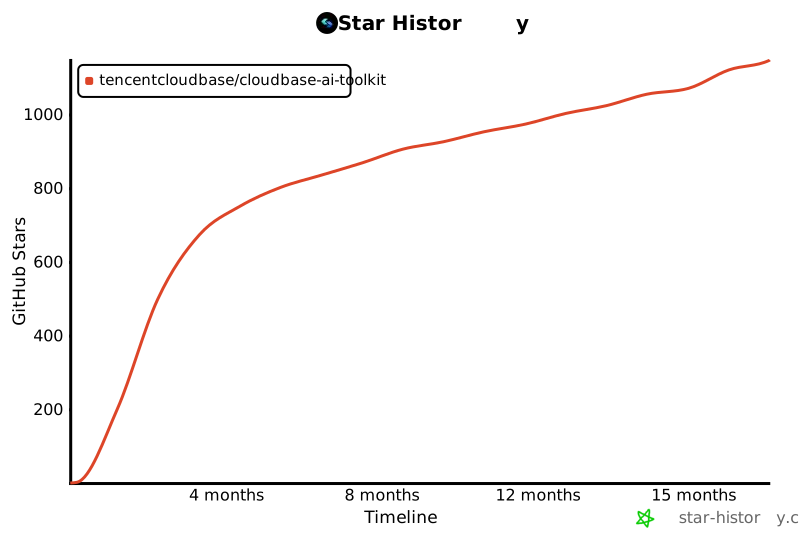](https://github.com/TencentCloudBase/CloudBase-AI-ToolKit)
## Contributors
Thanks to all the developers who have contributed to CloudBase MCP!
[](https://github.com/TencentCloudBase/CloudBase-AI-ToolKit/graphs/contributors)
---
<div align="center">
**If this project is helpful to you, please give us a Star!**
[![][github-stars-shield]][github-stars-link]
[MIT](LICENSE) © TencentCloudBase
</div>
<!-- Image Placeholders - These images need to be generated or replaced -->
<!--
Design style constraints (all images follow uniformly):
- Modern flat design, simple and vibrant
- Background color: Pure black #000000 (unified black background)
- Theme color gradient: #67E9E9 → #4896FF → #2BCCCC (maintained)
- Vibrant accent colors: Moderate use of #FFD93D (yellow), #6BCF7F (green) as accents
- Simple geometric shapes (circles, rectangles, lines), no text
- Use geometric shapes and icons to express concepts, abstract UI skeleton
- Promotional video style, modern UI skeleton
- Smooth lines, moderate light effects, balanced color scheme
Prompt templates (all images without text, pure geometric shapes and icons):
- image-overview: "Abstract UI skeleton diagram, modern style, pure black background #000000, theme colors #67E9E9 #4896FF #2BCCCC gradient, moderate vibrant accent colors, use geometric shapes (circles, rectangles, smooth lines) and icons to express AI IDE, code generation, cloud deployment flow, no text, promotional video style, modern UI skeleton"
- image-ai-native: "Abstract code generation interface skeleton, modern style, pure black background, theme color cyan blue gradient, use rectangles to represent code blocks, circles to represent AI icons, smooth lines to represent connections, no text, promotional video style, simple geometric shapes"
- image-deploy: "Abstract deployment interface skeleton, modern style, pure black background, theme color gradient, use circular progress indicators, rectangular progress bars, smooth lines to express deployment flow, no text, promotional video style, modern UI skeleton"
- image-fullstack: "Abstract full-stack architecture skeleton diagram, modern style, pure black background, theme color gradient, use circular nodes to represent different services (Web/Mini-program/Backend/Database), smooth lines connect to express integration relationships, geometric shapes iconized expression, no text, promotional video style"
- image-agent: "Abstract AI agent interface skeleton, modern style, pure black background, theme color gradient, use circles to represent Agent, rectangles to represent configuration cards, smooth lines to express data flow, geometric shapes iconized, no text, promotional video style, modern UI skeleton"
- image-debug: "Abstract issue diagnosis interface skeleton, modern style, pure black background, theme color gradient, use rectangles to represent log cards, circles to represent status indicators, smooth lines to express analysis flow, geometric shapes iconized, no text, promotional video style"
- image-knowledge: "Abstract knowledge retrieval interface skeleton, modern style, pure black background, theme color gradient, use rectangular cards to represent search results, circles to represent search icons, smooth lines to express relationships, geometric shapes iconized, no text, promotional video style, modern UI skeleton"
- image-workflow: "Abstract workflow selection interface skeleton, modern style, pure black background, theme color gradient, use circular buttons to represent two modes, rectangular panels to represent options, smooth lines to express flow, geometric shapes iconized, no text, promotional video style"
- image-case1-dev: "Abstract game development interface skeleton, modern style, pure black background, theme color gradient, use geometric shapes to represent code editor, game interface elements, no text, promotional video style, modern UI skeleton"
- image-case1-result: "Abstract game interface skeleton, modern style, pure black background, theme color gradient, use circles and rectangles to represent game elements, geometric shapes iconized expression, no text, promotional video style"
- image-case2: "Abstract mini-program development interface skeleton, modern style, pure black background, theme color gradient, use rectangles to represent mini-program interface, circles to represent function modules, geometric shapes iconized, no text, promotional video style, modern UI skeleton"
- image-case3: "Abstract issue diagnosis interface skeleton, modern style, pure black background, theme color gradient, use rectangles to represent log cards, circles to represent status, smooth lines to express diagnosis flow, geometric shapes iconized, no text, promotional video style"
-->
[image-overview]: https://7463-tcb-advanced-a656fc-1257967285.tcb.qcloud.la/mcp/video-banner.png
[image-ai-native]: https://via.placeholder.com/800x400/3B82F6/FFFFFF?text=AI+Native+Development
[image-deploy]: https://via.placeholder.com/800x400/10B981/FFFFFF?text=One-Click+Deploy
[image-fullstack]: https://via.placeholder.com/800x400/8B5CF6/FFFFFF?text=Full-Stack+Application
[image-agent]: https://via.placeholder.com/800x400/EC4899/FFFFFF?text=AI+Agent+Development
[image-debug]: https://via.placeholder.com/800x400/F59E0B/FFFFFF?text=Smart+Debugging
[image-knowledge]: https://via.placeholder.com/800x400/06B6D4/FFFFFF?text=Knowledge+Search
[image-workflow]: https://via.placeholder.com/800x400/6366F1/FFFFFF?text=Flexible+Workflow
[image-case1-dev]: https://7463-tcb-advanced-a656fc-1257967285.tcb.qcloud.la/turbo-deploy/turbo-deploy-001.png
[image-case1-result]: https://7463-tcb-advanced-a656fc-1257967285.tcb.qcloud.la/turbo-deploy/turbo-deploy-004.png
[image-case2]: https://7463-tcb-advanced-a656fc-1257967285.tcb.qcloud.la/turbo-deploy/turbo-deploy-005.png
[image-case3]: https://7463-tcb-advanced-a656fc-1257967285.tcb.qcloud.la/turbo-deploy/turbo-deploy-009.png
<!-- Links -->
[docs]: https://docs.cloudbase.net/ai/cloudbase-ai-toolkit/
[changelog]: https://github.com/TencentCloudBase/CloudBase-AI-ToolKit/releases
[github-issues-link]: https://github.com/TencentCloudBase/CloudBase-AI-ToolKit/issues
[github-stars-link]: https://github.com/TencentCloudBase/CloudBase-AI-ToolKit/stargazers
[github-forks-link]: https://github.com/TencentCloudBase/CloudBase-AI-ToolKit/network/members
[github-trending-url]: https://github.com/trending
[npm-link]: https://www.npmjs.com/package/@cloudbase/cloudbase-mcp
[cnb-link]: https://cnb.cool/tencent/cloud/cloudbase/CloudBase-AI-ToolKit
[deepwiki-link]: https://deepwiki.com/TencentCloudBase/CloudBase-AI-ToolKit
<!-- Shields -->
[npm-version-shield]: https://img.shields.io/npm/v/@cloudbase/cloudbase-mcp?color=3B82F6&label=npm&logo=npm&style=flat-square
[npm-downloads-shield]: https://img.shields.io/npm/dw/@cloudbase/cloudbase-mcp?color=10B981&label=downloads&logo=npm&style=flat-square
[github-stars-shield]: https://img.shields.io/github/stars/TencentCloudBase/CloudBase-AI-ToolKit?color=F59E0B&label=stars&logo=github&style=flat-square
[github-forks-shield]: https://img.shields.io/github/forks/TencentCloudBase/CloudBase-AI-ToolKit?color=8B5CF6&label=forks&logo=github&style=flat-square
[github-issues-shield]: https://img.shields.io/github/issues/TencentCloudBase/CloudBase-AI-ToolKit?color=EC4899&label=issues&logo=github&style=flat-square
[github-license-shield]: https://img.shields.io/badge/license-MIT-6366F1?logo=github&style=flat-square
[github-contributors-shield]: https://img.shields.io/github/contributors/TencentCloudBase/CloudBase-AI-ToolKit?color=06B6D4&label=contributors&logo=github&style=flat-square
[github-contributors-link]: https://github.com/TencentCloudBase/CloudBase-AI-ToolKit/graphs/contributors
[cnb-shield]: https://img.shields.io/badge/CNB-CloudBase--AI--ToolKit-3B82F6?logo=data:image/svg+xml;base64,PHN2ZyB3aWR0aD0iMTIiIGhlaWdodD0iMTIiIHZpZXdCb3g9IjAgMCAxMiAxMiIgZmlsbD0ibm9uZSIgeG1sbnM9Imh0dHA6Ly93d3cudzMub3JnLzIwMDAvc3ZnIj48cmVjdCB3aWR0aD0iMTIiIGhlaWdodD0iMTIiIHJ4PSIyIiBmaWxsPSIjM0I4MkY2Ii8+PHBhdGggZD0iTTUgM0g3VjVINSIgc3Ryb2tlPSJ3aGl0ZSIgc3Ryb2tlLXdpZHRoPSIxLjUiLz48cGF0aCBkPSJNNSA3SDdWOUg1IiBzdHJva2U9IndoaXRlIiBzdHJva2Utd2lkdGg9IjEuNSIvPjwvc3ZnPg==&style=flat-square
[deepwiki-shield]: https://deepwiki.com/badge.svg
[github-trending-shield]: https://img.shields.io/github/stars/TencentCloudBase/CloudBase-AI-ToolKit?style=social
<!-- Share Links -->
[share-x-link]: https://x.com/intent/tweet?hashtags=cloudbase,ai,devtools&text=Go%20from%20AI%20prompt%20to%20live%20app%20in%20one%20click!%20No%20DevOps%20config%20needed%20🚀&url=https://github.com/TencentCloudBase/CloudBase-AI-ToolKit
[share-x-shield]: https://img.shields.io/badge/-share%20on%20x-black?labelColor=black&logo=x&logoColor=white&style=flat-square
[share-telegram-shield]: https://img.shields.io/badge/-share%20on%20telegram-black?labelColor=black&logo=telegram&logoColor=white&style=flat-square
[share-telegram-link]: https://t.me/share/url?url=https://github.com/TencentCloudBase/CloudBase-AI-ToolKit&text=Go%20from%20AI%20prompt%20to%20live%20app%20in%20one%20click!%20No%20DevOps%20config%20needed%20🚀
[share-weibo-link]: http://service.weibo.com/share/share.php?sharesource=weibo&title=Go%20from%20AI%20prompt%20to%20live%20app%20in%20one%20click!%20No%20DevOps%20config%20needed%20🚀&url=https://github.com/TencentCloudBase/CloudBase-AI-ToolKit
[share-weibo-shield]: https://img.shields.io/badge/-share%20on%20weibo-black?labelColor=black&logo=sinaweibo&logoColor=white&style=flat-square