
Click on "Install Server".
Wait a few minutes for the server to deploy. Once ready, it will show a "Started" state.
In the chat, type
@followed by the MCP server name and your instructions, e.g., "@SE Ranking MCP ServerWhat are the top organic keywords for example.com?"
That's it! The server will respond to your query, and you can continue using it as needed.
Here is a step-by-step guide with screenshots.
SE Ranking MCP Server
This Model Context Protocol (MCP) server connects AI assistants to SE Ranking's SEO data and project management APIs. It enables natural language queries for:
Keyword research and competitive analysis
Backlink analysis and monitoring
Domain traffic and ranking insights
Website audits and technical SEO
AI search visibility tracking
Project and rank tracking management
Prerequisites
Before you begin, please ensure you have the following software and accounts ready:
SE Ranking Account: You will need an active SE Ranking account to generate an API token. If you don’t have one, you can sign up here.
Docker: A platform for developing, shipping, and running applications in containers. If you don’t have it, you can download it from the official Docker website.
Git: A free and open-source distributed version control system. You can download it from the official Git website.
AI Assistant: You will need an MCP-compatible client, such as Claude Desktop or the Gemini CLI.
API Tokens
This MCP server supports two types of API access:
Token | Environment Variable | Format | Purpose |
Data API |
| UUID (e.g., | Access to keyword research, domain analysis, backlinks data, SERP analysis, and website audits. Tools prefixed with |
Project API |
| 40-char hex (e.g., | Access to project management, rank tracking, backlink monitoring, and account management. Tools prefixed with |
Get your tokens from: https://online.seranking.com/admin.api.dashboard.html
You can use one or both tokens depending on which tools you need. If you only use Data API tools, you can omit PROJECT_API_TOKEN, and vice versa.
Rate Limits
API | Default Rate Limit |
Data API | 10 requests per second |
Project API | 5 requests per second |
Rate limits are customizable. Contact api@seranking.com to request adjustments.
Installation
Choose the installation method that best fits your needs:
Option 1: Docker (Recommended) - Best for standard usage, stability, and ease of updates. Use this if you just want to run the tool without managing dependencies.
Option 2: Local Node.js Server (For Developers) - Best for development, debugging, or environments where Docker isn't available (like Replit). Use this if you need to modify the code or run a custom setup.
Option 1: Docker (Recommended)
Open your terminal (or Command Prompt/PowerShell on Windows).
Clone the project repository from GitHub:
Navigate into the new directory:
Build the Docker Image:
How to Update SEO-MCP (Docker)
To ensure you have the latest features, pull the latest changes and rebuild:
Option 2: Local Node.js Server (For Developers)
In order to run the local Node server, you need to have Node.js 20+ version installed on your machine.
Install dependencies:
Build the project:
Start the server:
Then your HTTP server should be running at: http://0.0.0.0:5000/mcp.
In case you'd like to modify the HOST and PORT, you can do so by creating a .env file in the root directory of the project with the settings you want to override, for example:
Additionally, when running in external environments like Replit, you can set the DATA_API_TOKEN and PROJECT_API_TOKEN environment variables in the configuration panel.
Note: If you change the API token values when the server is running, you need to restart the server.
Verifying the HTTP Server
To send a sample test request and verify your setup:
For batch MCP Requests testing:
Connect to Claude Desktop
Claude Desktop reads its configuration from claude_desktop_config.json.
Click on the Claude menu and select Settings....
In the Settings window, navigate to the Developer tab in the left sidebar.
Click the Edit Config button to open the configuration file. This action creates a new configuration file if one doesn’t exist or opens your existing configuration.
The file is located at:
macOS:
~/Library/Application\ Support/Claude/claude_desktop_config.jsonWindows:
%AppData%\Claude\claude_desktop_config.jsonLinux:
~/.config/Claude/claude_desktop_config.json
Example of Claude Desktop configuration for MCP server
JSON Configuration Template:
Replace the
DATA_API_TOKENandPROJECT_API_TOKENplaceholder values with your tokens (see API Tokens section).After saving claude_desktop_config.json, restart Claude Desktop. You should see the server under MCP Servers/Tools.
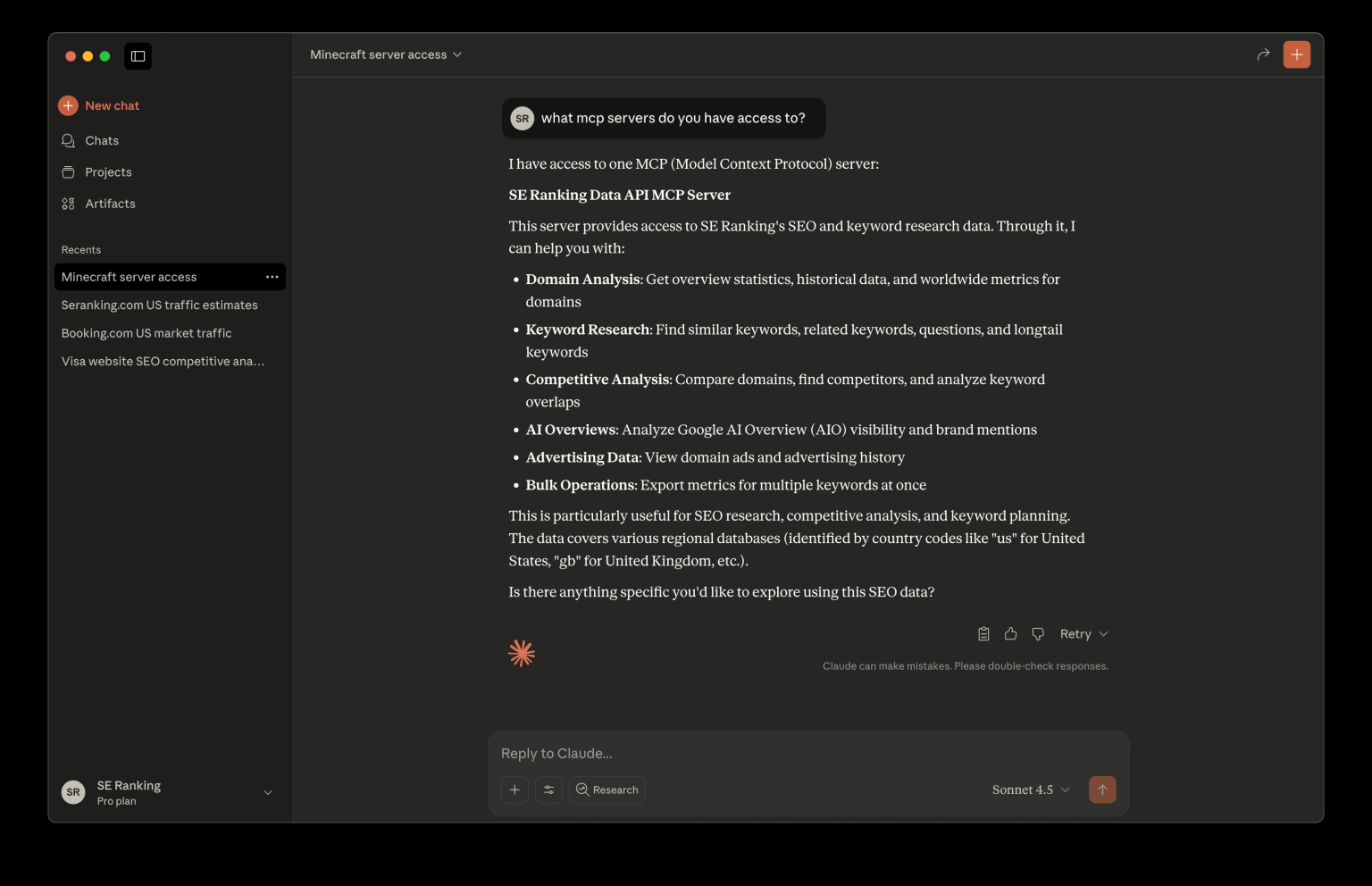
To verify the setup, ask Claude:
Do you have access to MCP?It should respond by listingseo-data-api-mcp.
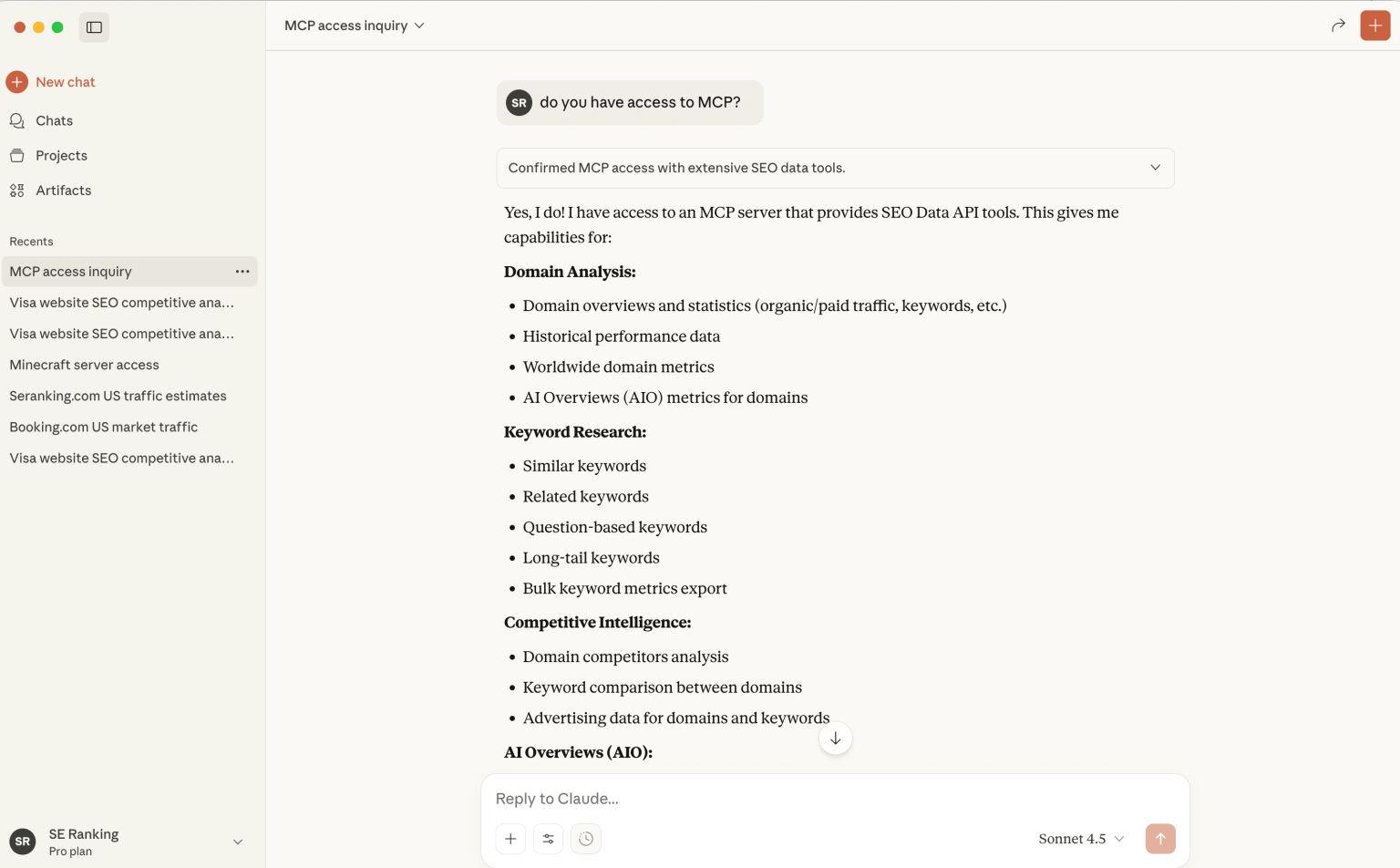
Your setup is complete! You can now run complex SEO queries using natural language.
Connect to Gemini CLI
Open the Gemini CLI settings file, which is typically located at:
~/.gemini/settings.jsonAdd the following JSON configuration, making sure to replace the API token placeholder values.
Replace the DATA_API_TOKEN and PROJECT_API_TOKEN placeholder values with your tokens (see API Tokens section).
Save the configuration file.
To verify the setup, launch the Gemini CLI by running
geminiin your terminal. Once the interface is active, pressCtrl+Tto view the available MCP servers. Ensure seo-data-api-mcp is listed.
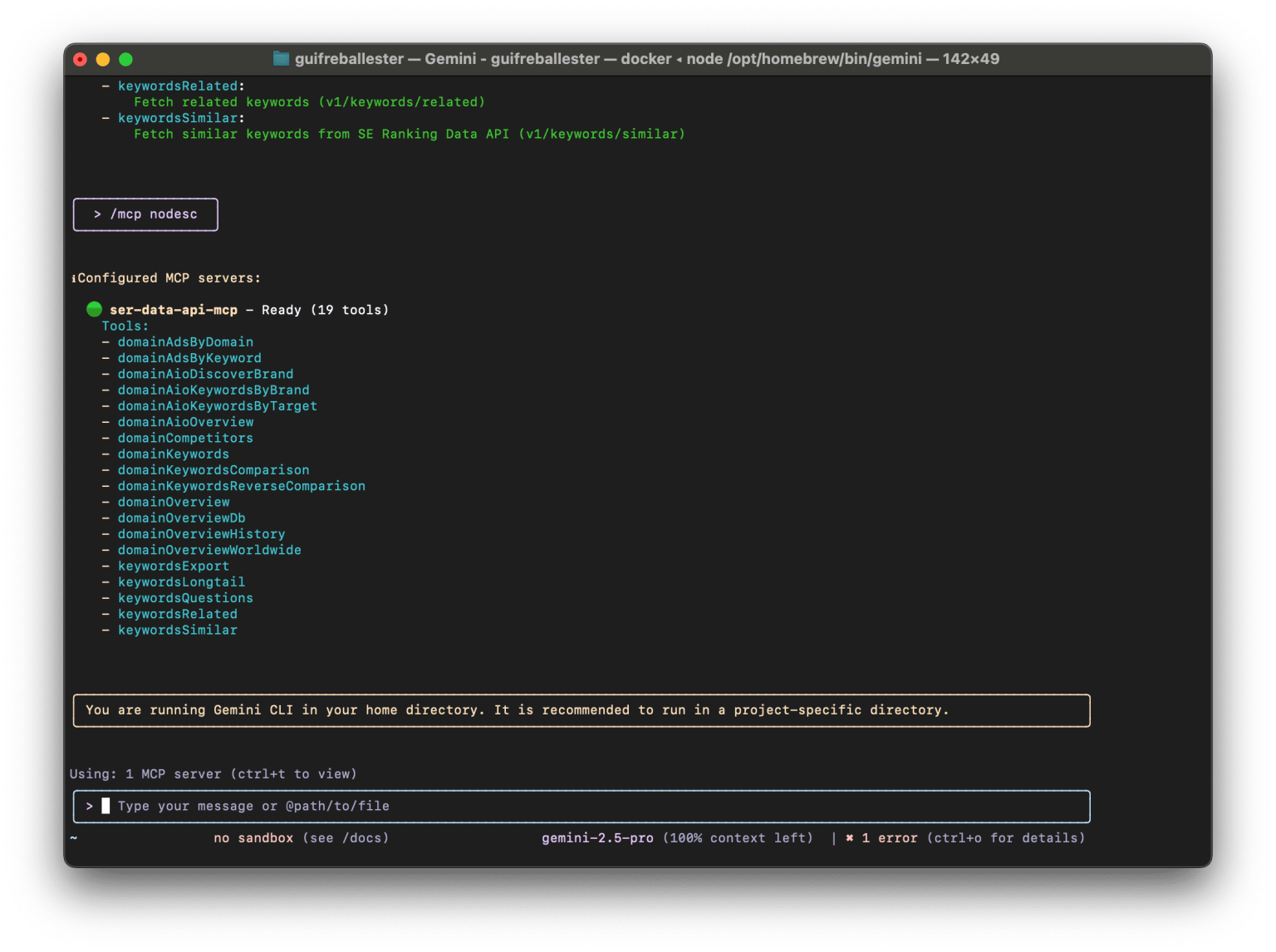
Your setup is complete! You can now run complex SEO queries using natural language.
Available Tools
Data API Tools
Module | Tool Name | Description |
SERP |
| Retrieves the raw HTML dump of a completed SERP task as a ZIP file. |
SERP |
| Retrieves a list of available locations for SERP analysis. |
SERP |
| Runs a SERP query and returns results. Creates task, polls until complete, and returns organic/ads/featured snippets (standard) or all SERP types including AI Overview, Maps, Reviews (advanced). |
SERP |
| Retrieves the status or advanced results of a specific SERP task. |
SERP |
| Retrieves the status or standard results of a specific SERP task. Returns organic, ads, and featured_snippet types only. |
SERP |
| Retrieves a list of all SERP tasks added to the queue in the last 24 hours. |
ai search |
| Identifies and returns the brand name associated with a given target domain, subdomain, or URL. |
ai search |
| Retrieves a high-level overview of a domain's performance in AI search engines. |
ai search |
| Retrieves a list of prompts where the specified brand is mentioned in AI search results. |
ai search |
| Retrieves a list of prompts (queries) that mention the specified target in AI search results. |
backlinks |
| Retrieves large-scale backlinks asynchronously, returning a task ID to check status later. |
backlinks |
| Retrieves a comprehensive list of backlinks for the specified target, with extensive filtering and sorting options. |
backlinks |
| Retrieves a list of anchor texts for backlinks pointing to the specified target. |
backlinks |
| Fetch authority metrics for a target (domain, host or URL). |
backlinks |
| Returns the total number of backlinks for the target. Supports batch requests. |
backlinks |
| Checks the status of an asynchronous backlinks export task. Returns download URL when complete. |
backlinks |
| Fetch site pages that have backlinks, with sorting and limit controls. |
backlinks |
| Returns key statistics for a target (backlinks count, referring domains, etc.). Supports batch requests. |
backlinks |
| Returns all backlinks pointing to a target using cursor-based pagination for large datasets. |
backlinks |
| Retrieves a list of referring domains pointing to the specified target. |
backlinks |
| Retrieves a summary of backlink metrics for one or multiple targets. |
backlinks |
| Returns live backlinks count for every day within the specified date range. |
backlinks |
| Returns distribution of Domain InLink Rank of all domains referencing a target. |
backlinks |
| Returns the domain InLink Rank (Domain Authority) of the target page's root domain. |
backlinks |
| Returns count of (newly) found or lost backlinks for every day in the date range. |
backlinks |
| Returns count of referring domains found or lost in the date range, by day. |
backlinks |
| Returns the InLink Rank (Page Authority) for a target URL. |
backlinks |
| Returns historical values of InLink Rank for a specific target page. |
backlinks |
| Returns IPv4 addresses that belong to backlinks pointing to a target. |
backlinks |
| Returns the number of unique IPs linking to a target. |
backlinks |
| Returns the number of unique subnets/C-blocks linking to a target. |
backlinks |
| Returns the number of unique domains linking to a target. Supports batch requests. |
backlinks |
| Returns a list of backlinks found or lost within the specified date range. |
backlinks |
| Returns referring domains found or lost in the specified date range. |
domain analysis |
| Retrieves paid ads for a specific domain. |
domain analysis |
| Retrieves paid ads for a specific keyword. |
domain analysis |
| Retrieves a list of organic or paid competitors for a domain. |
domain analysis |
| Retrieves keywords for which a domain ranks in organic or paid search. |
domain analysis |
| Compares keyword rankings of two websites. Find common keywords or keyword gaps. |
domain analysis |
| Fetch domain overview by database. |
domain analysis |
| Retrieves historical data for domain traffic and keyword rankings. |
domain analysis |
| Retrieves an aggregated worldwide overview of domain metrics. |
domain analysis |
| Retrieves a list of individual pages ranking within a specified domain. |
domain analysis |
| Retrieves a list of subdomains for a domain with search performance metrics. |
domain analysis |
| Retrieves worldwide overview of organic and paid traffic metrics for a specific URL. |
keyword research |
| Retrieves metrics for a bulk list of keywords. |
keyword research |
| Retrieves question-based keywords containing the seed keyword. |
keyword research |
| Retrieves long-tail variations for the seed keyword. |
keyword research |
| Retrieves keywords semantically related to the seed keyword. |
keyword research |
| Retrieves keywords similar to the seed keyword. |
website audit |
| Launches an advanced website audit that renders JavaScript. Suitable for SPAs. |
website audit |
| Launches a standard website audit that crawls HTML. Suitable for static sites. |
website audit |
| Permanently deletes a website audit report and all associated data. |
website audit |
| Retrieves a historical snapshot of a specific audit run. |
website audit |
| Retrieves URLs affected by a specific issue within an audit. |
website audit |
| Retrieves the full detailed report for a completed website audit. |
website audit |
| Checks the real-time status of a specific website audit. |
website audit |
| Returns all URLs found during an audit. |
website audit |
| Returns every hyperlink discovered during the audit. |
website audit |
| Retrieves all issues found on a specific page within an audit. |
website audit |
| Retrieves all website audits associated with your account. |
website audit |
| Launches a new crawl of a previously completed audit. |
website audit |
| Changes the title of an existing website audit report. |
Project API Tools
Module | Tool Name | Description |
account |
| Get the current account balance including currency and currency code. |
account |
| Get information about the current user subscription. |
account |
| Get information about the currently logged in user. |
analytics |
| Get popular queries from Google Search Console for a website. |
analytics |
| Assess potential traffic volume, traffic cost, and potential customers for a website. |
backlink checker |
| Add a list of URLs to the disavowed backlinks list. |
backlink checker |
| Add a single backlink to the backlink monitor for a website. |
backlink checker |
| Create a new group for organizing backlinks. |
backlink checker |
| Delete a backlink group. |
backlink checker |
| Remove a backlink from the disavowed backlinks list. |
backlink checker |
| Delete a list of backlinks from the backlink monitor. |
backlink checker |
| Get the status of a backlink import from Google Search Console. |
backlink checker |
| Get backlink statistics for a website. |
backlink checker |
| Import a list of backlinks to the backlink monitor. |
backlink checker |
| Get a list and count of backlink groups for a website. |
backlink checker |
| Get a list and count of disavowed backlinks for a website. |
backlink checker |
| Get a list of backlinks from the backlink monitor. |
backlink checker |
| Move backlinks from one group to another. |
backlink checker |
| Run an index or status check for a list of backlinks. |
backlink checker |
| Change the name of a backlink group. |
backlink checker |
| Start a backlink import from Google Search Console. |
backlink checker |
| Update settings for automatic backlink import from GSC. |
competitors |
| Add a competitor website to a project for position tracking. |
competitors |
| Remove a competitor website from a project. |
competitors |
| Get data on sites ranked in TOP 10 for tracked queries (14-day history). |
competitors |
| Get statistics on competitor keyword positions. |
competitors |
| Get TOP 10 results for tracked keywords in a project. |
competitors |
| Get top 100 results for tracked keywords in a project. |
competitors |
| Get a list of all competitors added to a project with statistics. |
keyword groups |
| Add a group for project keywords. |
keyword groups |
| Delete a project keyword group. |
keyword groups |
| Get a list of keyword groups for a project. |
keyword groups |
| Transfer project keywords from one group to another. |
keyword groups |
| Update the name of a project keyword group. |
marketing plan |
| Add a new task to the marketing plan for a website. |
marketing plan |
| Delete a task from the marketing plan. |
marketing plan |
| Get all marketing plan sections, items, and notes for a website. |
marketing plan |
| Set the completion status of a marketing plan task. |
marketing plan |
| Update an existing marketing plan task. |
project groups |
| Add a new project group to a user account. |
project groups |
| Delete a project group. |
project groups |
| Get a list of all project groups from a user account. |
project groups |
| Transfer projects from one group to another. |
project groups |
| Rename a project group. |
project management |
| Add new keywords to a project. |
project management |
| Add a new search engine to a project. |
project management |
| Add a new project to the user account. |
project management |
| Delete keywords from a project. |
project management |
| Delete a project from the user account. |
project management |
| Delete a search engine from a project. |
project management |
| Get total number of top and bottom advertisements by day. |
project management |
| Returns standard comparison dates available for reporting. |
project management |
| Get keyword ranking statistics for a specified time period. |
project management |
| Get a list of search engines employed by a project. |
project management |
| Get a project's summary statistics. |
project management |
| Get a list of keywords with target pages for a project. |
project management |
| Get a list of all user projects. |
project management |
| Run a ranking position check for keywords or entire project. |
project management |
| Manually set position for a project's keyword. |
project management |
| Change/update project settings. |
project management |
| Update an existing search engine in a project. |
sub-accounts |
| Create a new sub-account. |
sub-accounts |
| Delete a user sub-account. |
sub-accounts |
| Get extended information about a sub-account. |
sub-accounts |
| Get website IDs that belong to a sub-account. |
sub-accounts |
| Get website IDs shared with a sub-account. |
sub-accounts |
| Get a list of all sub-accounts of the current user. |
sub-accounts |
| Share one or more websites with a sub-account. |
sub-accounts |
| Edit sub-account settings, limits, and permissions. |
system |
| Get the list of all available regions supported by Google. |
system |
| Get the list of all available search engines. |
system |
| Get a complete list of possible languages for Google search engine. |
system |
| Get search volume data for a region and keyword list (max 10 keywords). |
system |
| Get regions where SE Ranking can run keyword search volume checks. |
url tags |
| Add a tag to the site and attach it to a link and/or domain. |
url tags |
| Delete a tag. |
url tags |
| Get a list of landing page tags added to domains and/or links. |
url tags |
| Add tags to a domain and/or link, replacing previously added tags. |
Available Prompts
Prompt Name | Arguments | Description |
|
| Create two SERP tasks for the query in two locations and compare top 10 organic domains, overlap, and unique competitors. |
|
| Fetch backlinks for competitors with a minimum Domain Trust, compare against your domain, and find opportunities. |
|
| Analyze a domain's global/country organic traffic, top competitors by shared keywords, and provide strategic recommendations. |
|
| Pull related/similar keywords for a market, clean/deduplicate, and cluster them by intent/theme with volume and H1/H2 ideas. |
|
| Estimate share of voice in AI search (e.g. ChatGPT, Perplexity) vs competitors, listing winning topics and gap-closing actions. |
Usage Example: Finding Keyword Opportunities
With the configuration complete, you can now use natural language prompts to interact with your SE Ranking data. Here is an example prompt to identify low-hanging keyword opportunities for a domain.
Copy and paste the following into your configured AI assistant:
What This Prompt Does
This prompt instructs the model to perform a comprehensive competitive analysis by:
Finding Lost & Declining Keywords: It first identifies keywords for seranking.com that have either been lost from the rankings or have dropped in position.
Identifying Top Competitors: It finds all organic competitors and sorts them to identify the top two based on the number of shared keywords.
Uncovering Competitor-Ranked Keywords: It compares seranking.com against its top competitors to find 30 high-volume keywords that they rank for, but seranking.com does not.
Generating a Final Report: Finally, it synthesizes all of this information into a concise report, highlighting the most promising opportunities for growth.
Troubleshooting
Docker image problems
If you’re having trouble getting the MCP server to connect, here are a few steps to diagnose the issue.
Verifying if the Docker container is running when you run your AI Assistant (Claude or Gemini). If you start a chat with an AI, and your MCP Server is set up properly via JSON config, it should automatically start the Docker container.
To check if it’s running, open your terminal and run:
If it’s working correctly, you will see an output similar to this:
This confirms that your AI assistant has successfully started the container, and it’s listening for connections.
If docker ps shows no running containers related to the MCP server, it usually points to a configuration issue:
Incorrect/invalid JSON: Double-check the claude_desktop_config.json or settings.json for any syntax errors like missing commas or brackets. You can validate the JSON here: https://jsonlint.com/.
Incorrect image name: Double-check the claude_desktop_config.json or settings.json for the correct image name
se-ranking/seo-data-api-mcp-server
Docker image running, but MCP server is not visible in Claude Desktop / Gemini CLI
If the docker image is running, but the MCP server is not visible in Claude Desktop, you can investigate the container by:
For the following example, the container ID is de4e410ef0fd:
Note: you can shorten the container ID in case no other containers share that prefix, ex. docker inspect de4. When you're running multiple AI chats and/or tools connected to the MCP Servers, there can be multiple containers running, but all with the same IMAGE name.
This will show you the big JSON output, where particularly important is the "Config" section, ex.:
Which shows you if you have the correct environment variables set.
Contributing
Prerequisites
Node.js 20+
npm
Running Tests
Environment Variables for Testing
Create a .env file in the project root with the following variables:
Variable | Required | Description |
| Yes | API token for Data API tools |
| Yes | API token for Project API tools |
| No | Set to |
| No | Set to |
E2E Tests
E2E tests make real API calls to SE Ranking services. They are disabled by default to avoid unnecessary API usage during development.
When
E2E_ENABLED=falseor unset, E2E tests are skippedSet
E2E_ENABLED=trueto run the full test suite with live API callsEnsure you have valid API tokens before enabling E2E tests
Other Development Commands
Support
SE Ranking API documentation: https://seranking.com/api/integrations/mcp/.
In case you have any questions or need help, please contact us at api@seranking.com