
Click on "Install Server".
Wait a few minutes for the server to deploy. Once ready, it will show a "Started" state.
In the chat, type
@followed by the MCP server name and your instructions, e.g., "@Ableton Live MCP Serverset the tempo to 120 bpm"
That's it! The server will respond to your query, and you can continue using it as needed.
Here is a step-by-step guide with screenshots.
Ableton Live MCP Server
📌 Overview
The Ableton Live MCP Server is a server implementing the Model Context Protocol (MCP) to facilitate communication between LLMs and Ableton Live. It uses OSC (Open Sound Control) to send and receive messages to/from Ableton Live. It is based on AbletonOSC implementation and exhaustively maps available OSC adresses to tools accessible to MCP clients.
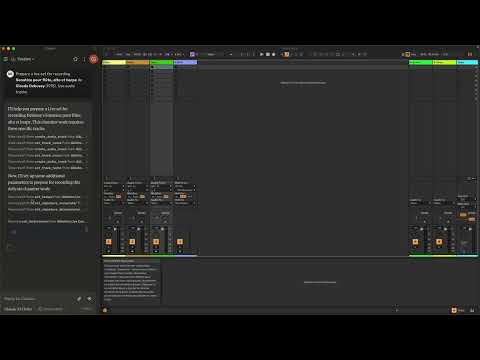
This project consists of two main components:
mcp_ableton_server.py: The MCP server handling the communication between clients and the OSC daemon.osc_daemon.py: The OSC daemon responsible for relaying commands to Ableton Live and processing responses.
✨ Features
Provides an MCP-compatible API for controlling Ableton Live from MCP clients.
Uses python-osc for sending and receiving OSC messages.
Based on the OSC implementation from AbletonOSC.
Implements request-response handling for Ableton Live commands.
⚡ Installation
Requirements
Python 3.8+
python-osc(for OSC communication)fastmcp(for MCP support)uv(recommended Python package installer)AbletonOSC as a control surface
Installation Steps
Install
uv(https://docs.astral.sh/uv/getting-started/installation):curl -LsSf https://astral.sh/uv/install.sh | shClone the repository:
git clone https://github.com/your-username/mcp_ableton_server.git
cd mcp_ableton_server
Install the project and its dependencies:
uv syncInstall AbletonOSC Follow the instructions at AbletonOSC
🚀 Usage
Running the OSC Daemon
The OSC daemon will handle OSC communication between the MCP server and Ableton Live:
uv run osc_daemon.pyThis will:
Listen for MCP client connections on port 65432.
Forward messages to Ableton Live via OSC on port 11000.
Receive OSC responses from Ableton on port 11001.
Example Usage
In Claude desktop, ask Claude:
Prepare a set to record a rock band
Set the input routing channel of all tracks that have "voice" in their name to Ext. In 2
⚙️ Configuration
By default, the server and daemon run on localhost (127.0.0.1) with the following ports:
MCP Server Socket: 65432
Ableton Live OSC Port (Send): 11000
Ableton Live OSC Port (Receive): 11001
To modify these, edit the AbletonOSCDaemon class in osc_daemon.py:
self.socket_host = '127.0.0.1'
self.socket_port = 65432
self.ableton_host = '127.0.0.1'
self.ableton_port = 11000
self.receive_port = 11001
Claude Desktop Configuration
To use this server with Claude Desktop, you need to configure it in your Claude Desktop settings. The configuration file location varies by operating system:
macOS:
~/Library/Application Support/Claude/claude_desktop_config.jsonWindows:
%APPDATA%/Claude/claude_desktop_config.json
Add the following configuration to your mcpServers section:
{
  "mcpServers": {
    "Ableton Live Controller": {
      "command": "/path/to/your/project/.venv/bin/python",
      "args": ["/path/to/your/project/mcp_ableton_server.py"]
    }
  }
This configuration ensures that:
The server runs with all dependencies properly managed
The project remains portable and reproducible
Contributing
Feel free to submit issues, feature requests, or pull requests to improve this project.
License
This project is licensed under the MIT License. See the LICENSE file for
details.
Acknowledgments
python-osc for OSC handling
Daniel John Jones for OSC implementation with AbletonOSC
Ableton Third Party Remote Scripts
Julien Bayle @Structure Void for endless inspirations and resources.
TODO
Explore resources and prompts primitives opportunities.
Build a standalone Ableton Live MCP client.
Resources
Unclaimed servers have limited discoverability.
Looking for Admin?
If you are the server author, to access and configure the admin panel.