# Nextcloud MCP Server
[](https://github.com/cbcoutinho/nextcloud-mcp-server/pkgs/container/nextcloud-mcp-server)
**Enable AI assistants to interact with your Nextcloud instance.**
The Nextcloud MCP (Model Context Protocol) server allows Large Language Models like Claude, GPT, and Gemini to interact with your Nextcloud data through a secure API. Create notes, manage calendars, organize contacts, work with files, and more - all through natural language.
> [!NOTE]
> **Nextcloud has two ways to enable AI access:** Nextcloud provides [Context Agent](https://github.com/nextcloud/context_agent), an AI agent backend that powers the [Assistant](https://github.com/nextcloud/assistant) app and allows AI to interact with Nextcloud apps like Calendar, Talk, and Contacts. Context Agent runs as an ExApp inside Nextcloud and also _[exposes an MCP server](https://docs.nextcloud.com/server/stable/admin_manual/ai/app_context_agent.html#using-nextcloud-mcp-server)_ for external MCP clients.
>
> This project (Nextcloud MCP Server) is a **dedicated standalone MCP server** designed specifically for external MCP clients like Claude Code and IDEs, with deep CRUD operations and OAuth support. It does not require any additional AI-features to be enabled in Nextcloud beyond the apps that you intend to interact with.
### High-level Comparison: Nextcloud MCP Server vs. Nextcloud AI Stack
| Aspect | **Nextcloud MCP Server**<br/>(This Project) | **Nextcloud AI Stack**<br/>(Assistant + Context Agent) |
|--------|---------------------------------------------|--------------------------------------------------------|
| **Purpose** | External MCP client access to Nextcloud | AI assistance within Nextcloud UI |
| **Deployment** | Standalone (Docker, VM, K8s) | Inside Nextcloud (ExApp via AppAPI) |
| **Primary Users** | Claude Code, IDEs, external developers | Nextcloud end users via Assistant app |
| **Authentication** | OAuth2/OIDC or Basic Auth | Session-based (integrated) |
| **Notes Support** | ✅ Full CRUD + search (7 tools) | ❌ Not implemented |
| **Calendar** | ✅ Full CalDAV + tasks (20+ tools) | ✅ Events, free/busy, tasks (4 tools) |
| **Contacts** | ✅ Full CardDAV (8 tools) | ✅ Find person, current user (2 tools) |
| **Files (WebDAV)** | ✅ Full filesystem access (12 tools) | ✅ Read, folder tree, sharing (3 tools) |
| **Document Processing** | ✅ OCR with progress (PDF, DOCX, images) | ❌ Not implemented |
| **Deck** | ✅ Full project management (15 tools) | ✅ Basic board/card ops (2 tools) |
| **Tables** | ✅ Row operations (5 tools) | ❌ Not implemented |
| **Cookbook** | ✅ Full recipe management (13 tools) | ❌ Not implemented |
| **Talk** | ❌ Not implemented | ✅ Messages, conversations (4 tools) |
| **Mail** | ❌ Not implemented | ✅ Send email (2 tools) |
| **AI Features** | ❌ Not implemented | ✅ Image gen, transcription, doc gen (4 tools) |
| **Web/Maps** | ❌ Not implemented | ✅ Search, weather, transit (5 tools) |
| **MCP Resources** | ✅ Structured data URIs | ❌ Not supported |
| **External MCP** | ❌ Pure server | ✅ Consumes external MCP servers |
| **Safety Model** | Client-controlled | Built-in safe/dangerous distinction |
| **Best For** | • Deep CRUD operations<br/>• External integrations<br/>• OAuth security<br/>• IDE/editor integration | • AI-driven actions in Nextcloud UI<br/>• Multi-service orchestration<br/>• User task automation<br/>• MCP aggregation hub |
See our [detailed comparison](docs/comparison-context-agent.md) for architecture diagrams, workflow examples, and guidance on when to use each approach.
Want to see another Nextcloud app supported? [Open an issue](https://github.com/cbcoutinho/nextcloud-mcp-server/issues) or contribute a pull request!
### Authentication
| Mode | Security | Best For |
|------|----------|----------|
| **OAuth2/OIDC** ⚠️ **Experimental** | 🔒 High | Testing, evaluation (requires patch for app-specific APIs) |
| **Basic Auth** ✅ | Lower | Development, testing, production |
> [!IMPORTANT]
> **OAuth is experimental** and requires a manual patch to the `user_oidc` app for full functionality:
> - **Required patch**: `user_oidc` app needs modifications for Bearer token support ([issue #1221](https://github.com/nextcloud/user_oidc/issues/1221))
> - **Impact**: Without the patch, most app-specific APIs (Notes, Calendar, Contacts, Deck, etc.) will fail with 401 errors
> - **What works without patches**: OAuth flow, PKCE support (with `oidc` v1.10.0+), OCS APIs
> - **Production use**: Wait for upstream patch to be merged into official releases
>
> See [OAuth Upstream Status](docs/oauth-upstream-status.md) for detailed information on required patches and workarounds.
OAuth2/OIDC provides secure, per-user authentication with access tokens. See [Authentication Guide](docs/authentication.md) for details.
## Quick Start
### 1. Install
```bash
# Clone the repository
git clone https://github.com/cbcoutinho/nextcloud-mcp-server.git
cd nextcloud-mcp-server
# Install with uv (recommended)
uv sync
# Or using Docker
docker pull ghcr.io/cbcoutinho/nextcloud-mcp-server:latest
# Or deploy to Kubernetes with Helm
helm repo add nextcloud-mcp https://cbcoutinho.github.io/nextcloud-mcp-server
helm repo update
helm install nextcloud-mcp nextcloud-mcp/nextcloud-mcp-server \
--set nextcloud.host=https://cloud.example.com \
--set auth.basic.username=myuser \
--set auth.basic.password=mypassword
```
See [Installation Guide](docs/installation.md) for detailed instructions, or [Helm Chart README](charts/nextcloud-mcp-server/README.md) for Kubernetes deployment.
### 2. Configure
Create a `.env` file:
```bash
# Copy the sample
cp env.sample .env
```
**For Basic Auth (recommended for most users):**
```dotenv
NEXTCLOUD_HOST=https://your.nextcloud.instance.com
NEXTCLOUD_USERNAME=your_username
NEXTCLOUD_PASSWORD=your_app_password
```
**For OAuth (experimental - requires patches):**
```dotenv
NEXTCLOUD_HOST=https://your.nextcloud.instance.com
```
See [Configuration Guide](docs/configuration.md) for all options.
### 3. Set Up Authentication
**Basic Auth Setup (recommended):**
1. Create an app password in Nextcloud (Settings → Security → Devices & sessions)
2. Add credentials to `.env` file
3. Start the server
**OAuth Setup (experimental):**
1. Install Nextcloud OIDC apps (`oidc` v1.10.0+ + `user_oidc`)
2. **Apply required patch** to `user_oidc` app for Bearer token support (see [OAuth Upstream Status](docs/oauth-upstream-status.md))
3. Enable dynamic client registration or create an OIDC client with id & secret
4. Configure Bearer token validation in `user_oidc`
5. Start the server
See [OAuth Quick Start](docs/quickstart-oauth.md) for 5-minute setup or [OAuth Setup Guide](docs/oauth-setup.md) for detailed instructions.
### 4. Run the Server
```bash
# Load environment variables
export $(grep -v '^#' .env | xargs)
# Start with Basic Auth (default)
uv run nextcloud-mcp-server
# Or start with OAuth (experimental - requires patches)
uv run nextcloud-mcp-server --oauth
# Or with Docker
docker run -p 127.0.0.1:8000:8000 --env-file .env --rm \
ghcr.io/cbcoutinho/nextcloud-mcp-server:latest
```
The server starts on `http://127.0.0.1:8000` by default.
See [Running the Server](docs/running.md) for more options.
### 5. Connect an MCP Client
Test with MCP Inspector:
```bash
uv run mcp dev
```
Or connect from:
- Claude Desktop
- Any MCP-compatible client
## Documentation
### Getting Started
- **[Installation](docs/installation.md)** - Install the server
- **[Configuration](docs/configuration.md)** - Environment variables and settings
- **[Authentication](docs/authentication.md)** - OAuth vs BasicAuth
- **[Running the Server](docs/running.md)** - Start and manage the server
### Architecture
- **[Comparison with Context Agent](docs/comparison-context-agent.md)** - How this MCP server differs from Nextcloud's Context Agent
### OAuth Documentation (Experimental)
- **[OAuth Quick Start](docs/quickstart-oauth.md)** - 5-minute setup guide
- **[OAuth Setup Guide](docs/oauth-setup.md)** - Detailed setup instructions
- **[OAuth Architecture](docs/oauth-architecture.md)** - How OAuth works
- **[OAuth Troubleshooting](docs/oauth-troubleshooting.md)** - OAuth-specific issues
- **[Upstream Status](docs/oauth-upstream-status.md)** - **Required patches and PRs** ⚠️
### Reference
- **[Troubleshooting](docs/troubleshooting.md)** - Common issues and solutions
### App-Specific Documentation
- [Notes API](docs/notes.md)
- [Calendar (CalDAV)](docs/calendar.md)
- [Contacts (CardDAV)](docs/contacts.md)
- [Cookbook](docs/cookbook.md)
- [Deck](docs/deck.md)
- [Tables](docs/table.md)
- [WebDAV](docs/webdav.md)
## MCP Tools & Resources
The server exposes Nextcloud functionality through MCP tools (for actions) and resources (for data browsing).
### Tools
The server provides 90+ tools across 8 Nextcloud apps. When using OAuth, tools are dynamically filtered based on your granted scopes.
For a complete list of all supported OAuth scopes and their descriptions, see [OAuth Scopes Documentation](docs/oauth-architecture.md#oauth-scopes).
#### Available Tool Categories
| App | Tools | Read Scope | Write Scope | Operations |
|-----|-------|-----------|-------------|------------|
| **Notes** | 7 | `notes:read` | `notes:write` | Create, read, update, delete, search notes |
| **Calendar** | 20+ | `calendar:read` `todo:read` | `calendar:write` `todo:write` | Events, todos (tasks), calendars, recurring events, attendees |
| **Contacts** | 8 | `contacts:read` | `contacts:write` | Create, read, update, delete contacts and address books |
| **Files (WebDAV)** | 12 | `files:read` | `files:write` | List, read, upload, delete, move files; **OCR/document processing** |
| **Deck** | 15 | `deck:read` | `deck:write` | Boards, stacks, cards, labels, assignments |
| **Cookbook** | 13 | `cookbook:read` | `cookbook:write` | Recipes, import from URLs, search, categories |
| **Tables** | 5 | `tables:read` | `tables:write` | Row operations on Nextcloud Tables |
| **Sharing** | 10+ | `sharing:read` | `sharing:write` | Create, manage, delete shares |
#### Document Processing (Optional)
The WebDAV file reading tool (`nc_webdav_read_file`) supports **automatic text extraction** from documents and images:
**Supported Formats:**
- **Documents**: PDF, DOCX, PPTX, XLSX, RTF, ODT, EPUB
- **Images**: PNG, JPEG, TIFF, BMP (with OCR)
- **Email**: EML, MSG files
**Features:**
- **Progress Notifications**: Long-running OCR operations (up to 120s) send progress updates every 10 seconds to prevent client timeouts
- **Pluggable Architecture**: Multiple processor backends (Unstructured.io, Tesseract, custom HTTP APIs)
- **Automatic Detection**: Files are processed based on MIME type
- **Graceful Fallback**: Returns base64-encoded content if processing fails
**Configuration:**
```dotenv
# Enable document processing (optional)
ENABLE_DOCUMENT_PROCESSING=true
# Unstructured.io processor (cloud/API-based, supports many formats)
ENABLE_UNSTRUCTURED=true
UNSTRUCTURED_API_URL=http://localhost:8002
UNSTRUCTURED_STRATEGY=auto # auto, fast, or hi_res
UNSTRUCTURED_LANGUAGES=eng,deu
PROGRESS_INTERVAL=10 # Progress update interval in seconds
# Tesseract processor (local OCR, images only)
ENABLE_TESSERACT=false
TESSERACT_LANG=eng
# Custom HTTP processor
ENABLE_CUSTOM_PROCESSOR=false
CUSTOM_PROCESSOR_URL=http://localhost:9000/process
CUSTOM_PROCESSOR_TYPES=application/pdf,image/jpeg
```
**Example Usage:**
```
AI: "Read the contents of Documents/report.pdf"
→ Uses nc_webdav_read_file tool with automatic OCR processing
→ Returns extracted text with parsing metadata
→ Sends progress updates during long operations
```
See [env.sample](env.sample) for complete configuration options.
**Example Tools:**
- `nc_notes_create_note` - Create a new note
- `nc_cookbook_import_recipe` - Import recipes from URLs with schema.org metadata
- `deck_create_card` - Create a Deck card
- `nc_calendar_create_event` - Create a calendar event
- `nc_calendar_create_todo` - Create a CalDAV task/todo
- `nc_contacts_create_contact` - Create a contact
- `nc_webdav_upload_file` - Upload a file to Nextcloud
- And 80+ more...
> [!TIP]
> **OAuth Scope Filtering**: When connecting via OAuth, MCP clients will only see tools for which you've granted access. For example, granting only `notes:read` and `notes:write` will show 7 Notes tools instead of all 90+ tools. See [OAuth Scopes Documentation](docs/oauth-architecture.md#oauth-scopes) for the complete scope reference, or [OAuth Troubleshooting - Limited Scopes](docs/oauth-troubleshooting.md#limited-scopes---only-seeing-notes-tools) if you're only seeing a subset of tools.
>
> **Known Issue**: Claude Code and some other MCP clients may only request/grant Notes scopes during initial connection. Track progress at [#234](https://github.com/cbcoutinho/nextcloud-mcp-server/issues/234).
### Resources
Resources provide read-only access to Nextcloud data:
- `nc://capabilities` - Server capabilities
- `cookbook://version` - Cookbook app version info
- `nc://Deck/boards/{board_id}` - Deck board data
- `notes://settings` - Notes app settings
- And more...
Run `uv run nextcloud-mcp-server --help` to see all available options.
## Examples
### Create a Note
```
AI: "Create a note called 'Meeting Notes' with today's agenda"
→ Uses nc_notes_create_note tool
```
### Manage Recipes
```
AI: "Import the recipe from this URL: https://www.example.com/recipe/chocolate-cake"
→ Uses nc_cookbook_import_recipe tool to extract schema.org metadata
```
### Manage Calendar
```
AI: "Schedule a team meeting for next Tuesday at 2pm"
→ Uses nc_calendar_create_event tool
```
### Organize Files
```
AI: "Create a folder called 'Project X' and move all PDFs there"
→ Uses WebDAV tools (nc_webdav_create_directory, nc_webdav_move)
```
### Project Management
```
AI: "Create a new Deck board for Q1 planning with Todo, In Progress, and Done stacks"
→ Uses deck_create_board and deck_create_stack tools
```
## Transport Protocols
The server supports multiple MCP transport protocols:
- **streamable-http** (recommended) - Modern streaming protocol
- **sse** (default, deprecated) - Server-Sent Events for backward compatibility
- **http** - Standard HTTP protocol
```bash
# Use streamable-http (recommended)
uv run nextcloud-mcp-server --transport streamable-http
```
> [!WARNING]
> SSE transport is deprecated and will be removed in a future MCP specification version. Please migrate to `streamable-http`.
## Contributing
Contributions are welcome!
- Report bugs or request features: [GitHub Issues](https://github.com/cbcoutinho/nextcloud-mcp-server/issues)
- Submit improvements: [Pull Requests](https://github.com/cbcoutinho/nextcloud-mcp-server/pulls)
- Read [CLAUDE.md](CLAUDE.md) for development guidelines
## Security
[](https://mseep.ai/app/cbcoutinho-nextcloud-mcp-server)
This project takes security seriously:
- OAuth2/OIDC support (experimental - requires upstream patches)
- Basic Auth with app-specific passwords (recommended)
- No credential storage with OAuth mode
- Per-user access tokens
- Regular security assessments
Found a security issue? Please report it privately to the maintainers.
## License
This project is licensed under the AGPL-3.0 License. See [LICENSE](./LICENSE) for details.
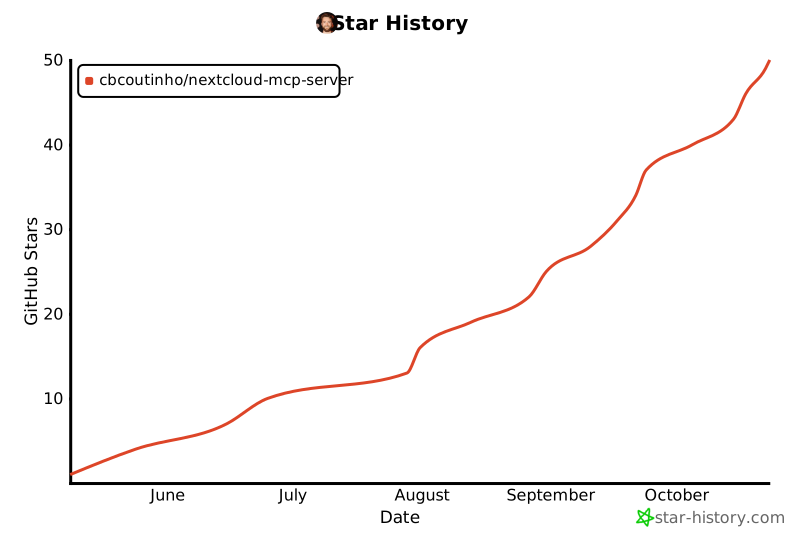
## Star History
[](https://www.star-history.com/#cbcoutinho/nextcloud-mcp-server&Date)
## References
- [Model Context Protocol](https://github.com/modelcontextprotocol)
- [MCP Python SDK](https://github.com/modelcontextprotocol/python-sdk)
- [Nextcloud](https://nextcloud.com/)
