
Provides an interactive notebook environment for executing JavaScript code, enabling literate programming workflows within reasoning sessions.
Allows exporting structured reasoning sessions and interactive notebooks into Markdown format to create human-readable records of cognitive processes.
Enables the execution of TypeScript code in isolated environments with support for package.json dependencies and cell-based execution.
Click on "Install Server".
Wait a few minutes for the server to deploy. Once ready, it will show a "Started" state.
In the chat, type
@followed by the MCP server name and your instructions, e.g., "@Thoughtboxhelp me plan a marketing campaign using backward thinking"
That's it! The server will respond to your query, and you can continue using it as needed.
Here is a step-by-step guide with screenshots.
Thoughtbox
A reasoning ledger for AI agents. Thoughtbox is an MCP server that provides structured reasoning tools, enabling agents to think step-by-step, branch into alternative explorations, revise earlier conclusions, and maintain a persistent record of their cognitive process.
Unlike ephemeral chain-of-thought prompting, Thoughtbox creates a durable reasoning chain — a ledger of thoughts that can be visualized, exported, and analyzed. Each thought is a node in a graph structure supporting forward thinking, backward planning, branching explorations, mid-course revisions, and autonomous critique via MCP sampling.
Local-First: Thoughtbox runs entirely on your machine. All reasoning data is stored locally at ~/.thoughtbox/ by default — nothing is sent to external servers. Your thought processes remain private and under your control.
Client Compatibility
Note: Thoughtbox is currently optimized for use with Claude Code. We are actively working on supporting additional MCP clients, but due to the wide variation in capability support across the Model Context Protocol ecosystem — server features (prompts, resources, tools), client features (roots, sampling, elicitation), and behaviors like
listChangednotifications — we're having to implement custom adaptations for many clients. See the gateway tool for one such adaptation.
If you're using a client other than Claude Code and encounter issues, please open an issue describing your client and the problem — this helps us prioritize compatibility work.
Progressive Disclosure
Thoughtbox uses a staged tool disclosure system to guide agents through proper initialization:
Stage | Tools Available | Trigger |
Stage 0 |
| Connection start |
Stage 1 | + |
|
Stage 2 | + |
|
Stage 3 | + | Domain activation |
This ensures agents establish proper session context before accessing advanced reasoning tools.
Gateway Tool (Always Available)
The thoughtbox_gateway tool is always enabled and provides a routing mechanism for clients that don't refresh tool lists mid-turn (e.g., Claude Code over streaming HTTP). It routes to all handlers internally while enforcing stage requirements:
The gateway returns clear error messages when operations are called at the wrong stage.
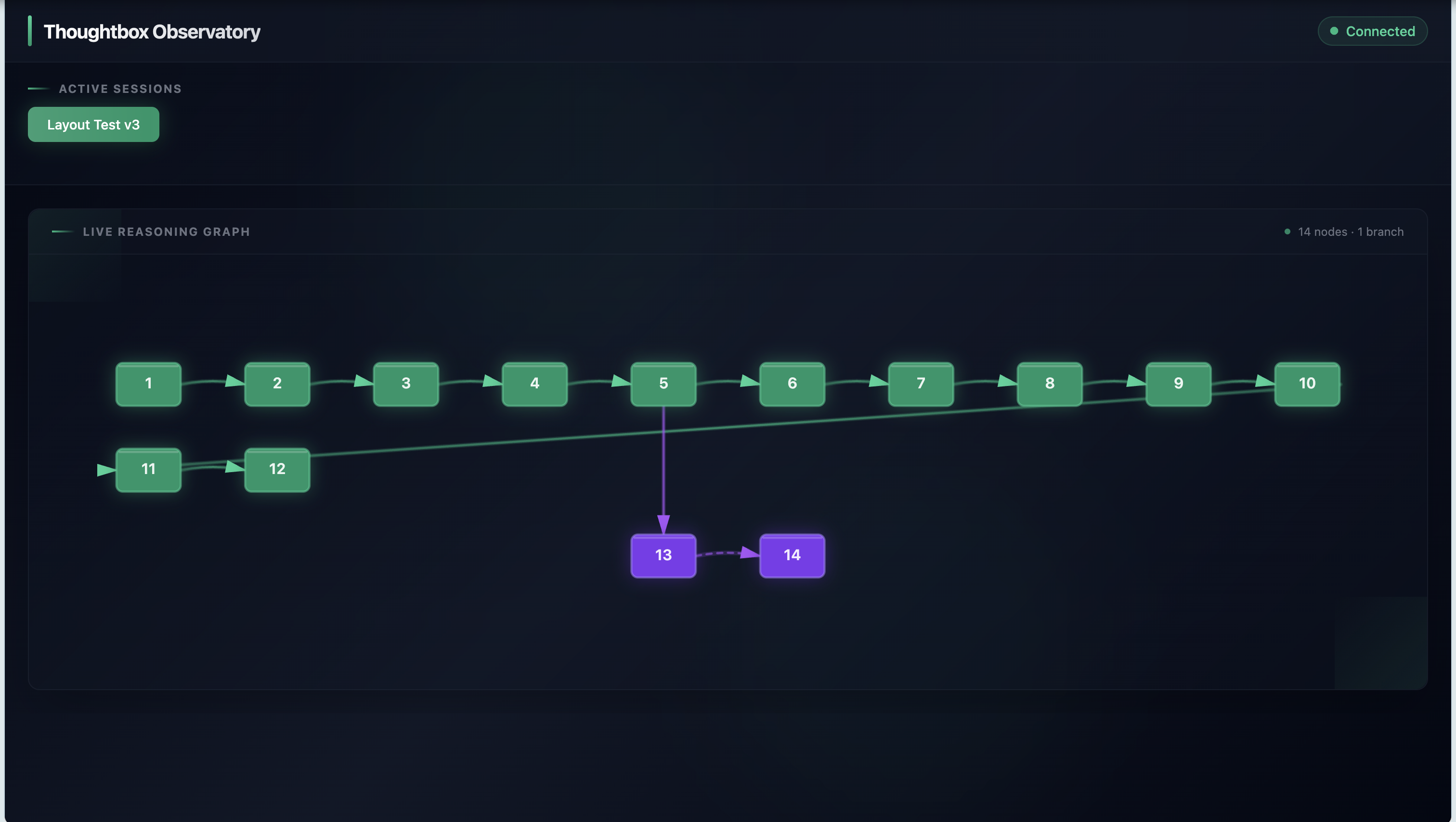 Observatory UI showing a reasoning session with 14 thoughts and a branch exploration (purple nodes 13-14) forking from thought 5.
Core Concepts
The Reasoning Ledger
Thoughtbox treats reasoning as data, not just process. Every thought is:
Numbered: Logical position in the reasoning chain (supports non-sequential addition)
Timestamped: When the thought was recorded
Linked: Connected to previous thoughts, branch origins, or revised thoughts
Persistent: Stored in sessions that survive across conversations
Exportable: Full reasoning chains can be exported as JSON or Markdown
This creates an auditable trail of how conclusions were reached — invaluable for debugging agent behavior, understanding decision-making, and improving reasoning strategies.
Thinking Patterns
Thoughtbox supports multiple reasoning strategies out of the box:
Pattern | Description | Use Case |
Forward Thinking | Sequential 1→2→3→N progression | Exploration, discovery, open-ended analysis |
Backward Thinking | Start at goal (N), work back to start (1) | Planning, system design, working from known goals |
Branching | Fork into parallel explorations (A, B, C...) | Comparing alternatives, A/B scenarios |
Revision | Update earlier thoughts with new information | Error correction, refined understanding |
Interleaved | Alternate reasoning with tool actions | Tool-oriented tasks, adaptive execution |
See the Patterns Cookbook for comprehensive examples.
Features
1. Init Tool — Session Management (Stage 0)
The entry point for establishing session context.
Operations:
get_state— Check current session statelist_sessions— Browse available sessions (filter by project, task, aspect)start_new— Begin a new work session with project/task/aspect scopingload_context— Resume an existing sessionnavigate— Move between project/task/aspect levelslist_roots— Query MCP roots from clientbind_root— Bind a root directory as project scope
2. Thoughtbox Cipher — Deep Thinking Primer (Stage 1)
A priming tool that prepares agents for structured reasoning. Calling this tool unlocks Stage 2 tools.
3. Session Tool — Persistence & Export (Stage 1)
Manage reasoning sessions with full persistence.
Operations:
list— List all sessionsget— Retrieve session detailsexport— Export session as JSON or Markdownanalyze— Get session statistics and insights
4. Thoughtbox Tool — Structured Reasoning (Stage 2)
The core tool for step-by-step thinking with full graph capabilities.
Parameters:
thought(string): The current thinking stepthoughtNumber(integer): Logical position in the chaintotalThoughts(integer): Estimated total (adjustable)nextThoughtNeeded(boolean): Continue thinking?branchFromThought(integer): Fork point for branchingbranchId(string): Branch identifierisRevision(boolean): Marks revision of earlier thoughtrevisesThought(integer): Which thought is being revisedcritique(boolean): Request autonomous LLM critique via MCP sampling API
Autonomous Critique: When critique: true, the server uses the MCP sampling/createMessage API to request an external LLM analysis of the current thought. The critique is returned in the response and persisted with the thought.
5. Observatory — Real-Time Visualization
A built-in web UI for watching reasoning unfold in real-time.
Features:
Live Graph: Watch thoughts appear as they're added
Snake Layout: Compact left-to-right flow with row wrapping
Hierarchical Branches: Branches collapse into clickable stub nodes (A, B, C...)
Navigation: Click stubs to explore branches, back button to return
Detail Panel: Click any node to view full thought content
Multi-Session: Switch between active reasoning sessions
Access: The Observatory is available at http://localhost:1729 when the server is running.
6. Mental Models — Reasoning Frameworks (Stage 2)
15 structured mental models that provide process scaffolds for different problem types.
Available Models:
rubber-duck— Explain to clarify thinkingfive-whys— Root cause analysispre-mortem— Anticipate failuressteelmanning— Strengthen opposing argumentsfermi-estimation— Order-of-magnitude reasoningtrade-off-matrix— Multi-criteria decisionsdecomposition— Break down complexityinversion— Solve by avoiding failureAnd 7 more...
Operations:
get_model— Retrieve a specific model's promptlist_models— List all models (filter by tag)list_tags— Available categories (debugging, planning, decision-making, etc.)
7. Notebook — Literate Programming (Stage 2)
Interactive notebooks combining documentation with executable JavaScript/TypeScript.
Features:
Isolated execution environments per notebook
Full package.json support with dependency installation
Sequential Feynman template for deep learning workflows
Export to
.src.mdformat
Operations: create, add_cell, run_cell, export, list, load, update_cell
Installation
Quick Start
MCP Client Configuration
Claude Code
Add to your ~/.claude/settings.json or project .claude/settings.json:
Cline / VS Code
Add to your MCP settings or .vscode/mcp.json:
Usage Examples
Forward Thinking — Problem Analysis
Backward Thinking — System Design
Branching — Comparing Alternatives
Environment Variables
Variable | Description | Default |
| Suppress thought logging to stderr |
|
| Base directory for persistent storage |
|
| Project scope for session isolation |
|
| Transport type ( |
|
Development
Docker Compose
A docker-compose.yml is included to run the HTTP MCP server and the Observatory UI together.
HTTP MCP + health: http://localhost:1731/health
Observatory UI/WebSocket: http://localhost:1729/
OpenTelemetry Collector: ports 4317 (gRPC) and 4318 (HTTP) for Claude Code telemetry
Persistent data: stored in named volume
thoughtbox-dataat/data/thoughtbox(override with env vars likeTHOUGHTBOX_PROJECTorTHOUGHTBOX_DATA_DIR).
Architecture
Storage
Thoughtbox supports two storage backends:
InMemoryStorage: Default for development, uses
LinkedThoughtStorefor O(1) thought lookupsFileSystemStorage: Persistent storage with atomic writes and project isolation
Data is stored at ~/.thoughtbox/ by default:
Contributing
We welcome contributions! See CONTRIBUTING.md for:
Development setup
Commit conventions (optimized for
thick_readcode comprehension)Testing with agentic scripts
Pull request process
License
MIT License — free to use, modify, and distribute.