
The Network AI server is a multi-agent orchestration control plane providing shared state management, security, budgeting, auditing, and lifecycle coordination across AI agent systems.
Shared State (Blackboard)
Read, write, list, delete, and check existence of entries with atomic
propose → validate → commitoperations to prevent race conditionsSupports optional TTL and agent token verification on writes
Token Budget Management
View ceiling, total spent, remaining tokens, and per-agent breakdowns
Spend tokens with allow/deny enforcement, reset counters, adjust ceilings dynamically, and retrieve the full transaction log
Security & Permissions
Create HMAC-signed tokens scoped to a resource and permission level
Validate (checking signature, expiration, revocation) and revoke tokens by ID
Audit & Monitoring
Query the append-only audit log with filters for agent, event type, outcome, and time range
Tail the log for the most recent N entries
Orchestrator Configuration
Read and update runtime settings (e.g.
maxParallelAgents,defaultTimeout,enableTracing) with immediate effect
Agent Lifecycle
List registered agents (filterable by status), dispatch tasks via the blackboard, and stop agents with full audit trails
FSM Governance
Manually trigger Finite State Machine transitions with attached metadata, recorded to the blackboard for audit
System Health
Retrieve a full orchestrator snapshot: version, config, agent count, blackboard key count, and overall health status
Supports 15+ AI frameworks including LangChain, AutoGen, CrewAI, and OpenAI Assistants, with federated budget tracking and shared state across distributed nodes.
Allows coordination of CrewAI agents within a multi-agent swarm, providing shared state management via an atomic blackboard and federated budget tracking.
Enables integration of LangChain agents into a coordinated swarm, supporting streaming and cross-framework agent interaction with shared memory.
Integrates OpenAI Assistants into a governed multi-agent environment, featuring identity-verified state writes and token ceiling enforcement.
Network-AI
TypeScript/Node.js multi-agent orchestrator — shared state, guardrails, budgets, and cross-framework coordination













Network-AI is a TypeScript/Node.js multi-agent orchestrator that adds coordination, guardrails, and governance to any AI agent stack.
Shared blackboard with locking — atomic
propose → validate → commitprevents race conditions and split-brain failures across parallel agentsGuardrails and budgets — FSM governance, per-agent token ceilings, HMAC / Ed25519 audit trails, and permission gating
17 adapters — LangChain (+ streaming), AutoGen, CrewAI, OpenAI Assistants, LlamaIndex, Semantic Kernel, Haystack, DSPy, Agno, MCP, Custom (+ streaming), OpenClaw, A2A, Codex, MiniMax, NemoClaw, and APS — no glue code, no lock-in
Persistent project memory (Layer 3) —
context_manager.pyinjects decisions, goals, stack, milestones, and banned patterns into every system prompt so agents always have full project context
The silent failure mode in multi-agent systems: parallel agents writing to the same key use last-write-wins by default — one agent's result silently overwrites another's mid-flight. The outcome is split-brain state: double-spends, contradictory decisions, corrupted context, no error thrown. Network-AI's
propose → validate → commitmutex prevents this at the coordination layer, before any write reaches shared state.
Use Network-AI as:
A TypeScript/Node.js library —
import { createSwarmOrchestrator } from 'network-ai'An MCP server —
npx network-ai-server --port 3001A CLI —
network-ai bb get status/network-ai audit tailAn OpenClaw skill —
clawhub install network-ai
5-minute quickstart → | Architecture → | All adapters → | Benchmarks →
⚡ Try in 60 Seconds
npm install network-aiimport { LockedBlackboard } from 'network-ai';
const board = new LockedBlackboard('.');
const id = board.propose('status', { ready: true }, 'agent-1');
board.validate(id, 'agent-1');
board.commit(id);
console.log(board.read('status')); // { ready: true }Two agents, atomic writes, no race conditions. That's it.
Want the full stress test? No API key, ~3 seconds:
npx ts-node examples/08-control-plane-stress-demo.tsRuns priority preemption, AuthGuardian permission gating, FSM governance, and compliance monitoring — all without a single LLM call.
If it saves you from a race condition, a ⭐ helps others find it.
What's Included
✅ Atomic shared state |
|
✅ Token budgets | Hard per-agent ceilings with live spend tracking |
✅ Permission gating | HMAC / Ed25519-signed tokens, scoped per agent and resource |
✅ Append-only audit log | Every write, grant, and transition signed and logged |
✅ 17 framework adapters | LangChain, CrewAI, AutoGen, MCP, Codex, APS, and 11 more — zero lock-in |
✅ FSM governance | Hard-stop agents at state boundaries, timeout enforcement |
✅ Compliance monitoring | Real-time violation detection (tool abuse, turn-taking, timeouts) |
✅ QA orchestration | Scenario replay, feedback loops, regression tracking, contradiction detection |
✅ Deferred adapter init | Lazy-load adapters on first use — zero startup cost for unused frameworks |
✅ Hook middleware |
|
✅ Flow control | Pause / resume / throttle writes on the blackboard |
✅ Skill composition |
|
✅ Semantic memory search | BYOE vector store with cosine similarity over blackboard data |
✅ Phase pipeline | Multi-phase workflows with human-in-the-loop approval gates |
✅ Confidence filtering | Multi-agent result scoring, threshold validation, and consensus aggregation |
✅ Matcher-based hooks | Glob patterns on agent/action/tool for targeted hook filtering |
✅ Fan-out / fan-in | Parallel agent spawning with pluggable aggregation strategies |
✅ Agent runtime sandbox | Sandboxed shell execution with policy enforcement and approval gates |
✅ Interactive console | TUI dashboard for live monitoring, agent control, blackboard/budget/FSM management |
✅ Pipe mode | JSON stdin/stdout protocol for programmatic AI-to-orchestrator control |
✅ Strategy agent | Meta-orchestrator with elastic agent pools, workload partitioning, and adaptive scaling |
✅ TypeScript native | ES2022 strict mode, zero native dependencies |
Why teams use Network-AI
Problem | How Network-AI solves it |
Race conditions in parallel agents | Atomic blackboard: |
Agent overspend / runaway costs |
|
No visibility into what agents did | HMAC / Ed25519-signed audit log on every write, permission grant, and FSM transition |
Locked into one AI framework | 17 adapters — mix LangChain + AutoGen + CrewAI + Codex + MiniMax + NemoClaw + APS + custom in one swarm |
Agents escalating beyond their scope |
|
Agents lack project context between runs |
|
No regression tracking on agent output quality |
|
Architecture
%%{init: {'theme': 'base', 'themeVariables': {'primaryColor': '#1e293b', 'primaryTextColor': '#e2e8f0', 'primaryBorderColor': '#475569', 'lineColor': '#94a3b8', 'clusterBkg': '#0f172a', 'clusterBorder': '#334155', 'edgeLabelBackground': '#1e293b', 'edgeLabelColor': '#cbd5e1', 'titleColor': '#e2e8f0'}}}%%
flowchart TD
    classDef app        fill:#1e3a5f,stroke:#3b82f6,color:#bfdbfe,font-weight:bold
    classDef security   fill:#451a03,stroke:#d97706,color:#fde68a
    classDef routing    fill:#14532d,stroke:#16a34a,color:#bbf7d0
    classDef quality    fill:#3b0764,stroke:#9333ea,color:#e9d5ff
    classDef blackboard fill:#0c4a6e,stroke:#0284c7,color:#bae6fd
    classDef adapters   fill:#064e3b,stroke:#059669,color:#a7f3d0
    classDef audit      fill:#1e293b,stroke:#475569,color:#94a3b8

    App["Your Application"]:::app
    App -->|"createSwarmOrchestrator()"| SO

    subgraph SO["SwarmOrchestrator"]
        AG["AuthGuardian\n(HMAC / Ed25519 permission tokens)"]:::security
        AR["AdapterRegistry\n(route tasks to frameworks)"]:::routing
        QG["QualityGateAgent\n(validate blackboard writes)"]:::quality
        QA["QAOrchestratorAgent\n(scenario replay, regression tracking)"]:::quality
        BB["SharedBlackboard\n(shared agent state)\npropose → validate → commit\nfilesystem mutex"]:::blackboard
        AD["Adapters — plug any framework in, swap freely\nLangChain · AutoGen · CrewAI · MCP · LlamaIndex · …"]:::adapters

        AG -->|"grant / deny"| AR
        AR -->|"tasks dispatched"| AD
        AD -->|"writes results"| BB
        QG -->|"validates"| BB
        QA -->|"orchestrates"| QG
    end

    SO --> AUDIT["data/audit_log.jsonl\n(HMAC / Ed25519-signed)"]:::audit
FederatedBudgetis a standalone export — instantiate it separately and optionally wire it to a blackboard backend for cross-node token budget enforcement.
ProjectContextManageris a Layer-3 Python helper (scripts/context_manager.py) that injects persistent project goals, decisions, and milestones into agent system prompts — see ARCHITECTURE.md § Layer 3.
→ Full architecture, FSM journey, and handoff protocol
Install
npm install network-aiNo native dependencies, no build step. Adapters are dependency-free (BYOC — bring your own client).
Use as MCP Server
Start the server (no config required, zero dependencies):
npx network-ai-server --port 3001
# or from source:
npx ts-node bin/mcp-server.ts --port 3001
Then wire any MCP-compatible client to it.
Claude Desktop — add to ~/Library/Application Support/Claude/claude_desktop_config.json (macOS) or %APPDATA%\Claude\claude_desktop_config.json (Windows):
{
  "mcpServers": {
    "network-ai": {
      "url": "http://localhost:3001/sse"
    }
  }
}
Cursor / Cline / any SSE-based MCP client — point to the same URL:
{
  "mcpServers": {
    "network-ai": {
      "url": "http://localhost:3001/sse"
    }
  }
}
Verify it's running:
curl http://localhost:3001/health   # { "status": "ok", "tools": <n>, "uptime": <ms> }
curl http://localhost:3001/tools    # full tool list
Tools exposed over MCP:
blackboard_read/blackboard_write/blackboard_list/blackboard_delete/blackboard_existsbudget_status/budget_spend/budget_reset— federated token trackingtoken_create/token_validate/token_revoke— HMAC / Ed25519-signed permission tokensaudit_query— query the append-only audit logconfig_get/config_set— live orchestrator configurationagent_list/agent_spawn/agent_stop— agent lifecyclefsm_transition— write FSM state transitions to the blackboard
Each tool takes an agent_id parameter — all writes are identity-verified and namespace-scoped, exactly as they are in the TypeScript API.
Options: --no-budget, --no-token, --no-control, --ceiling <n>, --board <name>, --audit-log <path>.
CLI
Control Network-AI directly from the terminal — no server required. The CLI imports the same core engine used by the MCP server.
# One-off commands (no server needed)
npx ts-node bin/cli.ts bb set status running --agent cli
npx ts-node bin/cli.ts bb get status
npx ts-node bin/cli.ts bb snapshot

# After npm install -g network-ai:
network-ai bb list
network-ai audit tail          # live-stream the audit log
network-ai auth token my-bot --resource blackboard
Command group | What it controls |
| Blackboard — get, set, delete, list, snapshot, propose, commit, abort |
| AuthGuardian — issue tokens, revoke, check permissions |
| FederatedBudget — spend status, set ceiling |
| Audit log — print, live-tail, clear |
Global flags on every command: --data <path> (data directory, default ./data) · --json (machine-readable output)
→ Full reference in QUICKSTART.md § CLI
Two agents, one shared state — without race conditions
The real differentiator is coordination. Here is what no single-framework solution handles: two agents writing to the same resource concurrently, atomically, without corrupting each other.
import { LockedBlackboard, CustomAdapter, createSwarmOrchestrator } from 'network-ai';

const board   = new LockedBlackboard('.');
const adapter = new CustomAdapter();

// Agent 1: writes its analysis result atomically
adapter.registerHandler('analyst', async () => {
  const id = board.propose('report:status', { phase: 'analysis', complete: true }, 'analyst');
  board.validate(id, 'analyst');
  board.commit(id);                           // file-system mutex — no race condition possible
  return { result: 'analysis written' };
});

// Agent 2: runs concurrently, writes to its own key safely
adapter.registerHandler('reviewer', async () => {
  const id = board.propose('report:review', { approved: true }, 'reviewer');
  board.validate(id, 'reviewer');
  board.commit(id);
  const analysis = board.read('report:status');
  return { result: `reviewed phase=${analysis?.phase}` };
});

createSwarmOrchestrator({ adapters: [{ adapter }] });

// Both fire concurrently — mutex guarantees no write is ever lost
const [, ] = await Promise.all([
  adapter.executeAgent('analyst',  { action: 'run', params: {} }, { agentId: 'analyst' }),
  adapter.executeAgent('reviewer', { action: 'run', params: {} }, { agentId: 'reviewer' }),
]);

console.log(board.read('report:status'));   // { phase: 'analysis', complete: true }
console.log(board.read('report:review'));   // { approved: true }
Add budgets, permissions, and cross-framework agents with the same pattern. → QUICKSTART.md
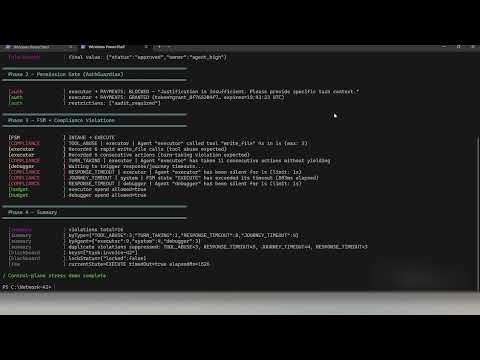
Demo — Control-Plane Stress Test (no API key)
Runs in ~3 seconds. Proves the coordination primitives without any LLM calls.
npm run demo -- --08What it shows: atomic blackboard locking, priority preemption (priority-3 wins over priority-0 on same key), AuthGuardian permission gate (blocked → justified → granted with token), FSM hard-stop at 700 ms, live compliance violation capture (TOOL_ABUSE, TURN_TAKING, RESPONSE_TIMEOUT, JOURNEY_TIMEOUT), and FederatedBudget tracking — all without a single API call.
8-agent AI pipeline (requires OPENAI_API_KEY — builds a Payment Processing Service end-to-end):
npm run demo -- --07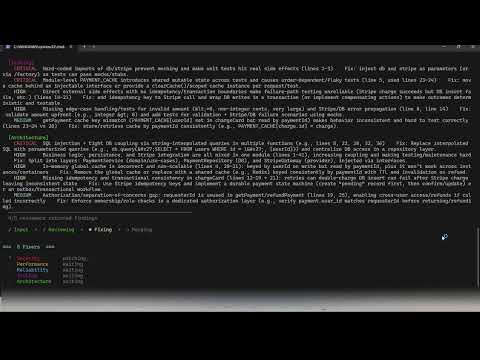
NemoClaw sandbox swarm (no API key) — 3 agents in isolated NVIDIA NemoClaw sandboxes with deny-by-default network policies:
npx ts-node examples/10-nemoclaw-sandbox-swarm.ts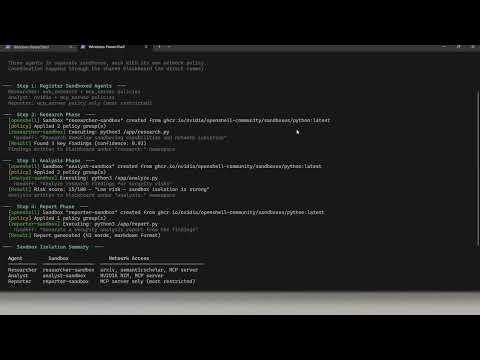
Adapter System
17 adapters, zero adapter dependencies. You bring your own SDK objects.
Adapter | Framework / Protocol | Register method |
| Any function or HTTP endpoint |
|
| LangChain |
|
| AutoGen / AG2 |
|
| CrewAI |
|
| Model Context Protocol |
|
| LlamaIndex |
|
| Microsoft Semantic Kernel |
|
| OpenAI Assistants |
|
| deepset Haystack |
|
| Stanford DSPy |
|
| Agno (formerly Phidata) |
|
| OpenClaw |
|
| Google A2A Protocol |
|
| OpenAI Codex / gpt-4o / Codex CLI |
|
| MiniMax LLM API (M2.5 / M2.5-highspeed) |
|
| NVIDIA NemoClaw (sandboxed agents via OpenShell) |
|
| Agent Permission Service (delegation-chain trust) |
|
Streaming variants (drop-in replacements with .stream() support):
Adapter | Extends | Streaming source |
|
| Calls |
|
| Pipes |
Extend BaseAdapter (or StreamingBaseAdapter for streaming) to add your own in minutes. See references/adapter-system.md.
Works with LangGraph, CrewAI, and AutoGen
Network-AI is the coordination layer you add on top of your existing stack. Keep your LangChain chains, CrewAI crews, and AutoGen agents — and add shared state, governance, and budgets around them.
Capability | Network-AI | LangGraph | CrewAI | AutoGen |
Cross-framework agents in one swarm | ✅ 17 built-in adapters | ⚠️ Nodes can call any code; no adapter abstraction | ⚠️ Extensible via tools; CrewAI-native agents only | ⚠️ Extensible via plugins; AutoGen-native agents only |
Atomic shared state (conflict-safe) | ✅ | ⚠️ State passed between nodes; last-write-wins | ⚠️ Shared memory available; no conflict resolution | ⚠️ Shared context available; no conflict resolution |
Hard token ceiling per agent | ✅ | ⚠️ Via callbacks / custom middleware | ⚠️ Via callbacks / custom middleware | ⚠️ Built-in token tracking in v0.4+; no swarm-level ceiling |
Permission gating before sensitive ops | ✅ | ⚠️ Possible via custom node logic | ⚠️ Possible via custom tools | ⚠️ Possible via custom middleware |
Append-only audit log | ✅ plain JSONL ( | ⚠️ Not built-in | ⚠️ Not built-in | ⚠️ Not built-in |
Encryption at rest | ✅ AES-256-GCM (TypeScript layer) | ⚠️ Not built-in | ⚠️ Not built-in | ⚠️ Not built-in |
Language | TypeScript / Node.js | Python | Python | Python |
Testing
npm run test:all          # All suites in sequence
npm test                  # Core orchestrator
npm run test:security     # Security module
npm run test:adapters     # All 17 adapters
npm run test:streaming    # Streaming adapters
npm run test:a2a          # A2A protocol adapter
npm run test:codex        # Codex adapter
npm run test:priority     # Priority & preemption
npm run test:cli          # CLI layer
npm run test:phase9       # Agent runtime, console, strategy agent
2,204 passing assertions across 24 test suites (npm run test:all):
Suite | Assertions | Covers |
| 147 | FSM governance, compliance monitor, adapter integration |
| 127 | SSE transport, |
| 121 | CRDT backend, vector clocks, bidirectional sync |
| 121 | MCP server, control-plane tools, audit tools |
| 176 | All 17 adapters, registry routing, integration, edge cases |
| 117 | Pluggable backend (Redis, CRDT, Memory) |
| 88 | Blackboard, auth, integration, persistence, parallelisation, quality gate |
| 87 | Federated budget tracking |
| 73 | Named multi-blackboard, isolation, backend options |
| 51 | Codex adapter: chat, completion, CLI, BYOC client, error paths |
| 50 | MiniMax adapter: lifecycle, registration, chat mode, temperature clamping |
| 93 | NemoClaw adapter: sandbox lifecycle, policies, blueprint, handoff, env forwarding |
| 64 | Priority preemption, conflict resolution, backward compat |
| 35 | A2A protocol: register, execute, mock fetch, error paths |
| 32 | Streaming adapters, chunk shapes, fallback, collectStream |
| 55 | Pluggable backend part 2, consistency levels |
| 42 | Named multi-blackboard base |
| 34 | Tokens, sanitization, rate limiting, encryption, audit |
| 65 | CLI layer: bb, auth, budget, audit commands |
| 67 | QA orchestrator: scenarios, feedback loop, regression, contradictions |
| 94 | Deferred init, hook middleware, flow control, skill composer, semantic search |
| 146 | Phase pipeline, confidence filter, matcher-based hooks, fan-out/fan-in |
| 280 | Agent runtime, sandbox policy, shell executor, file accessor, approval gate, console UI, orchestrator wiring, pipe mode, strategy agent |
Documentation
Doc | Contents |
Installation, first run, CLI reference, PowerShell guide, Python scripts CLI | |
Race condition problem, FSM design, handoff protocol, project structure | |
Provider performance, rate limits, local GPU, | |
Security module, permission system, trust levels, audit trail | |
Evaluation checklist, stability policy, security summary, integration entry points | |
Audit log field reference, all event types, scoring formula | |
Known adopters — open a PR to add yourself | |
End-to-end integration walkthrough | |
Adapter architecture, writing custom adapters | |
Permission scoring, resource types | |
Trust level configuration |
Use with Claude, ChatGPT & Codex
Three integration files are included in the repo root:
File | Use |
Claude API tool use & OpenAI Codex — drop into the | |
Custom GPT Actions — import directly in the GPT editor | |
Claude Projects — paste into Custom Instructions |
Claude API / Codex:
import tools from './claude-tools.json' assert { type: 'json' };
// Pass tools array to anthropic.messages.create({ tools }) or OpenAI chat completions
Custom GPT Actions:
In the GPT editor → Actions → Import from URL, or paste the contents of openapi.yaml.
Set the server URL to your running npx network-ai-server --port 3001 instance.
Claude Projects:
Copy the contents of claude-project-prompt.md (below the horizontal rule) into a Claude Project's Custom Instructions field. No server required for instruction-only mode.
Community
Join our Discord server to discuss multi-agent AI coordination, get help, and share what you're building:
Contributing
Fork → feature branch →
npm run test:all→ pull requestBugs and feature requests via Issues
MIT License — LICENSE · CHANGELOG · CONTRIBUTING ·
multi-agent · agent orchestration · AI agents · agentic AI · agentic workflow · TypeScript · Node.js · LangGraph · CrewAI · AutoGen · MCP · model-context-protocol · LlamaIndex · Semantic Kernel · OpenAI Assistants · Haystack · DSPy · Agno · OpenClaw · ClawHub · shared state · blackboard pattern · atomic commits · guardrails · token budgets · permission gating · audit trail · agent coordination · agent handoffs · governance · cost-awareness