<h1>Context Sync: 🧠 The Memory Layer for AI Development</h1>
**Finally, AI that remembers.**
---
<div align="center" style="background: linear-gradient(135deg, #667eea 0%, #764ba2 100%); padding: 30px; border-radius: 10px; margin: 20px 0;">
## 🎉 **NEW in v1.0.3:** Your AI Can Now Write Directly to <img src="https://upload.wikimedia.org/wikipedia/commons/4/45/Notion_app_logo.png" alt="Notion" width="28" height="28" style="vertical-align: middle;"/> Notion
**Ask AI to generate feature docs → AI writes them to Notion. Pull project specs from Notion → AI understands your plan instantly.**
💡 "Create API documentation in Notion" • 📄 "Export this architecture decision to Notion" • 🔍 "Read the product spec from Notion and implement it"
```bash
npm install -g @context-sync/server
context-sync-setup # Interactive wizard for Notion integration
```
[See What's Possible →](#-notion-integration) | [Full Changelog](./CHANGELOG.md)
</div>
---
<div align="center">
*Context Sync is the open-source infrastructure that gives AI systems persistent memory across all your development tools, sessions, and projects.*
<br>
[](https://www.npmjs.com/package/@context-sync/server)
[](https://github.com/Intina47/context-sync/stargazers)
[](https://www.npmjs.com/package/@context-sync/server)
[](LICENSE)
<br>
```bash
# The future of AI-assisted development
npm install -g @context-sync/server
```
*Local-first • Open source • Platform agnostic • Built by developers, for developers*
</div>
---
**Supports:**
<!-- PLATFORM BADGES - PROMINENT -->
<p>
<img src="https://img.shields.io/badge/Notion-Supported-000000?style=for-the-badge&logo=zed&logoColor=white" alt="Notion">
<img src="https://img.shields.io/badge/Cursor-Supported-00D4AA?style=for-the-badge&logo=cursor&logoColor=white" alt="Cursor">
<img src="https://img.shields.io/badge/Claude%20Desktop-Supported-6366f1?style=for-the-badge&logo=anthropic&logoColor=white" alt="Claude Desktop">
<img src="https://img.shields.io/badge/VS%20Code-Supported-007ACC?style=for-the-badge&logo=visualstudiocode&logoColor=white" alt="VS Code">
<img src="https://img.shields.io/badge/GitHub%20Copilot-Supported-24292e?style=for-the-badge&logo=github&logoColor=white" alt="GitHub Copilot">
<!-- Continue.dev -->
<img src="https://img.shields.io/badge/Continue.dev-Supported-1F8ACB?style=for-the-badge&logo=continue-dot-dev&logoColor=white" alt="Continue.dev">
<!-- windsurf -->
<img src="https://img.shields.io/badge/Windsurf-Supported-FF6F61?style=for-the-badge&logo=windsurf&logoColor=white" alt="Windsurf">
<!-- tabnine -->
<img src="https://img.shields.io/badge/TabNine-Supported-4A90E2?style=for-the-badge&logo=tabnine&logoColor=white" alt="TabNine">
<!-- zed -->
<img src="https://img.shields.io/badge/Zed-Supported-000000?style=for-the-badge&logo=zed&logoColor=white" alt="Zed">
</p>
---
## The Problem Every Developer Faces
AI systems lose context between conversations. You spend hours explaining your codebase, architecture decisions, and project context... then close the chat and start over tomorrow.
**The memory loss problem affects everyone:**
- Freelancers juggling multiple client projects
- Teams building complex applications
- Open source maintainers across different tools
- Anyone using AI for serious development work
**This isn't just inconvenient - it's fundamentally broken.**
---
## Context Sync: GitHub for AI Memory
Context Sync creates persistent, queryable memory for AI systems across all development environments.
**Think of it as distributed version control for AI context:**
```
┌─────────────────┐ ┌─────────────────┐ ┌─────────────────┐
│ Claude.ai │ │ Cursor IDE │ │ VS Code │
│ (Web & App) │ │ │ │ + Copilot │
└─────────┬───────┘ └─────────┬───────┘ └─────────┬───────┘
│ │ │
│ MCP Protocol (standardized) │
│ │ │
└──────────────────────┼──────────────────────┘
│
┌───────────▼────────────┐
│ Context Sync │
│ Memory Layer │
│ │
│ • Project Context │
│ • Code Understanding │
│ • Decision History │
│ • Architecture Maps │
│ • File Operations │
│ • Git Integration │
└────────────────────────┘
```
**Every AI tool gets the same shared memory.**
---
## Why Open Source?
**AI memory shouldn't be controlled by corporations.**
Context Sync is built by developers who were tired of:
- Losing context between AI conversations
- Being locked into single AI platforms
- Having no control over their development data
- Paying subscription fees for basic memory functionality
**Our philosophy:**
- **Local-first**: Your data stays on your machine
- **Platform agnostic**: Works with any AI that supports MCP
- **Community-driven**: Built for developers, by developers
- **Extensible**: Open architecture for unlimited customization
---
## Quick Start
```bash
# Install globally
npm install -g @context-sync/server
# Restart your AI tool (Claude Desktop, Cursor, VS Code)
# Then ask: "help me get started with context-sync"
```
**That's it.** Context Sync auto-configures and guides you through first-time setup with natural language instructions.
### 🎯 See the Problem in Action
**Before Context Sync:**
```
Monday - Claude Desktop:
You: "I'm building a React app with TypeScript, using Supabase for auth..."
Claude: *helps for 2 hours*
Tuesday - New chat:
You: "Continue working on my React app"
Claude: "What React app? Can you describe your project?"
You: *spends 20 minutes re-explaining everything*
```
**After Context Sync:**
```
Monday - Claude Desktop:
You: "I'm building a React app with TypeScript, using Supabase for auth..."
Claude: *helps for 2 hours*
Tuesday - New chat (or different AI tool):
You: "Continue working on my React app"
Claude: "Continuing your TypeScript React app with Supabase auth. What should we work on next?"
```
**That's the power of persistent AI memory.**
### 🚀 Get Started in 2 Minutes
```bash
# 1. Install Context Sync
npm install -g @context-sync/server
# 2. Restart your AI tool (Claude Desktop, Cursor, VS Code)
# 3. Ask for help setting up
"help me get started with context-sync"
```
Context Sync automatically detects your platform and guides you through setup with personalized instructions.
> 📖 **Need detailed documentation?** See the [Context Sync v1.0.0 Comprehensive Documentation](documentation/RELEASE_v1.0.0_COMPREHENSIVE_DOCUMENTATION.md) for complete setup guides, troubleshooting, and advanced configuration.
### 🔧 Platform-Specific Setup
<details>
<summary>VS Code + GitHub Copilot</summary>
<details>
<summary><b>Quick Setup for VS Code (30 seconds)</b></summary>
<br>
After installing Context Sync globally:
1. **Restart VS Code** completely
2. **Open Copilot Chat** (Ctrl+Shift+I / Cmd+Shift+I)
3. **Switch to Agent mode** (if available)
4. **Look for context-sync** in the Tools list
5. **Test:** Ask Copilot `"help me get started with context-sync"`
Context Sync should appear in available tools! ✨
</details>
### 🔧 Setup for Cursor
<details>
<summary><b>Quick Setup for Cursor (30 seconds)</b></summary>
<br>
After installing Context Sync, in Claude Desktop type:
```
setup cursor
```
Claude will give you OS-specific instructions! ✨
</details>
<details>
<summary><b>Manual Cursor Setup</b></summary>
<br>
1. Open Cursor: `Settings → MCP`
2. Add this configuration:
```json
{
"mcpServers": {
"context-sync": {
"command": "npx",
"args": ["-y", "@context-sync/server"]
}
}
}
```
3. Refresh MCP servers
4. Test: `"Help me get started with context-sync"`
Done! ✅
</details>
</details>
<details>
<summary>Claude Desktop</summary>
<details>
<summary><b>Quick Setup for Claude Desktop (30 seconds)</b></summary>
<br>
After installing Context Sync globally:
1. **Restart Claude Desktop** completely
2. **Start a new conversation**
3. **Test:** Ask Claude `"help me get started with context-sync"`
Claude will automatically configure itself! ✨
</details>
<details>
<summary><b>Manual Claude Desktop Setup</b></summary>
<br>
**Windows:**
```bash
# Edit config file
notepad "%APPDATA%\Claude\claude_desktop_config.json"
```
**macOS:**
```bash
# Edit config file
open ~/Library/Application\ Support/Claude/claude_desktop_config.json
```
**Linux:**
```bash
# Edit config file
nano ~/.config/Claude/claude_desktop_config.json
```
Add this configuration:
```json
{
"mcpServers": {
"context-sync": {
"command": "npx",
"args": ["-y", "@context-sync/server"]
}
}
}
```
Restart Claude Desktop and test: `"Help me get started with context-sync"`
</details>
</details>
<details>
<summary>Continue.dev (VS Code Extension)</summary>
<details>
<summary><b>Quick Setup for Continue.dev (30 seconds)</b></summary>
<br>
After installing Context Sync globally:
1. **Install Continue.dev** extension in VS Code
2. **Restart VS Code** completely
3. **Open Continue chat** (Ctrl+Shift+M / Cmd+Shift+M)
4. **Test:** Ask Continue `"help me get started with context-sync"`
Context Sync should be available as an MCP tool! ✨
</details>
<details>
<summary><b>Manual Continue.dev Setup</b></summary>
<br>
1. Open Continue config: `~/.continue/config.yaml`
2. Add MCP server configuration:
```yaml
mcpServers:
context-sync:
command: npx
args: ["-y", "@context-sync/server"]
```
3. Restart VS Code
4. Test: `"Help me get started with context-sync"`
</details>
</details>
<details>
<summary>Windsurf IDE</summary>
<details>
<summary><b>Quick Setup for Windsurf (30 seconds)</b></summary>
<br>
After installing Context Sync globally:
1. **Open Windsurf Settings** → MCP
2. **Add new server** with name `context-sync`
3. **Command:** `npx`
4. **Args:** `-y @context-sync/server`
5. **Save and restart** Windsurf
6. **Test:** Ask Windsurf `"help me get started with context-sync"`
</details>
</details>
<details>
<summary>Zed Editor</summary>
<details>
<summary><b>Quick Setup for Zed (30 seconds)</b></summary>
<br>
After installing Context Sync globally:
1. **Open Zed Settings** (Cmd+, / Ctrl+,)
2. **Navigate to MCP section**
3. **Add server:**
- **Name:** `context-sync`
- **Command:** `npx`
- **Args:** `["-y", "@context-sync/server"]`
4. **Restart Zed**
5. **Test:** Ask Zed assistant `"help me get started with context-sync"`
</details>
</details>
<details>
<summary>TabNine</summary>
<details>
<summary><b>Quick Setup for TabNine (30 seconds)</b></summary>
<br>
After installing Context Sync globally:
1. **Open TabNine settings**
2. **Navigate to MCP Servers**
3. **Add new server:**
```json
{
"context-sync": {
"command": "npx",
"args": ["-y", "@context-sync/server"]
}
}
```
4. **Restart your editor**
5. **Test:** Ask TabNine `"help me get started with context-sync"`
</details>
</details>
---
## 🔗 Notion Integration
**New in v1.0.3:** Sync your AI context directly to Notion!
Context Sync now includes native Notion API integration with **interactive setup wizard**:
```bash
# Install Context Sync
npm install -g @context-sync/server
# Run the setup wizard
context-sync-setup
# The wizard will:
# 1. Open your browser to Notion's integration page
# 2. Guide you step-by-step (just copy/paste 2 values)
# 3. Test the connection automatically
# 4. Save everything for you
```
**Features:**
- 🔍 **Search** your Notion workspace
- 📖 **Read** and **update** pages with proper formatting
- 📝 **Create** new documentation automatically
- 🎯 **Export decisions** as Architecture Decision Records (ADRs)
- 📊 **Generate project dashboards** with tech stack and architecture
- ✨ **Markdown support** - Beautiful, formatted pages in Notion
**Benefits:**
- ✅ **Smart updates** - Skip wizard if already configured
- ✅ **User-friendly setup** - Select pages by number, not UUID
- ✅ **Input validation** - Catches errors before API calls
- ✅ **Native integration** - Works seamlessly with Context Sync tools
📚 **[Full Notion Integration Guide →](./documentation/NOTION_INTEGRATION.md)**
---
## How It Works: Distributed AI Memory
Context Sync creates a **persistent knowledge layer** between you and AI systems using the Model Context Protocol (MCP).
**Architecture:**
```
Your Development Environment
┌─────────────────────────────────────────────────────────┐
│ IDE/Editor AI Tool Browser/Web │
│ ┌───────────┐ ┌───────────┐ ┌─────────────┐ │
│ │ Cursor │ │ Claude │ │ Claude.ai │ │
│ │ VS Code │ │ Desktop │ │ Web app │ │
│ │ Vim/etc │ │ Copilot │ │ Other AIs │ │
│ └─────┬─────┘ └─────┬─────┘ └──────┬──────┘ │
└────────┼──────────────────┼─────────────────┼───────────┘
│ │ │
└──────────────────┼─────────────────┘
│ MCP Protocol
│
┌───────────────────────────▼─────────────────────────────┐
│ Context Sync (Open Source) │
│ │
│ ┌─────────────┐ ┌─────────────┐ ┌─────────────────┐ │
│ │ Memory │ │ Files │ │ Git & Code │ │
│ │ • Projects │ │ • Read │ │ • Status │ │
│ │ • Context │ │ • Write │ │ • Diffs │ │
│ │ • History │ │ • Search │ │ • Analysis │ │
│ └─────────────┘ └─────────────┘ └─────────────────┘ │
│ │
│ Local SQLite Database (~/.context-sync/) │
└─────────────────────────────────────────────────────────┘
```
**Key advantages:**
- **Universal compatibility**: Works with any MCP-enabled AI
- **Local ownership**: All data stays on your machine
- **Zero vendor lock-in**: Open source and extensible
- **Intelligent caching**: Only loads what AI needs when it needs it
<br>
---
<br>
## What Makes Context Sync Different
### 🌍 Universal AI Memory Layer
**Context Sync isn't just another tool - it's infrastructure.**
**Like Git for code, Context Sync is version control for AI knowledge:**
- **Distributed**: Every AI tool gets the same shared memory
- **Local-first**: Your data, your control, your privacy
- **Platform agnostic**: Works with any MCP-compatible AI
- **Extensible**: Open source architecture for unlimited customization
**Current ecosystem support:**
- ✅ Claude Desktop (Mac/Windows/Linux)
- ✅ Cursor IDE
- ✅ VS Code + GitHub Copilot
- ✅ Continue.dev
- ✅ Windsurf
- ✅ Zed Editor
- ✅ TabNine
- ✅ Any MCP-compatible AI tool
- 🔄 More platforms added regularly via community contributions
### 🧠 Intelligent Context Management
**Smart memory that scales with your projects:**
**Project-Aware Context:**
- Automatic project detection and initialization
- Tech stack recognition (TypeScript, React, Python, etc.)
- Architecture decision tracking with reasoning
- Code structure understanding and analysis
**Efficient Memory Usage:**
- **1-3K tokens per project** (not full conversation dumps)
- On-demand querying (AI requests details as needed)
- Structured summaries instead of raw chat logs
- Never saturates context windows
**Developer-Focused Features:**
- File operations (read, write, search) with approval workflows
- Git integration (status, diffs, branches)
- Dependency analysis and call graph tracing
- TODO management with cross-project tracking
- Code symbol search and type analysis
### 🔒 Privacy-First Architecture
**Your code stays yours:**
- **100% local storage** (SQLite database on your machine)
- **No cloud dependencies** (optional git-based sync available)
- **No tracking or analytics** (we don't even have servers!)
- **Open source transparency** (audit every line of code)
- **Zero vendor lock-in** (export your data anytime)
<br>
---
<br>
## Context Sync vs. Existing Solutions
**The fundamental difference: Context Sync is infrastructure, not a product.**
**Other approaches:**
- **Chat-based solutions**: Store conversations → become bloated and slow
- **Platform-specific tools**: Lock you into one AI tool
- **Cloud-based services**: Your data on someone else's servers
- **Proprietary solutions**: No customization, no transparency
**Context Sync approach:**
- **Memory infrastructure**: Structured, queryable knowledge base
- **Universal compatibility**: Works with any MCP-enabled AI
- **Local-first**: Your data stays on your machine
- **Open source**: Community-driven development and customization
**Complementary, not competitive:**
- Use with Claude Pro for more daily messages
- Works alongside `/compact` for conversation compression
- Enhances existing AI tools rather than replacing them
<br>
---
<br>
## 💬 Common Questions
<details>
<summary><b>Why isn't this built into Claude already?</b></summary>
<br>
**Honest answer:** Business incentives.
If Claude remembered everything perfectly:
- You'd have shorter conversations
- Use fewer messages
- Hit rate limits slower
Persistent memory makes AI more useful but potentially less profitable for AI companies.
**That's why Context Sync is:**
- Open source (no profit motive)
- Local-first (you own your data)
- Community-driven (built by developers, for developers)
</details>
<details>
<summary><b>Won't this fill up my context window?</b></summary>
<br>
**No!** Context Sync uses only **1-3K tokens per project**.
**How it works:**
1. Stores structured summaries (not full conversations)
2. AI queries for details on-demand via MCP
3. Never dumps everything into a new chat
**Analogy:**
- ❌ Bad: Loading 10GB codebase into RAM
- ✅ Good: IDE that loads files as needed
**Example:**
- Your 10K line project with 50 decisions
- Context Sync summary: ~1.5K tokens
- AI queries for specific details when needed
You never saturate because you're not copying conversations - you're giving AI access to a queryable database.
</details>
<details>
<summary><b>Is my data safe and private?</b></summary>
<br>
**100% local. 100% yours.**
- ✅ SQLite database on YOUR machine
- ✅ No cloud sync (unless you configure it)
- ✅ No data sent to our servers (we don't have servers!)
- ✅ Open source - audit the code yourself
- ✅ Delete anytime - just remove `~/.context-sync/`
**Database location:**
- Mac/Linux: `~/.context-sync/data.db`
- Windows: `%USERPROFILE%\.context-sync\data.db`
**You control everything.**
</details>
<details>
<summary><b>Does this work with VS Code?</b></summary>
<br>
**Yes! Available since v0.6.0!** 🎉
VS Code with GitHub Copilot is now fully supported through MCP integration.
**Setup instructions:**
1. Install Context Sync: `npm install -g @context-sync/server`
2. Restart VS Code
3. Open Copilot Chat
4. Switch to Agent mode
5. Look for context-sync in Tools list
**Currently works with:**
- ✅ VS Code + GitHub Copilot (new!)
- ✅ Cursor IDE (full support)
- ✅ Claude Desktop (full support)
</details>
<details>
<summary><b>Does this work with Claude Code CLI?</b></summary>
<br>
**Also supported since v0.6.0!**
Claude Code just launched and supports MCP, so integration should be straightforward.
We're prioritizing:
1. VS Code extension
2. Claude Code CLI
3. Better onboarding
**Want it sooner?** Let us know in [GitHub Discussions](https://github.com/Intina47/context-sync/discussions)!
</details>
<details>
<summary><b>Can I use this on mobile?</b></summary>
<br>
**Not yet.** Mobile requires:
- Claude mobile app to support MCP (not available yet)
- OR a custom mobile app (planned for future)
**Current workaround:**
- Use Claude.ai web on mobile (read-only)
- Full features on desktop only
Mobile support depends on Anthropic adding MCP to their mobile app.
</details>
<details>
<summary><b>How much does this cost?</b></summary>
<br>
**Context Sync is 100% free and open source** (MIT License).
**Why free?**
- Built by developers, for developers
- Solves a problem we personally had
- Community-driven development
- No profit motive = no business incentives to limit features
**You might pay for:**
- Claude Pro subscription (recommended but not required)
- Your time (2 minutes to set up)
That's it!
</details>
<details>
<summary><b>What if I have multiple projects?</b></summary>
<br>
**Context Sync handles multiple projects beautifully!**
```bash
You: "Switch to my blog project"
AI: [loads blog context instantly]
You: "List my projects"
AI:
1. TaskFlow (Next.js + Supabase)
2. Personal Blog (Astro)
3. Client Website (WordPress)
You: "Switch to TaskFlow"
AI: [back to TaskFlow context]
```
Each project maintains its own:
- Architecture decisions
- Tech stack
- TODOs
- Code context
- Conversation history
</details>
<br>
---
<br>
## 🎬 Real-World Example
### Freelance Developer Workflow
**Monday Morning (Cursor):**
```
You: "Initialize project 'EcommerceClient' - Next.js 14, Stripe, PostgreSQL"
AI: "Project created! ✓"
*Build product catalog for 3 hours*
```
**Tuesday Afternoon (Claude Desktop):**
```
You: "Continue EcommerceClient - add shopping cart"
AI: "Adding cart to your Next.js app with Stripe integration.
Using the product schema we defined yesterday..."
```
**Wednesday (Cursor):**
```
You: "Switch back to Cursor. Review cart implementation"
AI: "Analyzing cart code... found 2 potential improvements..."
```
**No re-explaining. No context loss. Just continuous progress across tools.**
<br>
---
<br>
## 🗺️ Roadmap
<table>
<tr>
<td align="center" width="33%">
<h3>✅ v0.6.1 - prev</h3>
<sub>Released October 2025</sub>
<br><br>
✓ VS Code & GitHub Copilot support<br>
✓ Performance optimizations<br>
✓ Async file operations<br>
✓ File size limits & safety<br>
✓ Real-time cache invalidation
</td>
<td align="center" width="33%">
<h3>🔄 v1.0.0 - Current</h3>
<sub>release November 2025</sub>
<br><br>
• Windsurf, Tabnine, Zed, Continue intergration<br>
• Enhanced VS Code integration<br>
• Enhanced cursor integration<br>
• Better onboarding flow<br>
• Improved documentation<br>
• Additional performance optimizations
</td>
<td align="center" width="33%">
<h3>🔮 Future</h3>
<sub>Coming later</sub>
<br><br>
• Mobile support<br>
• Team collaboration<br>
• Analytics dashboard<br>
• More AI platforms<br>
• Advanced features
</td>
</tr>
</table>
**See detailed roadmap:** [ROADMAP.md](ROADMAP.md)
<br>
---
<br>
## 📊 Stats
<div align="center">
<img src="https://img.shields.io/npm/dt/@context-sync/server?label=Total%20Downloads&style=flat-square&color=cb3837">
<img src="https://img.shields.io/github/stars/Intina47/context-sync?label=Stars&style=flat-square&color=yellow">
<img src="https://img.shields.io/github/forks/Intina47/context-sync?label=Forks&style=flat-square&color=blue">
<img src="https://img.shields.io/github/issues/Intina47/context-sync?label=Issues&style=flat-square&color=green">
<br><br>
**Recent milestones:**
- 🎉 26 stars in first 24 hours
- 📦 400+ npm downloads in launch week
- 🚀 #17 on Product Hunt
- 💬 20K+ Reddit impressions
</div>
<br>
---
<br>
## 🛠️ Advanced Features
<details>
<summary><b>Full Feature List</b></summary>
<br>
### Project Management
- Initialize and switch between projects
- Track architecture and tech stack
- Store design decisions with reasoning
- Manage TODOs and priorities
### Code Analysis
- Dependency graph analysis
- Function call traces
- Type definition lookup
- Find all references
- Impact analysis
### File Operations
- Read project structure
- Search files and content
- Modify files (with approval)
- Preview changes before applying
### Git Integration
- Status and diff viewing
- Branch information
- Commit message suggestions
- Change tracking
### Cross-Platform
- Seamless Cursor ↔ Claude sync
- Platform-specific optimizations
- Context handoff automation
### Developer Tools
- 50+ MCP tools
- Extensible architecture
- TypeScript + SQLite
- Open source
</details>
<br>
---
<br>
## Join the AI Infrastructure Revolution
**Context Sync is built by the developer community, for the developer community.**
### 🚀 Why Contribute?
**You're not just contributing to a tool - you're building the future of AI-assisted development.**
- **Shape AI tooling standards**: Help define how AI systems should handle persistent memory
- **Solve your own problems**: Build features you need for your workflow
- **Learn cutting-edge tech**: Work with MCP, TypeScript, SQLite, and AI integrations
- **Join a movement**: Be part of making AI development tools truly open and extensible
### 🛠️ Ways to Contribute
**Code Contributions:**
- Add support for new AI platforms (Gemini, Ollama, etc.)
- Implement new analysis tools (Python dependency tracking, etc.)
- Build integrations for more editors (Vim, Emacs, etc.)
- Optimize performance and memory usage
**Non-Code Contributions:**
- Write documentation and tutorials
- Test beta features and report bugs
- Share use cases and workflows
- Help other developers in discussions
- Create example projects and templates
**Community Building:**
- Share Context Sync with fellow developers
- Write blog posts about your experience
- Speak at conferences or meetups
- Contribute to roadmap planning
### 📋 Current Priorities
**Help wanted on:**
- [ ] **Python ecosystem support** - pip, poetry, requirements analysis
- [ ] **Mobile/web integration** - React Native, Expo, web development workflows
- [ ] **Docker/containerization** - workspace detection for containerized apps
- [ ] **More Git integrations** - PR analysis, commit message generation
- [ ] **Performance optimizations** - faster workspace scanning, better caching
- [ ] **UI/dashboard development** - web interface for memory management
### 🎯 Get Started Contributing
1. **Star the repo** to show support
2. **Join discussions** to share ideas and get help
3. **Read [CONTRIBUTING.md](CONTRIBUTING.md)** for technical guidelines
4. **Pick an issue** labeled `good-first-issue` or `help-wanted`
5. **Submit a PR** - we review quickly and provide feedback
**New to open source?** We're beginner-friendly! Many contributors started here.
### 💬 Community Links
- **GitHub Discussions**: Feature requests, questions, showcase
- **Issues**: Bug reports and feature planning
- **Pull Requests**: Code contributions welcome
- **Roadmap**: [ROADMAP.md](ROADMAP.md) - see what's coming next
<br>
---
<br>
## 🔧 Troubleshooting
<details>
<summary><b>Claude Desktop doesn't see Context Sync</b></summary>
<br>
1. Verify installation:
```bash
context-sync --version
```
2. Check config file:
```bash
# Mac/Linux
cat ~/.config/Claude/claude_desktop_config.json
# Windows
type %APPDATA%\Claude\claude_desktop_config.json
```
3. Restart Claude completely:
- Mac: `⌘ + Q` (force quit)
- Windows: Right-click tray icon → Exit
4. Check MCP servers in Claude: Look for Context Sync in settings
Still stuck? [Create an issue](https://github.com/Intina47/context-sync/issues)
</details>
<details>
<summary><b>Cursor doesn't see Context Sync</b></summary>
<br>
1. Open Cursor settings: `Settings → MCP`
2. Verify configuration exists:
```json
{
"mcpServers": {
"context-sync": {
"command": "npx",
"args": ["-y", "@context-sync/server"]
}
}
}
```
3. Refresh MCP servers in Cursor
4. Test: Ask AI "What's my current project?"
</details>
<details>
<summary><b>"No active project" error</b></summary>
<br>
Set up a workspace first:
```bash
You: "Set workspace to /path/to/your/project"
```
Or check existing projects:
```bash
You: "What projects do I have?"
You: "Switch to [project-name]"
```
</details>
<details>
<summary><b>Context not syncing between platforms</b></summary>
<br>
1. Check platform status:
```bash
You: "Check platform status"
```
2. Verify both platforms are configured
3. Try manual sync:
```bash
You: "Sync context to Cursor"
```
</details>
**More help:** [TROUBLESHOOTING.md](TROUBLESHOOTING.md)
<br>
---
<br>
---
## License & Philosophy
**MIT License** - Use commercially, modify freely, redistribute openly.
Context Sync is **truly open source**:
- No dual licensing schemes
- No "enterprise" vs "community" versions
- No feature paywalls or subscription tiers
- No proprietary extensions or locked ecosystem
**Why MIT?** Because AI tooling infrastructure should belong to the developer community, not corporations.
---
## The Vision
**We're building the git of AI development.**
Just as git transformed how developers collaborate on code, Context Sync is transforming how developers collaborate with AI systems.
**Current state**: AI tools are isolated, forgetful, and platform-locked
**Our vision**: Universal, persistent, extensible AI memory layer
**End goal**: AI that truly understands and remembers your development context across all tools and platforms
**This is bigger than Context Sync** - we're establishing standards and protocols that any tool can implement. Think of us as the Apache Foundation for AI development infrastructure.
---
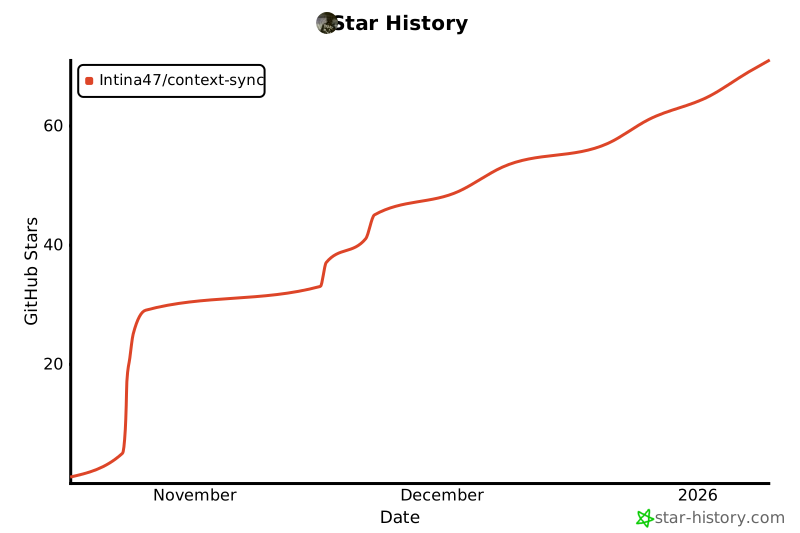
## Star History & Community
**Growing fast thanks to developers like you:**
[](https://star-history.com/#Intina47/context-sync&Date)
**Recent milestones:**
- 🎉 26 stars in first 24 hours
- 📦 400+ npm downloads in launch week
- 💬 Active community in GitHub Discussions
- 🚀 Growing contributor base from 6 countries
---
## Spread the Word
**Help other developers discover Context Sync:**
- ⭐ **Star the repository** (most important!)
- 🐦 **Share on social media** with your experience
- � **Write about it** in blogs, newsletters, forums
- 💬 **Tell colleagues** about the productivity gains
- 🎤 **Present at meetups** or conferences
- 🤝 **Contribute code or documentation**
**Every developer who discovers Context Sync makes the AI development ecosystem a little more open and powerful.**
---
<div align="center">
**Built by developers, for developers. Join the movement.**
[⭐ Star on GitHub](https://github.com/Intina47/context-sync) • [📖 Documentation](documentation/) • [💬 Discussions](https://github.com/Intina47/context-sync/discussions) • [🐛 Issues](https://github.com/Intina47/context-sync/issues)
</div>
