# T-SQL Analyzer CLI
T-SQL Analyzer is a command line tool for identifying, and reporting the presence of anti-patterns in T-SQL scripts.
It evaluates more than [140 rules](https://github.com/ErikEJ/SqlServer.Rules/blob/master/docs/readme.md) for design, naming and performance issues.
## Getting started
The tool runs on any system with the .NET 8.0 runtime installed.
### Installing the tool
```bash
dotnet tool install --global ErikEJ.DacFX.TSQLAnalyzer.Cli
```
### Usage
```bash
# Analyze all .sql scripts in current folder and sub-folders
tsqlanalyze
## Analyze a single file
tsqlanalyze -i C:\scripts\sproc.sql
## Analyze a folder
tsqlanalyze -i "c:\database scripts"
## Analyze a folder with a filter and a full folder path
tsqlanalyze -i c:\database_scripts\sp_*.sql "c:\old scripts"
## Analyze a script with a rule settings filter and for a specific SQL Server version
tsqlanalyze -i C:\scripts\sproc.sql -r Rules:-SqlServer.Rules.SRD0004 -s SqlAzure
## Analyze a .dacpac and save results to an xml file
tsqlanalyze -i C:\scripts\Chinook.dacpac -o result.xml
## Analyze a .dacpac and save results to a JSON file
tsqlanalyze -i C:\scripts\Chinook.dacpac -o result.json
## Analyze a .zip file with .sql files
tsqlanalyze -i C:\scripts\Fabric.zip
## Analyze a live database
tsqlanalyze -c "Data Source=.\SQLEXPRESS;Initial Catalog=Chinook;Integrated Security=True;Encrypt=false"
## Analyze a single file, and include path(s) to your own rules .dll file(s)
tsqlanalyze -i C:\scripts\sproc.sql -a C:\code\analyzers
## Analyze a single file, and reformat (PREVIEW)
tsqlanalyze -i C:\scripts\sproc.sql -f
```
Rule settings filters are demonstrated [here](https://github.com/rr-wfm/MSBuild.Sdk.SqlProj?tab=readme-ov-file#static-code-analysis)
The SQL Server version values are documented [here](https://learn.microsoft.com/dotnet/api/microsoft.sqlserver.dac.model.sqlserverversion)
> Note: UTF-8 with BOM encoding is required for the input files.
## Sample output
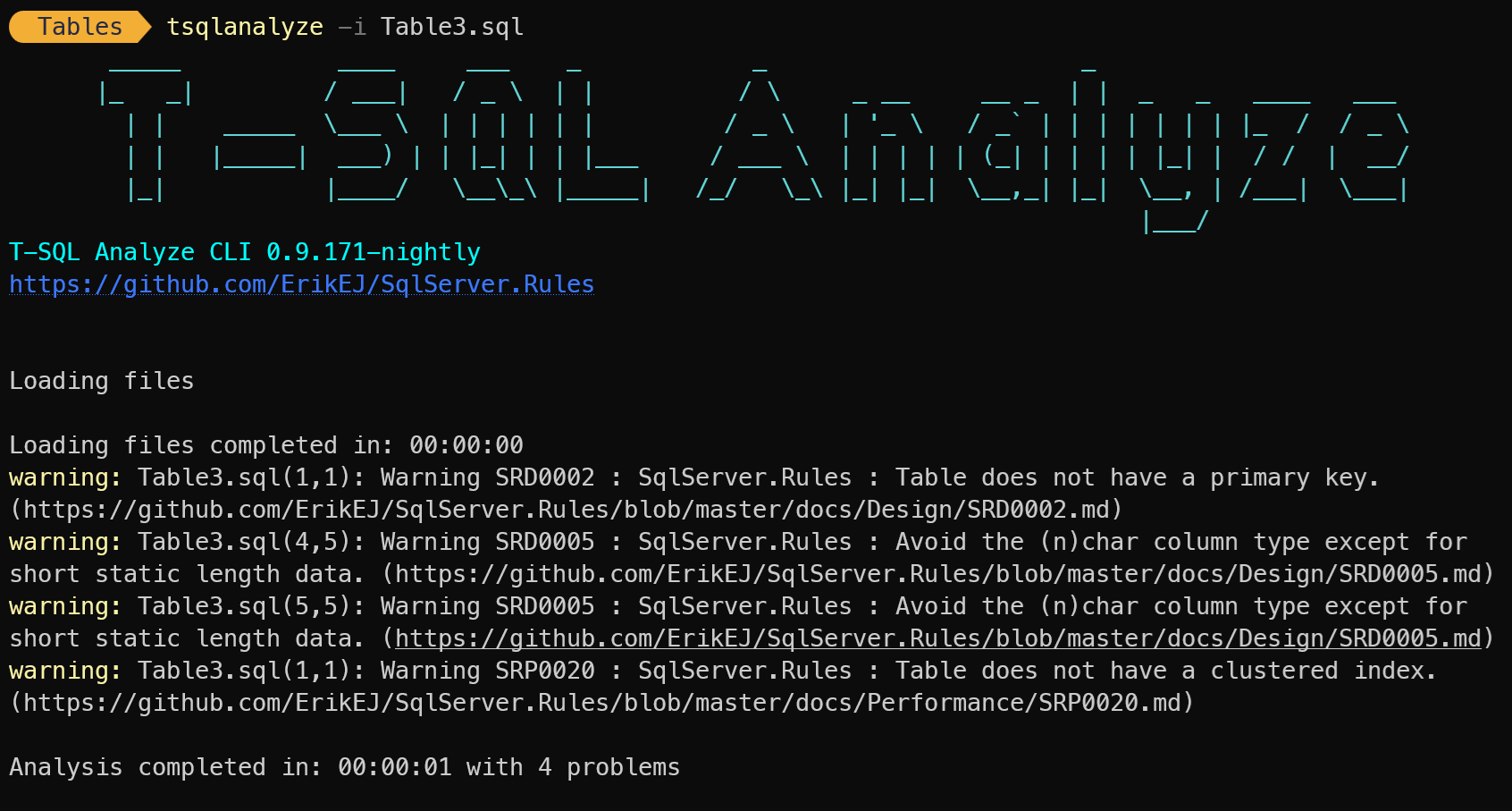
The tool will output a summary of the rules that were violated, and the line numbers where the violations occurred.
Table3.sql:
```sql
CREATE TABLE [dbo].[Table3]
(
[Id] INT NOT NULL,
[Wang] NCHAR(500) NOT NULL,
[Chung] NCHAR(10) NOT NULL
)
```
## MCP Server (preview)
You can use the tool to ask GitHub Copilot analyze your SQL Server CREATE scripts in Visual Studio or VS Code.
The TSQL Analyzer MCP Server supports quick installation across multiple development environments. Choose your preferred client below for streamlined setup:
| Client | One-click Installation | MCP Guide |
|--------|----------------------|-------------------|
| **VS Code** | [](https://vscode.dev/redirect/mcp/install?name=tsqlanalyzer&config=%7B%22name%22%3A%22tsqlanalyzer%22%2C%22command%22%3A%22dnx%22%2C%22args%22%3A%5B%22ErikEJ.DacFX.TSQLAnalyzer.Cli%22%2C%22--yes%22%2C%22--%22%2C%22-mcp%22%5D%7D) | [VS Code MCP Official Guide](https://code.visualstudio.com/docs/copilot/chat/mcp-servers) |
| **Visual Studio** | [](https://vs-open.link/mcp-install?%7B%22name%22%3A%22tsqlanalyzer%22%2C%22type%22%3A%22stdio%22%2C%22command%22%3A%22dnx%22%2C%22args%22%3A%5B%22ErikEJ.DacFX.TSQLAnalyzer.Cli%22%2C%22--yes%22%2C%22--%22%2C%22-mcp%22%5D%7D) | [Visual Studio MCP Official Guide](https://learn.microsoft.com/visualstudio/ide/mcp-servers) |
**Example JSON configuration:**
```json
{
"servers": {
"tsqlanalyzer": {
"type": "stdio",
"command": "dnx",
"args": [
"ErikEJ.DacFX.TSQLAnalyzer.Cli",
"--yes",
"--",
"-mcp"
]
}
}
}
```
## SQL Formatting (preview)
Inspired by the [SQL Formatter](https://marketplace.visualstudio.com/items?itemName=MadsKristensen.SqlFormatter) Visual Studio extension from [Mads Kristensen](https://github.com/madskristensen), the `-f` switch will enable formatting of the analyzed scripts using the [ScriptDom library](https://www.nuget.org/packages/Microsoft.SqlServer.TransactSql.ScriptDom).
- Formats T-SQL code to a consistent and readable layout
- Customizable formatting rules
- `.editorconfig` support
See [this](https://github.com/madskristensen/SqlFormatter?tab=readme-ov-file#editorconfig-support) for information about the `.editorconfig` format.
See [this](https://learn.microsoft.com/dotnet/api/microsoft.sqlserver.transactsql.scriptdom.sqlscriptgeneratoroptions?view=sql-transactsql-161#properties) for information about the available options.
> Enabling this will cause your script files to be updated!
## SQL Server Management Studio (SSMS) integration
You can run the tool against any script in the SQL editor, if configured as an external tool.
From the main menu, select `Tools`, `External Tools` and configure as shown:
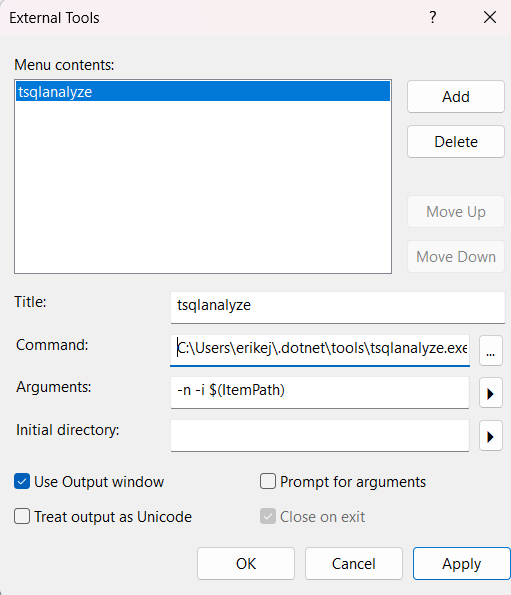
Title: `tsqlanalyze`
Command: `C:\Users\<YourUserName>\.dotnet\tools\tsqlanalyze.exe`
Arguments: `-n -i $(ItemPath)`
Use output window: `✓`
To run the tool, select `Tools`, `tsqlanalyze` and the result will be displayed in the Output window. Double click a warning to navigate to the related script line.

