
Provides comprehensive access to YouTube content, including video metadata, transcripts with search and timestamp filtering, playlist listings, comments, frame screenshots, and audio clip extraction.
Click on "Install Server".
Wait a few minutes for the server to deploy. Once ready, it will show a "Started" state.
In the chat, type
@followed by the MCP server name and your instructions, e.g., "@YouTube Ultimate Toolkit MCPSummarize this video and show the top comments: https://youtu.be/dQw4w9WgXcQ"
That's it! The server will respond to your query, and you can continue using it as needed.
Here is a step-by-step guide with screenshots.
A powerful Model Context Protocol (MCP) server that gives Claude AI full access to YouTube content - transcripts, metadata, comments, screenshots, and audio clips.
Works with both Claude Desktop (local) and Claude Web UI (remote with OAuth).
Demo
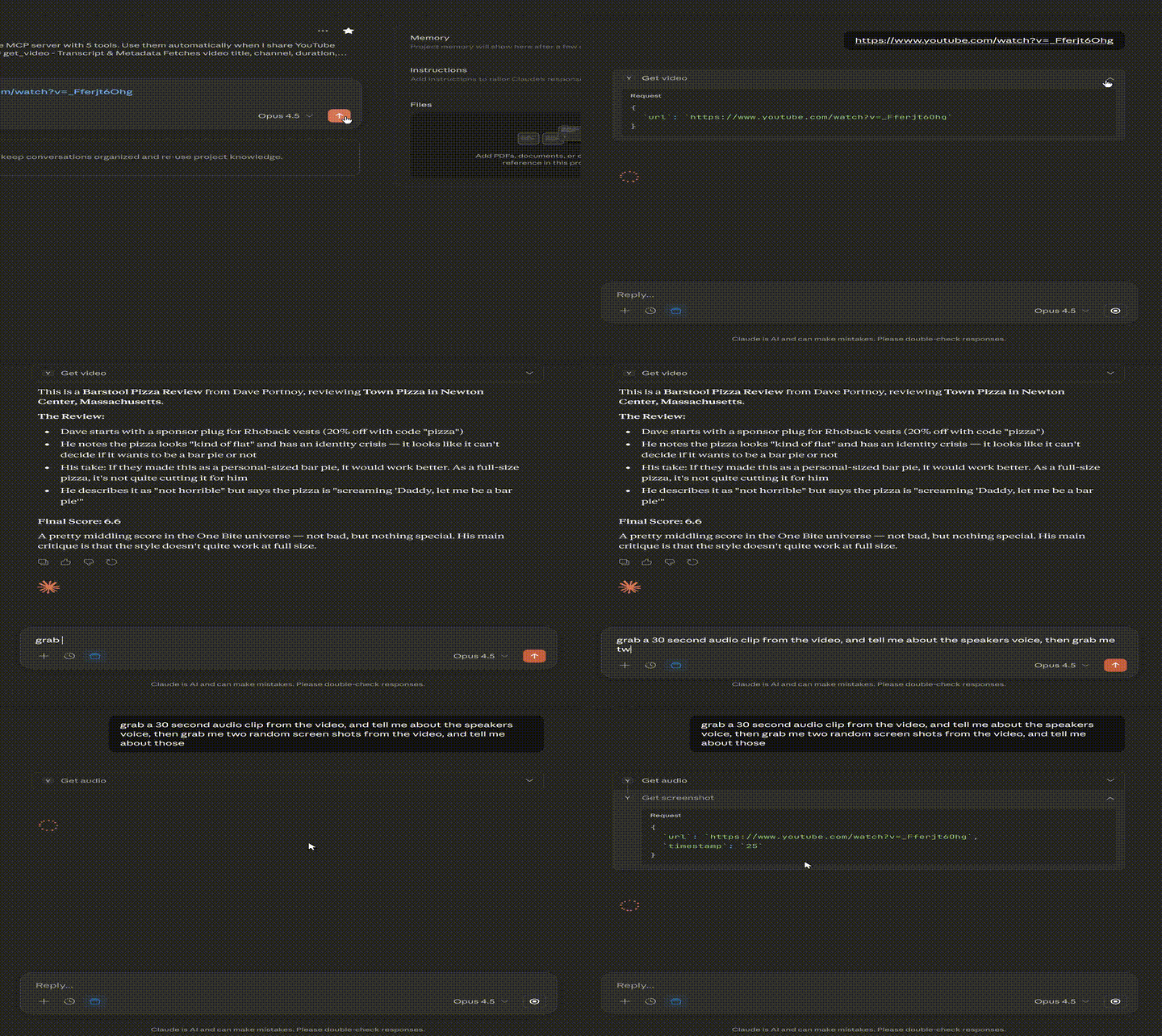
Why This MCP?
Feature | This MCP | Most Others |
Transcripts | ✅ | ✅ |
Timestamps | ✅ | Some |
Time range filtering | ✅ | Rare |
Transcript search | ✅ | Rare |
Key segments (hook/outro) | ✅ | ❌ |
Metadata | ✅ | ✅ |
Playlists | ✅ | Some |
Comments | ✅ | Very rare |
Screenshots | ✅ | 1-2 others |
Audio clips | ✅ | ❌ |
All URL formats | ✅ | Partial |
OAuth 2.1 + PKCE | ✅ | ❌ |
Password protection | ✅ | ❌ |
Rate limiting | ✅ | ❌ |
Claude Web UI support | ✅ | Few |
Features
Tool | Description |
| Fetch video metadata and transcript with search, timestamps, and time ranges |
| List all videos in a playlist |
| Get top comments with likes and reply counts |
| Capture video frames at any timestamp |
| Extract audio clips (max 120s) for speech/music analysis |
Quick Start
Option 1: Local Mode (Claude Desktop)
Add to Claude Desktop config (~/.config/claude/claude_desktop_config.json on Linux, ~/Library/Application Support/Claude/claude_desktop_config.json on macOS):
Option 2: Remote Mode (Claude Web UI)
Remote mode requires OAuth setup and a public URL. See Remote Mode Setup below.
Prerequisites
Node.js 18+
yt-dlp - YouTube content fetcher (must be kept updated)
ffmpeg - For screenshots and audio extraction (optional)
YouTube API Key - For comments feature only (optional)
Installing Prerequisites
Ubuntu/Debian:
macOS:
Windows:
Keeping yt-dlp Updated
YouTube frequently changes their API. If transcripts stop working, update yt-dlp:
Installation
Remote Mode Setup
Remote mode allows you to use this MCP with Claude Web UI (claude.ai) by exposing it over HTTPS with OAuth authentication.
1. Configure Environment
Edit .env:
2. Start the Server
3. Set Up HTTPS (Required)
Claude Web UI requires HTTPS. Use nginx as a reverse proxy:
4. Connect Claude Web UI
Go to Settings → Connectors → Add Custom Connector
Enter URL:
https://your-domain.com/mcpStart a new chat and enable the MCP
Ask Claude to fetch a YouTube video - the authorization popup will appear
Enter your password on the consent page and click "Authorize"
Tools Reference
get_video
Fetches video metadata and English transcript.
Parameters:
Parameter | Required | Description |
| Yes | YouTube URL (any format) or video ID |
| No | Add |
| No | Start time for transcript range (e.g., "60", "1:00") |
| No | End time for transcript range |
| No | Search transcript and highlight matches |
| No | Return only hook (first 40s) and outro (last 30s) |
Supported URL formats:
youtube.com/watch?v=VIDEO_IDyoutu.be/VIDEO_IDyoutube.com/shorts/VIDEO_IDyoutube.com/live/VIDEO_IDyoutube.com/embed/VIDEO_IDm.youtube.com/watch?v=VIDEO_IDmusic.youtube.com/watch?v=VIDEO_IDDirect video ID:
dQw4w9WgXcQ
get_playlist
Lists videos in a YouTube playlist.
Parameters:
Parameter | Required | Description |
| Yes | YouTube playlist URL |
| No | Max videos to return (default: 50, max: 200) |
get_comments
Fetches top comments from a video. Requires
Parameters:
Parameter | Required | Description |
| Yes | YouTube video URL or ID |
| No | Number of comments (default: 25, max: 100) |
| No | Sort: "relevance" (default) or "time" |
get_screenshot
Captures a frame from a video. Requires ffmpeg.
Parameters:
Parameter | Required | Description |
| Yes | YouTube video URL |
| No | Time to capture (default: "0"). Formats: "30", "1:30", "1:30:00" |
Returns: Base64-encoded JPEG image
get_audio
Extracts audio clips for analysis. Requires ffmpeg.
Parameters:
Parameter | Required | Description |
| Yes | YouTube video URL |
| No | Start time (default: "0") |
| No | End time (optional) |
| No | Max seconds (default: 60, max: 120) |
Returns: Base64-encoded MP3 audio (128kbps)
OAuth & Security
The remote mode implements OAuth 2.1 with PKCE for secure authentication.
How It Works
Claude connects to
/mcp- discovery/handshake methods work without authWhen you use a tool, Claude receives a 401 with OAuth discovery info
Claude performs dynamic client registration
Browser opens the consent page - you enter your password
Claude exchanges the auth code for an access token
Subsequent requests use the Bearer token
Security Features
Feature | Protection |
Password-protected consent | Only you can authorize access |
Bcrypt password hashing | Password stored securely |
Rate limiting | 5 attempts per IP, then 10-minute lockout |
XSS protection | All OAuth parameters HTML-escaped |
Command injection protection | yt-dlp spawned with |
PKCE (S256) | Prevents authorization code interception |
Troubleshooting
"No English transcript available"
Update yt-dlp - YouTube changes frequently:
MCP won't connect from Claude Web UI
Ensure HTTPS is configured correctly
Check service status:
sudo systemctl status youtube-mcpCheck logs:
sudo journalctl -u youtube-mcp -f
OAuth flow not starting
Verify
.well-known/endpoints return 200 (not 401)Check browser console for CORS errors
Ensure
/registerreturns valid credentials
Authorization window doesn't appear
OAuth triggers on first tool use, not on connection
Start a chat, enable the MCP, then ask Claude to fetch a YouTube video
Claude using wrong/old tools
Disconnect and reconnect the MCP in Claude settings to refresh the tool list.
Claude Project Prompt
Use this prompt in a Claude Project to automatically leverage the MCP:
Architecture
Transport: Streamable HTTP (MCP spec 2025-03-26)
Sessions: Stateful with UUID identifiers (in-memory)
OAuth: Authorization Code + PKCE, Dynamic Client Registration
Tokens: In-memory storage (lost on restart)
License
MIT - See LICENSE for details.
Contributing
Contributions are welcome! Please open an issue or PR on GitHub.