
Provides comprehensive code quality and security analysis tools, including repository management, code quality assessment, security vulnerability scanning, pull request analysis, file-level metrics, coverage information, and local CLI-based analysis capabilities.
Click on "Install Server".
Wait a few minutes for the server to deploy. Once ready, it will show a "Started" state.
In the chat, type
@followed by the MCP server name and your instructions, e.g., "@Codacy MCP Servershow me the security vulnerabilities in my backend repository"
That's it! The server will respond to your query, and you can continue using it as needed.
Here is a step-by-step guide with screenshots.
Codacy MCP Server
MCP Server for the Codacy API, enabling access to repositories, files, quality, coverage, security and more.
Table of Contents
Features / Tools
The following tools are available through the Codacy MCP Server:
Repository Setup and Management
codacy_setup_repository: Add or follow a repository in Codacy if not already present. This tool ensures the repository is registered with Codacy, allowing further analysis and management.
Organization and Repository Management
codacy_list_organizations: List organizations with pagination support.codacy_list_organization_repositories: List repositories in an organization with pagination support.codacy_get_repository_with_analysis: Get repository with analysis information, including metrics for Grade, Issues, Duplication, Complexity, and Coverage.
Code Quality and Analysis
codacy_list_repository_issues: Lists and filters code quality issues in a repository. This is the primary tool for investigating general code quality concerns (e.g. best practices, performance, complexity, style) but NOT security issues. For security-related issues, use the SRM items tool instead. Features include:Pagination support for handling large result sets
Filtering by multiple criteria including severity, category, and language
Author-based filtering for accountability
Branch-specific analysis
Pattern-based searching
Common use cases:
Code quality audits
Technical debt assessment
Style guide compliance checks
Performance issue investigation
Complexity analysis
File Management and Analysis
codacy_list_files: List files in a repository with pagination support.codacy_get_file_issues: Get the issue list for a file in a repository.codacy_get_file_coverage: Get coverage information for a file in the head commit of a repository branch.codacy_get_file_clones: Get the list of duplication clones (identical or very similar code segments) for a file in a repository.codacy_get_file_with_analysis: Get detailed analysis information for a file, including metrics for Grade, Issues, Duplication, Complexity, and Coverage.
Security Analysis
codacy_search_organization_srm_items: Primary tool to list security items/issues/vulnerabilities/findings across an organization. Results are related to the organization's security and risk management (SRM) dashboard on Codacy.codacy_search_repository_srm_items: List security items/issues/vulnerabilities/findings for a specific repository.
Both tools provide comprehensive security analysis including:
SAST (Code scanning)
Secrets (Secret scanning)
SCA (Dependency scanning)
IaC (Infrastructure-as-code scanning)
CICD (CI/CD scanning)
DAST (Dynamic Application Security Testing)
PenTesting (Penetration testing)
Pull Request Analysis
codacy_list_repository_pull_requests: List pull requests from a repository that the user has access to.codacy_get_repository_pull_request: Get detailed information about a specific pull request.codacy_list_pull_request_issues: Returns a list of issues found in a pull request (new or fixed issues).codacy_get_pull_request_files_coverage: Get diff coverage information for all files in a pull request.codacy_get_pull_request_git_diff: Returns the human-readable Git diff of a pull request.
Tool and Pattern Management
codacy_list_tools: List all code analysis tools available in Codacy.codacy_list_repository_tools: Get analysis tools settings and available tools for a repository.codacy_get_pattern: Get the definition of a specific pattern.codacy_list_repository_tool_patterns: List the patterns of a tool available for a repository.codacy_get_issue: Get detailed information about a specific issue.
CLI Analysis
codacy_cli_analyze: Run quality analysis locally using Codacy CLI. Features include:Analyze specific files or entire directories
Use specific tools or all available tools
Get immediate results without waiting for scheduled analysis
Apply fixes based on Codacy configuration
Setup
Requirements
Ensure your machine has the following tools installed:
git
node.js
ensure that the
npxcommand runs without issues.
For local analysis, the MCP Server requires the Codacy CLI to be installed. If it is not available, the MCP Server will attempt to install it for you. Codacy CLI v2 runs on macOS, Linux, and Windows (only with WSL).
Personal API Access Token
Get your Codacy's Account API Token from your Codacy Account.
You'll need it later in the setup.
Install
In supported IDEs like VS Code, Cursor, and Windsurf, the easiest way to install Codacy's MCP Server is to do it from the Codacy extension. If you haven't yet, install the extension from within your IDE, or from any of the available marketplaces (Microsoft, OpenVSX). From the extension panel, just click on Add Codacy MCP Server. Restart your IDE afterwards.
Without the extension, you can still use and install the MCP Server:
Cursor, Windsurf, and others
You can use the one-click install for Cursor:

Otherwise, depending on what you are connecting the MCP Server to, you can use the following methods:
Cursor: edit the
.cursor/mcp.jsonfile to add the followingWindsurf: edit the
.codeium/windsurf/mcp_config.jsonfile to add the followingClaude Desktop: edit the
claude_desktop_config.jsonfile to add the following
VS Code with Copilot
You can use the one-click install for VS Code:
Otherwise, if you wish to set it up manually:
For connecting the MCP Server to Copilot in VS Code, add the following to the global config of the IDE:
You can open the user settings.json file in:
View > Command Palette > Preferences: Open User Settings (JSON)
Or open the general settings.json file directly, which according to your OS should be located in:
for macOS:
~/Library/Application Support/Code/User/settings.jsonfor Windows:
%APPDATA%\Code\User\settings.jsonfor Linux:
~/.config/Code/User/settings.json
Don't forget to update the value of CODACY_ACCOUNT_TOKEN with your token.
Make sure you have Agent mode enabled: vscode://settings/chat.agent.enabled
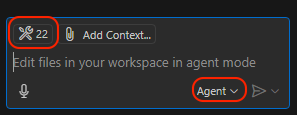
Open the Copilot chat and switch the mode to
Agent. You can check that the MCP server was enabled correctly by clicking on theSelect toolsicon, which should list all the available Codacy tools.
Troubleshooting
Claude Desktop and NVM
When using NVM with Claude Desktop, NPX may not work. You should first install the MCP Server globally, and then use Node directly:
Contribute
To work locally on the MCP Server code, run:
Testing with Inspector
You can test the MCP server using the inspector tool. You can either set a CODACY_ACCOUNT_TOKEN environment variable or pass it inline:
This will build the project and launch the MCP inspector with your Codacy token.
Testing with an Agent
You can test your local instance configuring the MCP Server as follows:
Codacy-CLI Support
In order to use the Codacy-CLI, it needs to be installed. Whenever the MCP Server will receive a request to analyze, it will try to install the CLI and initialize it.
In case you want to use a specific version of our CLI, send a CODACY_CLI_VERSION env variable in the MCP Server configuration.
License
This MCP server is licensed under the MIT License. This means you are free to use, modify, and distribute the software, subject to the terms and conditions of the MIT License. For more details, please see the LICENSE file in the project repository.