
Transforms natural language queries into valid GraphQL queries, with support for schema introspection, query validation, query execution against GraphQL endpoints, and query history tracking.
Uses OpenAI's language models to power the natural language to GraphQL query conversion through an AI agent built with LangGraph.
Click on "Install Server".
Wait a few minutes for the server to deploy. Once ready, it will show a "Started" state.
In the chat, type
@followed by the MCP server name and your instructions, e.g., "@Text-to-GraphQL MCP Servershow me the top 5 users by activity from last week"
That's it! The server will respond to your query, and you can continue using it as needed.
Here is a step-by-step guide with screenshots.
Text-to-GraphQL MCP Server
Transform natural language queries into GraphQL queries using an MCP (Model Context Protocol) server that integrates seamlessly with AI assistants like Claude Desktop and Cursor.

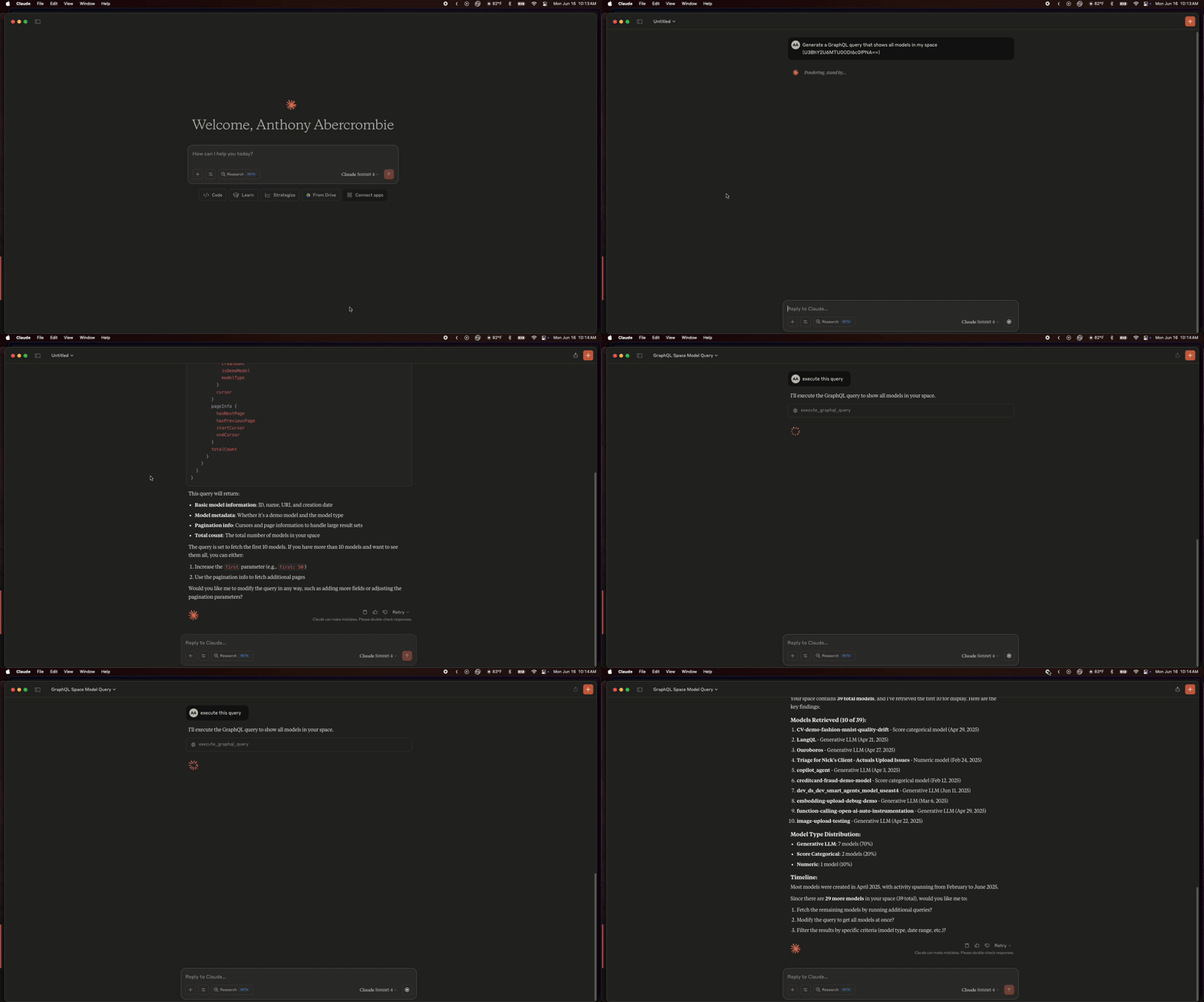
🚀 Overview
The Text-to-GraphQL MCP Server converts natural language descriptions into valid GraphQL queries using an AI agent built with LangGraph. It provides a bridge between human language and GraphQL APIs, making database and API interactions more intuitive for developers and non-technical users alike.
✨ Features
Natural Language to GraphQL: Convert plain English queries to valid GraphQL
Schema Management: Load and introspect GraphQL schemas automatically
Query Validation: Validate generated queries against loaded schemas
Query Execution: Execute queries against GraphQL endpoints with authentication
Query History: Track and manage query history across sessions
MCP Protocol: Full compatibility with Claude Desktop, Cursor, and other MCP clients
Error Handling: Graceful error handling with detailed debugging information
Caching: Built-in caching for schemas and frequently used queries
🛠 Installation
Prerequisites: Install UV (Recommended)
UV is a fast Python package installer and resolver. Install it first:
macOS/Linux:
Windows:
Find your UV installation path:
Important: You'll need the UV path for MCP configuration. The typical path is
~/.local/binon macOS/Linux, which translates to/Users/yourusername/.local/bin(replaceyourusernamewith your actual username).
Setup for MCP Usage
Note: The
uv runpattern automatically handles virtual environments, making MCP configuration cleaner and more reliable than traditional pip installations.
Alternative Installation Methods
From PyPI (when published):
Development Setup:
🏃♂️ Quick Start
1. Configure with Cursor (Recommended)
Add to your .cursor/mcp.json:
Important Setup Notes:
Replace
/path/to/text-to-graphql-mcpwith the actual path to your cloned repositoryReplace
/path/to/uv/binwith your actual UV installation path (typically/Users/yourusername/.local/binon macOS)The
PATHenvironment variable is required for MCP clients to find theuvcommand
2. Configure with Claude Desktop
Add to your Claude Desktop MCP configuration file:
macOS: ~/Library/Application Support/Claude/claude_desktop_config.json
Windows: %APPDATA%\Claude\claude_desktop_config.json
Setup Instructions:
Find your UV path: Run
which uvin terminal (typically/Users/yourusername/.local/bin/uv)Set the PATH: Use the directory containing
uv(e.g.,/Users/yourusername/.local/bin)Replace paths: Update both the
--directoryargument andPATHenvironment variable with your actual pathsAdd your API keys: Replace the placeholder values with your actual API keys
3. Common UV Path Examples
4. Alternative: Use Environment Variables
If you prefer using a .env file (useful for local development):
Then use a simplified MCP configuration (still requires PATH):
5. Run the MCP Server (Optional - for testing)
🔧 Usage
Available MCP Tools
generate_graphql_query
Convert natural language to GraphQL queries.
validate_graphql_query
Validate GraphQL queries against the loaded schema.
execute_graphql_query
Execute GraphQL queries and return formatted results.
get_query_history
Retrieve the history of all queries in the current session.
get_query_examples
Get example queries to understand the system's capabilities.
Example Interactions
Natural Language Input:
Generated GraphQL:
🐳 Deploying with Docker
💡 Key Concept: When using Docker with MCP clients (Claude/Cursor), environment variables are set during container startup (
docker run), not in the MCP client configuration. The MCP clients simply connect to the already-running container.
Building the Docker Image
Running the Container
Method 1: Using Environment Variables Directly
Method 2: Using an Environment File
Create a .env file:
Run the container:
Method 3: Using Docker Compose
Create a docker-compose.yml file:
Then run:
Using Docker with MCP Clients
When running the MCP server in Docker, you need to use docker exec to communicate with the container:
Important: The environment variables (OPENAI_API_KEY, GRAPHQL_ENDPOINT, etc.) must be set when you first run the container using one of the methods above. The MCP client configurations below only connect to an already-running container.
Step 1: First, ensure your container is running with environment variables
Step 2: Configure Cursor
Add to .cursor/mcp.json:
Step 2: Configure Claude Desktop
Add to your Claude Desktop configuration:
Note: The MCP client configurations don't need environment variables because they're connecting to a container that already has them set. If you restart the container, make sure to include the environment variables again.
🏗 Architecture
The system uses a multi-agent architecture built with LangGraph:
Intent Recognition: Understands what the user wants to accomplish
Schema Management: Loads and manages GraphQL schema information
Query Construction: Builds GraphQL queries from natural language
Query Validation: Ensures queries are valid against the schema
Query Execution: Executes queries against the GraphQL endpoint
Data Visualization: Provides recommendations for visualizing results
⚙️ Configuration
Environment Variables
Variable | Description | Default |
| OpenAI API key for LLM operations | Required |
| GraphQL API endpoint URL | Required |
| API key for your GraphQL service | Required |
| Authentication method: |
|
| Custom headers as JSON (overrides auto-auth) |
|
| OpenAI model to use |
|
| Model temperature for responses |
|
| Server host address |
|
| Server port |
|
| Max recursion for agent workflow |
|
Authentication Types
bearer(default): UsesAuthorization: Bearer <token>- standard for most GraphQL APIsapikey: UsesX-API-Key: <key>- used by some APIs like Arizedirect: UsesAuthorization: <token>- direct token without Bearer prefixCustom: Set
GRAPHQL_HEADERSto override with any custom authentication format
Common GraphQL API Examples
GitHub GraphQL API:
Shopify GraphQL API:
Arize GraphQL API:
Hasura:
🔍 Observability & Agent Development
Want to build better AI agents quickly? Check out Arize Phoenix - an open-source observability platform specifically designed for LLM applications and agents. Phoenix provides:
Real-time monitoring of your agent's performance and behavior
Trace visualization to understand complex agent workflows
Evaluation frameworks for testing and improving agent responses
Data quality insights to identify issues with your training data
Cost tracking for LLM API usage optimization
Phoenix integrates seamlessly with LangChain and LangGraph (which this project uses) and can help you:
Debug agent behavior when queries aren't generated correctly
Monitor GraphQL query quality and success rates
Track user satisfaction and query complexity
Optimize your agent's prompt engineering
Get started with Phoenix:
Visit docs.arize.com/phoenix for comprehensive guides on agent observability and development best practices.
🧪 Development
Setup Development Environment
Project Structure
🤝 Contributing
We welcome contributions! Please see our contributing guidelines for details.
Fork the repository
Create a feature branch (
git checkout -b feature/amazing-feature)Commit your changes (
git commit -m 'Add some amazing feature')Push to the branch (
git push origin feature/amazing-feature)Open a Pull Request
📝 License
This project is licensed under the Elastic License 2.0 (ELv2) - see the LICENSE file for details.
🐛 Troubleshooting
Common Issues
"No module named 'text_to_graphql_mcp'"
Ensure you've installed the package:
pip install text-to-graphql-mcp
"OpenAI API key not found"
Set your
OPENAI_API_KEYenvironment variableCheck your
.envfile configuration
"GraphQL endpoint not reachable"
Verify your
GRAPHQL_ENDPOINTURLCheck network connectivity and authentication
"Schema introspection failed"
Ensure the GraphQL endpoint supports introspection
Check authentication headers if required